Project 2
Objective: To perform the following tasks:
- Script two functions to perform edge detection on a given image using the Prewitt filter and Laplacian filter,
- Compare both the images and justify which output is better than the other.
Prewitt Operator:
Prewitt operator is used for edge detection in an image. It detects two types of edges: vertical edges and horizontal edges.
Laplacian Operator:
Laplacian is a derivative operator; its uses highlight grey level discontinuities in an image and try to deemphasize regions with slowly varying grey levels. This operation as result produces images which have grayish edge lines and other discontinuities on a dark background. This produces inward and outward edges in an image.
CODE:
#Modules to be imported
import cv2
import numpy as np
import os

#function to apply gaussian filter
def gaussian_filter(image, filter_size, sigma):

	filtered_image = cv2.GaussianBlur(image, (filter_size, filter_size), sigma)
	return filtered_image
#to read image from os folder
image = cv2.imread('car.jpeg')
#to create gray 2D image of original image
gray_image = cv2.cvtColor(image, cv2.COLOR_BGR2GRAY)
#creating gaussian filtered image using defined function gaussian filter
gaussian_image = gaussian_filter(gray_image, 5,5)


#function to apply prewitt filter
def prewitt_filter(image):
	image =gaussian_filter(image,5,5)
	vertical_filter = np.array([[-1,0,1], [-1,0,1], [-1,0,1]])
	horizontal_filter = np.array([[1,1,1], [0,0,0], [-1,-1,-1]])
	vertical_filtered = cv2.filter2D(image, -1, vertical_filter)
	abs_grad_x = cv2.convertScaleAbs(vertical_filtered)
	horizontal_filtered = cv2.filter2D(image, -1, horizontal_filter)
	abs_grad_y = cv2.convertScaleAbs(horizontal_filtered)
	grad = cv2.addWeighted(abs_grad_x, 0.5, abs_grad_y, 0.5,0)
	return grad

#function to apply Laplacian_filter
def laplacian_filter(image):
	filter1 = np.array([[0,1,0], [1,-4,1], [0,1,0]])
	filtered_image = cv2.filter2D(image, -1, filter1)
	laplacian_image = cv2.convertScaleAbs(filtered_image)
	return laplacian_image


# to read image from os
image = cv2.imread('car.jpeg')
# to create 2D gray of image
gray_image = cv2.cvtColor(image, cv2.COLOR_BGR2GRAY)
#applying prewitt filter by calling function
prewitt_edges = prewitt_filter(gray_image)
cv2.imshow('Gray Image -- Prewitt filtered_image', np.hstack((gray_image, prewitt_edges)))
cv2.waitKey(0)
save_figure = cv2.imwrite('Prewitt_filtered_image.jpeg', np.hstack((gray_image, prewitt_edges)))

#applying Laplacian filter function by calling
laplacian_edges = laplacian_filter(gray_image)
cv2.imshow('Gray Image --  filtered_image', np.hstack((gray_image, laplacian_edges)))
cv2.waitKey(0)
save_figure = cv2.imwrite('Laplacian_filtered_image.jpeg', np.hstack((gray_image, laplacian_edges)))

#laplacian of gaussian using gaussian filter function
laplacian_of_gaussian = laplacian_filter(gaussian_image)
cv2.imshow('laplacian_of_gaussian filtered image', laplacian_of_gaussian)
cv2.waitKey(0)
save_figure = cv2.imwrite('LOG.jpeg', np.hstack((laplacian_edges, laplacian_of_gaussian)))

#Prewitt of gaussian using gaussian filter function
prewitt_of_gaussian = prewitt_filter(gaussian_image)
cv2.imshow('POG filtered image', prewitt_of_gaussian)
cv2.waitKey(0)
save_figure = cv2.imwrite('POG.jpeg', np.hstack((prewitt_edges, prewitt_of_gaussian)))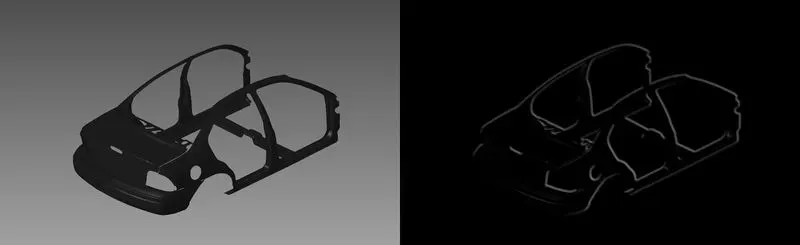
Figure(1) Grey image on left and Prewitt filtered image on right
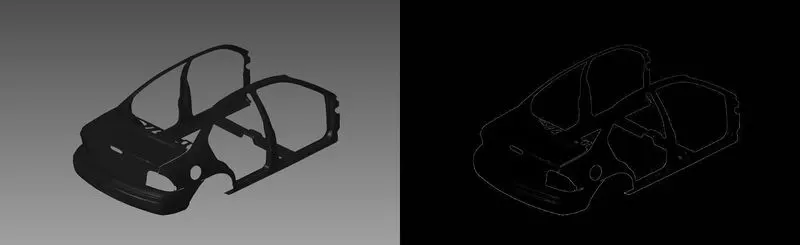
Fig(2) Grey image on Left and Laplacian Filtered Image on Right
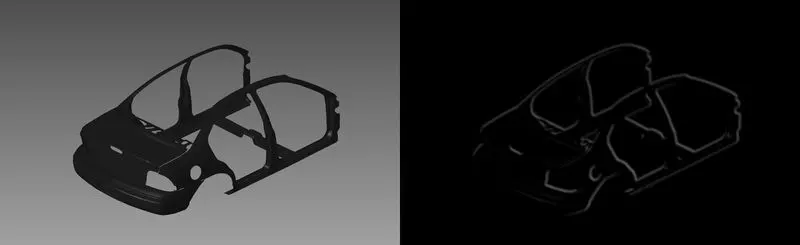
Fig(3) Grey image on Left and Prewitt of Gaussian filtered image on Right
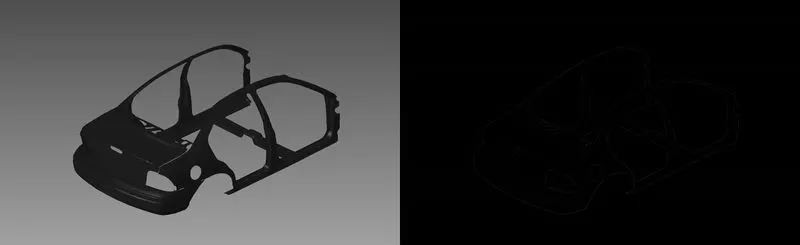
Fig(4) Grey image on left and Laplacian of Gaussian on Right
Conclusion:
The above figures conclude the following:
1. Laplacian alone gives better than Prewitt operatot
2. Applying Gaussian to Prewitt and Laplacian, Prewitt provides better result than Laplacian alone and Laplacian of gaussian operator.