Project : Scientific Calculator using JAVA with OOPS concepts
Project : Scientific Calculator
Introduction:
What is : object-oriented programming (OOP) concept
Object-Oriented Computers, or OOPs concepts, refer to programming languages that make use of objects. Simula is considered the first object-oriented programming language. The programming paradigm where everything is represented as an object is known as a truly object-oriented programming language. Inheritance, data binding, polymorphism, and other real-world concepts are all part of object-oriented programming. The basic goal of OOPs concepts with real time examples is to connect data and the functions that operate on it so that no other part of the code may access it except that function.
Project Explaination With Oops Concepts :
- Class and Object : In object-oriented programming, a group of data properties is combined with functions or methods to form an “object.” OOP languages are often class-based, which implies that a class defines the data characteristics and functions that are used to create objects, which are instances of the class.
- Inheritance : When one object acquires all the properties and behaviors of a parent object, it is known as inheritance. It provides code reusability. It is used to achieve runtime polymorphism.
- polymorphism : If one task is performed in different ways, it is known as polymorphism. For example: to convince the customer differently, to draw something, for example, shape, triangle, rectangle, etc. Abstraction : Hiding internal details and showing functionality is known as abstraction. For example phone call, we don't know the internal processing.
- Encapsulation : Binding (or wrapping) code and data together into a single unit are known as encapsulation. For example, a capsule, it is wrapped with different medicines.A java class is the example of encapsulation. Java bean is the fully encapsulated class because all the data members are private here.
Steps For Creation :
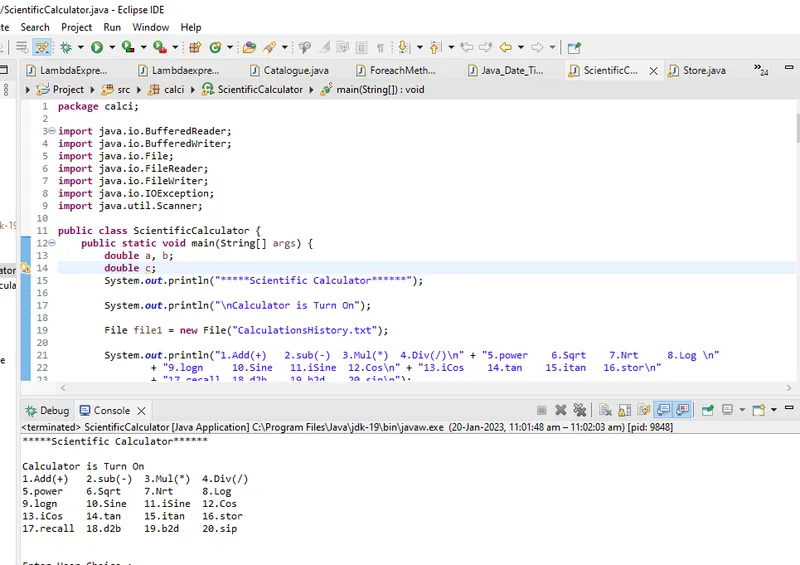
- 1.Create New Java Project : firstly Open eclipse Ide go to file then new then select new java project My file is created.
- 2.Create new Package : What is Package? A java package is a group of similar types of classes, interfaces and sub-packages. Package in java can be categorized in two form, built-in package and user-defined package for Eg. calci ,i gave. There are many built-in packages such as java, lang, awt, javax, swing, net, io, util, sql etc.
- import java.io.IOException; Signals that an I/O exception of some sort has occurred. This class is the general class of exceptions produced by failed orinterrupted I/O operations
- 3.Create Class : Class One of the fundamental notions in OOPs concepts with real time examples is the class, which is a collection of comparable entities. It is a mental component rather than a physical thing. Let’s take an example of one of the OOPs concepts with real time examples: If you had a class called “Sfirstly right click on project folder go to new and Select class to create name it Ex.ScientificCalculator.
- 4.Create Main method on it. Ex. public static void main(String[] args) { class would have characteristics that represented data like the objects , and all functions and operators. And print option. A family could be created by creating individual person objects from the class for each family member. Because each person is different, each person’s object would have different data attributes.
- Access modifiers are used to perform Data Hiding, an important feature of Object-Oriented Programming.Access modifiers are keywords that specify a class’s (or type’s) and its members’ accessibility. These modifications can be used from within or outside of the current application’s code. In.NET, access modifiers are used to control the accessibility of each of a type’s members from various code sections. This can be done either inside or outside the current assembly. An assembly is a logical unit of functionality that is made up of types and resources that are stored in one or more files.
- 6.Composition is a type of Aggregation that is more specific. It’s sometimes referred to as a “death” connection. Because child objects lack a lifecycle, when the parent object is deleted, all child objects are automatically deleted as well. Let’s use the example of a house and its rooms as an example. A house can have a number of rooms. It’s impossible for a single room to be a part of two different homes. As a result, deleting the homeroom will also delete the house room.
- 4.Object: Object is an instance of class. Create Objects on programme. The Object class is the parent class of all the classes in java by default. In other words, it is the topmost class of java.The Object class is beneficial if you want to refer any object whose type you don't know. Notice that parent class reference variable can refer the child class object, know as upcasting. Let's take an example, there is getObject() method that returns an object but it can be of any type like Employee,Student etc, we can use Object class reference to refer that object. For Ex.Create Object: Object obj=getObject();
File file1=new File("CalculationsHistory.txt"); // creating a new file by using File() constructor and file.createNewFile() method of File class. The File class have several methods for working with directories and files such as creating new directories or files, deleting and renaming directories or files, listing the contents of a directory etc import java.io.File; The Java.io.File class is an abstract representation of file and directory pathnames
- Attribute: double a ,b; and double c; Double : The Java double keyword is a primitive data type. It is a double-precision 64-bit IEEE 754 floating point. It is used to declare the variables and methods. It generally represents the decimal numbers.
- import.java.util.Scanner A simple text scanner which can parse primitive types and strings using regular expressions.A
Scannerbreaks its input into tokens using a delimiter pattern, which by default matches whitespace. The resulting tokens may then be converted into values of different types using the variousnextmethods.
For example, this code allows a user to read a number from System.in:
Scanner sc =new Scanner(System.in);
// we have created an object of Scanner named input . The System.in parameter is used to take input from the standard input. It works just like taking inputs from the keyboard.
double choice = sc.nextDouble();
nextDouble() method scans the next token of the input as a double.
This method will throw InputMismatchException if the next token cannot be translated into a valid double value.
If the translation is successful, the scanner advances past the input that matched.
Scientific Calculators OperationEg 1. Adding 2 Numbers on Calculator
- if (choice==1) { // Multiple Operation base on user Choice.
System.out.println("Enter 2 num for Addition");
a = sc.nextDouble(); // first Select Double a input
b = sc.nextDouble(); // Second Select Double b input
System.out.println(a+b); // Print Output of Addition Operation
break; //It breaks the current flow of the program at specified condition
}Eg 2 Find Sine value of a Number which user choosed
- if (choice==10) {
System.out.println("Enter num for Sine");
a = sc.nextDouble(); // Select Only single a input
System.out.println(Math.sin(a)); // returns the trigonometry sine of an angle.
break;
}
- Java BufferedWriter class is used to provide buffering for Writer instances. It makes the performance fast. It inherits Writer class. The buffering characters are used for providing the efficient writing of single arrays, characters, and strings.
- For eg. import java.io.BufferedWriter;
BufferedWriter bw = new BufferedWriter(new FileWriter(file1,true));
//Creates a buffered character output stream that uses a default-sized output buffer.
-
Java BufferedReader class is used to read the text from a character-based input stream. It can be used to read data line by line by readLine() method. It makes the performance fast. It inherits Reader class.
- For Eg. BufferedReader br = new BufferedReader(new FileReader(file1));
String contents; // An array of characters works same as Java string.
while((contents=br.readLine()) != null) // You're calling br.readLine() a second time inside the loop.
Therefore, you end up reading two lines each time you go around.
System.out.println(contents);
br.close(); //close() method closes the stream and releases any system resources associated with it - while loop is used to iterate a part of the program repeatedly until the specified Boolean condition is true
- try /catch in java : The
trystatement allows you to define a block of code to be tested for errors while it is being executed. Thecatchstatement allows you to define a block of code to be executed, if an error occurs in the try block. Thetryandcatchkeywords come in pairs:
Syntax: try {
// Block of code to try
}
catch (Exception e){
// Block of code to handle errors
}
- Example : Stor Data Stored in File Operation Using try-catch : try {
BufferedWriter bw = new BufferedWriter(new FileWriter(file1,true));
System.out.println("Enter Array Size");
int size=sc.nextInt();
int numbers[]= new int[size];
System.out.println("Enter Data in Array");
for(int i=0; i<size; i++) {
numbers[i]=sc.nextInt();
}
System.out.println("File Stored Successfully.");
bw.close();
break;
} catch (IOException e) {
System.out.println("File Unsuccessfully Stored ,Try again");
e.printStackTrace();
}
- (Note: Overall Program is mention on below rar format /zip format zip file)
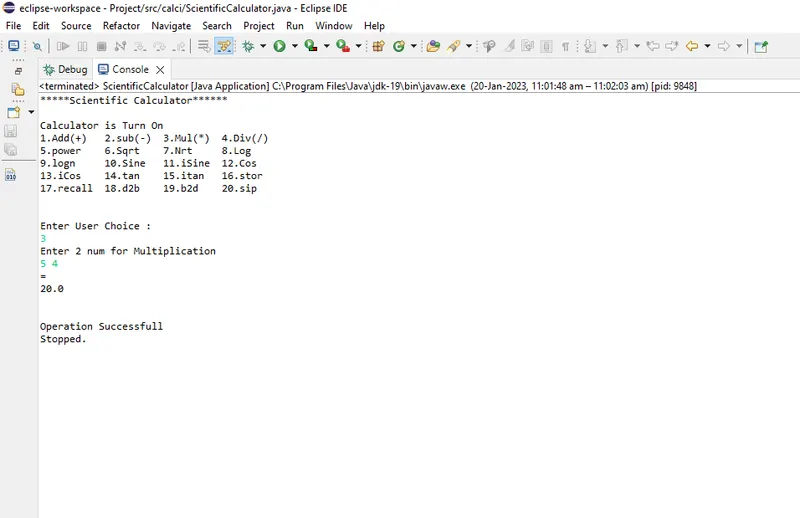
- OutPut Window Of Program: