Project 10
AIM: Image Segmentation using Mask RCNN
CODE:
I tried visualising the mask RCNN object segmentation using the provided link... but I got of errors and tried clearing them. Still, the code is reading only one class name every time I try, even after passing the 'coco.names' file for classes
So I tried a different way to solve the task. I hope this can be accepted.
#import modules
import cv2
import numpy as np
import random

#model weights and configs
frozen_inference_graph = 'frozen_inference_graph_coco.pb'

coco_model= 'mask_rcnn_inception_v2_coco_2018_01_28.pbtxt'

#image/ video path
file_path='traffic.mp4'

#reading classes from coco model
classes = []
with open("coco.names", "r") as f:
    classes = f.read().splitlines()
#print(classes)

#generates random colors for each BBox
def random_colors(N):
    np.random.seed(1)
    colors = [tuple(255 * np.random.rand(3)) for _ in range(N)]
    return colors

#captures the video
cap = cv2.VideoCapture(file_path)

font = cv2.FONT_HERSHEY_PLAIN

#creates model object using 'readNetFromTensorflow' from dnn with model weights and configs args
net = cv2.dnn.readNetFromTensorflow(frozen_inference_graph, coco_model)

#writing/saving the output video
codec = cv2.VideoWriter_fourcc(*'XVID')
vid_fps = int(cap.get(cv2.CAP_PROP_FPS))
width, height = int(cap.get(cv2.CAP_PROP_FRAME_WIDTH)), int(cap.get(cv2.CAP_PROP_FRAME_HEIGHT))

outVideo = cv2.VideoWriter('traffic_segmented.avi', codec, vid_fps, (width, height))

#to read video frame by frame
while True:
    ret, frame = cap.read()
    if not ret:
        break

    #create the empty black image for masking the objects
    black_image = np.zeros((height, width, 3), np.uint8)
    black_image[:] = (0, 0, 0)

    #model object takes blob as input : converting image to blob and converts RGB to BGR
    blob = cv2.dnn.blobFromImage(frame, swapRB=True)
    #use the ‘setInput’ function to prepare the model to propagate our query image through it
    net.setInput(blob)

    #‘boxes’ array holds the value of x-y coordinates of the detected objects and the ‘masks’ array holds the mask values.
    boxes, masks = net.forward(["detection_out_final", "detection_masks"])
    #print(boxes)

    detection_count = boxes.shape[2]

    #initialise colors from random_colors function
    colors = random_colors(detection_count)
    #print(detection_count)

    #loop to get BBox and scores with class and color for every BBOX detected only for confidence more than 0.5
    for i, color in enumerate(colors):
        #print(i, color)

        box = boxes[0, 0, i]
        class_id = box[1]
        score = box[2]
        label = str(classes[int(class_id)])
        if score < 0.5:
            continue
        score = round(score, 2)

        #dimensions of BBOX
        x = int(box[3] * width)
        y = int(box[4] * height)
        x2 = int(box[5] * width)
        y2 = int(box[6] * height)

        # roi is a sub-area of blank-image corresponding to the object in the real image
        roi = black_image[y: y2, x: x2]
        roi_height, roi_width, _ = roi.shape

        # 'mask' holds the mask values (for the current object) that were returned by the mask-rcnn
        mask = masks[i, int(class_id)]

        #15X15 array is resied to the size of object
        mask = cv2.resize(mask, (roi_width, roi_height))

        # ‘cv2.threshold’ function transforms ROI into mask
        # where all the pixels with values under 0.5 are converted to ‘0’ and the ones above 0.5 are ‘1’.
        _, mask = cv2.threshold(mask, 0.5, 255, cv2.THRESH_BINARY)

        #draw BBOX and write class and score of object
        cv2.rectangle(frame, (x, y), (x2, y2), color, 3)
        cv2.putText(frame, label+ " "+ str(score), (x, y-2), font, 2, color, 1)

        #‘cv2.findContours’ finds the array in the binary masks that were created above.
        contours, _ = cv2.findContours(np.array(mask, np.uint8), cv2.RETR_EXTERNAL, cv2.CHAIN_APPROX_SIMPLE)
        #filling the object with contours
        for cnt in contours:
            cv2.fillPoly(roi, [cnt], color)

    #Visualize the results and saaving
    #cv2.imshow("Final",np.hstack([img,black_image]))
    final_frame = ((0.6*black_image)+(0.4*frame)).astype("uint8")
    # cv2.imshow("Overlay_image",final_frame)
    # cv2.imwrite('traffic_seg.jpg', final_frame)
    # cv2.waitKey(0)

    outVideo.write(final_frame)
In the above code bbox contains 7 elements
bbox =[A class_id score x y x2 y2]
A = object detected lies in the classes the model was trained
Weights and Config are attached
frozen_inference_graph = 'frozen_inference_graph_coco.pb'
coco_model= 'mask_rcnn_inception_v2_coco_2018_01_28.pbtxt'
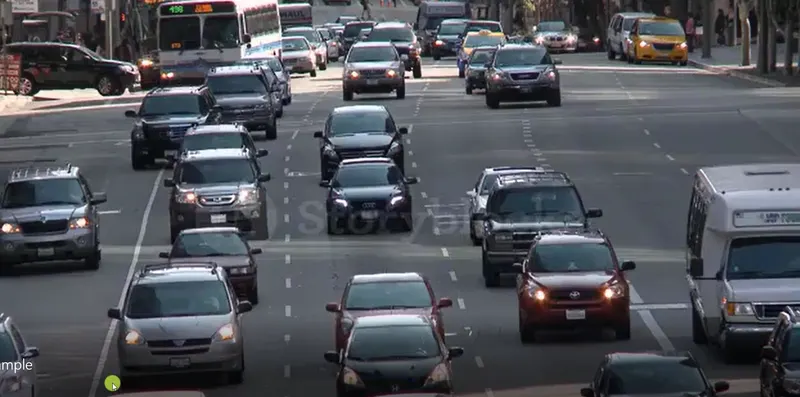
Input Image
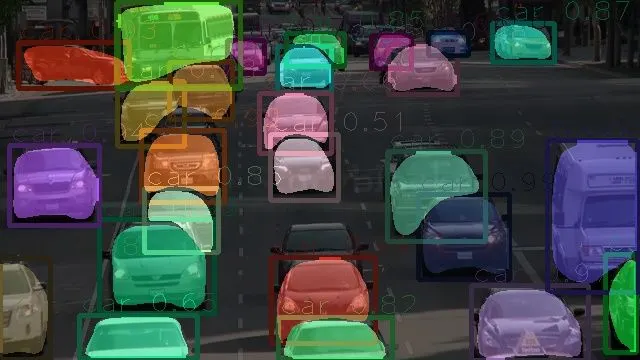
Output Image
Video INput and output to are attached
traffic.mp4 as input
traffic_segmented.avi