Project 1 - V&V SW Analysis - I
Project: 1
Write a Test plan to test features of a new mobile phone (Blackbox test) that needs to be implemented based on the given requirements. (The product is still in under development stage and is yet to be UA (User Acceptance) tested. Every other thing to be included in the test plan can be hypothetical.
|
US-1 |
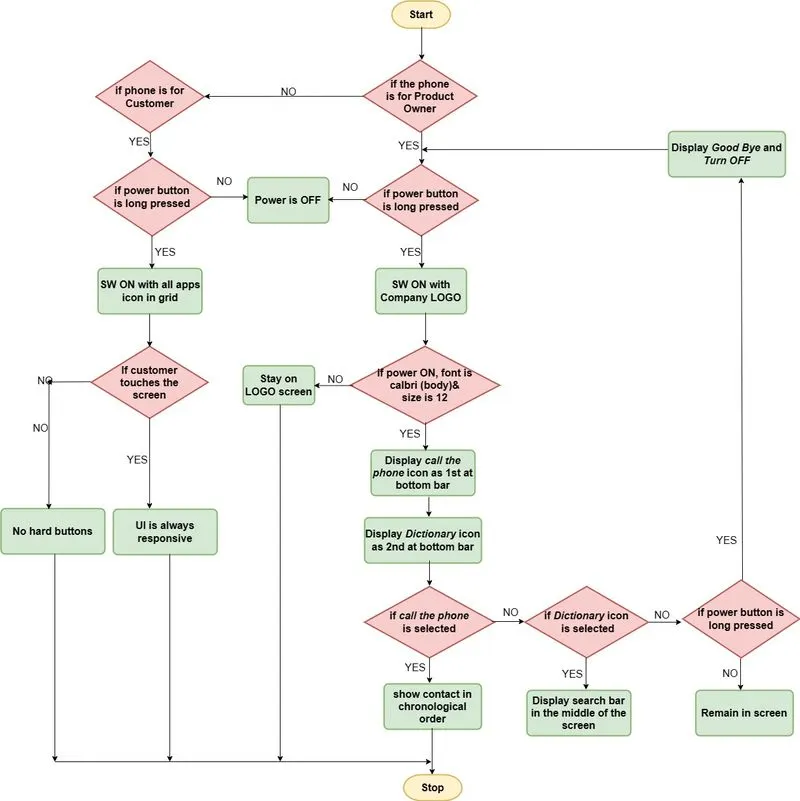
As a Product owner, when long pressed the power button of the phone shall switch on with a company logo at the center of the screen. |
|
US-2 |
As a Customer, when the power button is pressed my phone is switched ON and all my icons of the APPS shall be present in the grid |
|
US-3 |
As a Product owner, when the phone is powered ON ,I shall see the "call the phone" icon as the first icon at the bottom bar of my screen. |
|
US-4 |
As a Product owner, when the phone is powered ON, I shall see the "Dictionary" icon as the second icon at the bottom bar of my screen. |
|
US-5 |
As a Product owner,when I Clicked my "call the phone" icon ,all the contacts shall be visible based on chronological order. |
|
US-6 |
As a Product owner,when I Clicked my "Dictionary icon ,a search bar shall appear at the middle of the screen to let me search the meanings of the words I desire. |
|
US-7 |
As a Product owner,when I long pressed my "power on" button ,my phone shall be switched off saying "Good-Bye” Message. |
|
US-8 |
As a product owner ,my font in the mobile shall always be ''calibri (Body)" and shall be of size 12. |
|
US-9 |
As a Customer,I need my UI to be touch responsive. |
|
US-10 |
As a customer ,my mobile phone should have no hard buttons. |
TEST PLAN:
if (the owner long pressed the power button of the phone)
{
Print {“Phone switched ON with company logo at the center of the screen”};
}
else if (the customer long pressed the power button of the phone)
{
Print {“Phone switched ON with open all app icons in the grid”};
}
else if (the owner power on the phone)
{
Print {“Display font always in Calibri (body) with 12 size”};
}
else if (the owner power on the phone)
{
Print {“show call the phone icon on 1st position at bottom bar”};
}
else if (the owner power on the phone)
{
Print {“ shows Dictionary icon on 2nd position at bottom bar”};
}
else if (the owner click on call the phone icon)
{
Print {“Show the contacts list in chronological order;”};
}
else if (the owner click on the Dictionary icon)
{
Print {“search bar appears at centre”};
}
else if (the owner long press power on button)
{
Print {“displays Good-Bye and gets switched off”};
}
else if (customer requirement screen touch responsive)
{
Print {“replicates on-screen touch”};
}
else (customer requirement no hard buttons)
{
Print {“screen touch sensitive”};
}
FLOWCHART: