Project 1 - Parsing NASA thermodynamic data
AIM:-
To write a code in MATLAB to parse the NASA thermodynamic file data and then calculate the thermodynamic properties of all the species.
OBJECTIVE:-
- To write a function that extracts the 14 coefficients and calculates the enthalpy, entropy, and specific heats for all the species in the data file. You will be reading this file NASA thermodynamic data file THEMO.dat file.

R is the universal gas constant, T is the temperature
The FIRST 7 coefficients are HIGH-temperature coefficients and the SECOND 7 coefficients are LOW-temperature coefficients.
2. To Calculate the molecular weight of each species and display it in the command window.
3. To Plot the Cp, Enthalpy, and Entropy for the local temperature range (low temperature: high temperature) specific for each species.
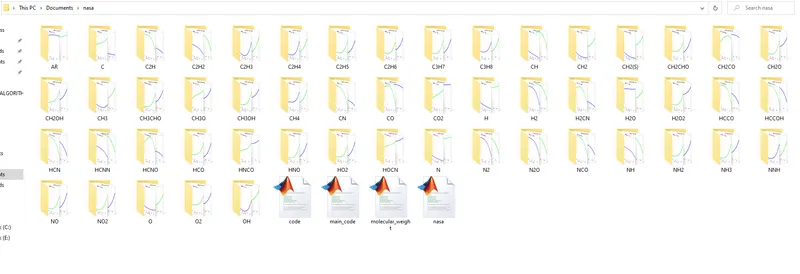
4. To Save the plots as images with appropriate names and dump them in separate folders for each species with suitable names. All these should be generated automatically.
THEORY:-
FILE PARSING:-
File parsing is used to read the data from the external text file or any other type of file and to use the data inside the file in the program by extracting the data from the file is known as file parsing.
Specific Heat:-
The heat is required to raise the temperature of the unit mass of a given substance by a given amount. The units of specific heat are usually calorie or joules per gram per Celsius degree.
Enthalpy:-
Enthalpy is the measurement of energy in a thermodynamic system. The quantity of enthalpy equals the total content of heat of a system, equivalent to the system’s internal energy plus the product of volume and pressure.
Entropy:-
function MW= molecular_weight(Species)

% Standard atomic name
Atomic_name = ['O','H','C','N','R'];
% Molecular weight of oxygen, hydrogen, carbon, nitrogen , argon
% Atomic Weight of standard atomic elements
Atomic_weight = [16,1,12,14,40];

MW = 0;
for i = 1:length(Species)
 for   j = 1:length(Atomic_name)

     if strcmp(Species(i),Atomic_name(j))
         MW = MW+Atomic_weight(j);
         p=j;

     end
 end
 N = str2double(Species(i));

 if N>1
      MW = MW+Atomic_weight(p)*(N-1);

 end

 end
end- Above Program is for calculating the molecular weight of the elements and their species.
- First, we created the function and name the file as molecular_weight, and also gave the same name to the function.
- Then we get the standard elements from the data file then we defined it as a variable called Atomic_name in the array.
- Then we find out the atomic weight of those elements and then and assign it a variable called Atomic_weight.
- Then we wanted to find out the molecular weight of all the species so that we don't need to put it every time so we created such a code so that we can automate the process of calculating the molecular weight.
- For that we used the for-loop before for loop we assigned the value of MW which is molecular weight as MW=0 this is our initial condition. Then for the for loop, we assigned the value of species to the variable i which will go running from 1 to length of Species and the total number of species is 53 so it will run 53 times.
- Then we assigned the variable j to the Atomic_name where our standard atomic elements are presented. And they are 5 in numbers so it is going to run for 5 times in the loop and going to give the required value.
- For starter, we used the if command and compare our both j and i string by using strcmp it is a string comparing command with the help of that command we compared species(i) and Atomic_name(j) so this was our condition
- Then we used the molecular weight formula which is MW+Atomic_weight(j) so if we run the system now then it will hope to compare with the species 1 and also with the Atomic_name if its value matches then it will going to select the number and will going to find the other number but if its value does not matches then for the species(1) it will going to run for 5 times and will going to match the element each time.
- But this was just for getting the individual elements and combining them but we have numbers in the species and there were no numbers in the Automic_name array so we defined a variable for j as p which is for the position.
- Then we converted the species from string to numbers and assigned it the variable N and then again use the if command and condition was if N>1 then it will going to use the formula MW = MW+Atomic_weight(p)*(N-1);
This formula is going to print the variable for n number of times if, for example, we have species called CH3 so we get the value of c and also H for only one time but we want it again 2 times so for that our formula comes into action and what it will do it will just add the molecular weight of H and get the atomic weight of it and going to repeat it for 3 times and going to get the value as 3 and then it will get subtract one time and will show the CH3. And finally, it will go to an end. - This program is going to get all the species names and will calculate all species molecular weight.
MATLAB MAIN PROGRAM:-
% File Parsing And data extracting
clear all
close all
clc
 % to get the data from file
 f1 = fopen('THERMO.dat','r');

 % For loop for skipping the unwanted data
 for i = 1:5
    fgetl(f1);
 end
 % For running all the file data in a loop
 for j = 1:53
 % For line1
 Tline1 = fgetl(f1);

 findingspace = strsplit(Tline1,' ');

Species = findingspace{1};

Findingdot = strfind(Tline1,'.');
%  Local Temperature ranges
% Low local temperature
Low_local_temp = str2double(Tline1(Findingdot(1)-3:Findingdot(1)));
% High local Temperature
High_local_temp = str2double(Tline1(Findingdot(2)-4:Findingdot(2)));
% Mid Local Temperature
Mid_local_temp = str2double(Tline1(Findingdot(3)-4:Findingdot(3)));

% for line 2
tline2 = fgetl(f1);
f_E = strfind(tline2,'E');
a1 = str2double(tline2(1:f_E(1)+3));
a2 = str2double(tline2(f_E(1)+4:f_E(2)+3));
a3 = str2double(tline2(f_E(2)+4:f_E(3)+3));
a4 = str2double(tline2(f_E(3)+4:f_E(4)+3));
a5 = str2double(tline2(f_E(4)+4:f_E(5)+3));

%For line 3
tline3 = fgetl(f1);
f_E = strfind(tline3,'E');
a6 = str2double(tline3(1:f_E(1)+3));
a7 = str2double(tline3(f_E(1)+4:f_E(2)+3));
a8 = str2double(tline3(f_E(2)+4:f_E(3)+3));
a9 = str2double(tline3(f_E(3)+4:f_E(4)+3));
a10 = str2double(tline3(f_E(4)+4:f_E(5)+3));

%For line 4
tline4 = fgetl(f1);
f_E = strfind(tline4,'E');
a11 = str2double(tline4(1:f_E(1)+3));
a12 = str2double(tline4(f_E(1)+4:f_E(2)+3));
a13 = str2double(tline4(f_E(2)+4:f_E(3)+3));
a14 = str2double(tline4(f_E(3)+4:f_E(4)+3));

% Finding specific heat, Entropy , Enthalpy
% R = universal gas constant
R = 8.314;

% For finding specific heat For high temperature

T = Low_local_temp:High_local_temp;

if  T>Mid_local_temp

    %For High Temperature
cp = R*( a1+(a2*T)+(a3*T.^2)+(a4*T.^3)+(a5*T.^4));

H =R*( a1+(a2*T/2)+(a3*T.^2/3)+(a4*T.^3/4)+(a5*T.^4/5)+(a6./T));

S = R*(a1*log(T)+(a2*T)+(a3*(T.^2)/2)+(a4*(T.^3)/3)+(a5*(T.^4)/4)+a7);

else
% For Low temperature
% For finding specific Temperature

cp =R*( a8+(a9*T)+(a10*T.^2)+(a11*T.^3)+(a12*T.^4));

 H =R*( a8+(a9*T/2)+(a10*T.^2/3)+(a11*T.^3/4)+(a12*T.^4/5)+(a13./T));

 S =R*( a8*log(T)+(a9*T)+(a10*(T.^2)/2)+(a11*(T.^3)/3)+(a12*(T.^4)/4)+a14);

end


%For making individual folder of species
t = sprintf('%s',Species);
mkdir(t)
cd(t)

%Plotting of Specific heat curve
figure(1)
plot(T,cp,'linewidth',4,'color','r')
xlabel('Temperature in K')
ylabel('Specific Heat cp')
grid on
title(sprintf('Species name= %s',Species))
saveas(1,'Specific heat.jpg')

% Plotting of Temperature and Enthalpy curve
figure(2)
plot(T,H,'linewidth',4,'color','b')
xlabel('Temperature in (K)')
ylabel('Enthalpy (H)')
grid on
title(sprintf('Species name= %s',Species))
saveas(2,'Enthalpy.jpg')

% Plotting of Temperature and Entropy curve
figure(3)
plot(T,S,'linewidth',4,'color','g')
xlabel('Temperature in K')
ylabel('Entropy (S)')
grid on
title(sprintf('Species name= %s',Species))
saveas(3,'Entropy.jpg')

cd ..
% Molecular weight of Species

M  = molecular_weight(Species);

Molecular_weight = sprintf('Molecular weight of %s is %d',Species,M)

end- The first step for starting the program is to clear all, close all, clc it will going to clear command window and will close all the opened chart.
- The next step is we want to open a new file and we want to read that file so we used the command called fopen and we gave the required parenthesis like the name of the file which is THERMO.dat and we wanted to read that file so we use r to read that file.
- In the next step, there was some name of the data file and we don't want that so we used the fgetl command to and used it inside the for loop and it is going to run it for 5 lines and then after that our main species data comes in.
- We have generated code to extract the data from the file. We have made the algorithm for only the first species we identified the pattern and according to that, we make the code so that it will be applied for all the species and with the help of for loop that was possible.
- After extracting all the values of the first species Calculated the Cp, H, S, And molecular weight for the first species at low temperature and at high temperature as our first seven values were the high-temperature values and the next seven values were the low-temperature values. All the outputs get calculated.
- After calculating the values then we put this data into a folder then we plotted all the data of enthalpy and entropy and specific heat curve and ended the for a loop.
RESULT:-
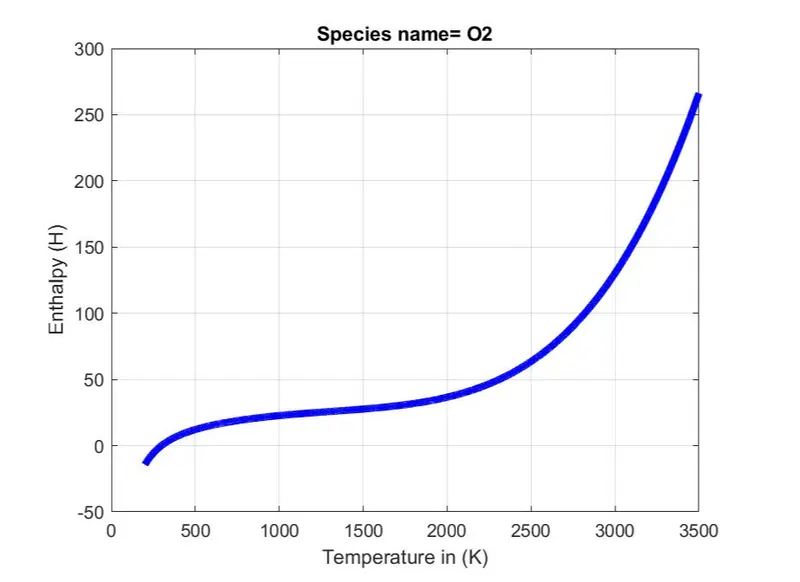
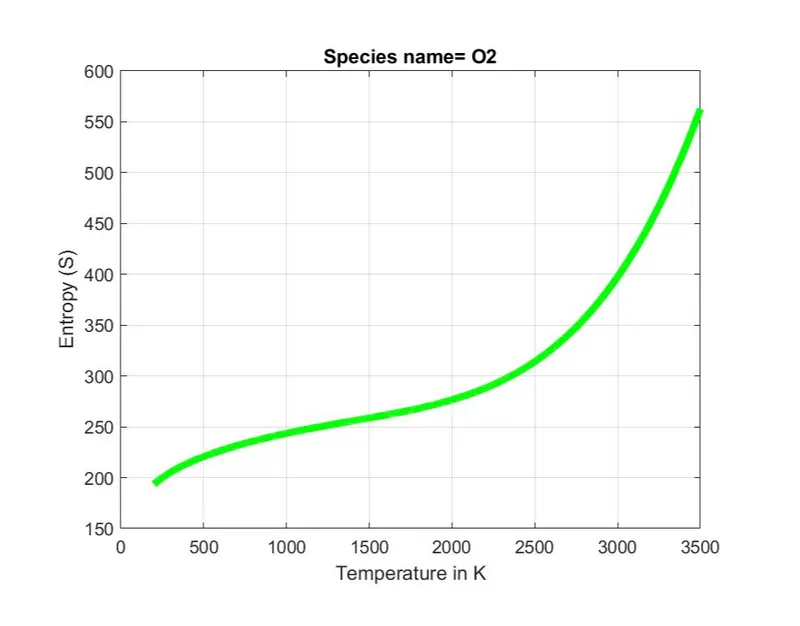
Output plot for O2
Output curve of Temperature(T) vs Specific heat(cp)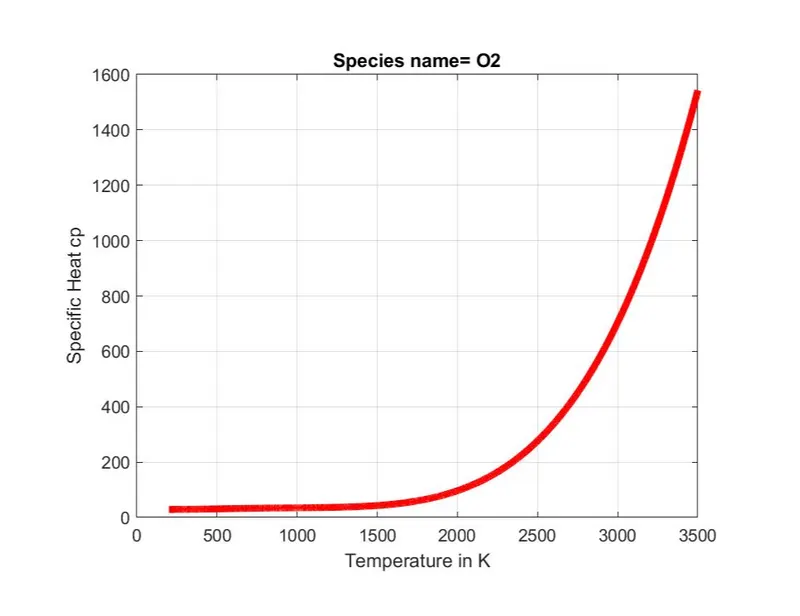
Output curve of Temperature(T) vs Enthalpy(H)
Output curve of Temperature(T) vs Entropy(S)
Output Plot For N2
Output curve of Temperature(T) vs Specific heat(cp)
Output curve for Temperature(T) vs Enthalpy(H)
Output Curve for Temperature(T) vs Entropy(S)
Output Plot for CO2
Output curve of Temperature(T) vs Specific heat(cp)
Output curve for Temperature(T) vs Enthalpy(H)
Output Curve for Temperature(T) vs Entropy(S)
- We have plotted all the plots of all the 53 species but We have uploaded some of them for reference. In the plot, we can see that the values are changing concerning temperature.
- By applying the formula in the code we get all the values of Specific heat, enthalpy, and entropy concerning temperature. As for both the high and low temperatures.
- R is the universal gas constant which is 8.314
Molecular weight output:-
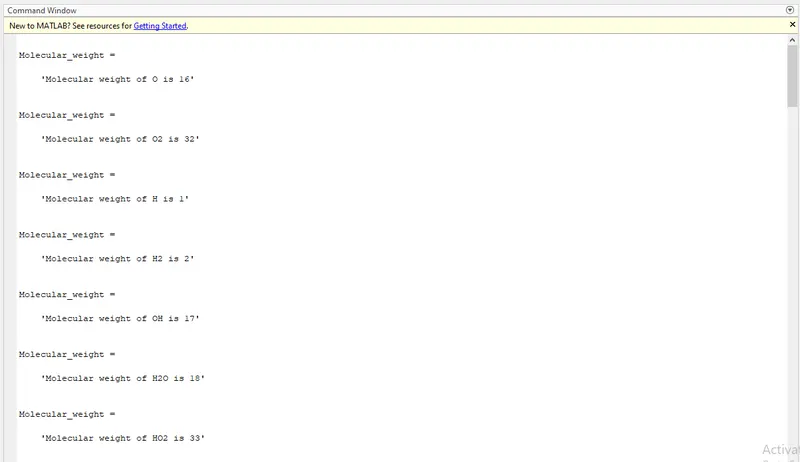
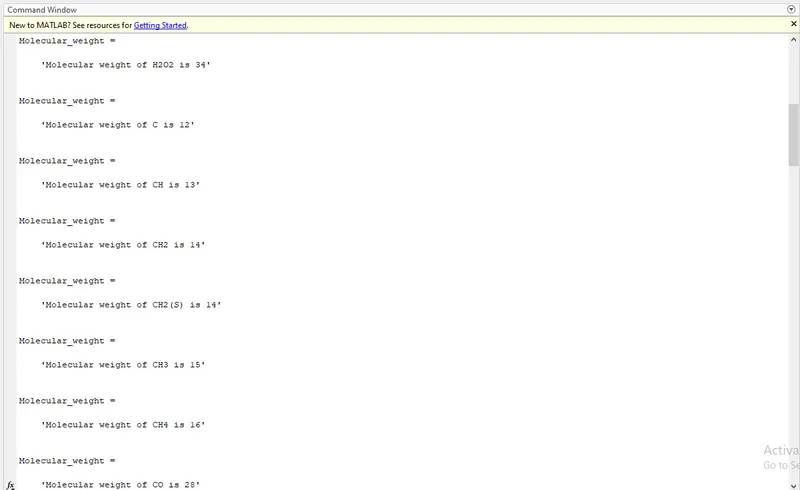
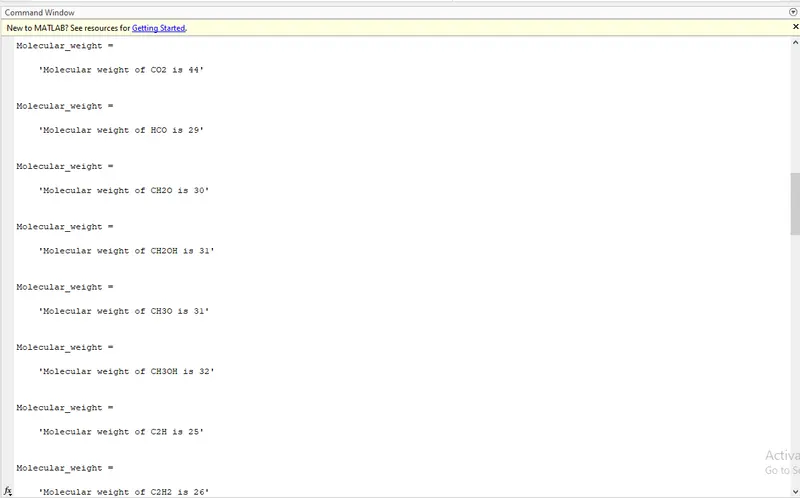
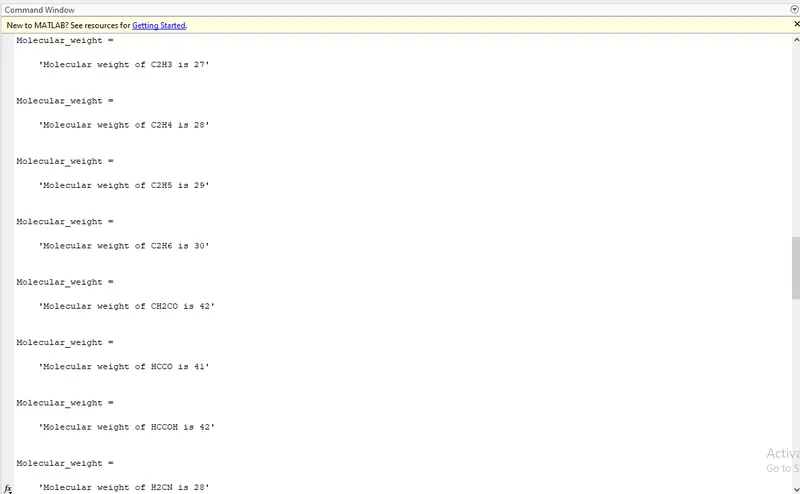
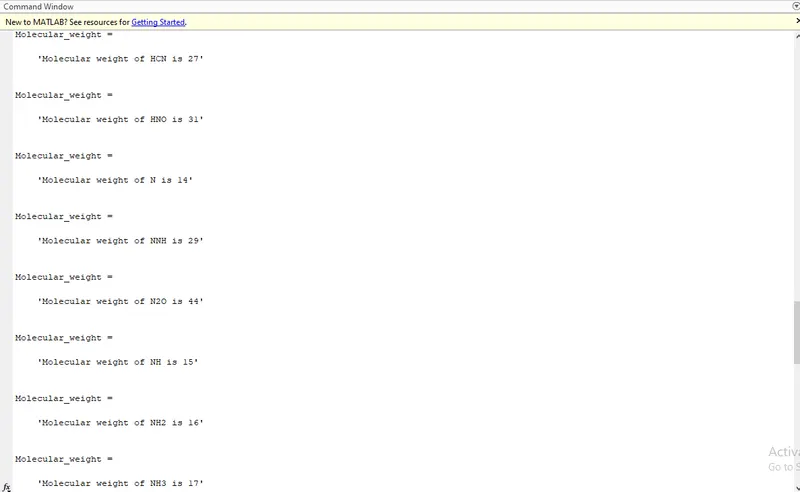
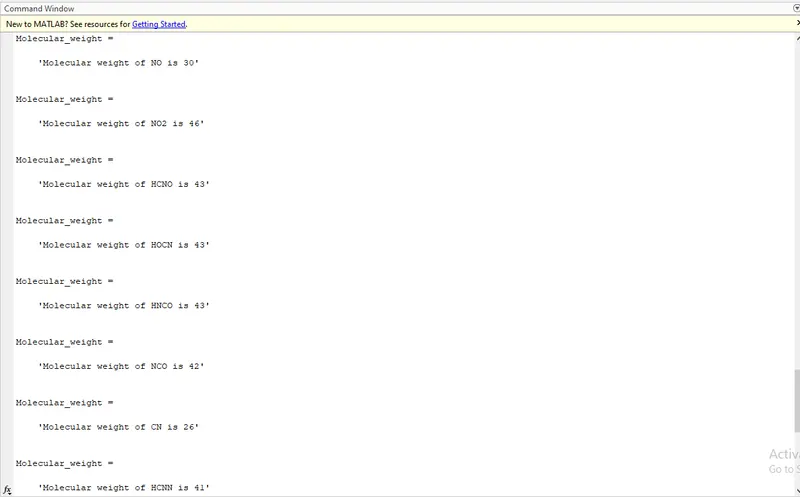
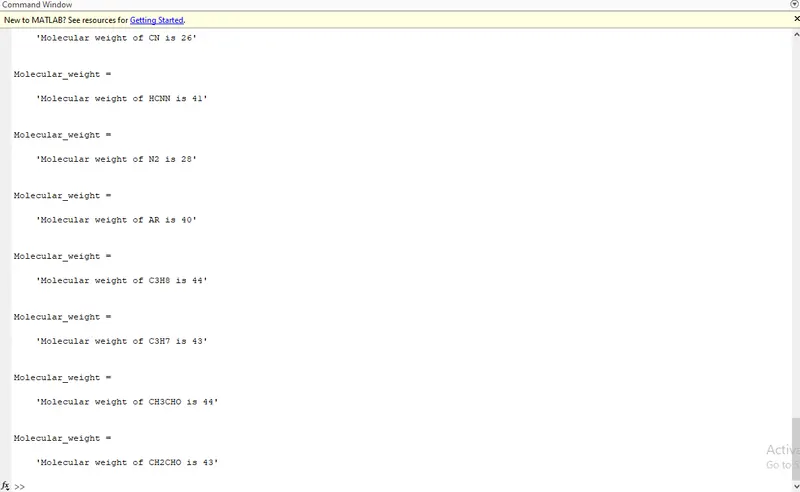
The molecular weight of all the species has been calculated using the function code where we inserted the formula for calculating the molecular weight of species.
Location of all species folder
Conclusion:-
With the help of MATLAB, we calculated the specific heat, enthalpy, Entropy, and molecular weight of all species and made the code in such a way that it will be able to calculate for every species and plotted the data on the curve.
And learn how to make the file and insert the data in the file with Matlab code.
Google Drive Link:-
https://drive.google.com/drive/folders/1_F_2ZNO_ObcGXFRqiolZ-iFDtmQGOdIv?usp=sharing