Project 1 - Parsing NASA thermodynamic data
PROJECT 1: PARSING NASA THERMODYNAMIC DATA
OBJECTIVE:
To parse a NASA thermodynamic data file and mathematically interpret it so as to obtain valuable thermodynamic data like Specific Heat,Enthalpy and Entropy for various species for various temperature ranges. Also to save and return plot ,results,etc according to the constraints specified.
PARSING:
Parsing, syntax analysis, or syntactic analysis is the process of analyzing a content, either in natural language, computer languages or data structures in order to facilitate the writing of compilers and interpreters. Parsing can be defined as top-down or bottom-up based on how the parse-tree is constructed. This is also a subcategory of file handling- which is necessary in all fields and applications. This is a basic feature so a computational program has tools for this.
Parsing a computer language with two levels of grammar: lexical and syntactic.
- The first stage is the token generation, or lexical analysis, by which the input character stream is split into meaningful symbols defined by a grammar of regular expressions. For example, a calculator program would look at an input such as "
12 * (3 + 4)^2" and split it into the tokens12,*,(,3,+,4,),^,2, each of which is a meaningful symbol in the context of an arithmetic expression. - The next stage is parsing or syntactic analysis, which is checking that the tokens form an allowable expression. This is usually done with reference to a context-free grammar which recursively defines components that can make up an expression and the order in which they must appear.
EQUATIONS:
These generalised equations use the interpreted coefficients and form a polynomial that gives the values of H,S,Cp for various species when the temperature is substituted.
MAIN CODE:
clear all
close all
clc

f1=fopen('THERMO.DAT','r');                     %Opening the Data file
fgetl(f1);                                      %Skipping the first line

global_temp=strsplit(fgetl(f1));                        %Obtaining Global Temperature Ranges, reading and Splitting the line into cells
global_low_temp=str2double(global_temp(2));             %Categorising the Global Temperatures
global_mid_temp=str2double(global_temp(3));
global_high_temp=str2double(global_temp(4));

fgetl(f1);                      %skipping the next 3 disclaimer lines
fgetl(f1);
fgetl(f1);

counter=0;                          %counter for while loop using (feof) command.
while counter<1                     %'While loop' to parse and compute data of all species in file till the end
    line1=strsplit(fgetl(f1));      %Obtaining and splitting of line 1 of individual species
    Species=line1{1};               %Reading the species name
    if Species~="END" & Species~=isempty(Species)           %In order to quit parsing if the file ends or with or without 'END'.
                                                            %Also '&&' is not used because both conditions are not scalar
        len=length(line1);
        local_low_temp=str2double(line1{len-3});        %Obtaining low,mid and high local temperatures
        local_mid_temp=str2double(line1{len-1});
        local_high_temp=str2double(line1{len-2});

        mol_wt=0;                               %Computing the molecular weight of species
        Atoms={'H','C','N','O','A'};            %cell containing the individual elements
        Atomic_wt={1 12 14 16 40};              %cell with mass of individual elements complimentary to previous cell
        for m1=1:length(Species)                %Code similar to basic linear searching in cell
            for m2=1:length(Atoms)
                tf=strcmpi(Species(m1),Atoms{m2});              %Line comparing the Species with Element cell
                if tf==1
                    mol_wt=mol_wt+Atomic_wt{m2};                %Line adding molecular weight if elements matched
                    mem=Atomic_wt{m2};                          %temporary variable storing atomic mass of last iteration-(useful incase of number in species name)
                end
            end
            n=str2double(Species(m1));                  %Line converting the string indexed with current iteration to a number
            nt=isnumeric(n);                            %Line checking if the converted index value is a number and nothing else
            if  nt==1 && n>1                            %Line checking if the number is greater than 1 to avoid 0.
                mol_wt=mol_wt+((n-1)*mem);              %Line adding the appropriate mol wt using the temporary variable
            end
        end
        Mw=sprintf("The molecular wt of %s is %f",Species,mol_wt);                      %Lines displaying the molecular mass of every species in command window
        disp(Mw)

        line2=fgetl(f1);                            %getting second line coefficients (a1-a5)
        L2=strfind(line2,'E');
        a1=str2double(line2(L2(1)-11:L2(1)+3));
        a2=str2double(line2(L2(2)-11:L2(2)+3));
        a3=str2double(line2(L2(3)-11:L2(3)+3));
        a4=str2double(line2(L2(4)-11:L2(4)+3));
        a5=str2double(line2(L2(5)-11:L2(5)+3));
        line3=fgetl(f1);                            %getting third line coefficients (a6-a10)
        L3=strfind(line3,'E');
        a6=str2double(line3(L3(1)-11:L3(1)+3));
        a7=str2double(line3(L3(2)-11:L3(2)+3));
        a8=str2double(line3(L3(3)-11:L3(3)+3));
        a9=str2double(line3(L3(4)-11:L3(4)+3));
        a10=str2double(line3(L3(5)-11:L3(5)+3));
        line4=fgetl(f1);                            %getting fourth line coefficients (a11-a14)
        L4=strfind(line4,'E');
        a11=str2double(line4(L4(1)-11:L4(1)+3));
        a12=str2double(line4(L4(2)-11:L4(2)+3));
        a13=str2double(line4(L4(3)-11:L4(3)+3));
        a14=str2double(line4(L4(4)-11:L4(4)+3));

        T=linspace(local_low_temp,local_high_temp,1000);     %Temperature array formed to simplify and speed up the plot generation process
                                                             %while maintaining the accuracy of dataset

        [Cp,H,S]= Calc(a1,a2,a3,a4,a5,a6,a7,a8,a9,a10,a11,a12,a13,a14,T,local_mid_temp);    %Function calling to calculate H,S,Cp and return the same.

        %Plotting
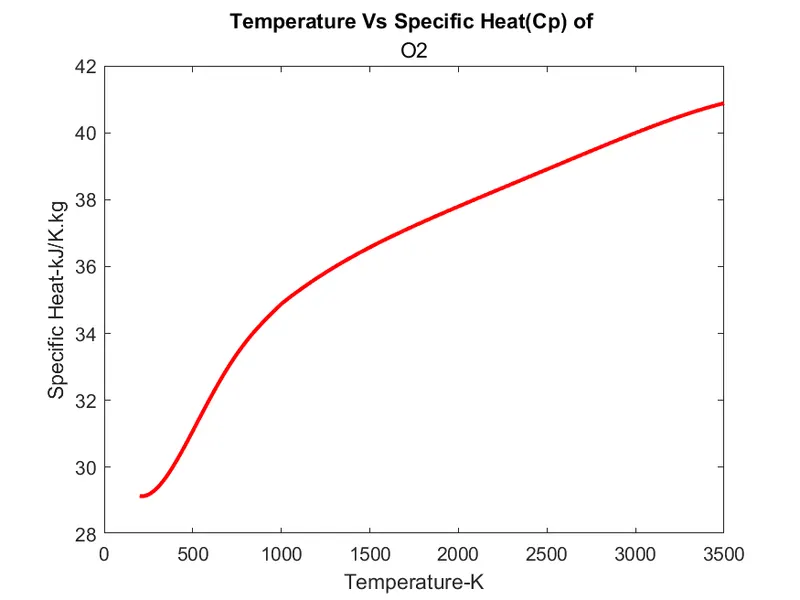
        figure(1)                           %Plotting Specific heat for the current species
        plot(T,Cp,'r','linewidth',2)
        xlabel('Temperature-K')
        ylabel('Specific Heat-kJ/K.kg')
        title('Temperature Vs Specific Heat(Cp) of ',Species)
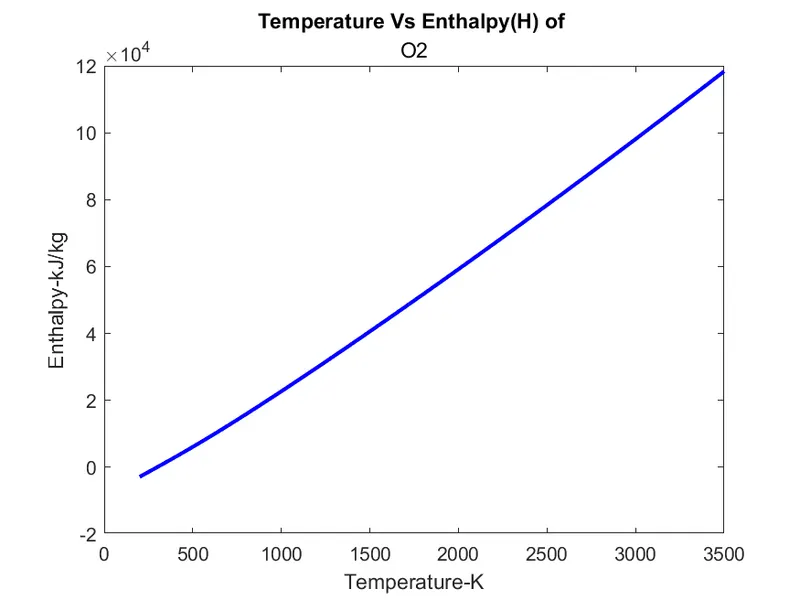
        figure(2)                           %Plotting Enthalpy for the current species
        plot(T,H,'b','linewidth',2)
        xlabel('Temperature-K')
        ylabel('Enthalpy-kJ/kg')
        title('Temperature Vs Enthalpy(H) of ',Species)
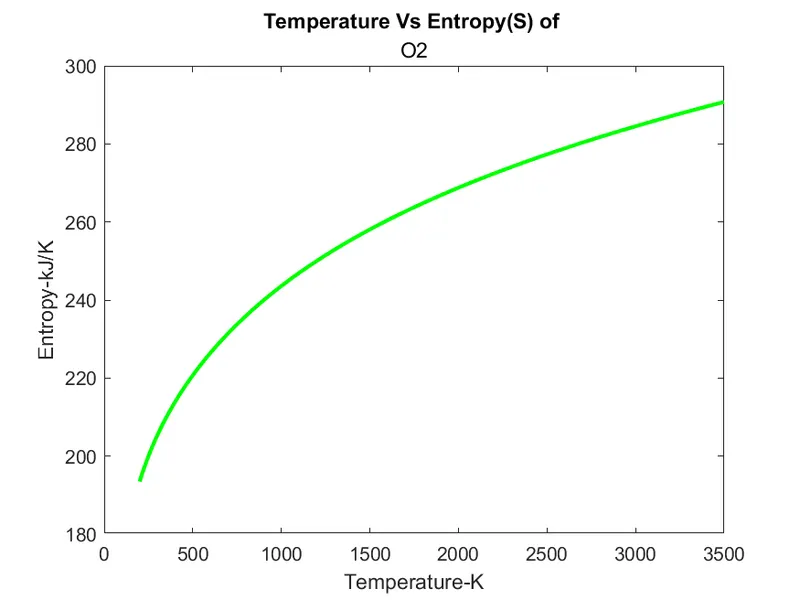
        figure(3)                           %Plotting Entropy for the current species
        plot(T,S,'g','linewidth',2)
        xlabel('Temperature-K')
        ylabel('Entropy-kJ/K')
        title('Temperature Vs Entropy(S) of ',Species)

        %Code to generate seperate folders for each species and save the plots
        current_folder=pwd;             %Code to store the current (initial and parent) directory
        mkdir(Species)                  %Code to generate a new directory
        cd(Species)                     %Code to change current directory to speciefied directory
        saveas(figure(1),'Specific Heat.png')           %Code to save the obtained plots in created individual folder and in necessary format
        saveas(figure(2),'Enthalpy.png')
        saveas(figure(3),'Entropy.png')
        cd(current_folder);                             %Code to revert the current directory to the parent directory for next species

    else
        counter=feof(f1);      %counter for ending the while loop
        fclose(f1);     %Closing the Data file
    end
end
FUNCTION CODE:
function [Cp,H,S]= Calc(a1,a2,a3,a4,a5,a6,a7,a8,a9,a10,a11,a12,a13,a14,T,local_mid_temp)
R=8.3145;  %Universal Gas constant in J⋅K−1⋅mol−1

Cp=zeros(1,length(T));          %The arrays are predefined to optimise code for performance else the arrays dynamically
H=zeros(1,length(T));           %change size for every iteration which slows down the code.
S=zeros(1,length(T));

for k=1:length(T)
    if T(k)>local_mid_temp          %high temperature coeffecients
        Cp(k)=(a1+a2.*T(k)+a3.*T(k).^2+a4.*T(k).^3+a5.*T(k).^4)*R;
        H(k)=(a1+(a2.*T(k))/2+(a3.*T(k).^2)/3+(a4.*T(k).^3)/4+(a5.*T(k).^4)/5+(a6./T(k)))*R.*T(k);
        S(k)=(a1.*log(T(k))+a2.*T(k)+(a3.*T(k).^2)/2+(a4.*T(k).^3)/3+(a5.*T(k).^4)/4+a7)*R;
    else                            %low temperature coeffecients
        Cp(k)=(a8+a9.*T(k)+a10.*T(k).^2+a11.*T(k).^3+a12.*T(k).^4)*R;
        H(k)=(a8+(a9.*T(k))/2+(a10.*T(k).^2)/3+(a11.*T(k).^3)/4+(a12.*T(k).^4)/5+(a13./T(k)))*R.*T(k);
        S(k)=(a8.*log(T(k))+a9.*T(k)+(a10.*T(k).^2)/2+(a11.*T(k).^3)/3+(a12.*T(k).^4)/4+a14)*R;
    end
end
end
File Handling Commands & Tools:
- fopen- opens the file using the file name and a file pointer/ ID.
- fclose- closes the file using the same file ID after the operations are completed.
- fgetl- reads/ gets the next line of the file and stores it in a character array as a string.
- strsplit- splits the character array obtained and stores it in indexed cells in one cell array.
- str2double- converts the string to a numerical value suitable for calculations.
- strfind- finds the specific character or number in a string and returns it's position.
- strcmpi- compares 2 strings case insensitively.
- isnumeric- checks if a variable is numeric or not.
- sprintf- stores the output in a character format and can be used for showing output.
- pwd- shows the path of current directory.
- mkdir- makes the specified path or folder as a new directory.
- cd- changes the current directory.
- saveas- saves the plot in the directory in a seperate format as specified.
- feof- find end of file: returns 1 if the end of file is reached else returns zero.
CODE EXPLANATIONS:
MAIN CODE:
- The file is opened using a file ID-(f1) and fopen command in reading mode.
- The lines are read/ obtained using fgetl command mostly stored and used but some are ignored.
- The global temperatures are read, split and stored.
- A counter is used for while loop to run and end the code according to the end of file.
- The code follows an if condition that checks for the end of file.
- Line 1 of a species is read, split, indexed, converted to suitable format and stored according to categories like species, local temperatures, etc . The molecular mass is calulated using species, it is explained seperately.
- Then the subsequent lines are read and split. The coeffcients are found out using 'strfind' cmd using 'E' as delimiter (for this file and code as this is common for all coefficients and can help in seperation of coefficients) proper indexing is used and the respective coefficients are read and stored.
- The Function calling is done to calculate and return the values of Cp, H, S for the species using the coefficients. It returns 3 arrays for the taken 1000 equally spaced temperature values.
- The plots are made and appropriate titles and axis labels with units are marked.
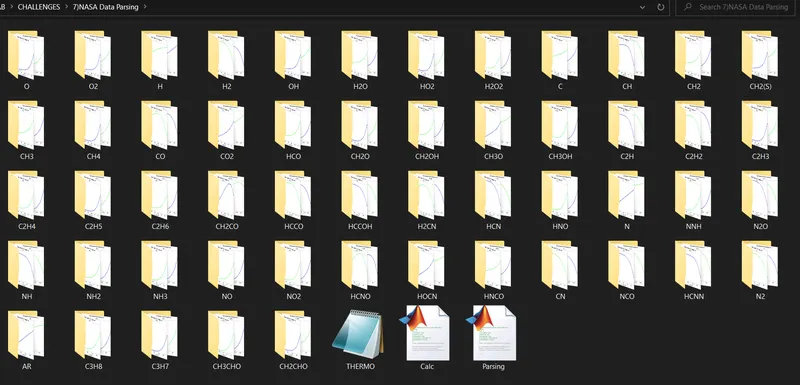
- The current directory has the main program, function block and the file itself, but the species needs its plots to be saved in folders with the species name, so the current directory is saved in a variable using pwd command and new directories are made with the species name of the iteration. Then using the cd command the current directory is changed to the new directory formed.
- The plots are then saved using the saveas command inside their respective folders using the above directory commands and after saving, the directory is reversed to the original directory for processing the next species.
- This process repeats until the end of the file.The else loop of the first for loop uses feof command to monitor the end of the file to end the while loop.
Molecular weight code explanation:
- The molecular weight of species is calculated using the Species name and the individual atomic masses of elements, which is already index matched with atomic names and stored in seperate cells.
- Two different 'For' loops are used for iterating Species and Atoms array (their lengths are taken as limits for the loop) and a Linear Search is performed for finding the mass of individual atoms.
- A variable (mem) saves atomic mass of the current atom for a reason.
- If the Species has more than 1 same atom and a number is in between the species name (like CH3OH), then the first for loop is failed and exited.
- The next 'If' loop checks if the next iteration within species is a number. If it is a numeric value then the number is detucted by 1 and multiplied the mem variable which stored the atomic mass in previous iteration.
- The number is deducted by 1 to avoid readdition of the mass of same atom again which already occured in previous iteration.
- The atomic weight of all atoms were continuously added and stored for each iteration then forms as molecular mass of the species after the last iteration and is displayed in the command window.
FUNCTION BLOCK:
- The function definition is done with assigning the input arguments.
- Since there are 1000 plot points (T is an array of 1000 values) Cp,H,S are arrays so for indexing we use a for loop and it's counter as an index. The element wise operators are used.
- The first 7 out pf the 14 coefficients are high temperature coefficients and the next 7 are low temperature coefficients. These are determined by local mid temperature value- (if the temperature in T array is above local mid temperature value- it uses high temperature coefficients and if it's below it, they use low temperature coefficients) these are segragated and executed using 'If' loop/condition.
- Since the size of Cp,H,S arrays will vary dynamically for each iteration if it's not preallocated, it affects the speed of processing. But since we know the final size of these arrays, we can predefine the arrays using an array of zeroes with the same size.This optimises the code for efficient and faster execution.
OUTPUTS:
Screenshot of the window where all the separate folders for each species are saved.
PLOTS OF:
1)O2:
2)N2:
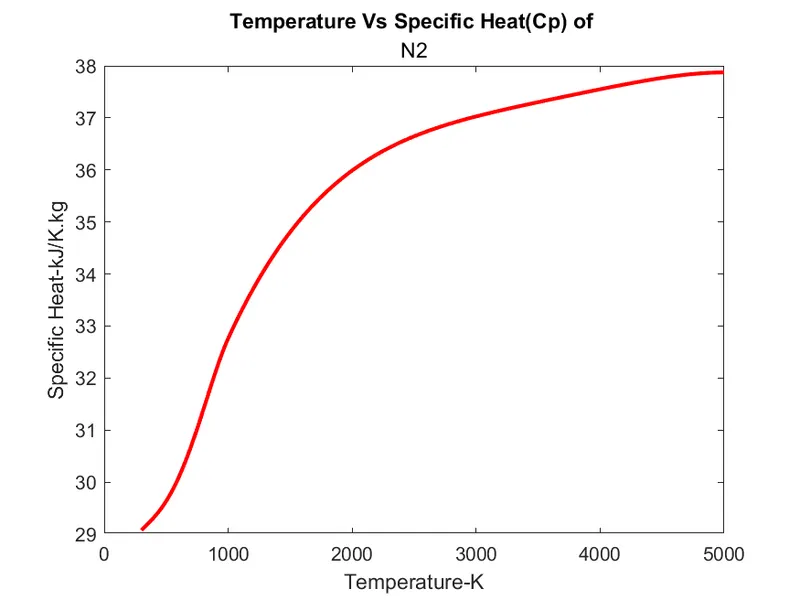
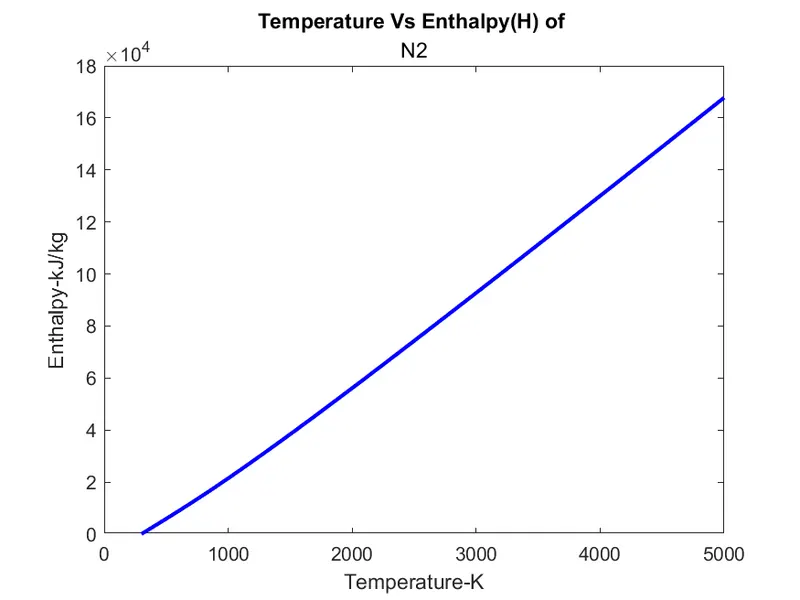
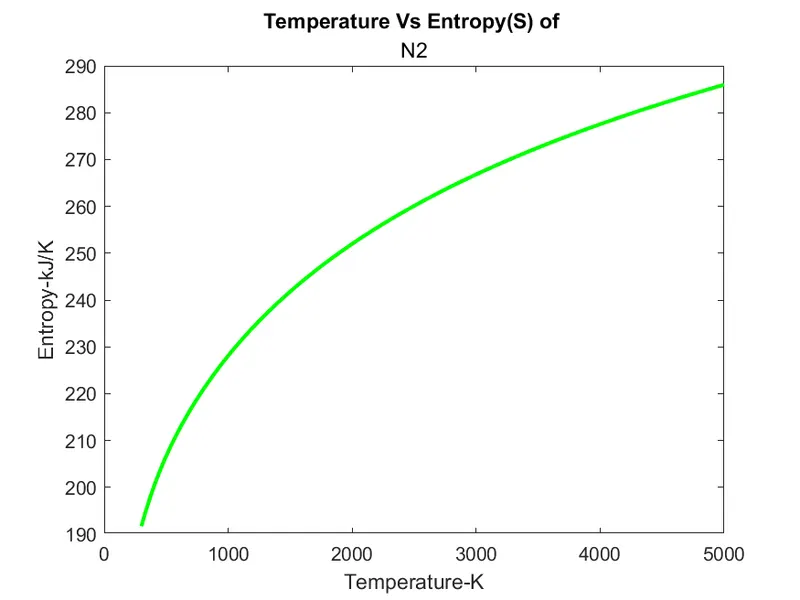
3)Co2:
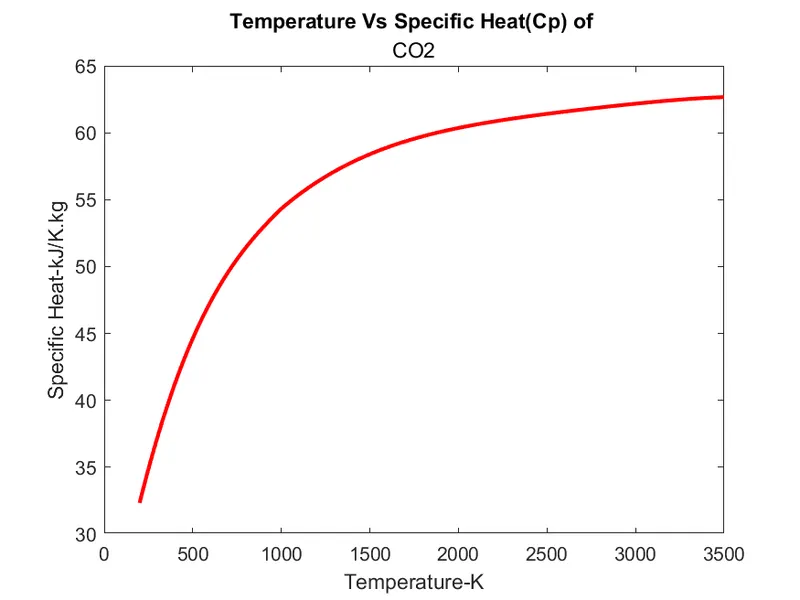
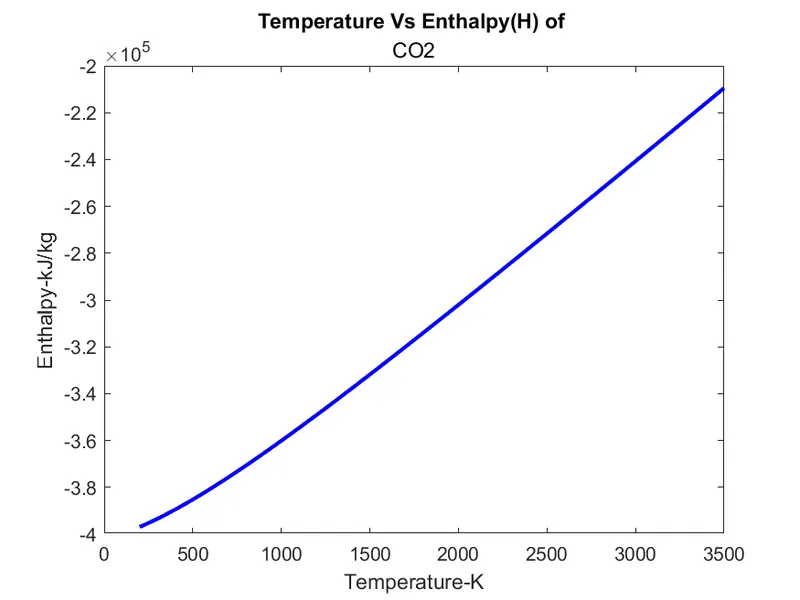
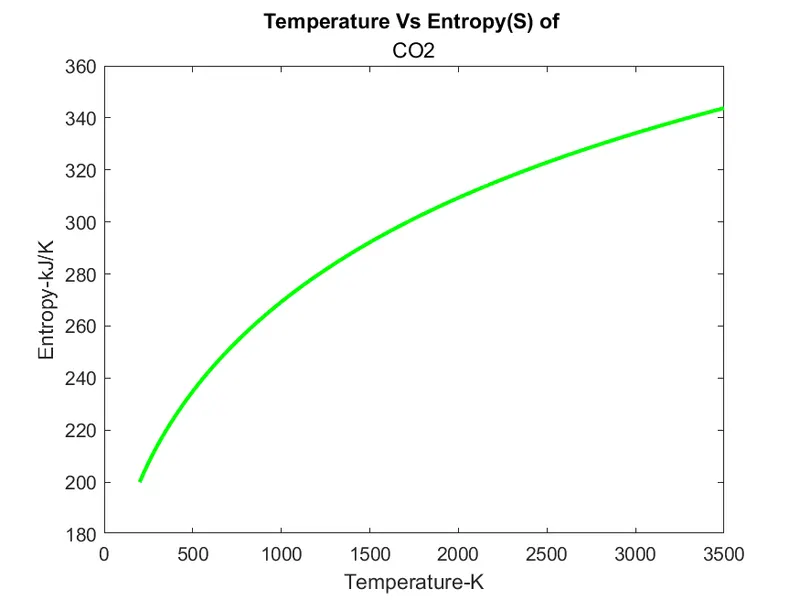
Molecular Weights Command Window Screenshot:
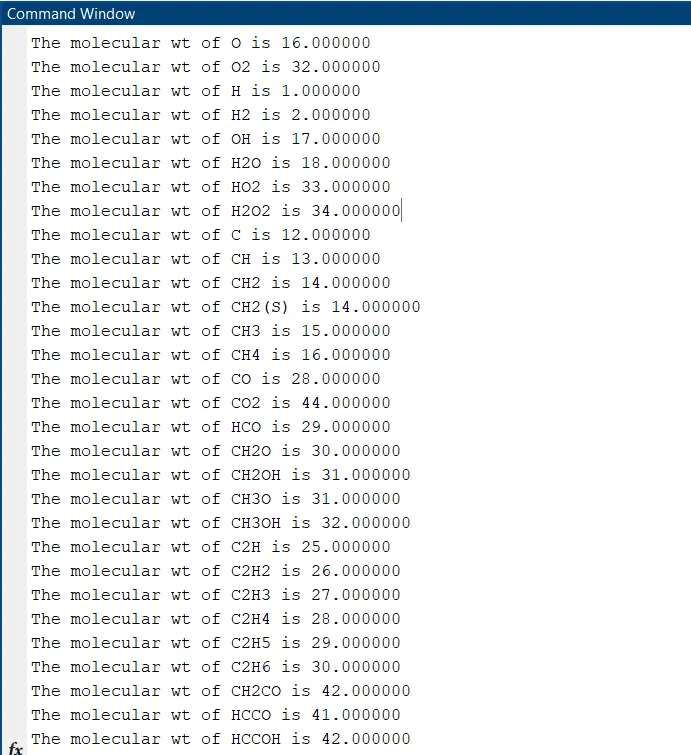
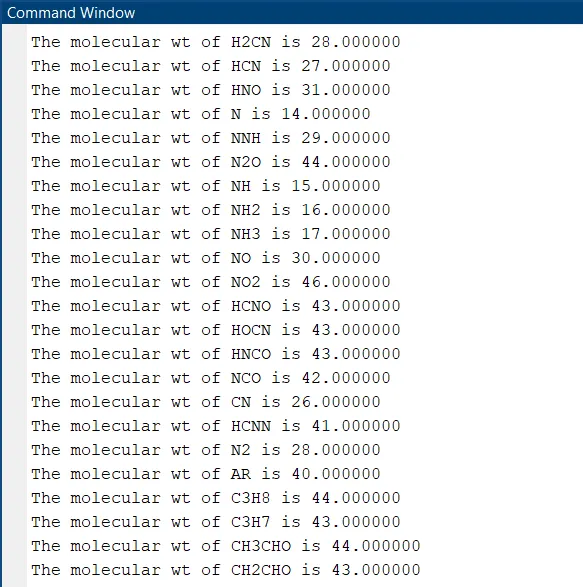
ERRORS And CORRECTIONS:
1) Molecular weight code:
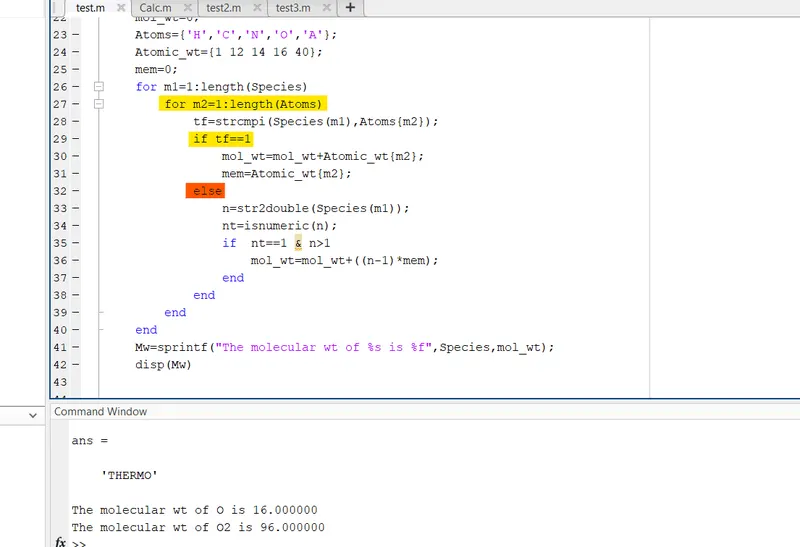
The 'else' condition errored the molecular masses of species (as seen in below picture in command window, mass of O2 was calculated to be 96 units. After the else was removed and the previous 'If" condition terminated the masses were correctly calculated.
2)Indexing Errors:
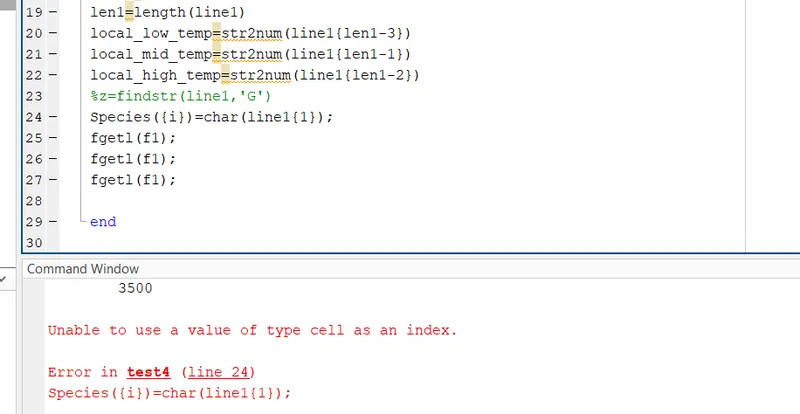
Initially the curly braces(representing the cells) were used for indexing the species variable in LHS at line 24, but later changed to ordinary paranthesis to overcome the errors.
3)Specific File Parsing Code:
The code initially was not generic and was using a 'for' loop that parses the file only upto the given 53 species, then it was replaced with a 'while' loop and counters with feof command. Which optimised the code to be more generic like it is now.
CONCLUSION:
The thermodynamic data file was parsed and the values (Cp,H,S,Molecular weights) were calculated for all species, plotted and stored/(dumped) individually in their respective files/folders.
REFERENCES:
https://en.wikipedia.org/wiki/Parsing
https://in.mathworks.com/matlabcentral/answers/423793-how-to-store-values-in-cell-array
https://in.mathworks.com/matlabcentral/answers/2015-find-index-of-cells-containing-my-string
https://in.mathworks.com/help/matlab/ref/strcmpi.html
https://in.mathworks.com/help/matlab/ref/feof.html
https://in.mathworks.com/help/matlab/ref/pwd.html?searchHighlight=pwd&s_tid=srchtitle
https://in.mathworks.com/help/matlab/ref/saveas.html?s_tid=srchtitle