Project 1 - Parsing NASA thermodynamic data
Problem Statement :
Parsing NASA's Thermodynamic Data file to calculate th specific heat, enthalpy & entropy of various gas species.
Theory:
File Parsing : Parsing a file means reading in a data stream. It means , to a computer, about what "reading text" means to a human being. MATLAB has built-in functions that can be called to open an external file, read through or skip through data and convert the data into a computable form.
Thermo.dat file - The thermodynamic data file from NASA contains co-efficients derived from linear regression methods for 53 gaseous species. These co-efficients along with a temperature range are for polynomials that can be used to derive specific heat , enthalpy, & entropy for each species.

The data for each element is stored in rows in the format shown above, using built in commands, data has to be extracted from each line of the file & used for computation of the thermodynamic properties.
File parsing commands.
The following commands have been used.
1) fileID = fopen(filename, permission)
'fopen' is the command used to open file('filename') with the type of access specified by 'permission'. The file name is specified as a character row vector or a string scalar.
if the file is not in the current folder, 'filename' must include a full or relative path. The permissions can be specified as follows.
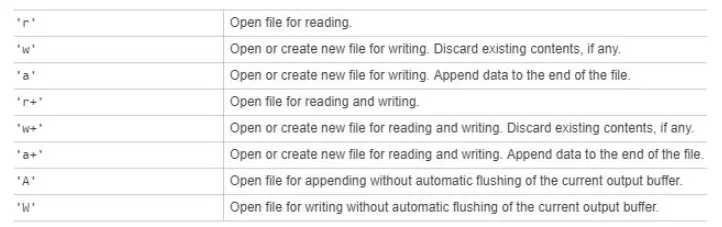
2) tline = fget(fileID)
The command returns the next line of the specified file, removing the newline characters. 'tline' becomes a character array containing the next line returned by the fgetl command.
3) A = fscanf(filename, formatspec) reads the data from an open text file into column vector A and interprets values in the file according to the format specified by formatspec.
4) flcose(fileID)-closes an open file.
About the program
% command to open the file to read data
file = fopen('THERMO.dat','r');

%The next few commands skip the header lines
fgetl(file);

%extract the data of the global temperature ranges.

A= fscanf(file,'%f',[2,inf]);
A = A(:);
global_low_temp = A(1);
global_mid_temp = A(2);
global_high_temp = A(3);

%The next few commands skip the header lines
fgetl(file);
fget1(file);
fgetl(file);
The first section of the program corresponds to the following first part of the data file.
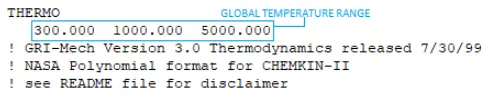
This section of the data file contains the header and introduction but the part we are mainly interested is the global temperature range. This line of data is scanned and extracted using the fscanf command. The code can be interpreted as scan all columns of the second row of data and store it in a column vector A from where the data is distributed into respective array vectors as per the low/mid/high classification. The next 3 fgetl commands are intended at skipping to the list of elements.
%User input for species name

Species = input('Enter the name pf species: ','s');
ct = 0;%while loop counter initiation

while feof(file)%condition is 'for end of life'
tline = fget1(file); %first line of each element
tline_1 = strsplit(tline,' '); % first line split & stored ina cell array
%'coefficients' function is called to extract6 data of local temps and
%the coefficients
[elements,LT_O,HT_O,MT_O,CE_1,CE_2,CE_3,CE_4,CE_5,CE_6,CE_7,CE_8,CE_9,CE_10,CE_11,CE_12,CE_13,CE_14] = Coefficients(file,tline_1);
Temp = linspace(LT_O,HT_O,1000);
The second section of the program starts with taking the input name of the species from the user . A while loop is initiated 'for the end of file' and the next fgetl command extracts the first line of every species every time it runs inside the loop.

The'strsplit' command uses white spaces to split the data into cell array elements. This cell array and the fieldID are then used as inpt argument to call the function 'coefficients' which extracts the co-efficients and local temperatures. The values of the low and high local temperatures are then used to create a range of 1000 values between the two. The co-efficients function code:
function [elements,LT_0,HT_0,MT_0,CE_1,CE_2,CE_3,CE_4,CE_5,CE_5,CE_6,CE_7,CE_8,CE_9,CE_10,CE_11,CE_12,CE_13,CE_14] = Coefficients(file,tline_1)
%extracting local temps from the first line of the element
elements = tline_1(1);
LT_0 = str2num(tline_1{1,(length(tline_1))-3});
HT_0 = str2num(tline_1{1,(length(tline_1))-2});
MT_0 = str2num(tline_1{1,(length(tline_1))-1});

%Extracting coefficients from the second line of the element
tline_2 = fgetl(file);
B = findstr(tline_2,'E');

CE_1 = tline_2(1:(B(1))+3);
CE_1 = str2num(CE_1);

CE_2 = tline_2((B(1)+4:(B(2))+3));
CE_2 = str2num(CE_2);

CE_3 = tline_2((B(2)+4:(B(3))+3));
CE_3 = str2num(CE_3);

CE_4 = tline_2((B(3)+4:(B(4))+3));
CE_4 = str2num(CE_4);

CE_5 = tline_2((B(4)+4:(B(5))+3));
CE_5 = str2num(CE_5);

%extracting co-efficients from the third line of the element
tline_3 = fgetl(file);
C = findstr(tline_3, 'E');

CE_6 = tline_3((1:(C(1))+3));
CE_6 = str2num(CE_6);

CE_7 = tline_3((C(1)+4:(C(2))+3));
CE_7 = str2num(CE_7);

CE_8 = tline_3((C(2)+4:(C(3))+3));
CE_8 = str2num(CE_8);

CE_9 = tline_3((C(3)+4:(C(4))+3));
CE_9 = str2num(CE_9);

CE_10 = tline_3((C(4)+4:(C(5))+3));
CE_10 = str2num(CE_10);

%extracting coefficients from the fourth line of the element
tline_4 = fgetl(file);
D = findstr(tline_4,'E');

CE_11 = tline_4((1:(D(1))+3));
CE_11 = str2num(CE_11);

CE_12 = tline_4((D(1)+4:(D(2))+3));
CE_12 = str2num(CE_12);

CE_13 = tline_4((D(2)+4:(D(3))+4));
CE_13 = str2num(CE_13);

CE_14 = tline_4((D(3)+4:(D(4))+4));
CE_14 = str2num(CE_14);
end
%To check for a match between user input file and data

if strcmpi(Species,element)
%Converting cell array to char away
element = char(element);
D = ["H","N","O","C","Ar"];% elements in data file

Atomic_weight = [1,14,16,12,40];%respective atomic weights.

weight = 0;
%code to find the molecular weight of the species
for k = 1:length(element)
for j = 1:length(D)
if strcmpi(element(k),D(j))
weight = weight + Atomic_weight(j);
a = Atomic_weight(j);
end
end
n = str2num(element(k));
if n > 1
weight = weight + (a*(n-1));
end
end

% Printing the value of molecular weight
fprintf("Molecular/Atomic weight of the species is %d",weight);
%Calculating the CP, H and S value for the range of temeperature by
%calling the 'Thermprop2' function
for i = 1:length(Temp)
[CP,H,S] = Thermoprop2(Temp(i),MT_0,CE_1,CE_2,CE_3,CE_4,CE_5,CE_6,CE_7,CE_8,CE_9,CE_10,CE_11,CE_12,CE_13,CE_14);
CP_1(i)=CP;
H_1(i)=H;
S_1(i)=S;
end
This section of the program has 'if' control structure to determine if the string input by the user is the same as the element name extracted by us after calling the 'coefficients' function. If the condition is true ,the rest of the program is executed or else the counter is incremented and the while loop goes again with extracting the element name, co-efficients, and temperatures of the next species in the data file. If the strings comparison yeilds true, then firstly the atomic weight of the species is calculated and printed after which a 'for' loop runs for the length of the temperature range. This loop calls the 'Thermprop2' function with input arguements as the coefficients and the temperature range and the outputs are vector arrays of specific heat, enthalpy and entropy values. The function uses the following equations to find the values of Cp, H and S.
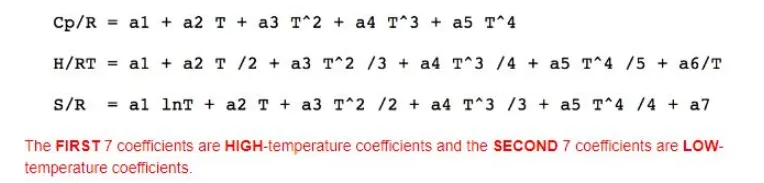
And the code above-mentioned 'Thermprop2' function is -
function [ CP, H, S] = Thermprop2(Temp,MT_0,CE_1,CE_2,CE_3,CE_4,CE_5,CE_6,CE_7,CE_8,CE_9,CE_10,CE_11,CE_12,CE_13,CE_14,)

%universal gas constant

R = 8.314;

%if temp is greater than mid temp, use the first 7 co-efficients , else use the last 7 co-efficients.

if Temp>= MT_0

CP = R*(CE_1+ (CE_2*Temp) + (CE_3*(Temp^2)) + (CE_4*(Temp^3)) + (CE_5*(Temp^4)));

H = R*Temp*(CE_1+((CE_2*Temp)/2) + ((CE_3*(Temp^2))/3) + ((CE_4*(Temp^3))/4)+((CE_5*(Temp^4))/5)+ (CE_6/Temp));


S = R*((CE_8*(log(Temp))) + (CE_9*Temp) + ((CE_10*(Temp^2))/2)+ ((CE_11*(Temp^3))/3)+((CE_12*(Temp^4))/4) + (CE_14));


end
end
%The cell array for element name is converted to a string
str = sprintf('%s',element);
mkdir(str)%to create folder with the folder names names of the species
newfolder = cd(str);%change directory to newly created folder.
%create the plot T vs H and save
figure(1);
plot(Temp,CP_1);
xlabel('Temperature');
ylabel('Specific Heat');
title(element);
saveas(figure(1),'Specific_Heat.png');
figure(2);
plot(Temp,H_1);
xlabel('Temperature');
ylabel('Enthalpy');
title(element);
saveas(figure(2),'Enthalpy.png')
figure(3);
plot(Temp,S_1);
xlabel('Temperature');
ylabel('Entropy');
title(element);
saveas(figure(3),'Entropy.png')
%use fopen to create new.txt file and with the write permission
%display the molecular weight of the species and close the file
file_2 = fopen('Molecular weight of %s is %d',element,weight);
fclose(file_2);
%change the directory back to the previous folder
oldFolder = cd('..');
%to break the program once the if condition is true and program
%execution is complete for the given species
break
end
end
%close the data file
fclose(file);
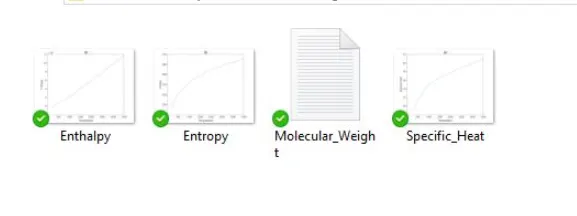
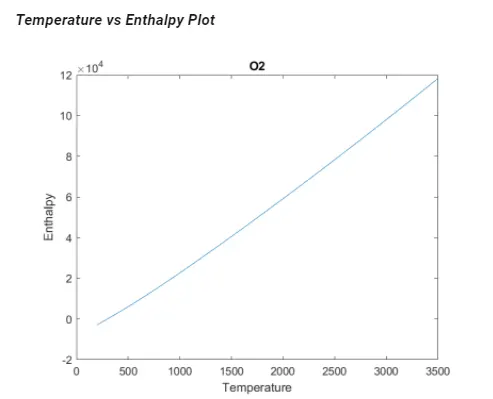
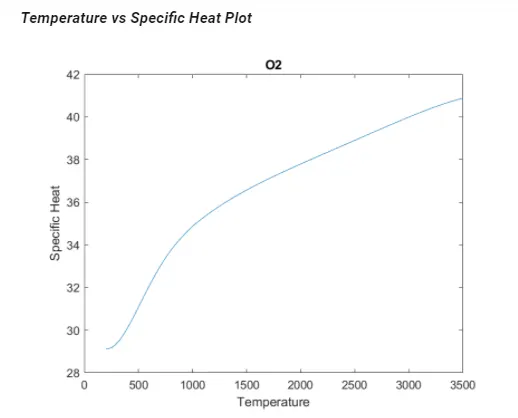
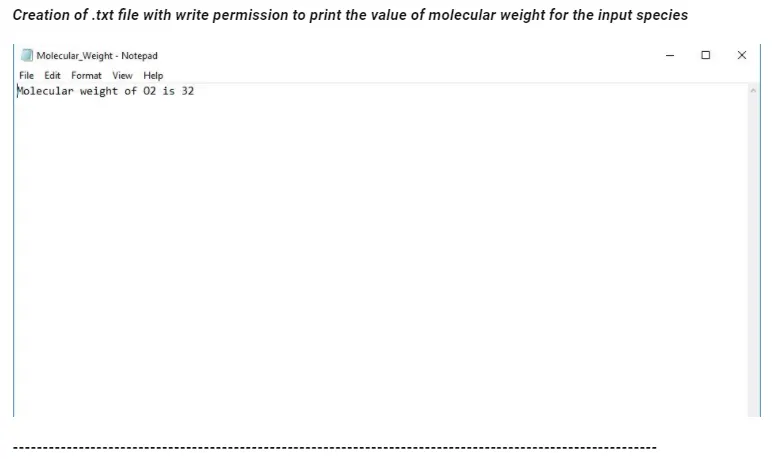
The final section of the program is a part of the program that gets executed if the 'If loop' is true . Firstly a new folder is created using the 'mkdir' function with the file name same as the species name. Once created, the working directory is changed to the newly created and folder which is followed by the plotting of Temperature vs Specific heat, enthalpy, entropy. All three plots are saved in the new folder. Once the plots are saved a new .txt file is created and opened and the molecular weight of the species is printed in the .txt file . The file is closed & working directory is changed back to the program's directory. Once all these commands are executed the loop is stopped using the 'break'-command.
Output
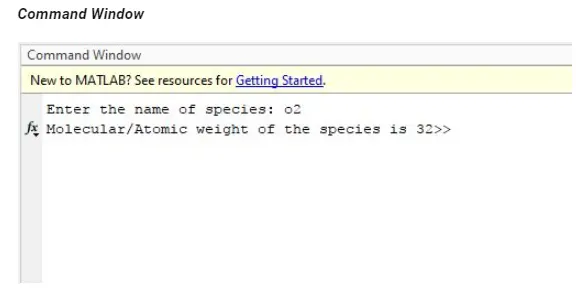
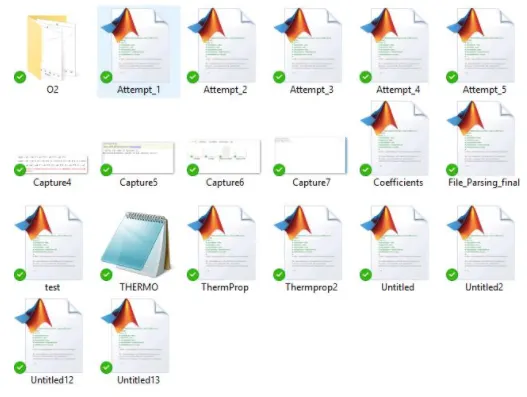
Creation of folder in the programs working directory
Saving the plot and molecular_weight.txt file in the new folder
Conclusion : File parsing is a really powerful tool that can be engaged while reading through and for extraction of large amounts of data from files. With MATLAB's capabilities to store, to compute, interpret & interact with data, the possibilities are countless