Project 1 - Parsing NASA thermodynamic data
Aim: To evaluate thermodynamic properties such as Cp, H and S. They have also documented the co-efficients that are required to evaluate these polynomials for 1000+ species.
Objective:
Writing a function that extracts the 14 co-efficients and calculates the enthalpy, entropy and specific heats for all the species in the data file. By reading this file NASA Thermodynamic data file. (Tip: use fopen and fgetl). The formulae are shown below.
Here R is the universal gas constant, T is the temperature
The FIRST 7 coefficients are HIGH-temperature coefficients and the SECOND 7 coefficients are LOW-temperature coefficients.
By using LOCAL TEMPERATURE RANGES which is unique for each individual species, not the GLOBAL TEMPERATURE RANGE.
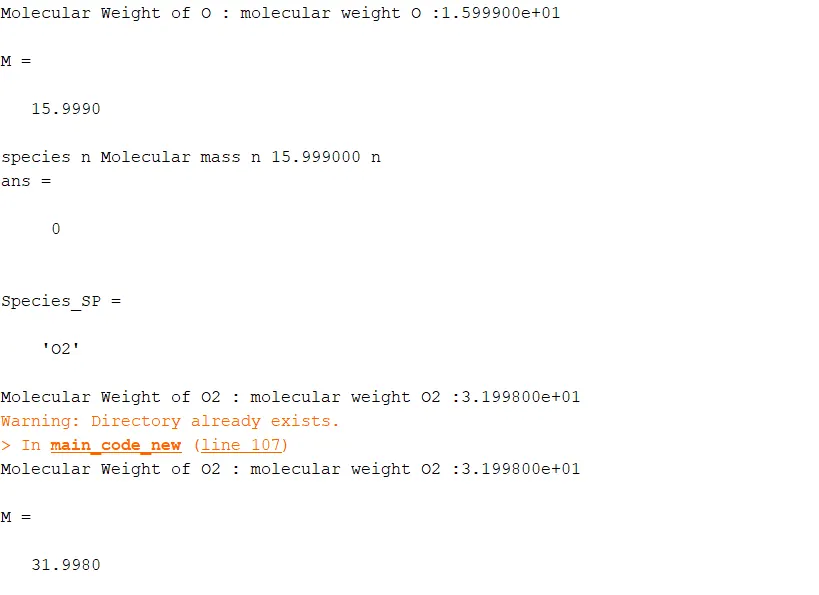
- Calculate the molecular weight of each species and display it in the command window.
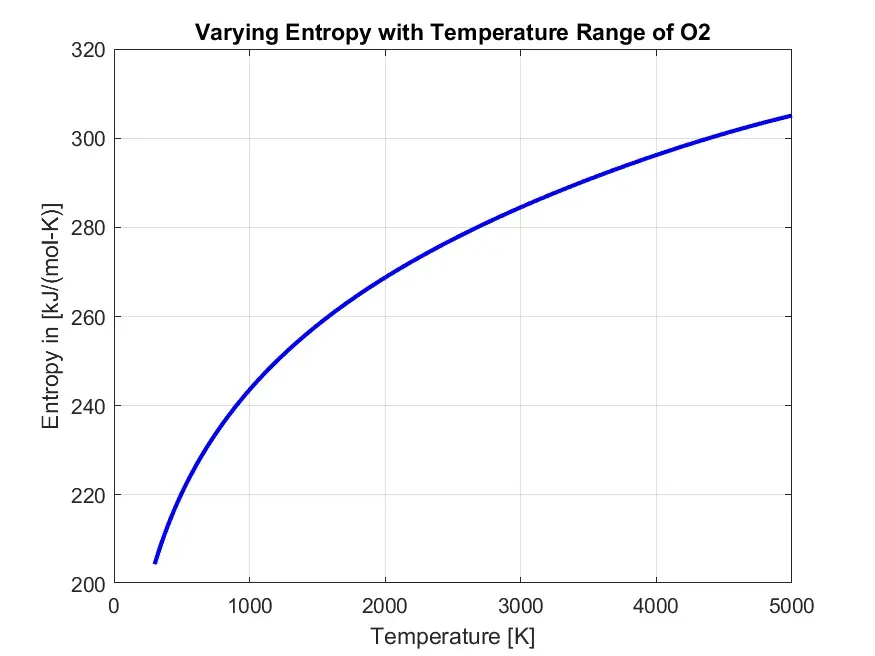
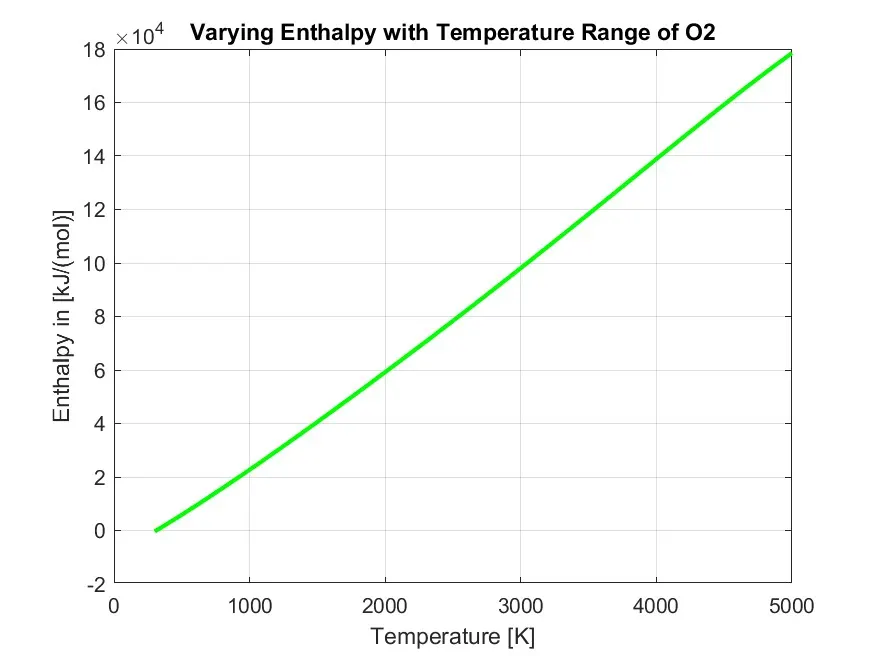
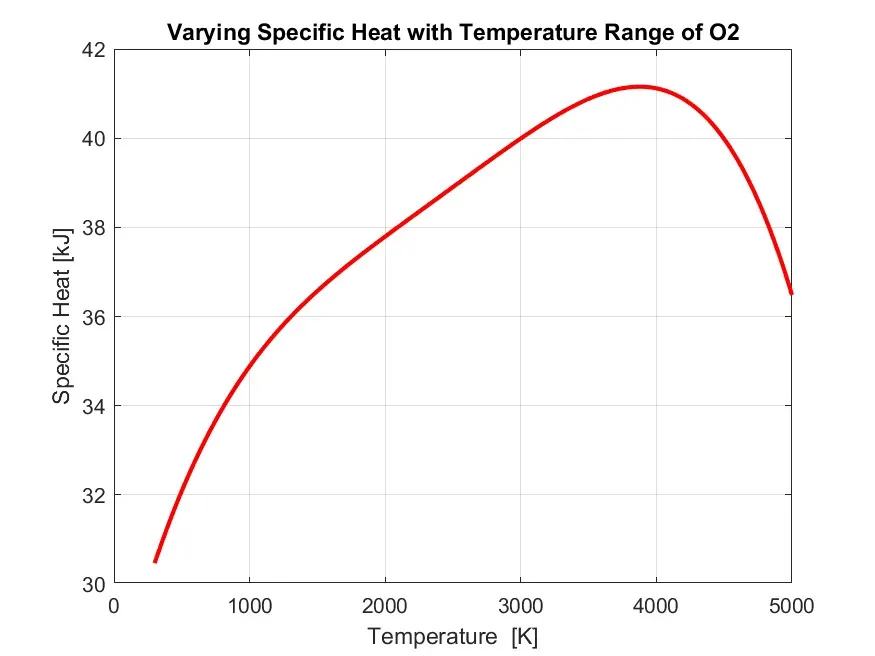
- Plotting the Cp, Enthalpy and Entropy for the local temperature range (low temp high temp) specific for each species.
- Saving the plots as images with appropriate names and dump them in separate folders for each species with suitable name.
Theroy:
Specific heat:
The specific heat capacity of a substance is the heat capacity of a sample of the substance divided by the mass of the sample. Informally, it is the amount of energy that must be added, in the form of heat, to one unit of mass of the substance in order to cause an increase of one unit in its temperature. The SI unit of specific heat is joule per kelvin and kilogram, J/.
The specific heat constants for constant pressure and constant volume processes are related to the gas constant for a given gas. This rather remarkable result has been derived from thermodynamic relations, which are based on observations of physical systems and processes. Using the kinetic theory of gases, this same result can be derived from considerations of the conservation of energy at a molecular level.
We can define an additional variable called the specific heat ratio, which is given the Greek symbol "gamma", which is equal to cp divided by cv:
gamma = cp / cv
Enthalpy:
Enthalpy, a property of a thermodynamic system, is the sum of the system's internal energy and the product of its pressure and volume. It is a state function used in many measurements in chemical, biological, and physical systems at a constant pressure, which is conveniently provided by the large ambient atmosphere.
If we are dealing with a gas, it is most convenient to use forms of the thermodynamics equations based on the enthalpy of the gas. From the definition of enthalpy:
h = e + p * v
Entropy:
Entropy is a scientific concept as well as a measurable physical property that is most commonly associated with a state of disorder, randomness, or uncertainty. The term and the concept are used in diverse fields, from classical thermodynamics, where it was first recognized, to the microscopic description of nature in statistical physics, and to the principles of information theory.
What is File parsing ?
File parsing means reading a file from the outer folder inside the matlab or extracting the value of a folder provided extracting the value inside the folder. The name Parse refers in matlab reading a function, script or internal code inside the memory. Some of the common commands used are (fopen, fgetl, fgets etc).
We are using this technique to read the Thermodynamic data by using file parsing to get the value of Cp, H, and S.
Explanation:
- Getting the heading of the file.
- The given program will get the header of the file which start with clear all close all and clc
- The command fopen will used for reading the thermodynamic data.
- The fgetl command returns the next line of the specified file, removing the newline characters.
- If the file is nonempty, then fgetlreturns tline as a character vector.
- If the file is empty and contains only the end-of-file marker, then fgetlreturns tline as a numeric value -1.
- Getting the Global Temperature:
- The global temperature info is stored in string so we use the command str2double so that it returns the value in {} as a string.
- Which gives us the cell array. From which we can get the global temperature value.
- For skipping the next three comments we use fgetl command.
-
% Getting the temperature data

global_temp = fgetl(f1);

x = strsplit(global_temp);

global_temp_low = str2double(x{2});
global_temp_mid = str2double(x{3});
global_temp_high = str2double(x{4});

fgetl(f1);
fgetl(f1);
fgetl(f1);
BODY OF THE CONTENT:
Code for calling function Specific_heat( ):
% Specific heat calculation function

function Cp = Specificheat(a1,a2,a3,a4,a5,a8,a9,a10,a11,a12,Temp,R,global_medium_temp)
% Comparing with global temperature
% If less than global temperature - minimum coefficients are taken
if  Temp <= global_medium_temp
Cp = R*(a8 + (a9*Temp) + (a10*(Temp).^2) + (a11*(Temp).^3) + (a12*(Temp).^4));
else
Cp = R*(a1 + (a2*Temp) + (a3*(Temp).^2) + (a4*(Temp).^3) + (a5*(Temp).^4));
% Else maximum coefficients are taken
end
Specific Heat function:
- Here I have used the same formula as mention above. To calculate the cp, h and s value.
- For loop is for repeating these condition for all three at once cp, h and s.
- If loop is used here because there are condition applied for finding value all 7 co-efficient of higher temperature. And value of 7 co-efficient of lower temperature.
Code for calling function Enthalpy( ):
% Enthalpy Calculation function

function H = Enthalpy(a1,a2,a3,a4,a5,a6,a8,a9,a10,a11,a12,a13,Temp,R,global_medium_temp)
% Comparing with global temperature
% If less than global temperature - minimum coefficients are taken

       if Temp <= global_medium_temp
        H = R*Temp.*(a8 + ((a9*Temp)/2) + ((a10*(Temp).^2)/3) + ((a11*(Temp).^3)/4) + ((a12*(Temp).^4)/5) +((a13./Temp)));
       else
% Else maximum coefficients are taken

        H = R*Temp.*(a1 + ((a2*Temp)/2) + ((a3*(Temp).^2)/3) + ((a4*(Temp).^3)/4) + ((a5*(Temp).^4)/5) +((a6./Temp)));
end
Code for calling function Entropy( ):
% Entropy Calculatin function

function S = Entropy_calc(a1,a2,a3,a4,a5,a7,a8,a9,a10,a11,a12,a14,Temp,R,global_medium_temp)
% Comparing with global temperature
% If less than global temperature - minimum coefficients are taken

    if Temp <= global_medium_temp
        S = R.*(a8.*log(Temp) + (a9.*Temp) + (a10*((Temp).^2)/2) + (a11*((Temp).^3)/3) + (a12*((Temp).^4)/4) + a14);
    else

% Else - maximum coefficients are taken
        S = R.*(a1.*log(Temp) + (a2.*Temp) + (a3*((Temp).^2)/2) + (a4*((Temp).^3)/3) + (a5*((Temp).^4)/4) + a7);
end
Code for calculating molecular weight by calling function wt( ):
% Molecular Weight Calculation function

function Molecularweight = Molecular_weight(Species_SP)
         % Standard - Atomic Name
         atomic_name = ['H','C','O','N','A'];
         % Hydrogen, Carbon, Oxygen, Nitrogen, Argon

         fprintf('Molecular Weight of ');
         fprintf(Species_SP);
         fprintf(' : ');
         % Standard Atomic Number
         Atomic_Weight = [1.008 12.011 15.999 14.007 39.948];
         % Starting Range of Molecule
         Molecularweight = 0;

         �ding Atomic number to obtain particular value
        for i = 1:length(Species_SP)
            for j = 1:length(atomic_name)
                if strcmpi(Species_SP(i),atomic_name(j))
                        Molecularweight = Molecularweight +Atomic_Weight(j);
                    position = j;
                end
            end
            n = str2num(Species_SP(i));

            if n>1

                Molecularweight = Molecularweight + Atomic_Weight(position)*(n-1);

            end
        end
            fprintf('molecular weight %s :',Species_SP);
            fprintf('%d',Molecularweight);
            disp(' ');
end
Molecular Weight function:
- Hence we can see the thermodynamic data contains 5 species that are oxygen, carbon, nitrogen, Hydrogen, Argon.
- These are named as elements and are stored in array.
- Where as their atomic masses are stored in atomic mass array.
- Here I have used For loop so that the process is to be repeated for each and every species.
- Strcmp command is used to compare the elements and corresponding atomic mass.
- And the molecular weight is stored in mol_wt.
- And Hence the molecular weight is calculated.
- Now I have to pass this function to the main code.
Creating a folder:
- Inorder to create a folder I have used the command mkdir which allows matlab to create a new folder to store the species data.
- Strcat command is used to concatenate a string to identify the name of the folder.
- Pwd command is used to identify the nature of the folder. For example .txt .file etc.
% Creating a folder 'SPECIES' to save all the species_name
    species_name = strcat('Property ...',species_name);
    mkdir(species_name);
    file = pwd;
MAIN CODE:
clear all
close all
clc

% Make directory
mkdir 'C:\Users\abhik\Desktop\NASA File Parsing'

%  Reading Data file - NASA Thermodynamic
% Open a file & 'r' Open the file for reading
f1=fopen('THERMO.dat','r')
gt=fgetl(f1);

% Obtaing Temperatures - by Reading Header Information
global_temp=fgetl(f1);

% Spliting
t=strsplit(global_temp);

% Converting string cells to numbers using str2num,
global_low_temp=str2num(t{2});
global_medium_temp=str2num(t{3});
global_high_temp=str2num(t{4});

% Temperature range & Gas Constant
    % Temperature Range assumed
Temp=linspace(global_low_temp,global_high_temp,1000);
% Universal Gas Constant J/(mol-K)
    R = 8.314;

% skipping three comment lines in the file
for i = 1:3
    gt=fgetl(f1);
end

 for i = 1:53
gt=fgetl(f1);
A=strsplit(gt,' ');
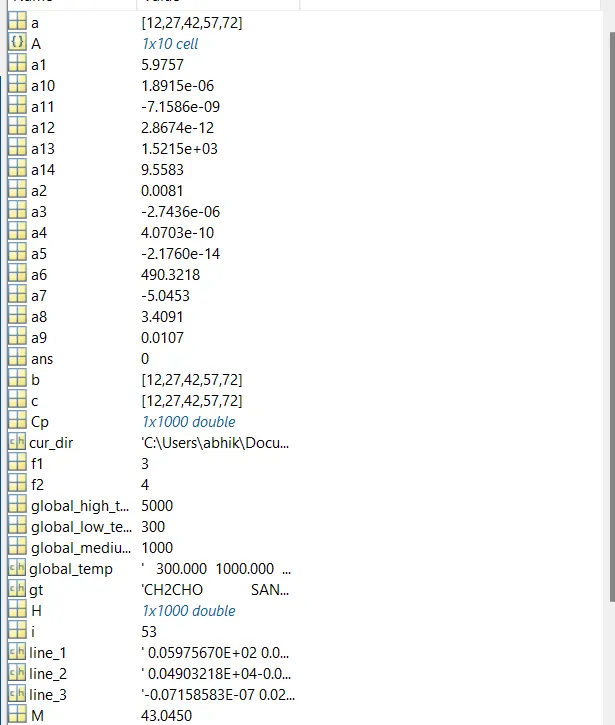
Species_SP=(A{1})


line_1=fgetl(f1)  ;
a=strfind(line_1,'E');

% Extracting higher and lower temperature coefficients

% % Extracting FIRST 7 coefficients i.e HIGH-temperature coefficients
a1=line_1(1:a(1)+3);
a1=str2num(a1);              2=line_1(a(1)+4:a(2)+3);
a2=str2num(a2) ;             *3=line_1(a(2)+4:a(3)+3);
a3=str2num(a3)  ;            :4=line_1(a(3)+4:a(4)+3);
a4=str2num(a4);              J5=line_1(a(4)+4:a(5)+3);
a5=str2num(a5)  ;            %5

line_2=fgetl(f1);
b=strfind(line_1,'E');;
a6=line_2(1:b(1)+3);
a6=str2num(a6)  ;            j7=line_2(a(1)+4:b(2)+3);
a7=str2num(a7);              %7

 % Extracting SECOND 7 coefficients - LOW-temperature coefficients
a8=line_2(b(2)+4:b(3)+3);
a8=str2num(a8);              �9=line_2(b(3)+4:b(4)+3);
a9=str2num(a9) ;             �10=line_2(b(4)+4:b(5)+3);
a10=str2num(a10) ;


line_3=fgetl(f1);
c=strfind(line_1,'E');

a11=line_3(1:c(1)+3);
a11=str2num(a11);
a12=line_3(c(1)+4:c(2)+3);
a12=str2num(a12);
a13=line_3(c(2)+4:c(3)+3);
a13=str2num(a13);
a14=line_3(c(3)+4:c(4)+3);
a14=str2num(a14);

% Specific heat calculation
    Cp = Specificheat(a1,a2,a3,a4,a5,a8,a9,a10,a11,a12,Temp,R,global_medium_temp);

    % Enthalpy calculation
    H = Enthalpy(a1,a2,a3,a4,a5,a6,a8,a9,a10,a11,a12,a13,Temp,R,global_medium_temp);

    % Entropy calculation
    S = Entropy_calc(a1,a2,a3,a4,a5,a7,a8,a9,a10,a11,a12,a14,Temp,R,global_medium_temp);

    �lculating molecular weight of species
    Molecularweight(i) = Molecular_weight(Species_SP);

    % Read & Write Molecular list
     Molecular_list = fopen('Molecular weight.txt','a+');
         fprintf( Molecular_list,'Molecular weight of %s is %d \n',Species_SP,Molecularweight);
         fclose(Molecular_list);

     % plotting(CP,H,S,Temp,Species_SP)
        % Saving as a folder

           cur_dir=pwd;
           mkdir(Species_SP);
           cd(Species_SP);

        % Plot 1, Specific heat (CP) vs Temperature Range (Temp)

        figure(1)
        plot(Temp,Cp,'linewidth',2,'color','r');
        xlabel('Temperature  [K]');
        ylabel('Specific Heat [kJ]');
        title(sprintf('Varying Specific Heat with Temperature Range of %s',Species_SP));
        grid on
        saveas(figure(1),'Specific Heat.jpg');

        % Plot 2, Enthalpy (H) vs Temperature Range (Temp)

        figure(2)
        plot(Temp,H,'linewidth',2,'color','g');
        xlabel('Temperature [K]');
        ylabel('Enthalpy in [kJ/(mol)]');
        title(sprintf('Varying Enthalpy with Temperature Range of %s',Species_SP));
        grid on
        saveas(figure(2),'Ethalpy.jpg');

        % Plot 3, Entropy (S) vs Temperature Range (Temp)

        figure(3)
        plot(Temp,S,'linewidth',2,'color','b');
        xlabel('Temperature [K]');
        ylabel('Entropy in [kJ/(mol-K)]');
        title(sprintf('Varying Entropy with Temperature Range of %s',Species_SP));
        grid on
        saveas(figure(3),'Entropy.jpg');

        cd(cur_dir);

        % Molecular weight

        M = Molecular_weight(Species_SP)
        f2 = fopen('molecular mass','w');
        fprintf('%s n %s n %f n','species','Molecular mass',M)
        fclose(f2)
end
Code Explanation:
-
'clear all' - clear all the variables in the workspace,
'close all' - closes all the plots and figures and
'clc' - clears the command window.
- Making a directory using 'mkdir' with location address.
- After that, reading the text file 'Thermo.dat' file and opening it by using ‘fopen’ and 'r' as reading command.
- For reading the line in a text file using ‘fgetl’.
- To obtain the temperature range from the Thermo.dat file, using ‘strsplit’ to split the temperature into a particular string cell.
- Used ‘str2num’ for converting string cell to numbers.
- Divided the temperature into a string and then converted to a number so that temperature values can be used separately to solve the NASA thermodynamics.
- Using ‘for & end’ loops to skip the next three comment lines in the text file.
- Reading all the 53 species to plot specific heat(cp), enthalpy(H), and entropy(S), with temperature values, and to find the molecular weights.
- Used ‘for’ loop to read 53 species.
- Used ‘strfind’ to find string.
- Using 'linspace' specified the temperature range from low to high.
- Adding universal gas constant value ‘R’.
- Extracted higher and lower temperature coefficient by reading line by line from the species.
- Calling specific heat, enthalpy, entropy function codes.
- Calculating Molecular weight.
Plots:
O2
- Screenshot of the folder:

- Molecular weights:
Errors:
- There are basic syntactic error and some new command error which have been resolved immediately.
Saving the Command window Data:
- For saving the Command Window data I have used the command ‘dairy’ which will store in txt file in the same directory. For example (diary Results.txt).
Conclusion:
- The thermodynamic data has been parsed, and thermodynamic data has been calculated and plotted for each species.
- It has been clearly seen that the data of cp, h and s vary at different temperature range from low-temperature to high-temperature at each compound.
- Hence we have calculated the Molecular weight of different species and stored the data using file parsing technique.
CONCLUSION:
So here we were able to parse the data from the THERMO.dat file. Then using this data we were able to calculate the thermodynamic properties and also make plots for these properties with respect to the temperature.