Project 1 - Parsing NASA thermodynamic data
Aim: To perform File parsing for the given NASA Thermodynamic data and extracts the 14 co-efficients and calculates the enthalpy, entropy and specific heats for all the species in the data file.
Definition for the term:
* File Parsing
* Specific Heat(C_P)
* Enthalpy(H)
* Entropy(S)
1) File Parsing:
File parsing refers to examining a file.Using file parsing,data can be extracted from the file which can be stored and be used to perform calculations.Here a themodynamics file generated by NASA is parsed.From which the high temperature and low temperature of various species are extracted and are further stored to calculate the Specific Heat(C_p),Enthalpy(H) and Entropy(S).
2) Specific Heat(C_P):
Specific Heat Capacity is defined as the heat required to raise the temperature of a given mass by a unit temperature.It is denoted as cp">cp Its unit is JK">J/K.
3) Enthalpy(H):
Enthalpy refers to the internal energy of a system which includes the temperature and pressure.In an enclosed system,the change in heat is refered to as Enthalpy of the system.It is denoted as "H".Its unit is J/mol.
4) Entropy(S):
Entropy is a function of state of a system.It is an external property and is reversible.Entropy plays and important part in thermodynamics.The second law of thermodynamics is based on entropy which says that entropy of an isolated system never decreases.It is denoted as "S".Its unit is J/K.
Obecjtive:
1) To extract the coefficient and temperature values from the given file of 53 different species
2) To find the specific heat(C_P),enthalpy(H),entropy(S) for all the species in the file
3) To plot the results of species w.r.t low and high temperature and to save them in a folder
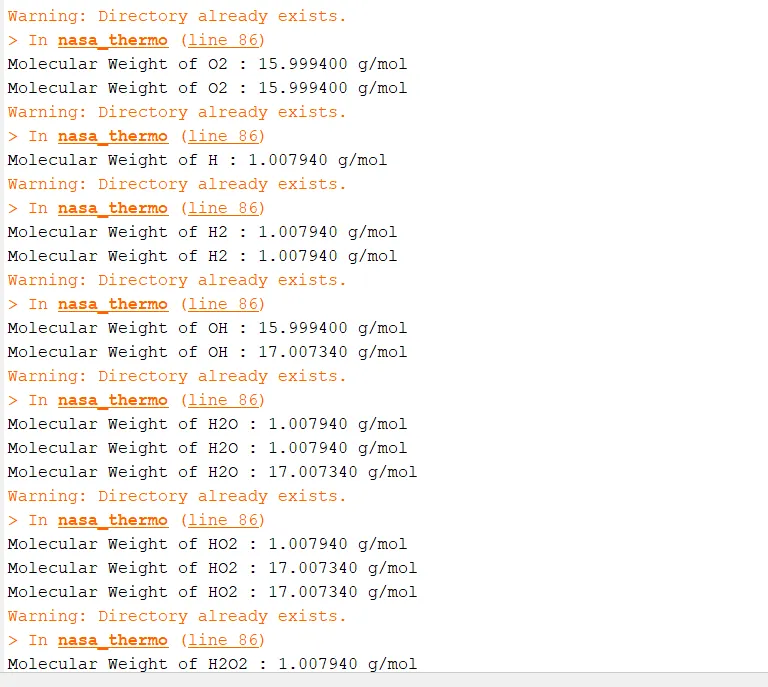
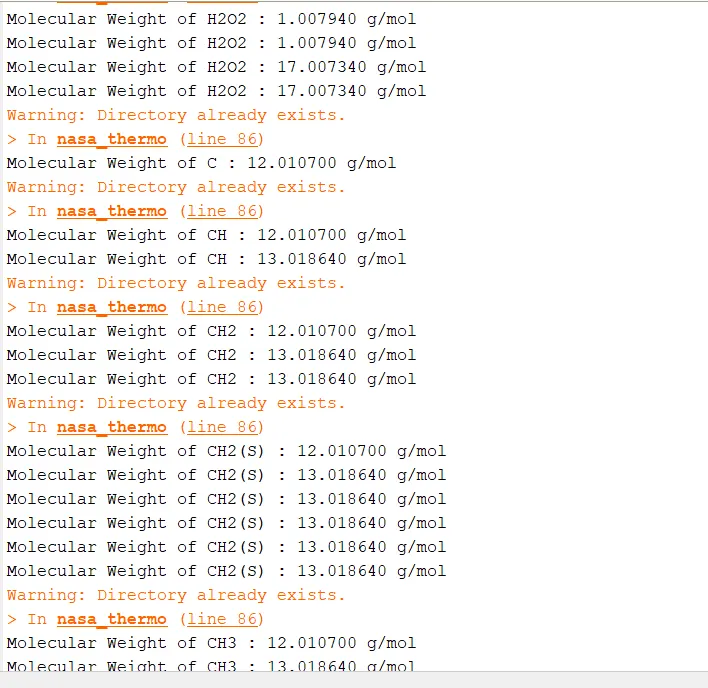
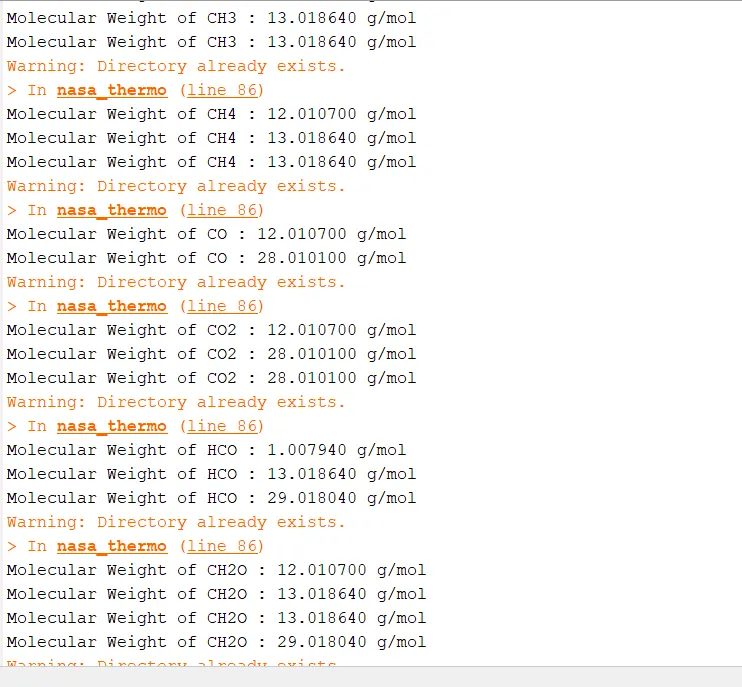
4) To calculate the molecular weight of each species
File Parsing Program:
% A function for specific heat

function [Cp] = specific_heat(c1,c2,c3,c4,c5,c8,c9,c10,c11,c12,T,R,global_med_temp)

if T<=global_med_temp
    Cp = (c8+(c9*T)+(c10*T.^2)+(c11*T.^3)+(c12*T.^4))*R;
else
    Cp = (c1+(c2*T))+(c3*T.^2)+(c4*T.^3)+(c5*T.^4)*R;
end

% A Function for Enthalpy

function [H] = enthalpy(c1,c2,c3,c4,c5,c6,c8,c9,c10,c11,c12,c13,T,R,global_med_temp)

if T<=global_med_temp
    H = R*T.*(c8+(c9*T/2)+((c10*T.^2)/2)+(c11*T.^3)/2)+((c12*T.^4)/2)+((c13./T));
else
    H = R*T.*(c1+(c2*T/2)+((c3*T.^2)/2)+((c4*T.^3)/2)+((c5*T.^4)/2)+(c6./T));
end

% A Function for Entropy

function [S] = entropy(c1,c2,c3,c4,c5,c7,c8,c9,c10,c11,c12,c14,T,R,global_med_temp)

if T<= global_med_temp
    S = (c8*log(T)+(c9*T/2)+(c10*T.^2/2)+(c11*T.^3/3)+(c12*T.^4/4)+c14)*R;

else
    S = (c1*log(T)+(c2*T/2)+(c3*T.^2/2)+(c4*T.^3/3)+(c5*T.^4/4)+c7)*R;
end


% Creating a function to find molecular weight

function [MW] = molecular_weight(species)
species1 = upper(species);

elements = ['H','C','N','O','A'];

Atomic_weight = [1.00794 12.0107 14.0067 15.9994 39.948];

MW = 0;
for i = 1:length(species1)
    for j = 1:length(elements)
        if strcmp(species1(i),elements(j))
            MW = MW+Atomic_weight(j);


        end
    end
    fprintf('Molecular Weight of %s : %f g/mol\n',species1,MW);
end


% File Parsing NASA Thermodynamic data

clear
close
clc

% Making Directory
mkdir('C:\Program Files\MATLAB\species\')

% Reading the Thermodynamic data
  f = fopen('THERMO.dat','r');
  gt = fgetl(f);

  % Extracting global temperature range
  global_temp = fgetl(f);
  t = strsplit(global_temp);
  global_low_temp = str2double(t{2});
  global_med_temp = str2double(t{3});
  global_high_temp = str2double(t{4});

  % Defining temperature

  T = linspace(global_low_temp,global_high_temp,1000);

  % Universal Gas Constant
  R = 8.314;

  % To Extract the header lines
  for i = 1:3

      gt = fgetl(f);

  end

  % To Read the data file

  for i = 1:53
      gt = fgetl(f);
      A = strsplit(gt,' ');
      species = (A{1});

      % The first 7 are high temperature coefficients and remaining 7 are low temperature coefficients

      line1 = fgetl(f);
      a = strfind(line1,'E');

      c1 = str2double(line1(1:a(1)+3));
      c2 = str2double(line1(a(1)+4:a(2)+3));
      c3 = str2double(line1(a(2)+4:a(3)+3));
      c4 = str2double(line1(a(3)+4:a(4)+3));
      c5 = str2double(line1(a(4)+4:a(5)+3));

      line2 = fgetl(f);
      b = strfind(line2,'E');

      c6 = str2double(line1(1:b(1)+3));
      c7 = str2double(line1(b(1)+4:b(2)+3));
      c8 = str2double(line2(b(2)+4:b(3)+3));
      c9 = str2double(line2(b(3)+4:b(4)+3));
      c10 = str2double(line2(b(4)+4:b(5)+3));

      line3 = fgetl(f);
      c = strfind(line3,'E');

      c11 = str2double(line3(1:c(1)+3));
      c12 = str2double(line3(c(1)+4:c(2)+3));
      c13 = str2double(line3(c(2)+4:c(3)+3));
      c14 = str2double(line3(c(3)+4:c(4)+3));

      % Calculating Specific Heat
      Cp = specific_heat(c1,c2,c3,c4,c5,c8,c9,c10,c11,c12,T,R,global_med_temp);

      % Calculation of Enthalpy
      H = enthalpy(c1,c2,c3,c4,c5,c6,c8,c9,c10,c11,c12,c13,T,R,global_med_temp);

      % Calculation of Entropy
      S = entropy(c1,c2,c3,c4,c5,c7,c8,c9,c10,c11,c12,c14,T,R,global_med_temp);

      % Claculation of molecular weight

      MW = molecular_weight(species);

      % Saving plot in folder

      current_directory=pwd;
      mkdir(species);
      cd(species);

      % plotting
      % Specific Heat vs Temperature

      figure(1)
      plot(T,Cp,'LineWidth',2,'Color','r')
      xlabel('Temperature [k]')
      ylabel('Specific Heat [KJ/Kg-K]')
      title(species)
      grid on
      saveas(1,'Specific Heat.jpg')

      % Enthalpy vs Temperature

      figure(2)
      plot(T,H,'LineWidth',2,'Color','g')
      xlabel('Temperature [k]')
      ylabel('Enthalpy [KJ]')
      title(species)
      grid on
      saveas(2,'Enthalpy.jpg')

      % Entropy vs Temperature

      figure(3)
      plot(T,S,'LineWidth',2,'Color','b')
      xlabel('Temperature [k]')
      ylabel('Entropy [KJ]')
      title(species)
      grid on
      saveas(3,'Entropy.jpg');

      cd(current_directory);
  end
Program Breakdown and Explaination:
* The file named "THERMO.dat" is given the reading access using the "fopen" command in matlab
* Next line is called using the "fgetl" command and the string is split using the "strsplit" command.
* The numbers in the string are converted using the "str2double" command.
* The global temperatures are extracted using indexing.
* Similarly the process is repeated in each line of the first species and the remaining coefficients and the local temperatures are extracted.
* A Separate function script is created for Specific heat ,Enthalpy ,Entropy and molecular weight, these functions are then called during the main coding.
* The command "For loop" was utilitied for looping the 53 species and to skip different steps in the NASA thermodynamic data file.
* A nested "for loop" is created where one checks the species name and other checks the positon of the element and saves it.
* A range of temperature is created using the "linspace" command.
* The C_p,H and S is calculated for this range of temperature and are plotted.
* A directory is created using the "mkdir" command to make folders with the name of the species and the plots are saved in the particular folder for 53 different species each species contain 3 plot individually.
* A function is created to calculate the molecular weight of the species and is called in the main program.
* "if" "strcmp" "strsplit" "str2double" "mkdir" "pwd" "fgetl" "fopen" these are some inbuild command used during the programming of file parsing.
* The outputs and the inputs having the high tempererature coefficients and the low temperature coefficients and temperature is determined.
Screenshot of the 53 Species Plot folder:

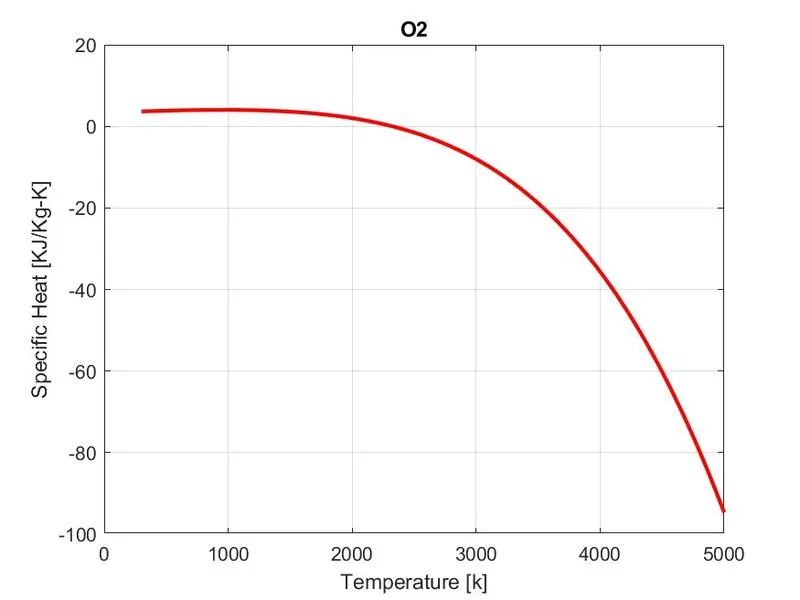
Specific heat Plot for Oxygen gas(O2):
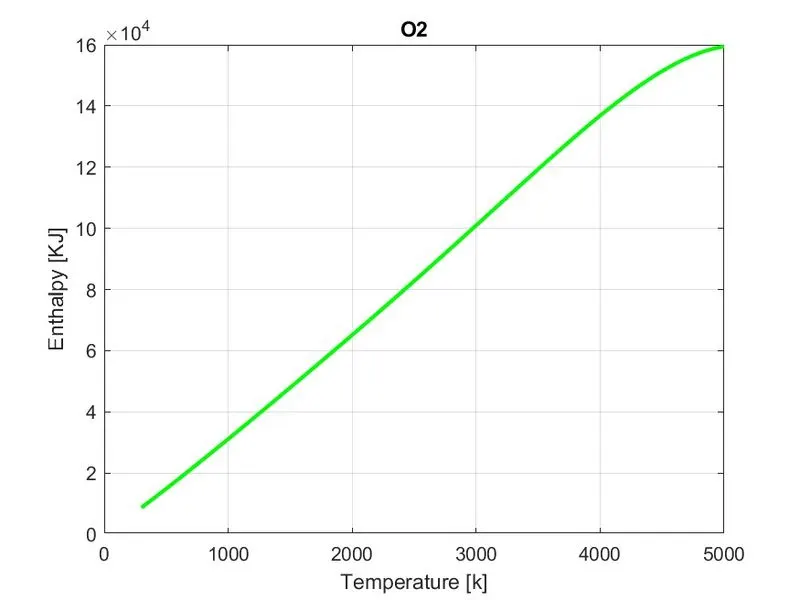
Enthalpy Plot for Oxygen gas(O2):
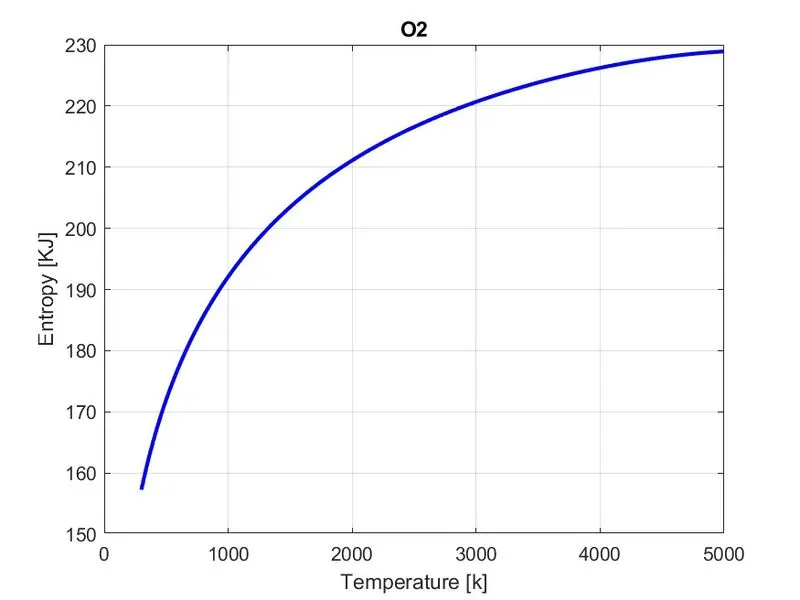
Entropy Plot for Oxygen gas(O2):
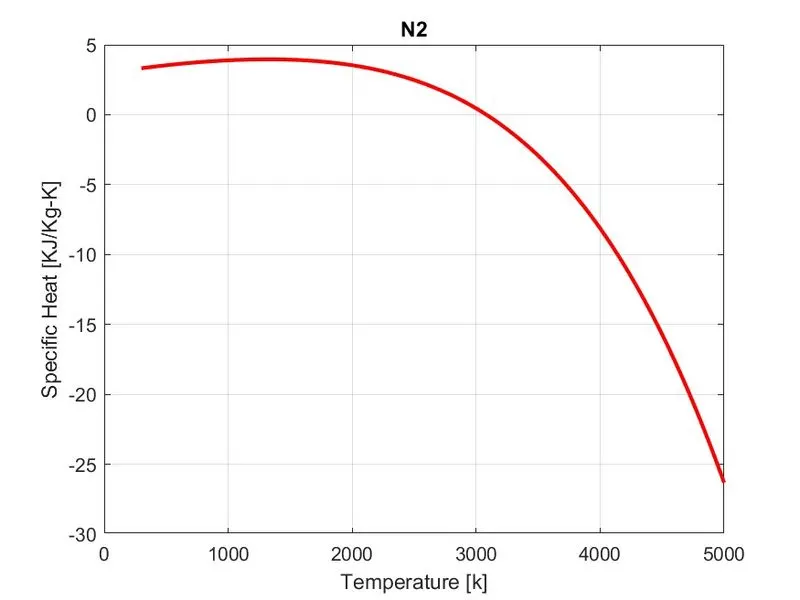
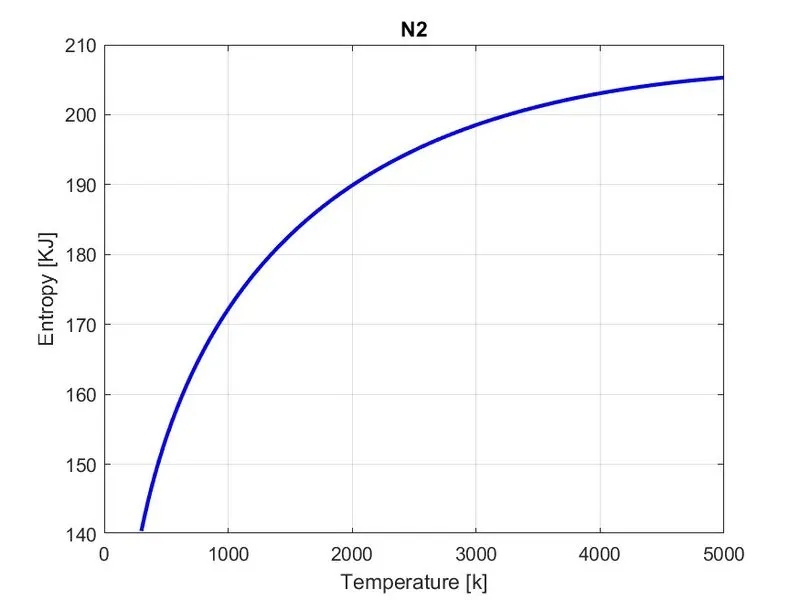
Specific heat Plot for Nitrogen gas(N2):
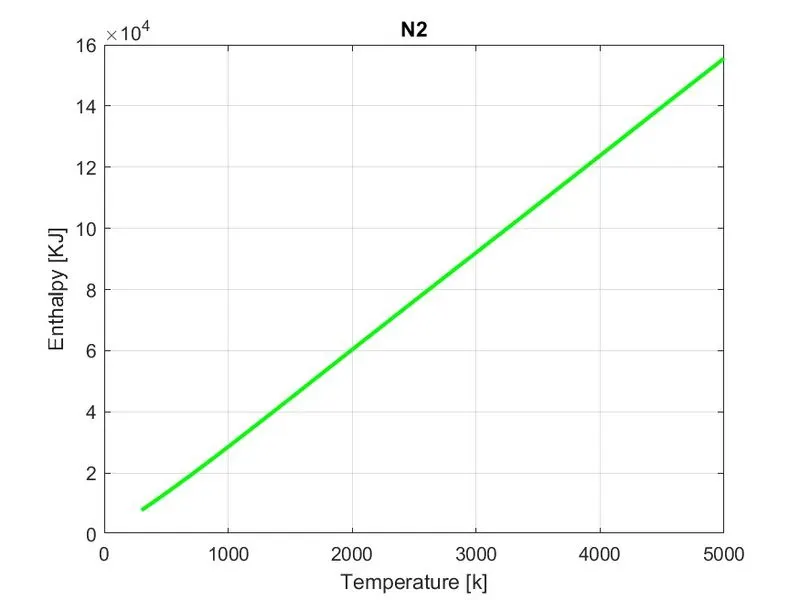
Enthalpy Plot for Nitrogen gas(N2):
Entropy Plot for Nitrogen gas(N2):
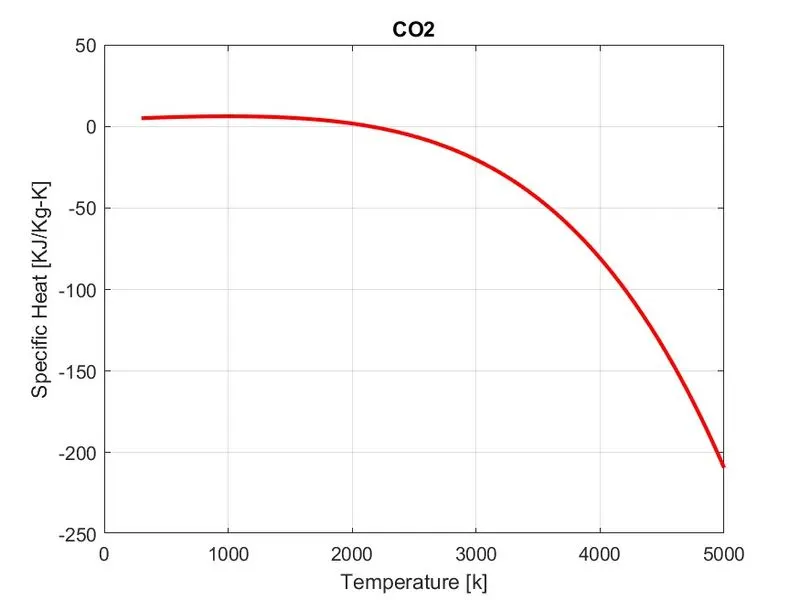
Specific heat Plot for Carbondioxide (CO2):
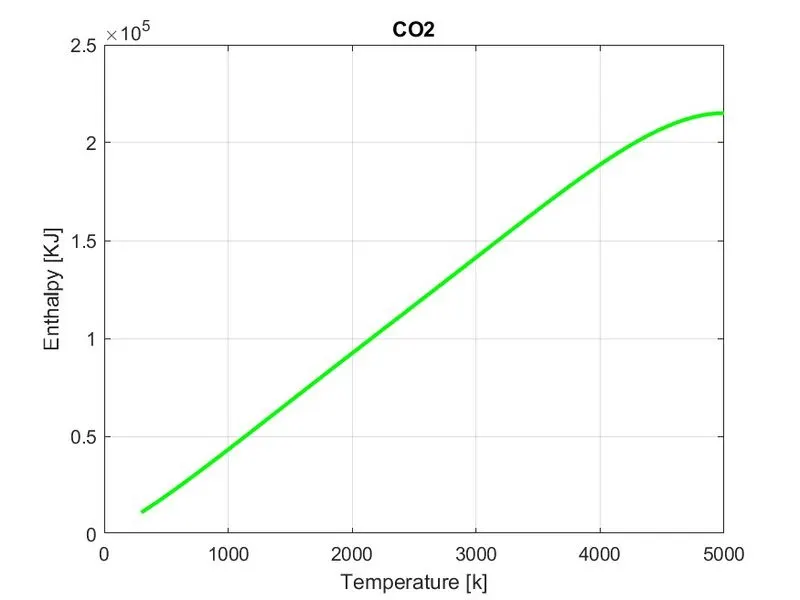
Enthalpy Plot for Carbondioxide (CO2):
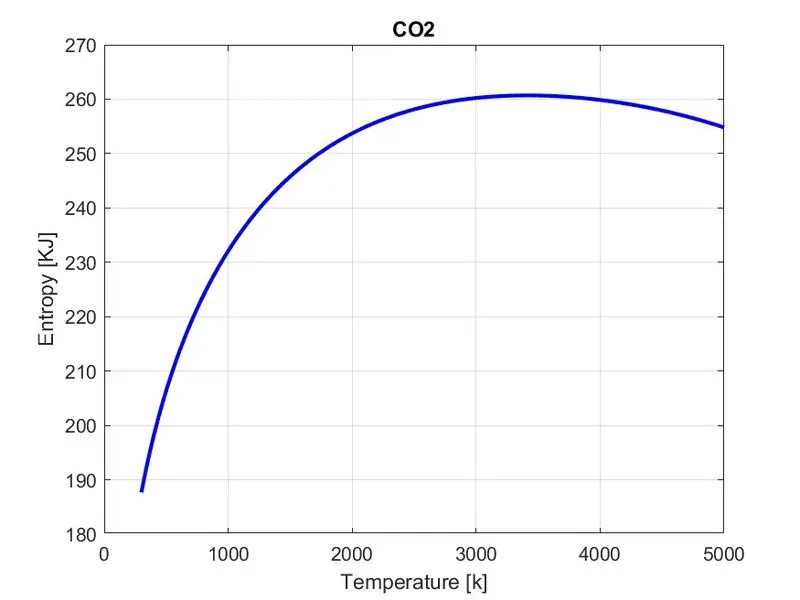
Entropy Plot for Carbondioxide (CO2):
Screenshot of the coding performed in MATLAB:
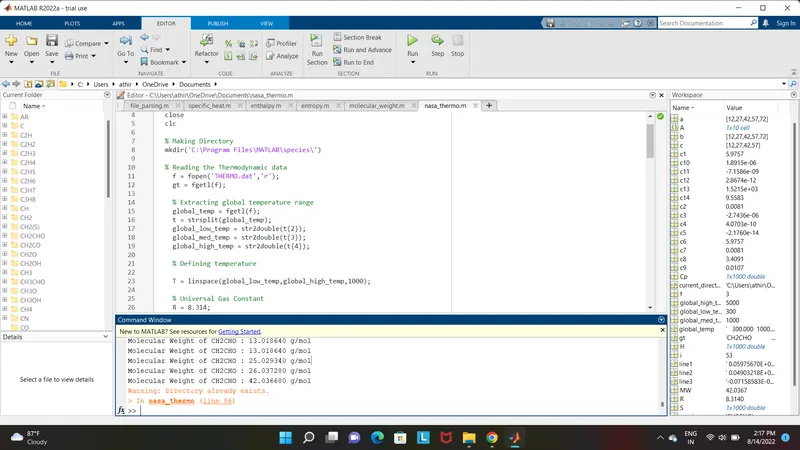
Screenshot of Molecular Weight: