Project 1 - Parsing NASA thermodynamic data
Aim:
To parse a thermodynamics file by NASA.
Objective:
- To extract the coefficients from the file for each compound.
- To calculate the molecular weight of each species.
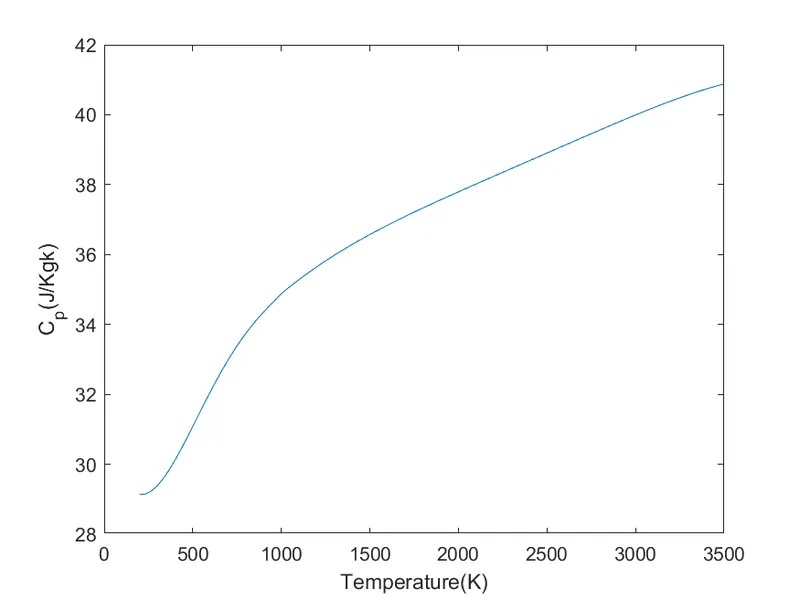
- Plot the Specific Heat(c_p),Enthalpy(H) and Entropy(S) of each species with respect to both the low and high
temperature coefficients. - Save the plots in respective folders of the species.
Theory:
File Parsing:
File parsing refers to examining a file.Using file parsing, data can be extracted from the file which can be stored and
be used to perform calculations. Here thermodynamics file generated by NASA is parsed. From which the high
temperature and low temperature of various species are extracted and are further stored to calculate the Specific
Heat (c_p), Enthalpy(H) and Entropy(S).
Specific Heat Capacity (c_p):
Specific Heat Capacity is defined as the heat required to raise the temperature of a given mass by a unit
temperature.It is denoted as "cp". Its unit is J/K.
Enthalpy (H):
Enthalpy refers to the internal energy of a system which includes the temperature and pressure.In an enclosed
system, the change in heat is refered to as Enthalpy of the system.It is denoted as "H". Its unit is J/mol.
Entropy (S):
Entropy is a function of state of a system.It is an external property and is reversible.Entropy plays and important part
in thermodynamics. The second law of thermodynamics is based on entropy which says that entropy of an isolated
system never decreases.It is denoted as "S".Its unit is J/K.
Description of Program:
For all the Compound:
1. The file named "THERMO.dat" is given the reading access using the "fopen" command.
2. Next line is called using the "fgetl" command and the string is split using the "strsplit" command.
- The numbers in the string are converted using the "str2double" command.
4. The global temperatures are extracted using indexing.
5. Similarly the process is repeated in each line of the first species and the remaining coefficients and the local temperatures are extracted.
6. A function is created containing the formulas to calculate the C_p,H and S and is called in the main program
7. A range of temperature is created using the "linspace" command.
8. The C_p,H and S is calculated for this range of temperature and the graphs are plotted.
9. A different directory is created using the "mkdir" command to make folders with the name of the species and the plots are saved in the particular species name.
10. A function is created to calculate the molecular weight of the species and is called in the main program.
11. "while -feof" command is used to run the file till the end.
12. "if" and "strcmp" command is used to end the program after string is read as 'END'
For User defined Compound:
1.The file named "THERMO.dat" is given the reading access using the "fopen" command.
2 . Next line is called using the "fget!" command and the
string is split using the "strsplit" command.
3. The numbers in the string are converted using the "str2double" command.
4. The global temperatures are extracted using indexing.
- The User defined compound is asked using the "input" command
6. An "if" and "strcmp" conditional statement is used to compare the species name with the user defined input. If
it matches, the program runs and generates the desired results else the loop repeats itself until the input matches with the species name to give the desire.
Function 1- To Calculate the C_p, H and S:
- The outputs and the inputs having high tempererature coefficients and the low temperature coefficients
and temperature is determined.
2. An "if" conditional loop is used to give the condition to use low temperture coefficients or high temperature
coefficients if the temperature is less than mid local temperature and high local temperature respectively.
Function 2 - Calculate the Molecular weight:
- The common elements and their respective atomic weight are mentioned.
2. A nested for loop is created where one checks the species name and other checks the positon of the element and saves it.
3. An "if" conditional loop is used in case the molecules are more than one.
4. The molecular weight is calculated accordingly.
5. "sprintf" command is used to print the molecular weight.
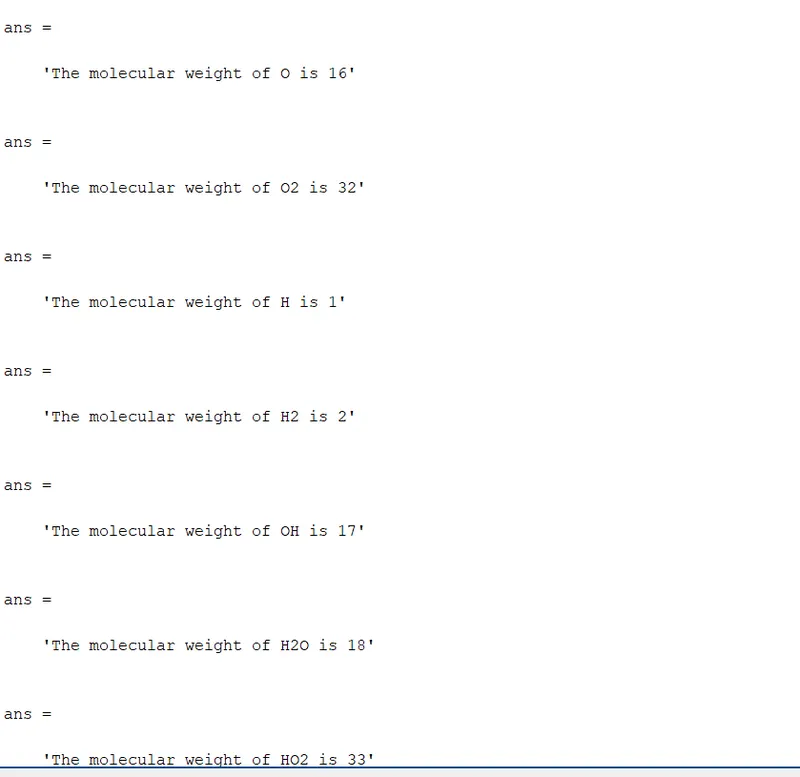
Molecular weight of Various Species in Command window:
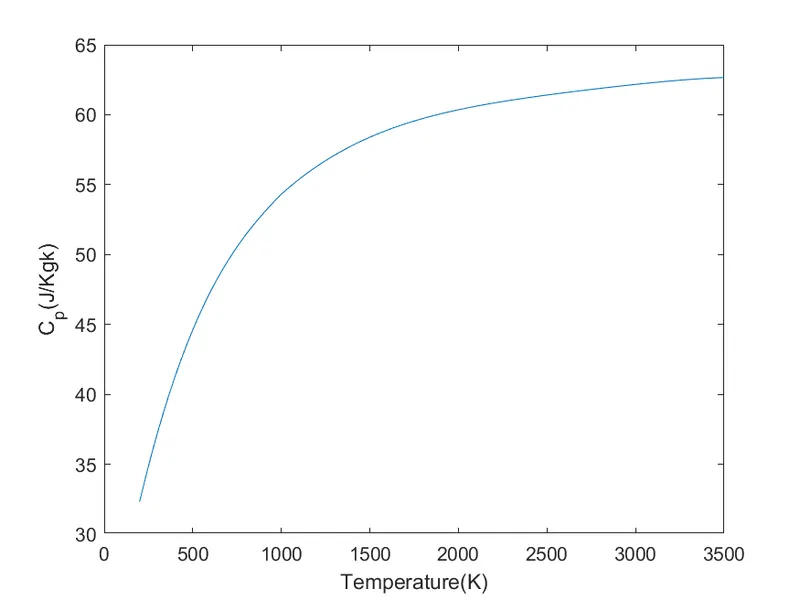
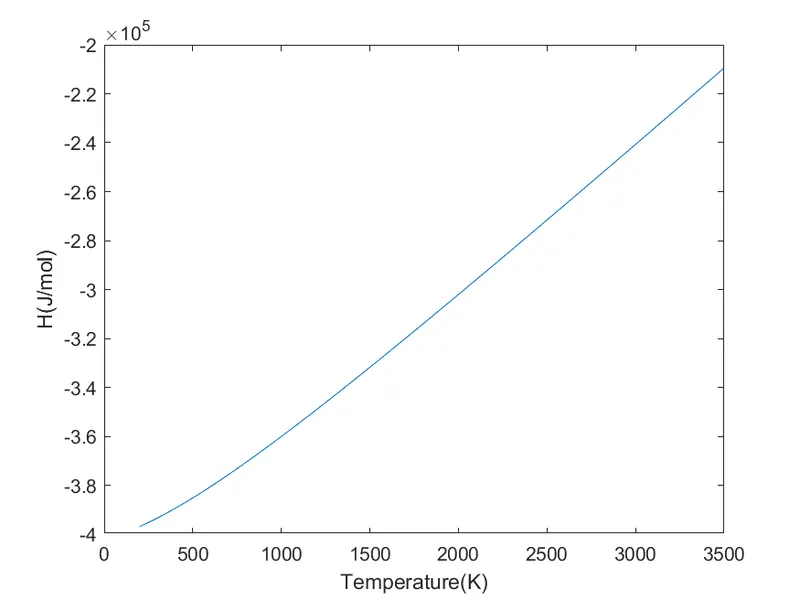
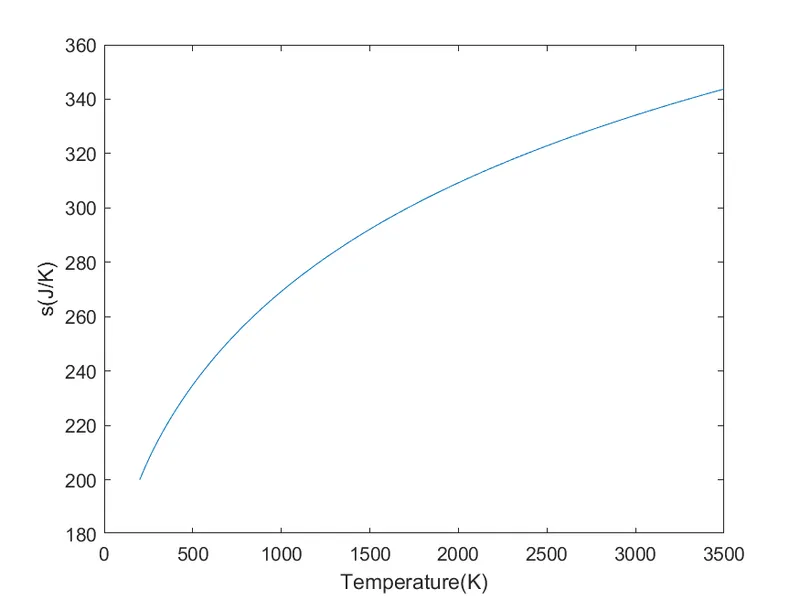
Plots for CO2:
Plots for N2:
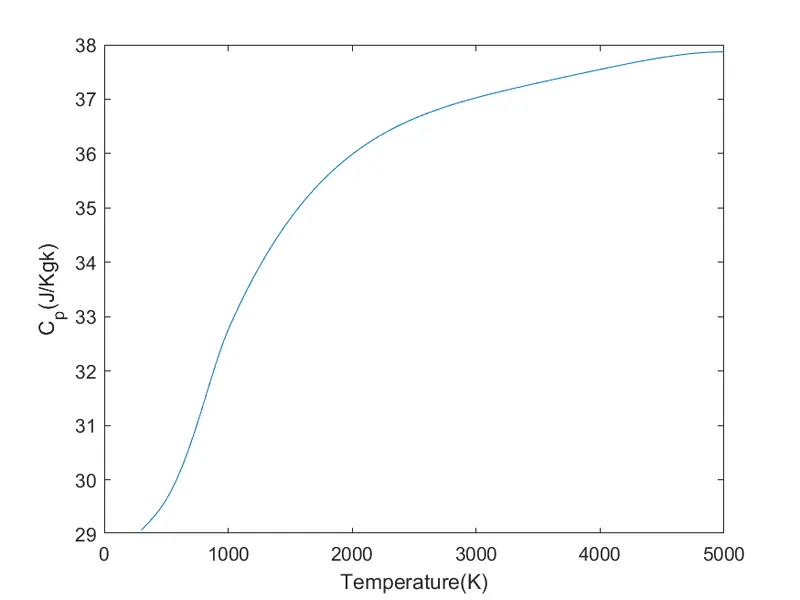
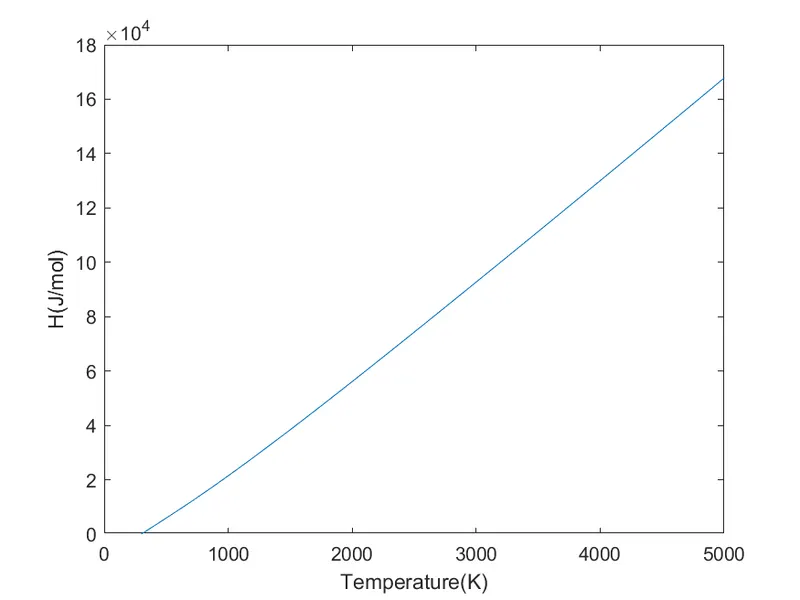
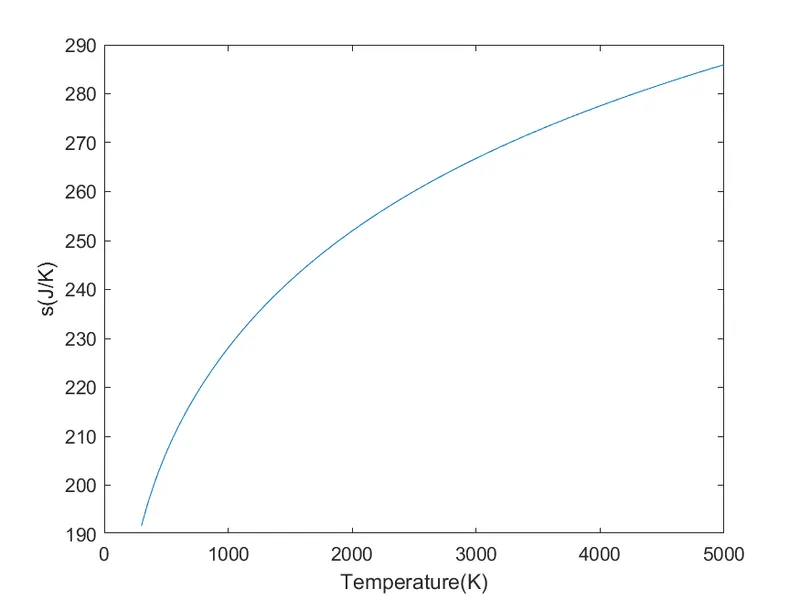
Plots for O2:
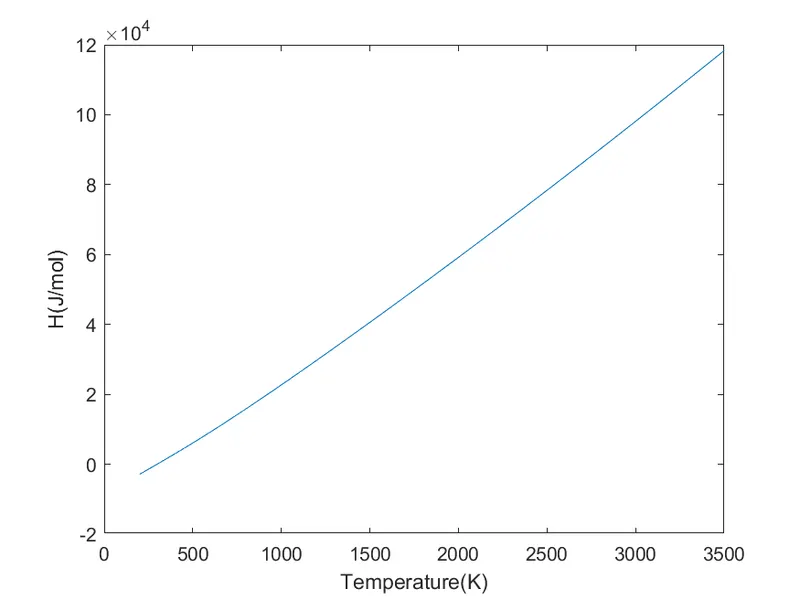
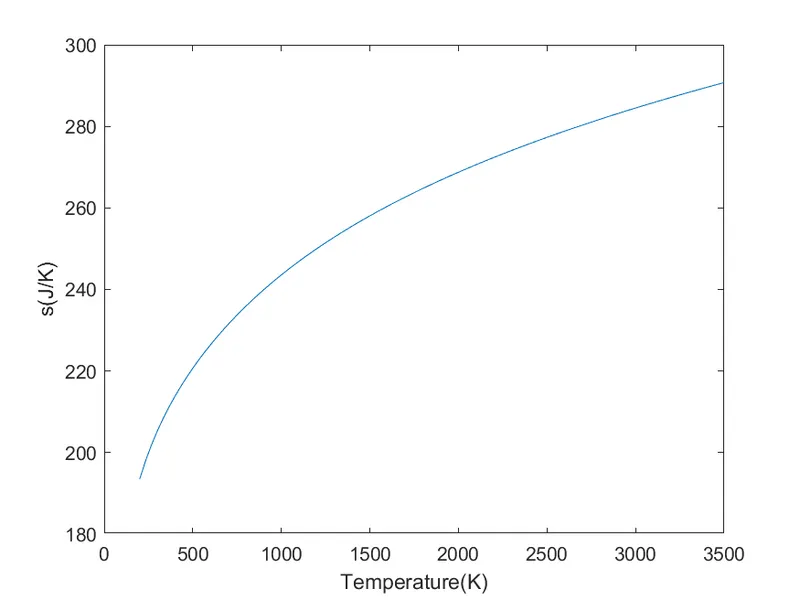
Screenshot of Folder Containing the created Folders:
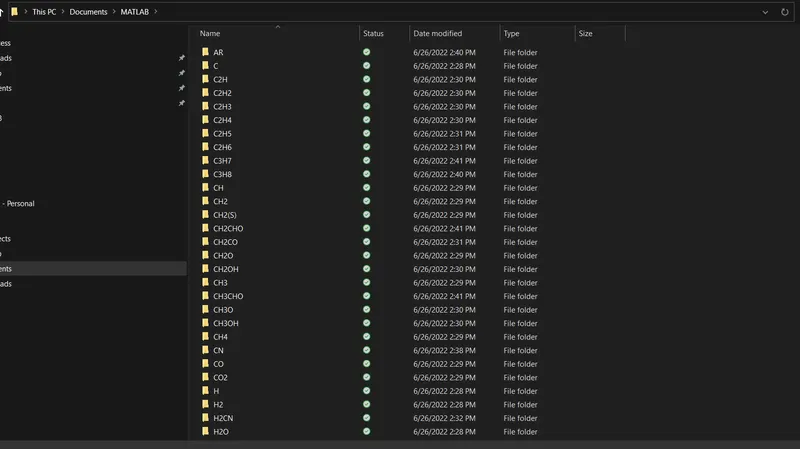
Results and Conclusion:
- The coefficients were extracted from file.
- The molecular weight were calculated for all compounds.
- The graphs were plotted and were saved in respective folders.
Main Code:
%File parsing
clear all
close all
clc

%Opening the file and extracting data
b = fopen('THERMO.dat','r');

for i = 1:5
q = fgetl(b);
end
for j=1:inf
line= fgetl(b);
%Extracting the local temperatures:
line1 = strsplit(line,' ');
if strcmp(line1,'END') == 1
    break
end

species_name = line1{1};
r=length(line1);
l_lowtemp = str2double(line1{r-3});
l_midtemp = str2double(line1{r-1});
l_hightemp = str2double(line1{r-2});

%Extracting the coefficients:
line2 = fgetl(b);
strposl2 = strfind(line2,'E');
a1 = str2double(line2(1: strposl2(1)+3) );
a2 = str2double(line2(strposl2(1)+4:strposl2(2)+3));
a3 = str2double(line2(strposl2(2)+4:strposl2(3)+3));
a4 = str2double(line2(strposl2(3)+4:strposl2(4)+3));
a5 = str2double(line2(strposl2(4)+4:strposl2(5)+3));
line3 = fgetl(b);
strposl3 = strfind(line3,'E');
a6 = str2double(line3(1: strposl3(1)+3));
a7 = str2double(line3(strposl3(1)+4:strposl3(2)+3));
a8 = str2double(line3(strposl3(2)+4:strposl3(3)+3));
a9 = str2double(line3(strposl3(3)+4:strposl3(4)+3));
a10 = str2double(line3(strposl3(4)+4:strposl3(5)+3));
line4 = fgetl(b);
strposl4 = strfind(line4,'E');
a11 = str2double(line4(1:strposl4(1)+3));
a12 = str2double(line4(strposl4(1)+4:strposl4(2)+3));
a13 = str2double(line4(strposl4(2)+4:strposl4(3)+3));
a14 = str2double(line4(strposl4(3)+4:strposl4(4)+3));

%Range of temperature for which the C-p, H ands is calculated:
T=linspace(l_lowtemp, l_hightemp,100);
for i = 1: length(T)
[c_p(i),H(i),s(i)] = fileparse(a1, a2, a3, a4, a5, a6, a7, a8, a9, a10, a11, a12, a13, a14,l_midtemp, T(i));
end

%Making a directory and changing to it to save the plots:
mkdir(species_name)
cd(species_name)

%Creating the plots:
figure(1)
plot(T,c_p);
xlabel('Temperature(K)');
ylabel('C_p(J/Kgk)');

m1 = 'C_p of %s';
m2 = species_name;
m3 = sprintf (m1,m2);
saveas(figure(1),sprintf('%s.png',m3))

figure(2)
plot(T,H);
xlabel('Temperature(K)');
ylabel('H(J/mol)');

m4 = 'Enthalpy (H) of %s';
m5 = species_name;
m6 = sprintf(m4,m5);
saveas (figure(2),sprintf('%s.png',m6))

figure(3)
plot (T,s);
xlabel('Temperature(K)');
ylabel('s(J/K)');
m7='Entropy(S) of %s';
m8 = species_name;
m9 = sprintf(m7,m8);
saveas(figure(3),sprintf('%s.png',m9))

%Changing back to the working directory:
cd( 'C:\Users\admin\OneDrive\Documents\MATLAB')

%Calculating the molecular weight:
[molecular_wt] = mw(species_name);
end

%Closing the file:
fclose(b);
Fileprase function:
function[c_p,H,S] = fileparse(a1,a2,a3,a4,a5,a6,a7,a8,a9,a10,a11,a12,a13,a14,l_midtemp,T)
R = 8.314;

if (T>=l_midtemp)
c_p = R* (a1+a2*T+a3*T^2+a4*T^3+a5*T^4);
H = R*T*(a1+a2*(T/2)+a3*((T^2)/3)+a4*((T^3)/4)+a5*((T^4)/5)+a6/T);
S = R*(a1*log(T)+a2*T+a3*((T^2)/2)+a4*((T^3)/3)+a5*((T^4)/4)+a7);

else

c_p = R*(a8+a9*T+a10*T^2+a11*T^3+a12*T^4);
H = R*T*(a8+a9*(T/2)+a10*((T^2)/3)+a11*((T^3)/4)+a12*((T^4)/5)+(a13/T));
S = R*(a8*log(T)+a9*T+a10*((T^2)/2)+a11*((T^3)/3)+a12*((T^4)/4)+a14);
end
Function for molecular weight:
function [molecular_wt] = mw(species_name)
elements = ['H','C','N','O','A'];
atomic_wt = [1,12,14,16,40];
molecular_wt = 0;

for i = 1: length(species_name)
    for j = 1:length(elements)
        if strcmpi(species_name(i),elements(j))
        molecular_wt = molecular_wt + atomic_wt (j);
        position = j;
        end
    end

        f=str2double(species_name(i));
        if f>1
        molecular_wt = molecular_wt+atomic_wt(position) *(f-1);
        end

end
 sprintf('The molecular weight of %s is %d',species_name,molecular_wt)
end