Project 1 - Parsing NASA thermodynamic data
Aim: To write a code for parsing the NASA thermodynamic data file and then to calculate the thermodynamic properties of various gas species.
Objective: To write a function to extract the higher temperature and lower temperature co-efficients and to calculate the enthalpy,entropy and specific heats for all the species in the NASA thermodynamic file "Thermo.dat". And to plot the specific heat, enthalpy and entropy for the local temperature range for each species.
File parsing: Parsing a file means reading in a data stream of some sort and building an in memory model of the semantic content of that data.
Formulas:
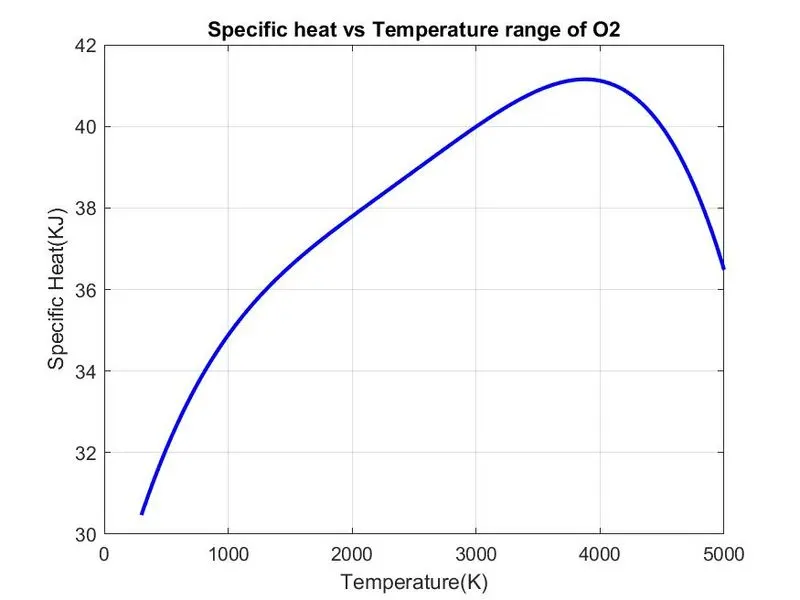
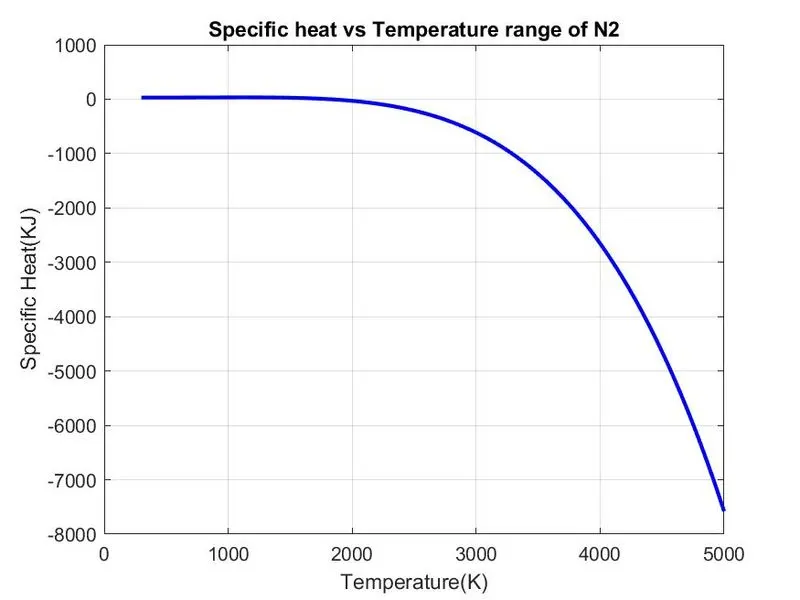
Specific Heat (Cp)=(a1+(a2.*T_r)+(a3.*(T_r).^2)+(a4.*(T_r).^3)+(a5.*(T_r).^4)).*R
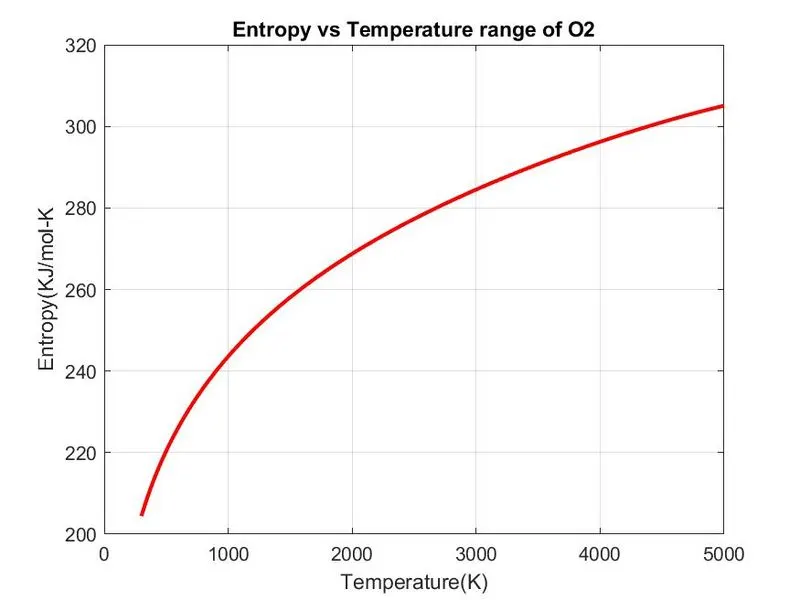
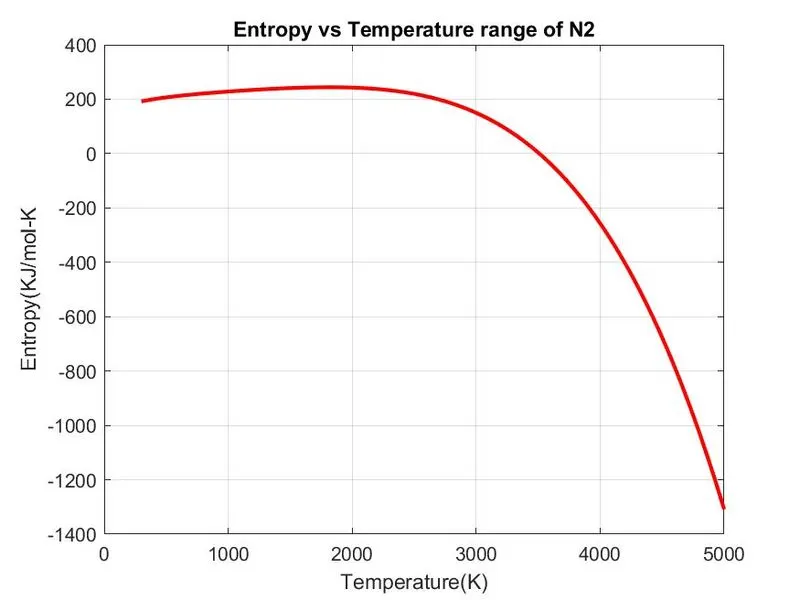
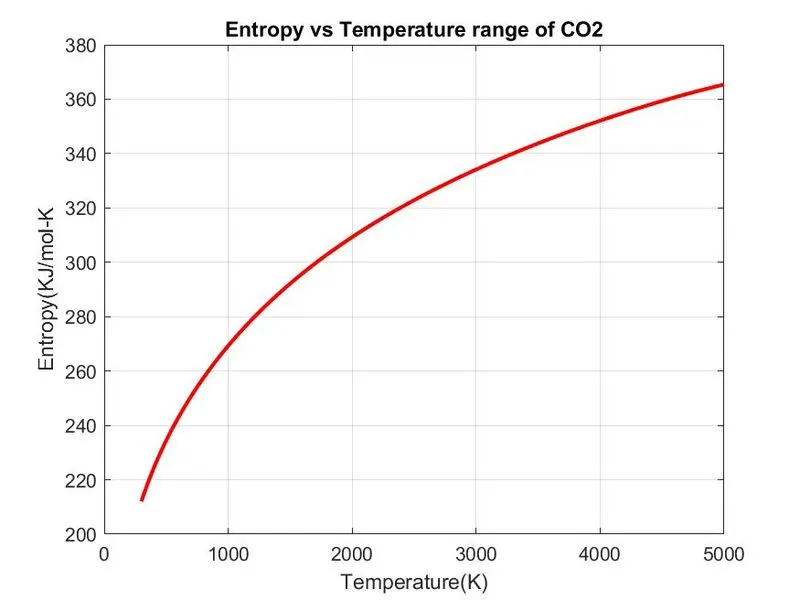
Entropy (S)= R*(a1.*log(T_r)+(a2.*T_r)+((a3.*(T_r).^2)/2)+((a4.*(T_r).^3)/3)+((a5*(T_r).^4)/4)+a7)
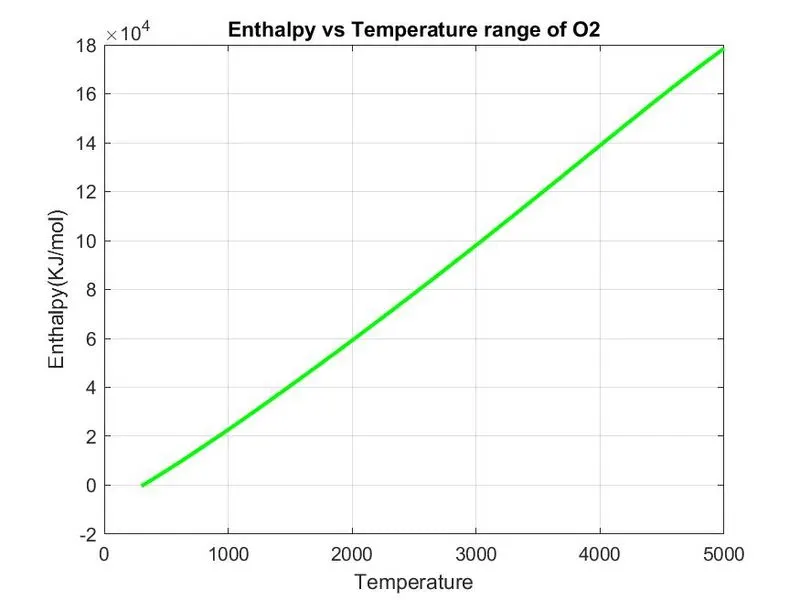
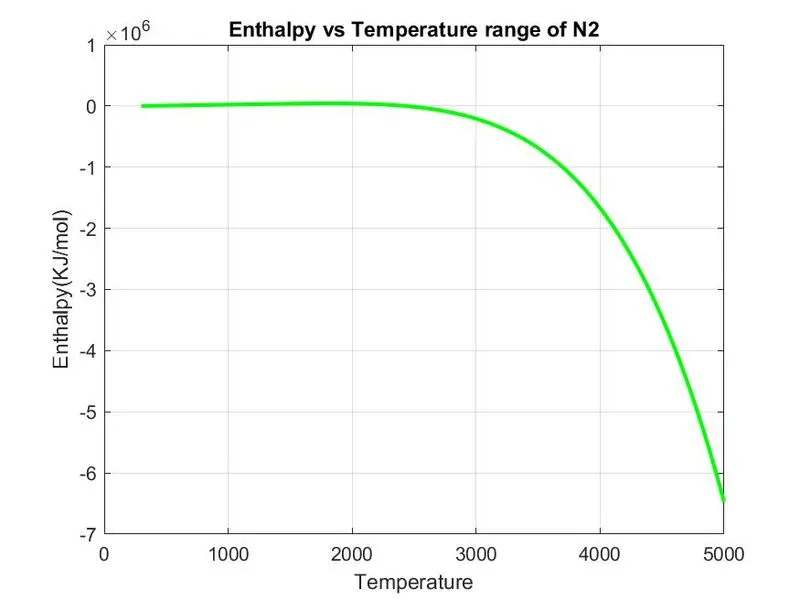
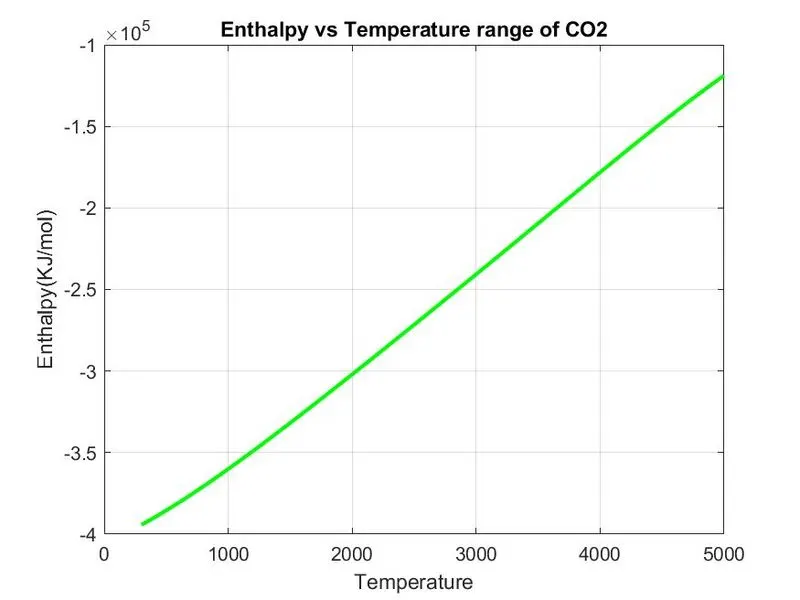
Enthalpy (H)= H = R*T_r.*(a1+(a2*T_r/2)+(a3*(T_r).^2/3)+((a4*(T_r).^3)/4)+(a5*(T_r).^4)/5+(a6./T_r))
MAIN CODE:
clear all
close all
clc
R = 8.314
f1 = fopen('THERMO.dat','r')
get = fgetl(f1);

temp = fgetl(f1);

%splitting the terms
s = strsplit(temp);
%converting strings cells into numbers
low_temp = str2num(s{2})
mid_temp = str2num(s{3})
high_temp = str2num(s{4})
% Defining temp range
T_r = linspace(low_temp,high_temp,1000)

%for skipping the lines
for i=1:3
    get = fgetl(f1);

end
% Getting each species
for j = 1:53
    tline = fgetl(f1);
    A=strsplit(tline,' ');
    species = (A{1});

    low_temp = str2num(A{end-3});
    mid_temp = str2num(A{end-2});
    high_temp = str2num(A{end-1});

    %getting next line
    tline1 = fgetl(f1);
    %finding the string E
    a =  strfind(tline1,'E');
    % finding first 7 higher co-efficients
    a1 = tline1(1:a(1)+3);
    a1 = str2num(a1);
    a2 = tline1(a(1)+4:a(2)+3);
    a2 = str2num(a2);
    a3 = tline1(a(2)+4:a(3)+3);
    a3 = str2num(a3);
    a4 = tline1(a(3)+4:a(4)+3);
    a4 = str2num(a4);
    a5 = tline1(a(4)+4:a(5)+3);
    a5 = str2num(a5);

    tline2 = fgetl(f1);
    b = strfind(tline2,'E');
    a6 = tline2(1:b(1)+3);
    a6 = str2num(a6);
    a7 = tline2(b(1)+4:b(2)+3);
    a7 = str2num(a7);

   % Finding second 7 Lower Co-efficients
   a8 = tline2(b(2)+4:b(3)+3);
   a8 = str2num(a8);
   a9 = tline2(b(3)+4:b(4)+3);
   a9 = str2num(a9);
   a10 = tline2(b(4)+4:b(5)+3);
   a10 = str2num(a10);

   tline3 = fgetl(f1);
   c = strfind(tline3,'E');
   a11 = tline3(1:c(1)+3);
   a11 = str2num(a11);
   a12 = tline3(c(1)+4:c(2)+3);
   a12 = str2num(a12);
   a13 = tline3(c(2)+4:c(3)+3);
   a13 = str2num(a13);
   a14 = tline3(c(3)+4:c(4)+3);
   a14 = str2num(a14);

   % calculating Specific heat
   Cp = Specific_heat(a1,a2,a3,a4,a5,a8,a9,a10,a11,a12,T_r,R,mid_temp);

   % calculating Entropy
   S = Entropy(a1,a2,a3,a4,a5,a7,a8,a9,a10,a11,a12,a14,T_r,R,mid_temp);

   % calculating Enthalpy
   H = Enthalpy(a1,a2,a3,a4,a5,a6,a8,a9,a10,a11,a12,a13,T_r,R,mid_temp);

   % calculatiing Molecular weight of the species
   W = Molecular_weight(species);

   % writing molecular weight file
   MW_file = fopen('Molecular Weight.txt','W');
   fprintf(MW_file,'Molecular Weight of %s is %d',species,W);
   fclose(MW_file); % closing the file

   %Plotting Cp, H and S with Temperature
   % Saving in a folder
   cd('C:\Users\Windows10\Desktop\atomic_species')
   mkdir(species);
   cd(species);
   % Plot 1 Cp vs T
   figure(1)
   plot(T_r,Cp,'linewidth',2,'color','b');
   xlabel('Temperature(K)');
   ylabel('Specific Heat(KJ)');
   title(sprintf('Specific heat vs Temperature range of %s',species));
   grid on
   saveas(figure(1),'Specific Heat.jpg');

   % Plot 2 S vs T
   figure(2)
   plot(T_r,S,'linewidth',2,'color','r');
   xlabel('Temperature(K)');
   ylabel('Entropy(KJ/mol-K');
   title(sprintf('Entropy vs Temperature range of %s', species));
   grid on
   saveas(figure(2),'Entropy.jpg');

   % Plot 3 Cp vs T
   figure(3)
   plot(T_r,H,'linewidth',2,'color','g');
   xlabel('Temperature');
   ylabel('Enthalpy(KJ/mol)');
   title(sprintf('Enthalpy vs Temperature range of %s',species));
   grid on
   saveas(figure(3),'Enthalpy.jpg');

   cd('C:\Users\Windows10\Desktop\atomic_species')

end
Procedure:
- At first use clear all, close all and clc to clear all datas in workspace, all plots and figures and clear datas in the command window.
- Using fgetl command we will read the THERMO.dat file.
- Using strsplit command we will split the temperatures and convert the string to number using str2num command.
- Using the linspace command we will assign temperature and we will run loop to skip command lines the data file using fgetl command inside the loop.
- Then using loop we will run 53 elements in the data file by assigning fgetl command and splitting into cell array.
- Using strfind command we will 'E' string from the line of the data file and then will find all 14 coefficients which are in strings. It will converted into numbers using str2num command.
- Then we will assume first 7 co-efficients as higher temperature and second 7 for lower temperature.
- After taking all 14 co-efficients from 'THERMO.dat' file, then we will call all the functions for specific heat, entropy and enthalpy. The code and procedure for writing these functions will be discussed below.
- To these functions we will input the values of all co-efficients.
- For molecular weight formula we will open a file named'Molecular Weight.txt' and print the values.
- Next step is to create a folder inorder to save the files of all plots of Cp, H and S.
- After that plotting of Cp vs T, S vs T and H vs T is done using plot command for all the species in the file.
- All plots will be saved in the respective folders.
- Finally using end command we will the end for loop.
Functions:
To find specific heat:
function Cp = Specific_heat(a1,a2,a3,a4,a5,a8,a9,a10,a11,a12,T_r,R,mid_temp)

if (T_r <= mid_temp)
    Cp = (a8+(a9.*T_r)+(a10.*(T_r).^2)+(a11.*(T_r).^3)+(a12.*(T_r).^4)).*R;
else
    Cp = (a1+(a2.*T_r)+(a3.*(T_r).^2)+(a4.*(T_r).^3)+(a5.*(T_r).^4)).*R;
end
end
Procedure:
- Create a function named specific heat.
- Assigning the values for co-efficients, temperature ,gas constant and mid temperature.
- Using 'if' conditional statement we will split the temperature ranges to temperatures equal to or below mid temperature as lower temperature co-efficient in the formula.
- Then use 'else' condition to specify higher temperature co-efficients.
- Using end command we will end the if statement and function
- Create a function named specific heat.
- Assigning the values for co-efficients, temperature ,gas constant and mid temperature.
- Using 'if' conditional statement we will split the temperature ranges to temperatures equal to or below mid temperature as lower temperature co-efficient in the formula.
- Then use 'else' condition to specify higher temperature co-efficients.
- Using end command we will end the if statement and function
To find Entropy:
function S = Entropy(a1,a2,a3,a4,a5,a7,a8,a9,a10,a11,a12,a14,T_r,R,mid_temp)

if (T_r<= mid_temp)
    S = R*(a8.*log(T_r)+(a9.*T_r)+((a10.*(T_r).^2)/2)+((a11.*(T_r).^3)/3)+((a12*(T_r).^4)/4)+a14);
else
    S = R*(a1.*log(T_r)+(a2.*T_r)+((a3.*(T_r).^2)/2)+((a4.*(T_r).^3)/3)+((a5*(T_r).^4)/4)+a7);
end
end
Procedure:
- Creating a function named entropy.
- Assigning all co-efficient values, temperature, gas constant and mid temperature.
- Using If and else statement splitting temperatures ranges as higher and lower temperature co-efficients.
- Ending the function.
To find the Enthalpy:
function H = Enthalpy(a1,a2,a3,a4,a5,a6,a8,a9,a10,a11,a12,a13,T_r,R,mid_temp)

if (T_r<=mid_temp)
    H = R*T_r.*(a8+((a9*T_r)/2)+((a10*(T_r).^2)/3)+((a11*(T_r).^3)/4)+((a12*(T_r).^4)/5)+(a13./T_r));
else
    H = R*T_r.*(a1+(a2*T_r/2)+(a3*(T_r).^2/3)+((a4*(T_r).^3)/4)+(a5*(T_r).^4)/5+(a6./T_r));
end
end
Procedure:
- Create a function enthalpy.
- Assigning values of co-efficients, temperature, gas constant and mid temperature.
- Using If and else statement specifying and splitting the higher and lower temperature co-efficients.
- Then using end command will end the function.
To find Molecular weight:
function[W]=Molecular_weight(species)
%Defining atomic name of the species
atomic_name=['H','C','O','N','Ar'];

%Defining atomic masses of main species
atomic_weight=[1.008 12.011 15.999 14.007 39.948];

W=0; % molecular weight starting range
for i=1:length(species) %loop runs to the length of the species
    for j=1:length(atomic_name) %loop runs to the length of the atomic names
        if strcmp(species(i),atomic_name(j))
            W=W+atomic_weight(j);
            position=j;
        end
    end
    n=str2num(species);
    if n>1
        W=W+atomic_weight(position)*(n-1);
    end
end

fprintf('Molecular Weight of %s :- ',species);
fprintf('%f',W);
disp(' ')
end
Procedure:
- Create a Function for molecular weight.
- Assigning the species input to the function.
- Then defining the main elements in the 53 species in an array.
- We will create array for atomic weight.
- Starting range for the molecular weight is assigned as zero.
- Then we will run a for loop for running to the length of the species and a nested loop is created to run to the length of the string atomic name.
- Using if condition we will use a command 'strcmp' to compare the species and atomic name strings to calculate molecular mass if by comparison both string found same then we will assign its molecular weight.
- Then we will convert the string into number using str2num command and then will assign to n.
- Using if statement we will find whether the species contains more than one element if there are more then 1 elements that is n>1 then we will increment the atomic weight by the multiplication of position and n-1 to the atomic weight array.
- Then we will print the molecular weight using 'fprintf' command and display it using 'disp' command.
Results:
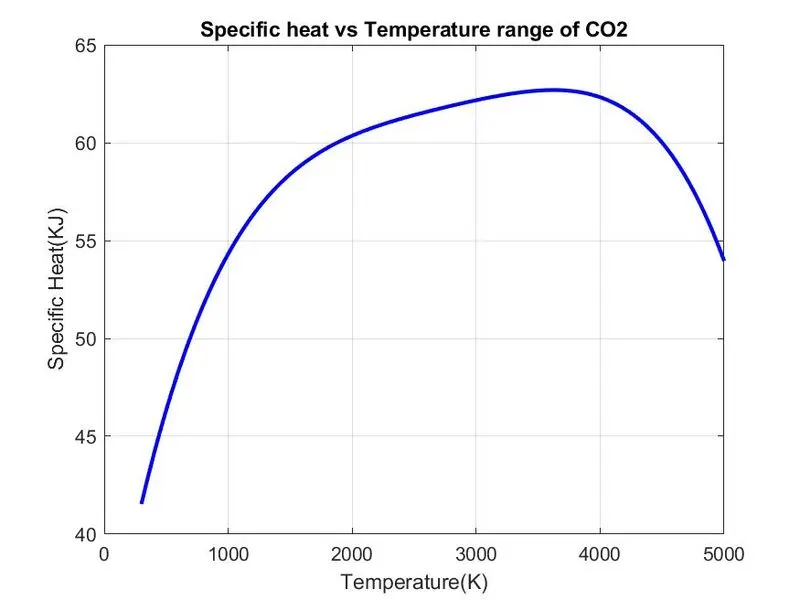
Plots of all the species listed in the "THERMO.dat" file is being saved in a file named atomic_species and from those species the plots of O2, N2 and CO2 is attached here with the results and the screenshot of the window where all files are saved is also attached below.

Plots of O2 species:
Plots of N2:
Plots for CO2:
Error:
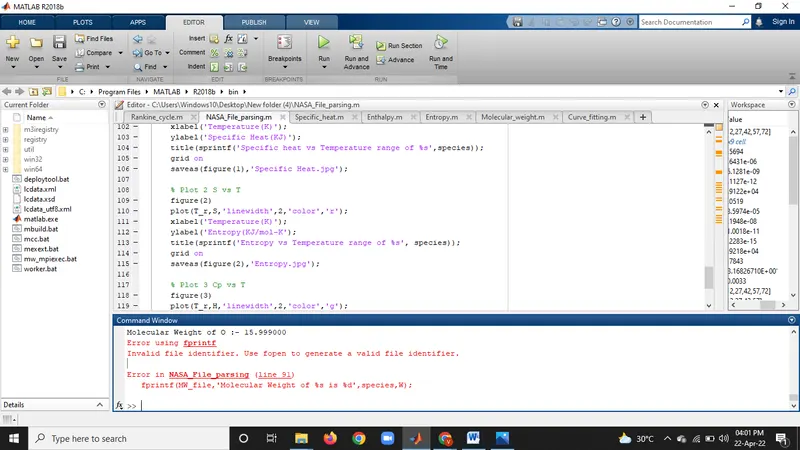
An error occured while running the program because of not converting some of the co-efficients from string to number. It is solved after defining them into numbers using str2num command.