Project 1 (Mini Project on Vehicle Direction Detection
1) AIM OF THE PROJECT1:
To develop a model in simulink to detect the Vehicle Direction and Provide Indication to the Driver to run in the Recommended direction with the help of Steerer Input & Camera Input that captures the Road Signal.
2) DESCRIPTION:
(a) Developing a Model -
>> Open Matlab file >> Open Simulink >> Create New Model >> Create a SLDD for the Inputs,outputs & for Constants for the given Signal and enter the Values as given in the Question.
- Choose code generation, Storage class for Input signals: ImportedExtern;
- Storage class for Output signal: Export to File;
- Storage class for local signals: localizable;
- Storage class for Signal Parameters: Const
>> Save Changes >> Export it.
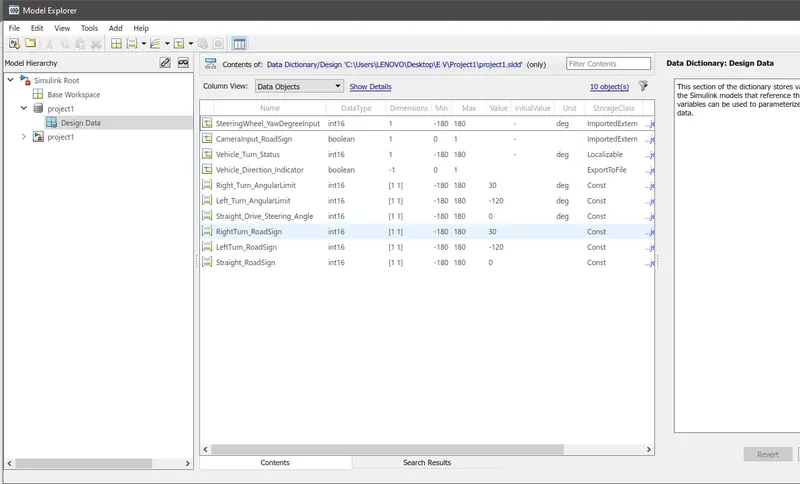
MODELLING:
>> Go to Main Window >> with the help of Requirement1 information take seperate Subsystem & compare the Steerer Angular input with 3 Constant angular Values with the help of a Switch >> add the Input,Output and Constant values to SLDD >> Save.
>> Take Requirement 2 Subsystem >> Inputs to this requirement are local signal from requirement 1 (Signal Name: Vehicle_Turn_Status) & an input signal from camera (Signal Name: CameraInput_RoadSign), which confirms the occurrence of a road sign.
>> Signal Vehicle_Turn_Status is compared against calibration values (Calibration Values: RightTurn_RoadSign, LeftTurn_RoadSign, Straight_RoadSign), if each of them is found equal, then each of the three corresponding output is compared against the camera input signal.
>>Use logical operator block, use MUX to select only one among them to get final output signal (Signal Name: Vehicle_Direction_Indicator).
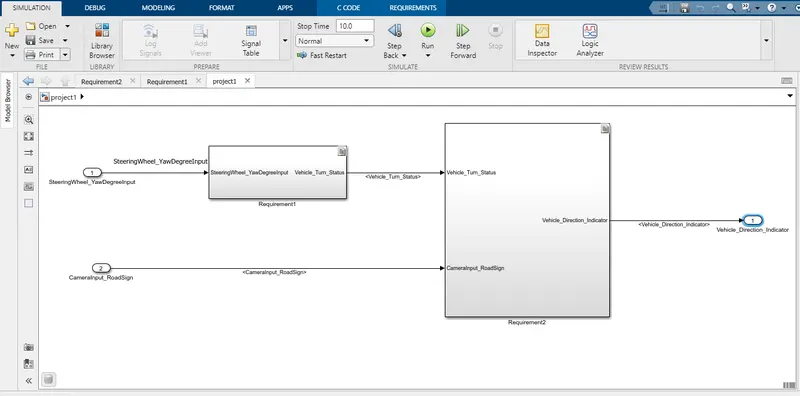
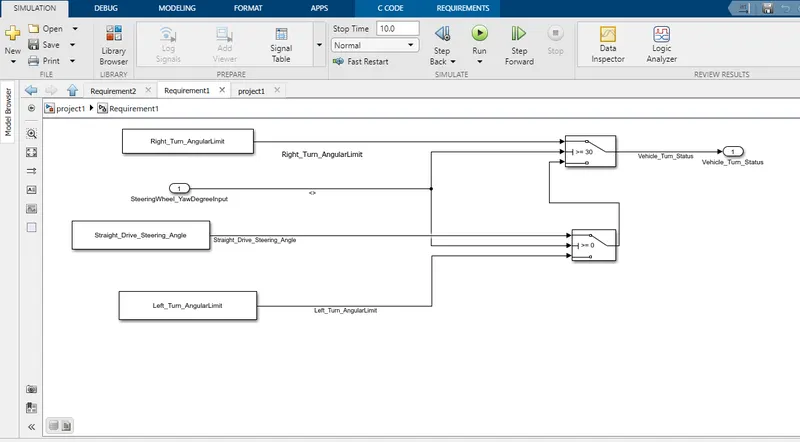
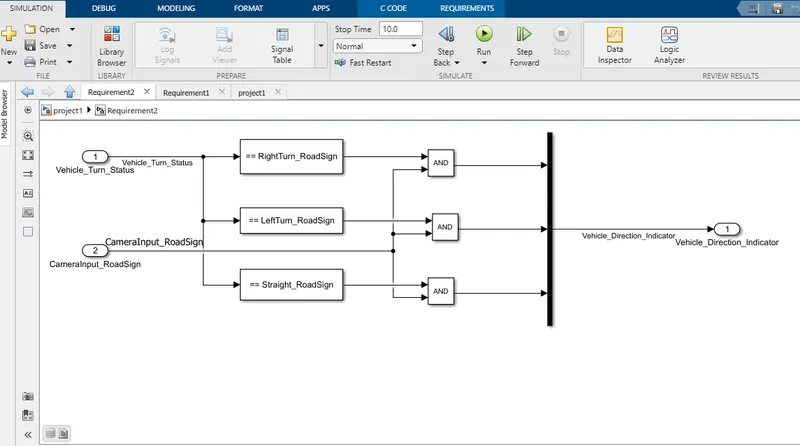
(b) MODEL SETTING (CONFIGURATION PARAMETERS)
>> Solver >> Type - Fixed Step >> Solver - Discrete >> Fundamental Sample Time - 0.01 >>.
>> Code Generation >> System Target file >> Browse >> choose ert.tlc - Embedded Codder >> apply >> ok.
Go to main Window >> Run the Init File >> Run the Simulink File >> Check for errors.
(c) MODEL ADVISOR :
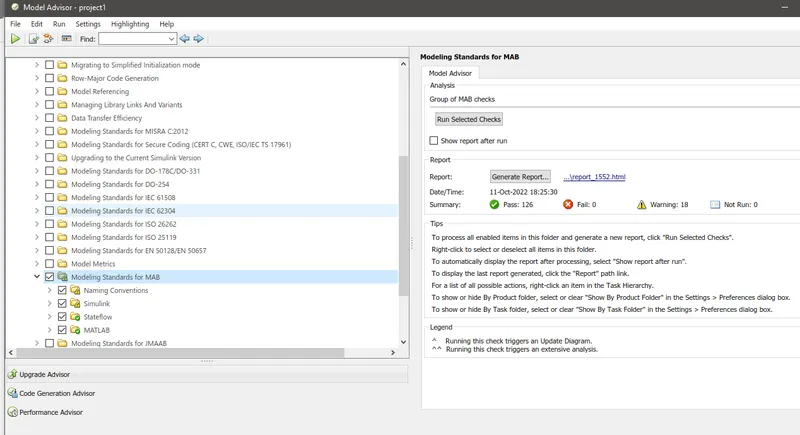
>> Go to model Advisor >> select the whole File Name >> Ok
>> Select only BY TASK >> Modelling Standards for MAB >> RUN the selected Check >> Check for error >> If any Fail then check for resolving it >> Click the Hyperlink to generate the report.
(d) REQUIREMENT LINKING & TAGGING :
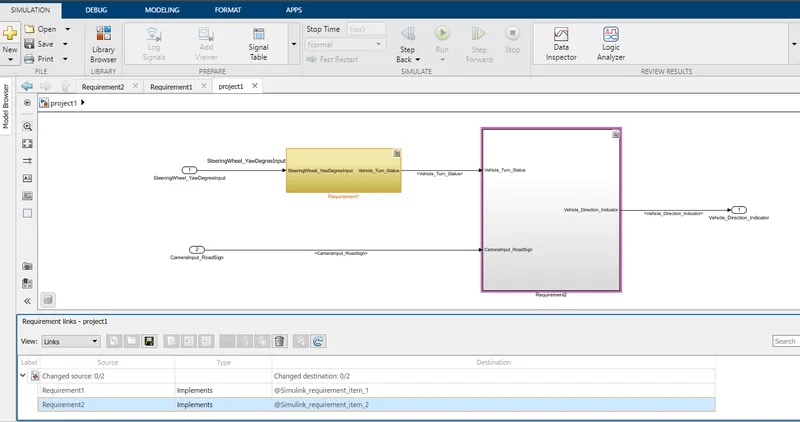
>> Copy the both Requirements data to the Word doc >> Select Requirement1 data in word doc>> Right click in Requirement1 Subsystem >> Requirement >> Link to Selection in Word
>>Select Requirement2 data in word doc>> Right click in Requirement1 Subsystem >> Requirement >> Link to Selection in Word >>
>> Requirement will get linked >> go to APPS >> Requirements Manager >> requirement option get created >> Slect Requirement >> slect requirement Browser >> Highlight Link >> Save all >> .slmx file is created in the same folder.
(E) CODE GENERATION:
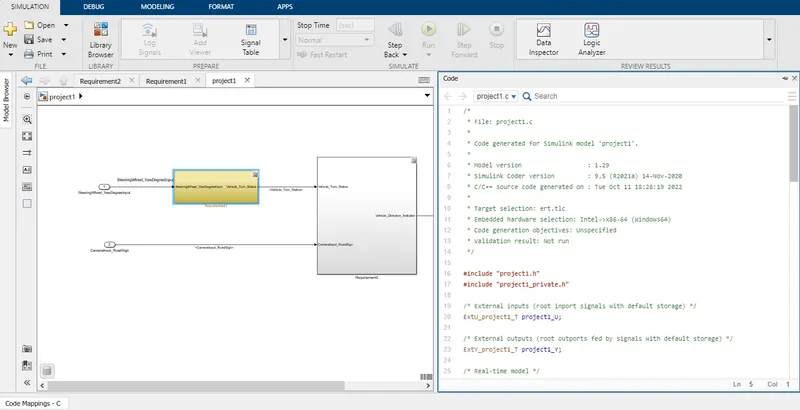
>> Goto Apps >> Embedded Coder >> Code >> Build and Generate Code
4) RESULT:
Simulink Modelling to detect the Vehicle direction is done with proper SLDD and Requirement is tagged and traced.Modelling advisory report and Code generation reports are Generated. All the Documents are attached.