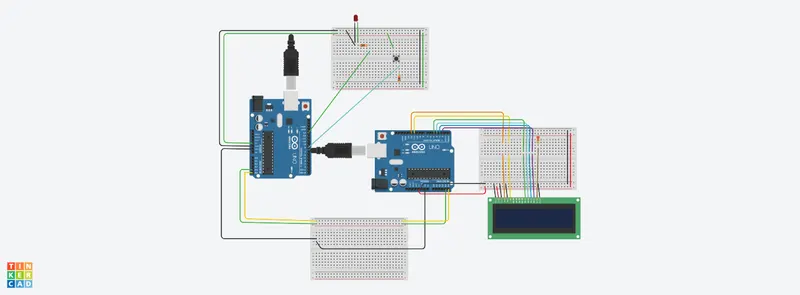
Project 1 - Interfacing a 16*2 LCD with Arduino using I2C protocol
Master code:
#include <Wire.h>
int BUTTON = 8;
int LED = 13;
int BUTTONstate = 0;
void setup()
{
Wire.begin();
pinMode(BUTTON, INPUT);
pinMode(LED, OUTPUT);
}
void loop()
{
Wire.beginTransmission(9);
BUTTONstate = digitalRead(BUTTON);
if(BUTTONstate == HIGH)
{
digitalWrite(LED, HIGH);
delay(2000);
}
else
{
digitalWrite(LED, LOW);
}
Wire.beginTransmission(9);
Wire.write(LED);
Wire.endTransmission();
}
Slave code:
// include the library code:
#include <LiquidCrystal.h>
#include <Wire.h>
int ledState;
// initialize the library with the numbers of the interface pins
LiquidCrystal lcd(12, 11, 5, 4, 3, 2);
void setup() {
// set up the LCD's number of columns and rows:
lcd.begin(16, 2);
Wire.begin(9);
Wire.onReceive(receiveEvent);
Serial.begin(9600);
// Print a message to the LCD
}
void loop() {
// set the cursor to column 0, line 1
// (note: line 1 is the second row, since counting begins with 0):
delay(300);
}
void receiveEvent(int x)
{
ledState = Wire.read();
Serial.println(ledState);
if(ledState == HIGH)
{
lcd.setCursor(0,1);
lcd.print("LED IS ON");
}
else
{
lcd.setCursor(0, 1);
lcd.print("LED IS OFF");
}
}