Project 1 - Interfacing a 16*2 LCD with Arduino using I2C protocol
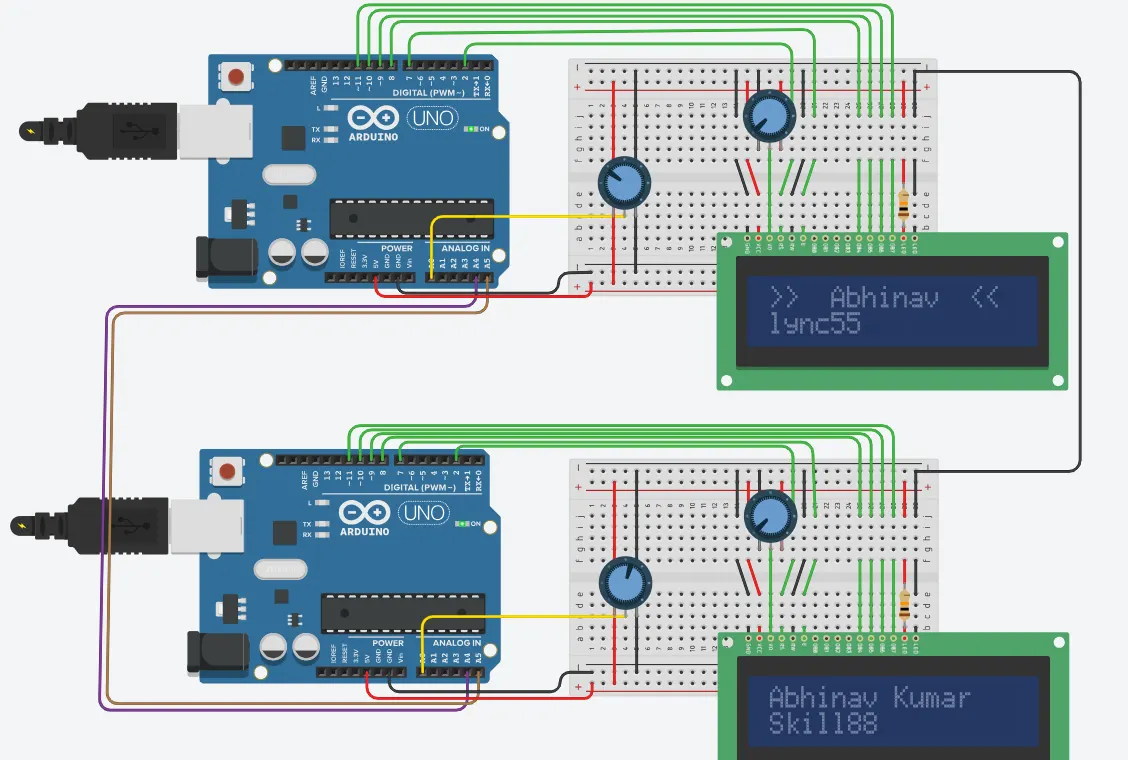
master code
#include<Wire.h> //library for I2C communication functions
#include<LiquidCrystal.h> //Library for LCD display function
LiquidCrystal lcd(2, 7, 8, 9, 10, 11); // define LCD module pins (Rs, EN,D4,D5,D6,D7)
byte SlaveReceived = 0;
void setup()
{
lcd.begin(16,2); //initialize LCD display
lcd.setCursor(0,0);
// lcd.print("Abhinav Kumar"); //print abhinav kumar in LCD
// lcd.setCursor(0,1); // set cursor second line of display
//lcd.print("lync"); //print skill-lync
delay(5000);
lcd.clear(); //clear lcd display
Serial.begin(9600); //begin serial communication at 9600 baud rate
Wire.begin(8); //begin i2c comm. at pin A4 and A5
Wire.onReceive(receiveEvent);
Wire.onRequest(requestEvent);
}
void loop(void)
{
lcd.setCursor(0,0);
lcd.print(">> Abhinav <<");
lcd.setCursor(0,1);
lcd.print("lync");
lcd.print(SlaveReceived);
Serial.println("Slave Received From Master:");
Serial.println(SlaveReceived);
delay(500);
lcd.clear();
}
void receiveEvent (int howMany)
{
SlaveReceived = Wire.read();
}
void requestEvent()
{
int potvalue = analogRead(A0);
byte SlaveSend = map(potvalue,0,1023,0,127);
Wire.write(SlaveSend);
}
slave code:
#include<Wire.h> //library for I2C communication functions
#include<LiquidCrystal.h> //Library for LCD display function
LiquidCrystal lcd(2, 7, 8, 9, 10, 11); // define LCD module pins (Rs, EN,D4,D5,D6,D7)
void setup()
{
lcd.begin(16,2);
lcd.setCursor(0,0);
lcd.print("Abhinav Kumar");
lcd.setCursor(0,1);
lcd.print("Skill");
delay(5000);
lcd.clear();
Serial.begin(9600);
Wire.begin();
}
void loop()
{
Wire.requestFrom(8,1);
byte MasterReceive = Wire.read();
int potvalue = analogRead(A0);
byte MasterSend = map(potvalue,0,1023,0,127);
Wire.beginTransmission(8); //Start transmit to master arduino
Wire.write(MasterSend); //
Wire.endTransmission(); //stop transmitting
lcd.setCursor(0,0);
lcd.print("Abhinav Kumar");
lcd.setCursor(0,1);
lcd.print("Skill");
lcd.print(MasterReceive);
Serial.println("Master Received From Slave");
Serial.println(MasterReceive);
delay(500);
lcd.clear();
}