Project 1 - Interfacing a 16*2 LCD with Arduino using I2C protocol
Project 1 - Interfacing a 16*2 LCD with Arduino using I2C protocol.
Ans-
Below image of two arduino connect. one is work as a master and second is slave. Arduino(Master) connect potentiomenter(Analog Input) connected to analog A1 pin. and 16x2 LCD conncected to arduino 2(slave). Arduino1(master) sends pot value to Arduino 2(slave) and salve trasfer data to LCD uses data lines.
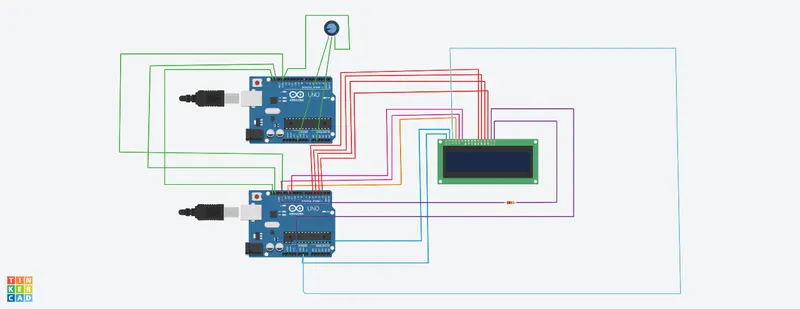
Code:-
//MASTER
#include<Wire.h> //header file
void setup() //pin setup
{
pinMode(A1, INPUT); //define analog input pin A1 as a input
Serial.begin(9600); //select boud rate
Wire.begin();
}
void loop()
{
float value=analogRead(A1); //here read analog pin A1
signed int voltage=(value*5)/1024; //here convert analog value into voltage. refrence voltage is 5V and value is float analogRead value which read on A1 pin
Wire.beginTransmission(1);
Wire.write(voltage);
Wire.endTransmission();
delay(50);
}
//SLAVE
#include<Wire.h> //header file
#include<LiquidCrystal.h> //LCD header file
LiquidCrystal lcd(12,11,5,4,3,2); //define LCD Module Pins (RS,EN,D4,D5,D6,D7)
void setup()
{
Serial.begin(9600);
Wire.begin(1);
Wire.onReceive(ruso); //receive data
lcd.begin(16,2); //LCD turn ON backlight
}
void loop()
{
delay(50); //here wait for 5ms
}
void ruso(int y)
{
signed int voltage=Wire.read(); //read wire voltage
lcd.setCursor(0,0); //set lcd cursor on first row first column
lcd.print("the voltage is");
//lcd.setCursor(0,1);
lcd.print(voltage); //display or print here "the voltage is" this string
//Serial.print("voltage value\n");
//Serial.println(5);
delay(50);
}