Project 1 - Interfacing a 16*2 LCD with Arduino using I2C protocol
Brief Description:
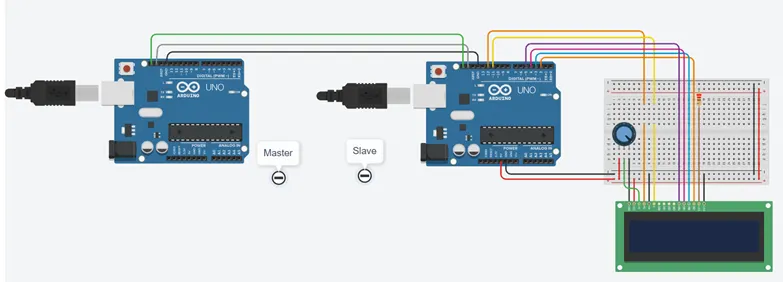
The project focuses on implementing communication between two Arduino boards, a Master and a Slave, using the I2C protocol. The objective is to send a counter value from the Master Arduino to the Slave Arduino and display it on a 16*2 LCD connected to the Slave Arduino.
The project involves the following components and steps:
-
Master Arduino: The Master Arduino generates a counter value ranging from 0 to 5. It utilizes the Wire library to establish I2C communication and sends the counter value to the Slave Arduino using the
Wire.write()function. -
Slave Arduino: The Slave Arduino is responsible for receiving the counter value from the Master Arduino. It uses the Wire library to receive the data through the
Wire.onReceive()function. The received counter value is then displayed on a 16*2 LCD connected to the Slave Arduino using the LiquidCrystal library. -
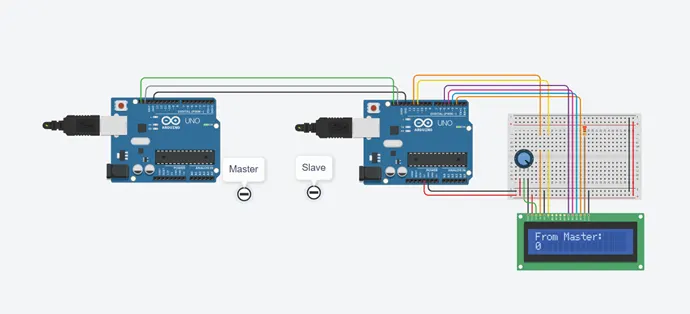
I2C Communication: The Master and Slave Arduinos are connected via the SDA (data line) and SCL (clock line) pins to enable I2C communication. The Wire library facilitates the transmission and reception of data between the Arduinos.
-
LCD Display: The Slave Arduino controls the 16*2 LCD using the LiquidCrystal library. The received counter value is displayed on the LCD screen by setting the cursor position and using the
lcd.print()function.
The implemented code for both the Master and Slave Arduinos enables the exchange of the counter value via I2C communication. The Master Arduino continuously sends incremented counter values to the Slave Arduino, which in turn displays them on the connected LCD screen. The Serial Monitor provides a real-time display of the counter values sent by the Master Arduino.
Tinkercad Link:
Connection: