Project 1 - Interfacing a 16*2 LCD with Arduino using I2C protocol
Interfacing a 16*2 LCD with Arduino using I2C protocol
In this project implementing the Code for “Interfacing a 16*2 LCD with two Arduino’s (one for Master and one for Slave) using Inter-Integrated Circuit (I2C) communication protocol” by sending the message to LCD using I2C communication protocol and display the message on LCD screen.
What is I2C communication?
The Inter-Integrated Circuit (I2C) Protocol is a protocol intended to allow multiple "peripheral" digital integrated circuits ("chips") to communicate with one or more "controller" chips. Using I2C communication many peripherals can be connected to a master using only two wires. Hence it is also called a two-wire communication.
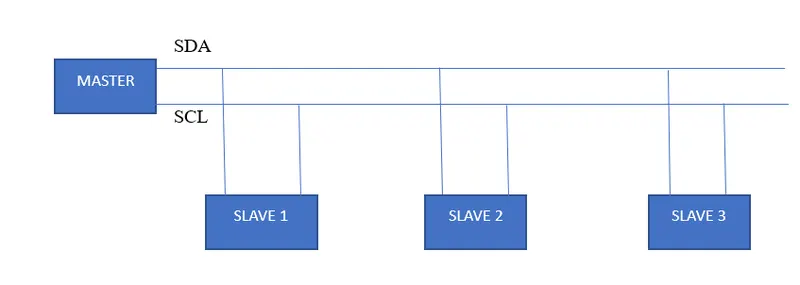
SDA-Serial Data Adress
SCL-Serial Clock.
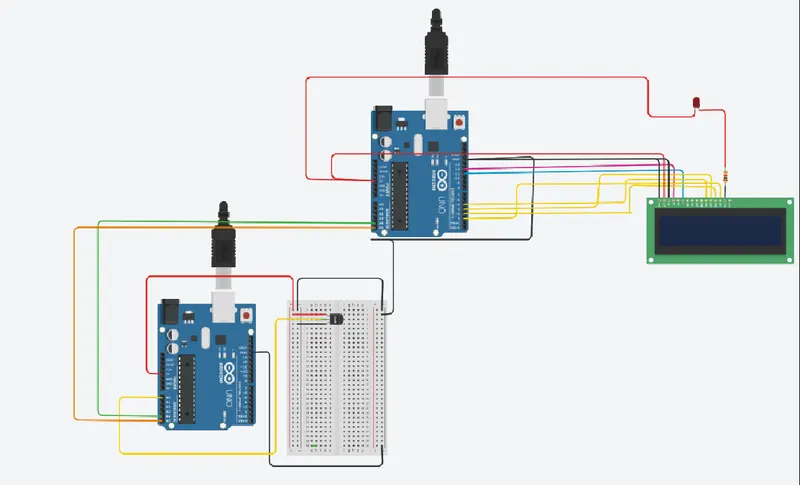
In This Project, an Arduino used as a master is connected with a temperature sensor. The data of the sensor is sent from master to slave and is displayed in the LCD display.
Mater Code.
//Master code
#include<Wire.h>
int room1;
float volt,temp,temp1;
void setup()
{
Wire.begin(3);
Wire.onRequest(requestEvent);//request event function
}
void loop(void)
{
volt = analogRead(A0);
temp=map(volt,360,20, 125,0);//convert volt to degrees from 0 to 125 deg
room1=temp;
}
void requestEvent()
{
Wire.write(room1);//send Temp of room 1 to master
}
Slave Code
#include<LiquidCrystal.h>
#include<Wire.h>
LiquidCrystal lcd(12,11,5,4,3,2);
int X;//for printing temp1
long int Y;//for printing temp2
void setup()
{
Wire.begin();
Serial.begin(9600);
}
void loop()
{
Wire.requestFrom(3,1);//request one byte from slave 3
while(Wire.available())
{
X = Wire.read();//receive date from 3
}
lcd.begin(16,2);
lcd.setCursor(0,0);
lcd.print("Temp Room 1");
lcd.setCursor(0,1);
lcd.print(X);
Serial.println(X);
lcd.print("Deg celcuis");
delay(100);
lcd.clear();
}