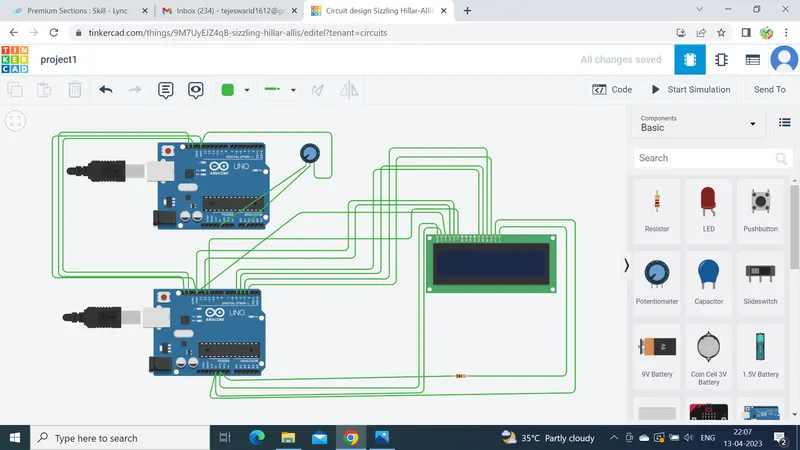
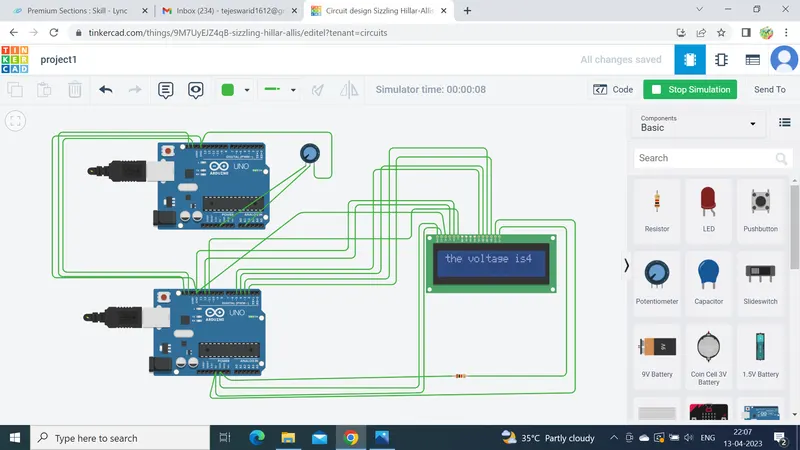
//MASTER
#include<Wire.h>//header file for I2C
void setup()
{
  pinMode(A1, INPUT);//taking A1 [pin as input pin
  Wire.begin();//begin function

}

void loop()
{
  float value=analogRead(A1);//reading the value of voltage using analogread function
  signed int voltage=(value*5)/1024;//converting the analog to digital value
  Wire.beginTransmission(1);//transmission begin functioncalled
  Wire.write(voltage);//i2c write function called for writing the voltage value
  Wire.endTransmission();//transmission end function
  delay(50);
}
//SLAVE
#include<Wire.h>//I2C header file
#include<LiquidCrystal.h>//LCD header file for LCD functions
LiquidCrystal lcd(12,11,5,4,3,2);//LCD pins used for connection
void setup()
{

  Wire.begin(1);//beginfunction is called
  Wire.onReceive(value);//onreceive function gets the voltage value
  lcd.begin(16,2);
}
void loop()
{
  delay(50);//delay function with 50ms
}
void value(int y)
{

  signed int voltage=Wire.read();//reading the value using read function
  lcd.setCursor(0,0);//setting the cursor position at 0,0
  lcd.print("the voltage is");//printing the message
  lcd.print(voltage);//printing the value
  delay(50);//delay

}