Project 1 - Interfacing a 16*2 LCD with Arduino using I2C protocol
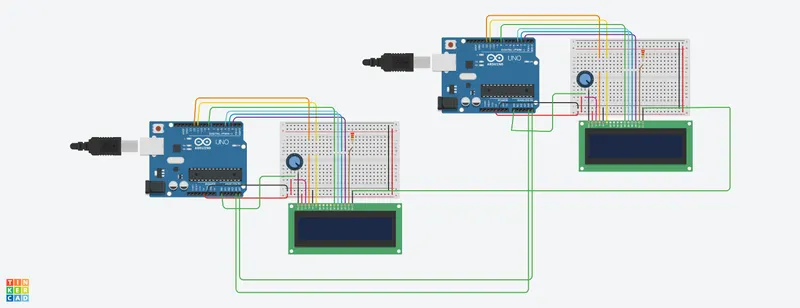
CIRCUIT DIAGRAM :
C++ CODE :
/*
LiquidCrystal Library - To Demonstrates the use of a 16x2 LCD display.
The LiquidCrystal library works with all LCD
displays that are compatible with the Hitachi
HD44780 driver. There are many of them out
there, and you can usually tell them by the
16-pin interface.
The circuit:
* LCD RS pin to digital pin 12
* LCD Enable pin to digital pin 11
* LCD D4 pin to digital pin 8
* LCD D5 pin to digital pin 4
* LCD D6 pin to digital pin 3
* LCD D7 pin to digital pin 2
* LCD R/W pin to ground
* LCD VSS pin to ground
* LCD VCC pin to 5V
* 10K resistor:
* ends to +5V and ground
* wiper to LCD VO pin (pin 3)
*/
Master Arduino Programming :
//I2C MASTER CODE
//I2C Communication between Two Arduino
//Circuit Digest
#include<Wire.h> //Library for I2C Communication functions
#include <LiquidCrystal.h> //Library for LCD display function
int seconds = 0;
LiquidCrystal lcd(12, 11, 8, 4, 3, 2); //Define LCD Module Pins (RS,EN,D4,D5,D6,D7)
int val1=A4;
int val2=A5;
void setup()
{
lcd.begin(16, 2); // Set up the number of columns and rows on the LCD.
lcd.setCursor(0,0); //Sets Cursor at first line of Display
lcd.print("circuit Digest"); //Prints CIRCUIT DIGEST in LCD
lcd.setCursor(0,1); //Sets Cursor at second line of Display
lcd.print("I2C 2 ARDUINO"); //Prints I2C ARDUINO in LCD
delay(5000); //Delay for 5 seconds
lcd.clear(); //Clears LCD display
Serial.begin(9600); //Begins Serial Communication at 9600 baud rate
Wire.begin(); //Begins I2C communication at pin (A4,A5)
}
void loop()
{
Wire.requestFrom(8,1); // request 1 byte from slave arduino (8)
byte MasterReceive = Wire.read(); // receive a byte from the slave arduino and store in MasterReceive
int potvalue = analogRead(A0); // Reads analog value from POT (0-5V)
byte MasterSend = map(potvalue,0,1023,0,127); //Convert digital value (0 to 1023) to (0 to 127)
Wire.beginTransmission(8); // start transmit to slave arduino (8)
Wire.write(MasterSend); // sends one byte converted POT value to slave
Wire.endTransmission(); // stop transmitting
lcd.setCursor(0,0); //Sets Currsor at line one of LCD
lcd.print(">> Master <<"); //Prints >> Master << at LCD
lcd.setCursor(0,1); //Sets Cursor at line two of LCD
lcd.print("SlaveVal:99"); //Prints SlaveVal: in LCD
lcd.print(MasterReceive);
}
Slave Arduino Programming :
//I2C SLAVE CODE
//I2C Communication between Two Arduino
//CircuitDigest
#include <LiquidCrystal.h> //Library for LCD display function
#include<Wire.h> //Library for I2C Communication functions
int seconds = 0;
LiquidCrystal lcd(12, 11, 8, 4, 3, 2); //Define LCD Module Pins (RS,EN,D4,D5,D6,D7)
byte SlaveReceived = 0;
int val1=A4;
int val2=A5;
void setup()
{
lcd.begin(16, 2); // Set up the number of columns and rows on the LCD.
lcd.setCursor(0,0); //Sets Cursor at first line of Display
lcd.print("Circuit Digest"); //Prints CIRCUIT DIGEST in LCD
lcd.setCursor(0,1); //Sets Cursor at second line of Display
lcd.print("I2C 2 ARDUINO"); //Prints I2C ARDUINO in LCD
delay(5000); //Delay for 5 seconds
lcd.clear(); //Clears LCD display
Serial.begin(9600); //Begins Serial Communication at 9600 baud rate
Wire.begin(8); //Begins I2C communication with Slave Address as 8 at pin (A4,A5)
Wire.onReceive(receiveEvent); //Function call when Slave receives value from master
Wire.onRequest(requestEvent); //Function call when Master request value from Slave
}
void loop()
{
lcd.setCursor(0,0); //Sets Currsor at line one of LCD
lcd.print(">> Slave <<"); //Prints >> Slave << at LCD
lcd.setCursor(0,1); //Sets Cursor at second line of Display
lcd.print("MasterVal: 100"); //Prints MasterVal: in LCD
lcd.print(SlaveReceived); //Prints SlaveReceived value in LCD received from Master
Serial.println("Slave Received From Master:"); //Prints in Serial Monitor
Serial.println(SlaveReceived); //Prints SlaveReceived value in LCD received from Master
delay(500); //Delay for 5 seconds
lcd.clear(); //Clears LCD display
}
void receiveEvent (int howMany) //This Function is called when Slave receives value from master
{
SlaveReceived = Wire.read(); //Used to read value received from master and store in variable SlaveReceived
}
void requestEvent() //This Function is called when Master wants value from slave
{
int potvalue = analogRead(A0); // Reads analog value from POT (0-5V)
byte SlaveSend = map(potvalue,0,1023,0,127); // Convert potvalue digital value (0 to 1023) to (0 to 127)
Wire.write(SlaveSend); // sends one byte converted POT value to master
}
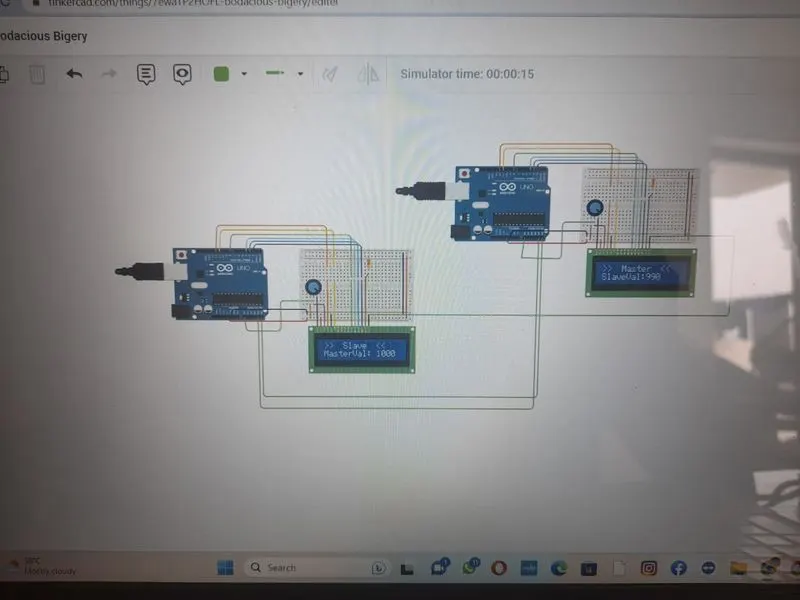
OUTPUT :
// OUTPUT VIDEO ALSO ALSO ATTACHED