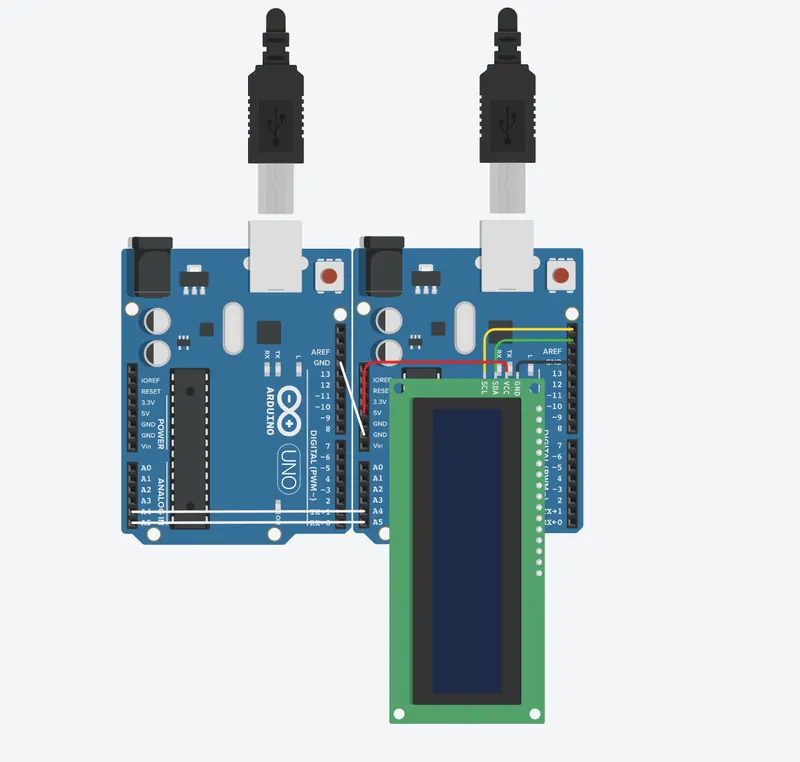
Project 1 - Interfacing a 16*2 LCD with Arduino using I2C protocol
MASTER CODE
#include <Wire.h>
String wordSent ="";
void setup()
{
Serial.begin(9600);
Wire.begin(); // join i2c bus (address optional for master)
Serial.println("Please type word");
}
void loop()
{
wordSent ="";
if (Serial.available())
{
wordSent = Serial.readStringUntil('\n'); // read the incoming String until end:
Serial.println(wordSent);
Wire.beginTransmission(8); // transmit to device #8
Wire.print(wordSent);
Wire.endTransmission();
}
delay(500);
}
SLAVE CODE
// C++ code
//
#include <Adafruit_LiquidCrystal.h>
#include <Wire.h>
//int seconds = 0;
char buf[40] ;
boolean flagRx = false;
Adafruit_LiquidCrystal lcd(0);
void setup()
{
lcd.begin(16, 2);
Wire.begin(8);
lcd.print("Please type word");
lcd.clear();
Wire.onReceive(receiveEvent); // register event
Serial.begin(9600);
}
void loop ()
{
if (flagRx)
{
lcd.print("Words Sent");
lcd.setCursor(0,1);
Serial.println(buf);
lcd.print(buf);
flagRx = false;
delay (5000);
lcd.clear();
}
}
void receiveEvent (int howMany)
{
int i;
for (i=0; i<howMany; i++)
{
buf[i] = Wire.read(); // receive byte as a character
}
buf[i] = '\0'; // assume it is a string, add zero-terminator
flagRx = true; // set flag, we received something.
}