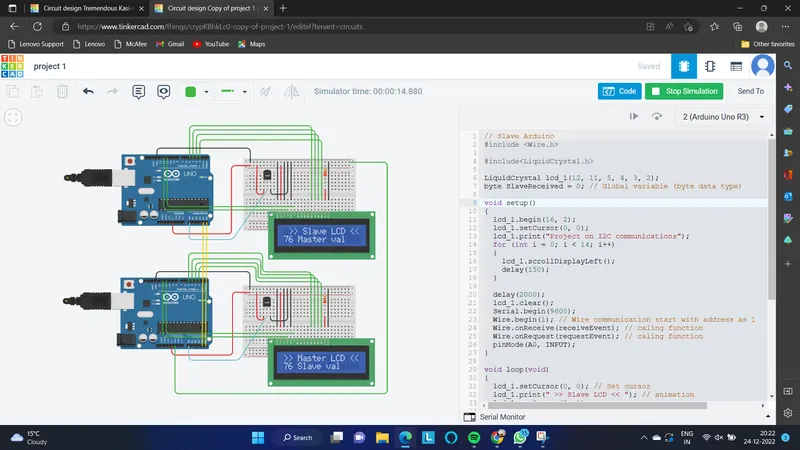
#include

#include

LiquidCrystal lcd_1(12, 11, 5, 4, 3, 2);
byte SlaveReceived = 0; // Global variable (byte data type)

void setup()
{
  lcd_1.begin(16, 2);
  lcd_1.setCursor(0, 0);
  lcd_1.print("Project on I2C communications");
  for (int i = 0; i < 14; i++)
  {
    lcd_1.scrollDisplayLeft();
    delay(150);
  }

  delay(2000);
  lcd_1.clear();
  Serial.begin(9600);
  Wire.begin(1); // Wire communication start with address as 1
  Wire.onReceive(receiveEvent); // caling function
  Wire.onRequest(requestEvent); // caling function
  pinMode(A0, INPUT);
}

void loop(void)
{
  lcd_1.setCursor(0, 0); // Set cursor
  lcd_1.print(" >> Slave LCD << "); // animation
  lcd_1.setCursor(0, 1);
  lcd_1.print(SlaveReceived); // Printing data coming from master arduion
  lcd_1.print(" Master val");

}
void receiveEvent (int howMany) // This function is hepling in read data
{
  SlaveReceived = Wire.read(); // store data in 'SlaveReceived'
}
void requestEvent()
{
  float volt = analogRead(A0); // Reading analog value
  volt = volt * 4.99; // conversion
  float temperature = volt / 10;
  byte SlaveSend = (temperature); // converted value
  Wire.write(SlaveSend); // Sending converted valve
  Serial.println(" Slave sending data to Master:"); // Printed on Serial Moniter
  Serial.println(SlaveSend); // Slave valve is printing on Serial Moniter
}