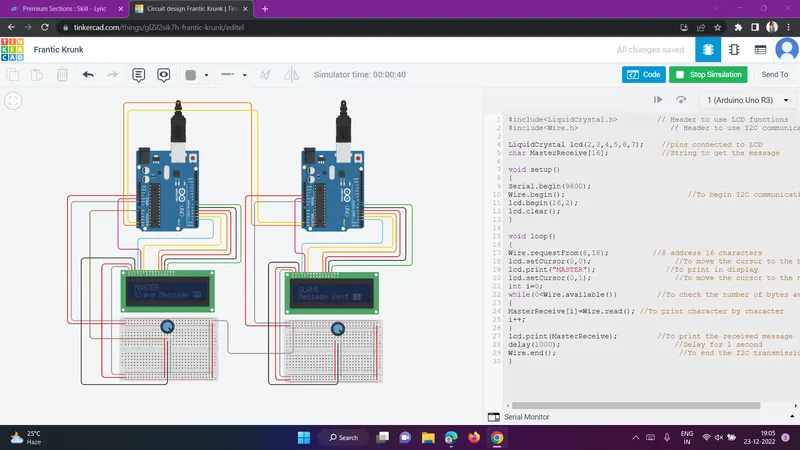
Project 1 - Interfacing a 16*2 LCD with Arduino using I2C protocol
Master
#include
#include
LiquidCrystal lcd(2,3,4,5,6,7); //pins connected to LCD
char MasterReceive[16];
void setup()
{
Serial.begin(9600);
Wire.begin(); //To begin I2C communication
lcd.begin(16,2);
lcd.clear();
}
void loop()
{
Wire.requestFrom(8,16); //8 address 16 characters
lcd.setCursor(0,0); //To move the cursor to the begining
lcd.print("MASTER"); //To print in display
lcd.setCursor(0,1); //To move the cursor to the next line
int i=0;
while(0
MasterReceive[i]=Wire.read(); //To print character by character
i++;
}
lcd.print(MasterReceive); //To print the received message
delay(1000);
Wire.end(); //To end the I2C transmission
}
Slave
#include
#include
LiquidCrystal lcd(2,3,4,5,6,7);
void setup()
{
Serial.begin(9600);
Wire.begin(8); //To begin I2C communication
Wire.onRequest(send);
lcd.begin(16,2); //To start the LCD display
lcd.clear(); //To clear the display
}
void loop()
{
lcd.setCursor(0,0); //To move the cursor to the begining
lcd.print("SLAVE"); //To display in LCD
lcd.setCursor(0,1); //To move the cursor to the next line
lcd.println("Message sent "); //To display in LCD
}
void send()
{
char ch[17]="Slave Message ";
Wire.write(ch);
}