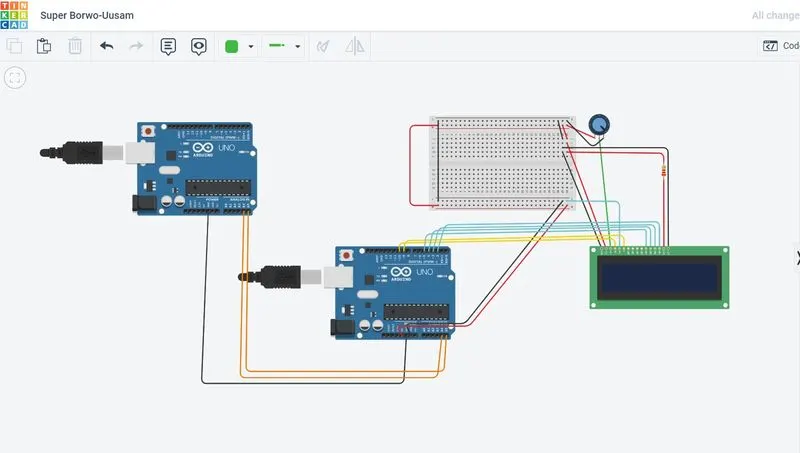
Project 1 - Interfacing a 16*2 LCD with Arduino using I2C protocol
MASTER CODE:
#include
char x[32]={"iam sarath chandra "};
char y[32]={"iam chetan kumar "};
void setup()
{
Wire.begin();
//Wire.onRequest(requestEvent);
}
void loop()
{
Wire.beginTransmission(2); // transmit to device #2
Wire.write(x);
Wire.endTransmission();
delay(1000);
Wire.beginTransmission(2);
Wire.write(y);
Wire.endTransmission(); // stop transmitting
delay(1000);
}
/*void requestEvent()
{
//Inside the wire.write is the data to be sent to the master upon request
Wire.write("hi ");
delay(2000);
Wire.write("I sarath chandra ");
}*/
SLAVE CODE:
#include
#include
// Creates an LCD object. Parameters: (rs, enable, d4, d5, d6, d7)
LiquidCrystal lcd(10,9,5,4,3,2);
char x[16];
char y[16];
int n=0;
void setup()
{
Serial.begin(9600);
// set up the LCD's number of columns and rows:
lcd.begin(16, 2);
// Clears the LCD screen
lcd.clear();
Wire.begin(2);
Wire.onReceive(receiveEvent);
}
void receiveEvent(int bytes) {
if(n==0)
{
for(int i=0;i<16;i++)
{
x[i] = Wire.read(); // read one by one character from the I2C
}
n=1;
delay(500);
}
if(n==1)
{
for(int i=0;i<16;i++)
{
y[i] = Wire.read(); // read one by one character from the I2C
}
n=0;
delay(500);
}
Serial.print("x is:");
Serial.println(x);
Serial.print("y is:");
Serial.println(y);
lcd.setCursor(0,0);
lcd.print(x);
lcd.setCursor(0,1);
lcd.print(y);
delay(1000);
}
void loop()
{
delay(2000);
}