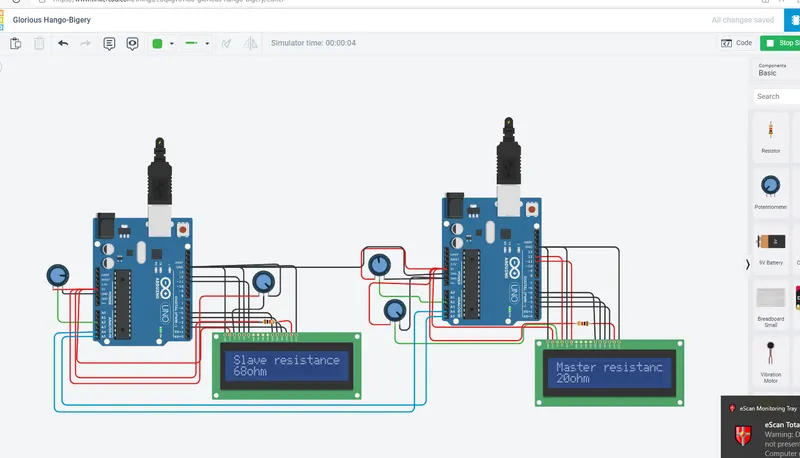
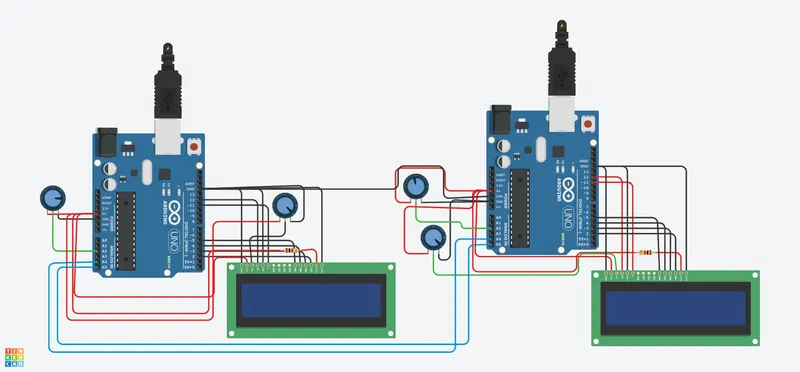
TEMPERATURE MONITORING SYSTEM USING I2C PROTOCOL
## MASTER ARDUINO CODE ##
#include<LiquidCrystal.h> //header
#include<Wire.h> // header file for I2C protocol
LiquidCrystal lcd(12,11,5,4,3,2); //pin used for LCD
byte a; // declaring variable for slaves
void setup()
{
pinMode(A2,INPUT); // configuring the pin as INPUT
lcd.begin(16,2); // beginning the LCD
lcd.setCursor(0,0);
lcd.print("MASTER"); // displaying the content in LCD
delay(500); // delay of 500 milliseconds
lcd.setCursor(0,1);
lcd.print("data from slave");// displaying the content in LCD
delay(500); // delay of 500 milliseconds
lcd.clear();// clearing the content in the LCD
Wire.begin();// begining of Serail Communication
}
void loop()
{
Wire.requestFrom(1,1); // request from slave 1
a=Wire.read(); // reading data from slave 1
Wire.beginTransmission(1); // beginning the transmission from master to slave
float volt=analogRead(A2); // reading the input from the potentiometer
byte potmtr=map(volt,0,1023,0,255); // mapping the data to one bit as it is bit by bit transmission
Wire.write(potmtr); // writing the data to slave through serial data wire
Wire.endTransmission(); // ending the transmission of data
lcd.setCursor(0,0);
lcd.print("Slave resistance");// displaying the content in LCD
lcd.setCursor(0,1);
lcd.print(a); // Displaying the value of slave in master LCD
lcd.print("ohm");
delay(500);// delay of 500 milliseconds
lcd.clear(); // clearing the content in LCD
}
## SLAVE ARDUINO CODE ##
#include<LiquidCrystal.h> // header file for
LiquidCrystal lcd(12,11,5,4,3,2);
#include<Wire.h>// header file for I2C protocol
byte b; // declaring variable for slaves
void setup()
{
pinMode(A2,INPUT);// configuring the pin as INPUT
lcd.begin(16,2);// beginning the LCD
lcd.setCursor(0,0);
lcd.print("SLAVE");// displaying the content in LCD
delay(500);// delay of 500 milliseconds
lcd.setCursor(0,1);
lcd.print("Data from Master");// displaying the content in LCD
delay(500);// delay of 500 milliseconds
lcd.clear();// clearing the content in the LCD
Wire.begin(1);// begining of I2C protocol
Wire.onRequest(requestevent);// Requesting the master to receive the data
Wire.onReceive(receiverequest); // receiving request from Master
}
void loop()
{
lcd.setCursor(0,0);
lcd.print("Master resistance");// displaying the content in LCD
lcd.setCursor(0,1);
lcd.print(b);// displaying data received from master
lcd.print("ohm");
delay(500); // delay of 500 milliseconds
lcd.clear();// clearing the content in the LCD
}
void requestevent() // called function
{
float volt=analogRead(A2);// reading the input from the potentiometer
byte res=map(volt,0,1023,0,255);// mapping the data to one bit as it is bit by bit transmission
Wire.write(res);// writing the data to master through serial data wire
}
void receiverequest(int val)// callled function
{
b=Wire.read(); // reading the data from master
}