Project 1 - Controlling a DC motor using PWM and monitoring its Running status
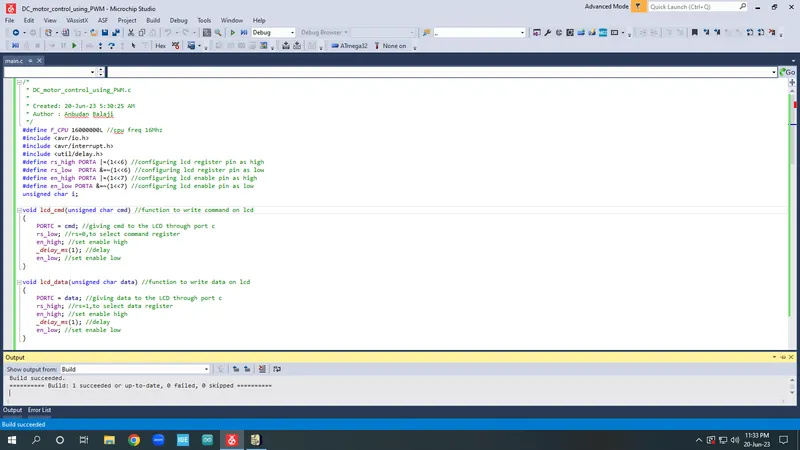
/*
* DC_motor_control_using_PWM.c
*
* Created: 20-Jun-23 5:30:25 AM
* Author : Anbudan Balaji
*/
#define F_CPU 16000000L //cpu freq 16Mhz
#include <avr/io.h>
#include <avr/interrupt.h>
#include <util/delay.h>
#define rs_high PORTA |=(1<<6) //configuring lcd register pin as high
#define rs_low PORTA &=~(1<<6) //configuring lcd register pin as low
#define en_high PORTA |=(1<<7) //configuring lcd enable pin as high
#define en_low PORTA &=~(1<<7) //configuring lcd enable pin as low
unsigned char i;
void lcd_cmd(unsigned char cmd) //function to write command on lcd
{
PORTC = cmd; //giving cmd to the LCD through port c
rs_low; //rs=0,to select command register
en_high; //set enable high
_delay_ms(1); //delay
en_low; //set enable low
}
void lcd_data(unsigned char data) //function to write data on lcd
{
PORTC = data; //giving data to the LCD through port c
rs_high; //rs=1,to select data register
en_high; //set enable high
_delay_ms(1); //delay
en_low; //set enable low
}
void lcd_init() //initialize lcd display
{
lcd_cmd(0x38); _delay_ms(5); //2 lines and 5x7 matrix
lcd_cmd(0x02); _delay_ms(5); //return home
lcd_cmd(0x01); _delay_ms(5); //clear screen
lcd_cmd(0x0c); _delay_ms(5); //display on, cursor off
lcd_cmd(0x06); _delay_ms(5); //increment cursor
lcd_cmd(0x80); _delay_ms(5); //force cursor begin 1st line
}
void cursor_pos(char x,char y) //set cursor position
{
if((x<1||x>2)||(y<1||y>16)) //condition to check 2 rows and 16 columns
{
x=1; //force to start 1st line
y=1; //force to start 2nd line
}
if (x==1)
{
lcd_cmd(0x80+y); //start 1st line(1st row + 1st column)
}
else
{
lcd_cmd(0xC0+y); //start 2nd line(2nd row + 1st column)
}
}
void lcd_out(char a,char b,char *str) //lcd string output function
{
cursor_pos(a,b);
while(*str) //check cursor position
{
lcd_data(*str); //send the data to lcd function with string as argument
str++; //increment the string
}
}
void motor_dir() //motor direction function
{
if((PIND &(1<<0))==0) //check direction pin open or close
{
PORTA &=~(1<<1); //clearing port A pin 1 status before toggling
PORTA|=(0b00000001); //00000001
lcd_out(1,1,"Motor ON "); //display motor on
lcd_out(2,1,"Direction-CW "); //display direction in clk wise
}
else
{
PORTA &=~(1<<0); //clearing port A pin 0 status during the toggling
PORTA|=(0b00000010); //00000010
lcd_out(1,1,"Motor ON "); //display motor on
lcd_out(2,1,"Direction-CCW"); //display direction in counter clk wise
}
OCR0=i; //i increases in ISR, the corresponding value is to be loaded into output comparator register
}
int main(void)
{
DDRC |=0xFF; //set lcd port C as output
DDRD &=~(1<<2); //set port D pin 2 as input (interrupt=speed control)
DDRD &=~(1<<0); //set port D pin 0 as input (change direction)
DDRD &=~(1<<6); //set port D pin 6 as input (motor on and off)
PORTD |=((1<<2)|(1<<6)); //enable pullup resistor
DDRA |=((1<<0)|(1<<1)); //set port A pin 0 and pin 1 as output
DDRB |=(1<<3); //set port B pin 3 as output
PORTB |=(1<<3); //set port B pin 3 as high
i=50; //initializing i=64, because we are running the motor with 25% duty cycle
TCCR0=0x61; //Non-Inverting mode, PWM phase correct mode,NO prescaler.
GICR=(1<<INT0); //enable external interrupt 0
MCUCR=0x02; //negative edge trigger
sei(); //enable global interrupt
lcd_init(); //call function for lcd initialize
while(1)
{
while((PIND &(1<<6))==0) //condition on/off switch pin, if switch is closed
{
motor_dir(); //while switch is closed then the we determine direction of the motor
}
PORTA=0x00; //turn off the motor
lcd_cmd(0x01); //clear screen
lcd_out(1,1,"Motor OFF"); //call lcd out function
_delay_ms(1000); //delay
}
}
ISR(INT0_vect) //interrupt service routine
{
i=i+20; //adding the value to the timer
}
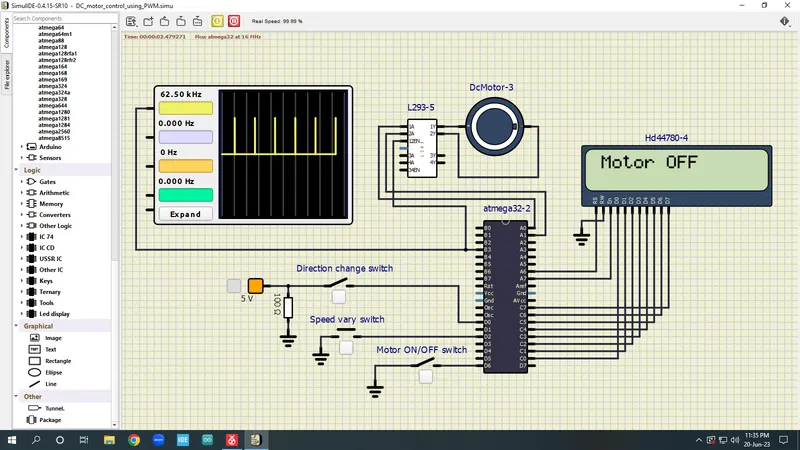
Motor ON/OFF switch - OFF
Direction switch - OFF
Speed vary switch - OFF
conclusion is Motor OFF
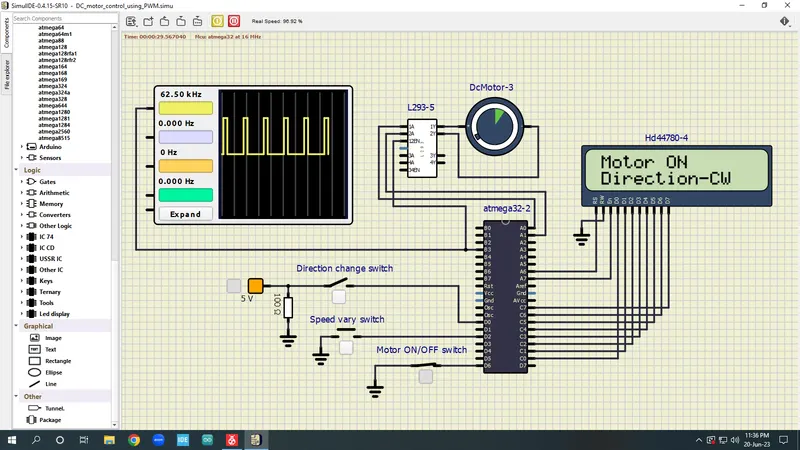
Motor ON/OFF switch - ON
Direction switch - OFF
Speed vary switch - OFF
conclusion is Motor ON and rotate clockwise direction
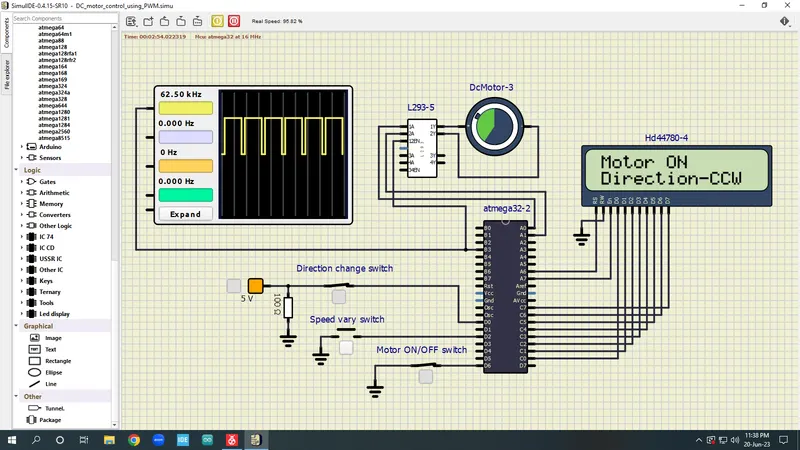
Motor ON/OFF switch - ON
Direction switch - ON
Speed vary switch - OFF
conclusion is Motor ON and rotate counter clockwise direction
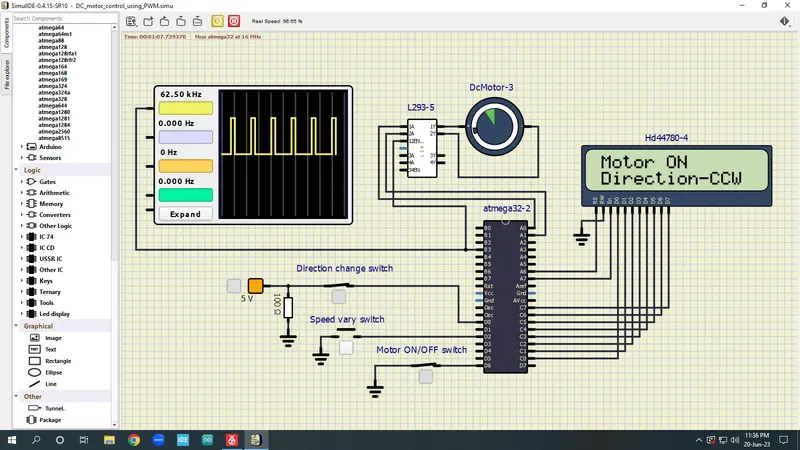
Motor ON/OFF switch - ON
Direction switch - ON
Speed vary switch - ON
conclusion is Motor ON , rotate counter clockwise direction, speed increase and also pulse width also changed.