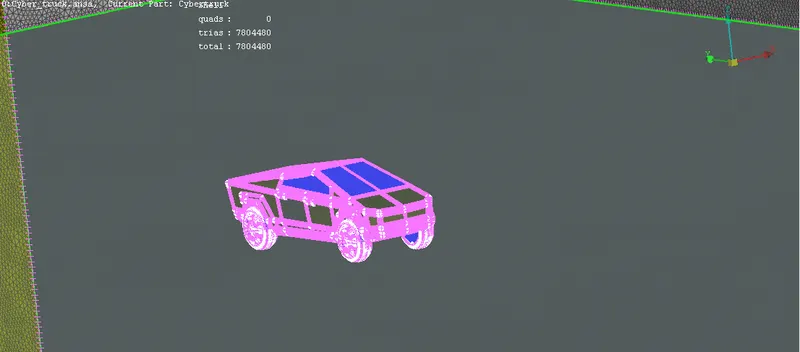
Project 1 : CFD Meshing for Tesla Cyber Truck
Report on Cyber Truck
Aim
To generate a CFD mesh on a Tesla Cyber-Truck car model for external fluid flow analysis
Objective
- To clean the geometry (errors)
- Create mesh and external volume
- Creating a mesh around the model for external fluid flow
PROCEDURE
- Import the ANSA file, as the car is symmetric from central axis, use planar cut to divide it into two parts and delete the half.
- After separating, check the geometry and clear the entire intersectional joint.
- One of the major intersections is at wheel shafts, as the shaft is inside the body, we can completely delete the shaft or else just delete the overlapping surfaces.
- Clear all the single cons and intersections, by creating new plane surfaces.
- After creating a complete clean model, use transformation command to create the copy. And use paste command or create new command to join the single cons.
- After creating the model Set the PIDs accordingly such as windows, lights, tyres, and body
- Now create the mesh for different part with different mesh sizes mentioned below
- Body 5mm
- Lights 2mm
- Wheels 3mm
- Tyres 3mm
- By maintaining certain parameters such as skewness, aspect ratio, warping etc
- In this assignment we are considering only the skewness, now by maintaining the highest valve of skewness for triangular mesh (0.6), give the meshing parameters and mesh quality
- Mesh parameters are given individually to each PID, where the minimum and maximum target length will be set, that means the minimum and maximum length of a mesh.
- In quality of mesh we give the range of min and max side length by considering all parts of the design. For this assignment of BMW, min and max lengths were 0.1 and 7 respectively.
- While doing the meshing it gives “off” elements which are beyond the limits of the parameters mentioned (skewness, min and max target length).
- These off elements should be cleared by reconstructing in (improve command right click on off) the off elements or by using ‘move’ command under grid and change the position of node till the error is cleared.
- Use freeze command to fix the mesh.
- After meshing create the other half using transform command (by hiding the logo)
- And use cons paste command to eliminate the single coons (it attaches the surfaces)
- As we are creating for an external flow analysis, need to create a block around the car.
- With a gap of
- Front 4x
- Rear 6x
- Top 3x
- Sides 4x
- Bottom more than the size of the car could be any. (so the plane should not intersect the car model)
Where x= length of the car = 5970.
- For creating a plane, initially plot hot points accordingly using relative command in points
- Then create new surfaces by joining the curves.
- Now mesh the bottom plane with 100 mesh length and top with 200 mesh length, for smaller mesh size system may hang.
- Now for varying mesh design to side faces use spacing command in that mention the sides and growth rate and limits
- And do any of the meshing (spot generates less no of mesh elements)
Learning outcomes
Got to learn new commands such as
- creating a plane using points and curves
- Creating a variable mesh
- Plane cut
- Plane extension
- About quality criteria like Skewness, wrap angle, aspect ratio.
Results
Finally created a perfect meshed model with external shell for fluid analysis
Drive Link: https://drive.google.com/file/d/1ZujFt4mMvheW18YDMBfnVr6E0DEBXK1W/view?usp=sharing