Project 1
PROJECT:- Ecommerce Management
This project contains theoretical as well as implementation in SQL.
Contents
- Mini world and Project Description
- Basic structure
- Functional requirements
- Entity Relation (ER) diagram and constraints
- Relational database schema
- Implementation
- Creating tables
- Inserting data
- Queries
- Basic queries
- PL/SQL function
Mini world and Description
In this modern era of online shopping no seller wants to be left behind, moreover due to its simplicity the shift from offline selling model to an online selling model is witnessing a rampant growth.
Therefore, as an engineer our job is to ease the path of this transition for the seller. Amongst many things that an online site requires the most important is a database system. Hence in this project we are planning to design a database where small clothing sellers can sell their product online.
Basic Structure
Functional requirement
- A new user can register on the website.
- A customer can see details of the product present in the cart
- A customer can view his order history.
- Admin can start a sale with certain discount on every product.
- Customer can filter the product based on the product details.
- A customer can add or delete a product from the cart.
- A seller can unregister/ stop selling his product.
- A seller/ customer can update his details.
- Admin can view the products purchased on particular date.
- Admin can view number of products sold on a particular date.
- A customer can view the total price of product present in the cart unpurchased.
- Admin can view details of customer who have not purchased anything.
- Admin can view total profit earned from the website.
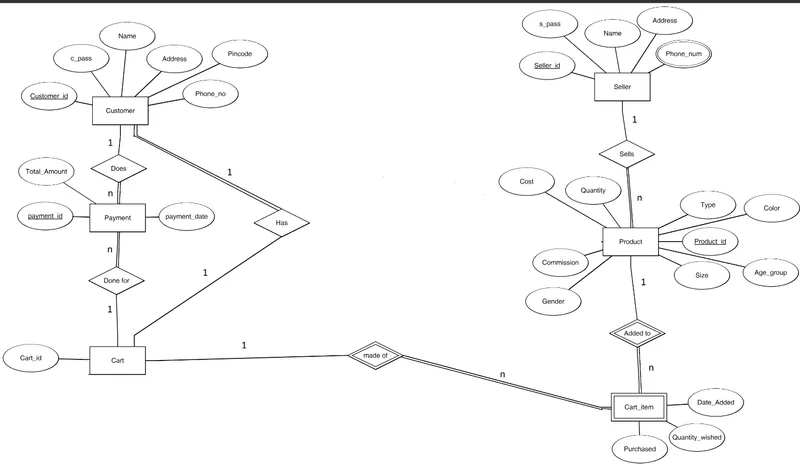
Entity Relation Diagram for ecommerce
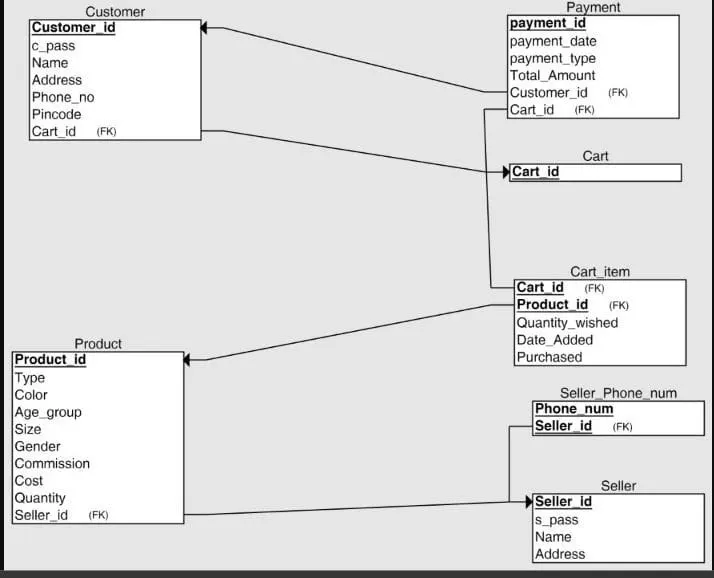
Relational Database Schema
Implementation
We can directly copy and paste all the commands from the text given here into the SQL console to create and insert values into your table.
Creating Tables
QERY:-
CREATE TABLE Cart
    (
        Cart_id VARCHAR(7) NOT NULL,
        PRIMARY KEY(Cart_id)
    );

    CREATE TABLE Customer
    (
        Customer_id VARCHAR(6) NOT NULL,
        c_pass VARCHAR(10) NOT NULL,
        Name VARCHAR(20) NOT NULL,
        Address VARCHAR(20) NOT NULL,
        Pincode NUMBER(6) NOT NULL,
        Phone_number_s number(10) NOT NULL,
        PRIMARY KEY (Customer_id),
        Cart_id VARCHAR(7) NOT NULL,
        FOREIGN KEY(Cart_id) REFERENCES cart(Cart_id)
    );

    CREATE TABLE Seller
    (
        Seller_id VARCHAR(6) NOT NULL,
        s_pass VARCHAR(10) NOT NULL,
        Name VARCHAR(20) NOT NULL,
        Address VARCHAR(10) NOT NULL,
        PRIMARY KEY (Seller_id)
    );

    CREATE TABLE Seller_Phone_num
    (
        Phone_num NUMBER(10) NOT NULL,
        Seller_id VARCHAR(6) NOT NULL,
        PRIMARY KEY (Phone_num, Seller_id),
        FOREIGN KEY (Seller_id) REFERENCES Seller(Seller_id)
        ON DELETE CASCADE
    );

    CREATE TABLE Payment
    (
        payment_id VARCHAR(7) NOT NULL,
        payment_date DATE NOT NULL,
        Payment_type VARCHAR(10) NOT NULL,
        Customer_id VARCHAR(6) NOT NULL,
        Cart_id VARCHAR(7) NOT NULL,
        PRIMARY KEY (payment_id),
        FOREIGN KEY (Customer_id) REFERENCES Customer(Customer_id),
        FOREIGN KEY (Cart_id) REFERENCES Cart(Cart_id),
        total_amount numeric(6)
    );

    CREATE TABLE Product
    (
        Product_id VARCHAR(7) NOT NULL,
        Type VARCHAR(7) NOT NULL,
        Color VARCHAR(15) NOT NULL,
        P_Size VARCHAR(2) NOT NULL,
        Gender CHAR(1) NOT NULL,
        Commission NUMBER(2) NOT NULL,
        Cost NUMBER(5) NOT NULL,
        Quantity NUMBER(2) NOT NULL,
        Seller_id VARCHAR(6),
        PRIMARY KEY (Product_id),
        FOREIGN KEY (Seller_id) REFERENCES Seller(Seller_id)
        ON DELETE SET NULL
    );

    CREATE TABLE Cart_item
    (
        Quantity_wished NUMBER(1) NOT NULL,
        Date_Added DATE NOT NULL,
        Cart_id VARCHAR(7) NOT NULL,
        Product_id VARCHAR(7) NOT NULL,
        FOREIGN KEY (Cart_id) REFERENCES Cart(Cart_id),
        FOREIGN KEY (Product_id) REFERENCES Product(Product_id),
        Primary key(Cart_id,Product_id)
    );

    alter table Cart_item add purchased varchar(3) default 'NO';
Inserting Values
These are some demo values. Full data will be updated in future commits
    insert into Cart values('crt1011');

    insert into Customer values('cid100','ABCM1235','rajat','G-453','632014',9893135876, 'crt1011');

    insert into Seller values('sid100','12345','aman','delhi cmc');

    insert into Product values('pid1001','jeans','red','32','M',10,10005,20,'sid100');

    insert into Seller_Phone_num values('9943336206','sid100');

    insert into Cart_item values(3,to_date('10-OCT-1999','dd-mon-yyyy'),'crt1011','pid1001','Y');

    insert into Payment values('pmt1001',to_date('10-OCT-1999','dd-mon-yyyy'),'online','cid100','crt1011',NULL);
If the customer wants to see details of product present in the cart
select * from product where product_id in(
        select product_id from Cart_item where (Cart_id in (
            select Cart_id from Customer where Customer_id='cid100'
        ))
    and purchased='NO');
If a customer wants to see order history
select product_id,Quantity_wished from Cart_item where (purchased='Y' and Cart_id in (select Cart_id from customer where Customer_id='cid101'));
Customer wants to see filtered products on the basis of size,gender,type
select product_id, color, cost, seller_id from product where (type='jeans' and p_size='32' and gender='F' and quantity>0)
If customer wants to modify the cart
delete from cart_item where (product_id='pid1001' and Cart_id in (select cart_id from Customer where Customer_id='cid100'));
If a seller stops selling his product
    delete  from seller where seller_id = 'sid100';
    update product set quantity = 00 where seller_id is NULL;
If admin want to see what are the product purchased on the particular date
select product_id from cart_item where (purchased='Y' and date_added='12-dec-2018');
How much product sold on the particular date
select count(product_id) count_pid,date_added from Cart_item where purchased='Y' group by(date_added);
If a customer want to know the total price present in the cart
select sum(quantity_wished * cost) total_payable from product p join cart_item c on p.product_id=c.product_id where c.product_id in (select product_id from cart_item where cart_id in(select Cart_id from customer where customer_id='cid101') and purchased=’Y’);
Show the details of the customer who has not purchased any thing
Select * from customer where customer_id not in (select customer_id from Payment);
Find total profit of the website from sales.
select sum(quantity_wished * cost * commission/100) total_profit from product p join cart__item c on p.product_id=c.product_id where purchased=’Y’;
PL/SQL function
Procedure which returns the type of product with the cost less than the given cost
    create or replace procedure cost_filter(c in number,t in varchar)
    is
    cs product.cost%type;
    ty product.type%type;
    id product.product_id%type;
    cursor cf is
    select product_id,cost,type from product where cost<c and type=t;
    begin
    open cf;
    loop
    fetch cf into id,cs,ty;
    exit when cf%notfound;
    dbms_output.put_line('Product' || id || 'has cost ' || cs || ' and the type is' || ty);
    end loop;
    close cf;
    exception
    when no_data_found then
    dbms_output.put_line('Sorry no such products exist');
    end;
Function which returns total number of products which a particular seller sells
    create or replace function totalProducts(sId in varchar)
    return number
    is
    total number(2):=0;
    begin
    select count(*) into total
    from product
    where seller_id=sId;
    return total;
    end;
    /
Function execution:
    declare
    c number(2);
    begin
    c:=totalProducts('sid102');
    dbms_output.put_line('Total products is : '|| c);
    end;
Procedure which returns the total quantity of product with the given ID
Procedure with exception handling
    create or replace procedure prod_details(p_id in varchar)
    is
    quan number(2);
    begin
    select quantity into quan from product where product_id=p_id;
    exception
    when no_data_found then
    dbms_output.put_line('Sorry no such product exist !!');
    end;
    /