Project 1
Ans
Product Pricing Discounts
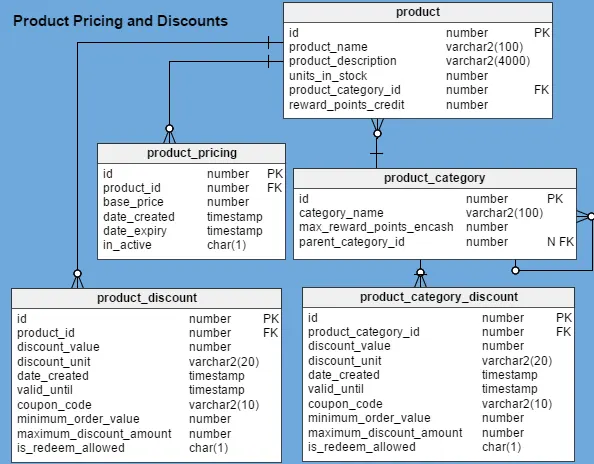
Usually every online retailer’s database has a product table that contains basic details like name, description, when the product was listed, the number of units in stock, and so on. They do not keep pricing details in the same table, as pricing changes over time.
In this product table, I’ve added two new columns:
reward_points_credit– Each product comes with a set number of reward points that are credited to the customer’s account when they buy the product.product_category_id– This is the category to which the product belongs, such as electronics, clothing, food, or beverage.
The product_category table holds details about product categories and subcategories. You might be surprised to see the max_reward_points_encash column in this table. Usually, retailers impose some restrictions on the maximum reward points that can be redeemed with a single order. This depends primarily on the order’s product category. For example, a site selling vacation packages allows customers to pay up to 30% of their purchase with reward points when the customer is buying an international tour package, but only 10% of a domestic tour package can be redeemed. This is considering the fact that the profit margin is smaller with domestic tour packages than with international packages.
The product_pricing table stores pricing details for an individual product at any given time. The create_date, expiry_date and in_active columns are the most important, and they are also self-explanatory. I’ve added them to this table to capture pricing data, since price is a slowly changing dimension. There is one and only one active record for any product at any time.
E-commerce portals usually apply a discount to an entire set of products (a product category) rather than applying it to individual products. The product_category_discount table holds all discounts and offers currently valid for a product category. To understand the columns in this table, let’s look at the terms and conditions of a sample offer:
30% OFF All Soaps
Coupon Code – SOAP30OFF
- Offer is valid until 30th April 2017.
- Customer will receive 30% off our entire range of soaps.
- Maximum discount is $80.
- Coupon code can be used with reward points.
- Coupon code can be used only once and is not applicable with any other coupon code.
- Coupon code is applied to products’ MRP (maximum retail price).
- Taxes applicable on the discounted price.
Now, let’s take a look this table’s columns:
id– The primary key of the table.product_category_id– The product category related to the discount. This is the “SOAP” subcategory in our example.discount_value– The amount of discount offered. In this case, the value is ”30”.discount_unit– The type of discount, i.e. a percentage (30%) or a flat currency amount ($30). We would expect values like “PERCENTAGE” or “CURRENCY”; in this example, it would be a percentage.create_date– The date when the offer was entered into the system.valid_from– When the offer starts. E-commerce portals may advertise an offer that only becomes available in the future.-
valid_until– The date when the offer is no longer valid. In the above example, this would be “30 April 2017”.
Note: There are cases when an offer is valid for just a few minutes. Therefore, I’ve used the TIMESTAMP data type for thecreate_date,valid_from, andvalid_untilcolumns. coupon_code– A preset code that users enter during the checkout process to receive a discount. It is “SOAP30OFF” in this example.minimum_order_value– The minimum amount needed for an order to be eligible for a particular offer. In our example, since there is no minimum order value given, this column would be “0”.maximum_discount_amount– The maximum discount that a customer can get with this offer code.is_redeem_allowed– If customers can redeem reward points while using this coupon code.
The product_discount table is an exact replica of product_category_discount except that it holds the details of discounts and offers for individual products rather than entire product categories. Retail sites sometimes offer discounts on a particular product to boost its sales or to clear out their inventory.
Loyality Reward scheme
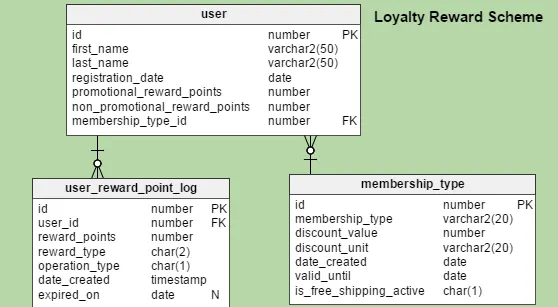
Let’s assume that every e-commerce site has a user table that stores basic details about their customers. I’ll add a few more columns to this standard table:
promotional_reward_points– The individual user’s current balance of promotional reward points. These reward points are usually associated with an offer and can expire. In addition, there are restrictions on how these points can be used. They may be redeemed as partial payment for an order, but not as full payment. At this point, themax_reward_points_encashcolumn I added to theproduct_categorytable should make more sense.non_promotional_reward_points– The user’s current balance of non-promotional reward points (such as a refund on a returned product). Many online retailers credit non-promotional reward points to users’ reward accounts instead of refunding the purchase amount to the payment source. These points have no expiry date, and customers can use them in subsequent orders with no major restrictions.membership_type_id– The customer’s current membership type – for example, an Amazon Prime customer. Customers with premium memberships often pay a certain amount each year in return for perks like free shipping or special members-only prices.
Since subscribing to a premium membership is optional, this column is NULLABLE.
The membership_type table stores details about the types of memberships available. A customer can subscribe to any one of them. The columns in this table are:
id– A unique ID number assigned to each membership type.membership_type– The name of a membership type – Prime, Silver, Gold, Platinum, etc.discount_value– The membership discount amount associated with the relevant membership type.discount_unit– If the discount is a percentage or a flat currency amount.date_created– When the membership was introduced.valid_until– When the membership type is no longer valid. Usually, membership types are valid indefinitely.is_free_shipping_active– Whether free shipping is offered to customers of a particular membership type.
There are portals that have a predefined set of memberships and that track customers’ order history. They can set membership type for individual customers based on how active the customers are. This is also a good way of rewarding customers’ loyalty.
The user_reward_point_log table records the reward point activity of individual customers. The columns in this table are:
id– The primary key of this table.user_id– The related user ID.reward_points– The number of points to be credited to or debited from the customer’s account.reward_type– Whether points are promotional or non-promotional.operation_type– Whether the operation is a credit or debit.create_date– The date when the transaction occurred.expiry_date– The date when promotional reward points expire. Usually these points are valid for some months or years.
Tie ups with bank and payment wallet
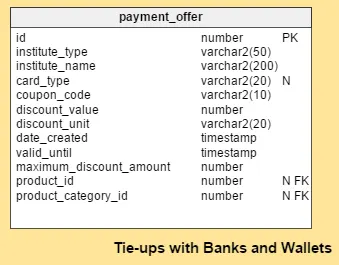
Many shopping sites leverage various third-party payment gateways (like PayPal). In addition, they may tie up with financial institutes like banks or wallet services like Oxigen; this provides customers with supplementary offers and incentives if they use that service. For example: “Take 30% off a bus ticket of $150 or more and get $15 cash back when you use your Discover credit card”.
This subject area is concerned with the latter part of that offer: the perk that comes with using your Discover card. There is only one table for this section, payment_offer. The columns in this table are:
id– The primary key of the table.institute_type– Whether the institute is a bank or a wallet service.institute_name– The name of the bank or wallet.card_type– Whether the offer is valid for credit cards, debit cards, or both.coupon_code– The related coupon code.discount_value– The value of the offer. In the Discover card example, it would be “15”.discount_unit– Whether the discount is a percentage or flat currency amount. Above, it is a flat amount.create_date– The date that the record was added to the table.valid_from– When the offer starts. These offers can also be made for future dates.valid_until– When the offer ends.maximum_discount_amount– The maximum discount amount that can be offered with an order.product_id– The relevant product ID, when the offer is related to a specific product.product_category_id– The relevant product category ID, when the offer is related to a specific category.
If the offer is applicable for any order, irrespective of product or product category, both of these columns (product_id and product_category_id) would be NULL. Thus, I have kept both of these columns NULLABLE.