Modeling and Simulation of flow around an Ahmed Body using Ansys Fluent and Validating Result with Experimental data
Aim:
The major objective of this project was to model and set up the simulation of flow around an Ahmed Body using Ansys Fluent and Comparing the simulation result with the experimental data provided.
Introduction:
The Ahmed body is a generic car body (a simplified vehicle model). The airflow around the Ahmed body captures the essential flow features around an automobile and was first defined and characterized in the experimental work of Ahmed. Although it has a very simple shape, the Ahmed body allows us to capture characteristic features that are relevant to bodies in the automobile industry.
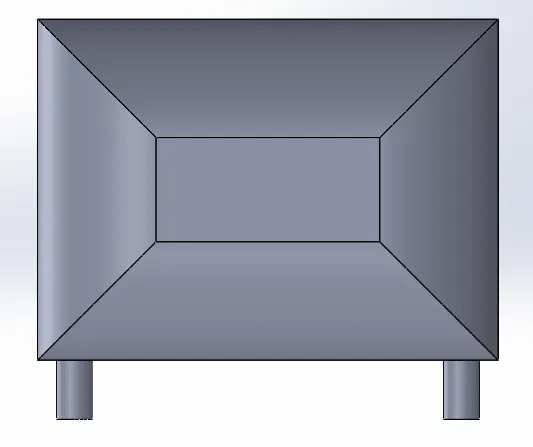
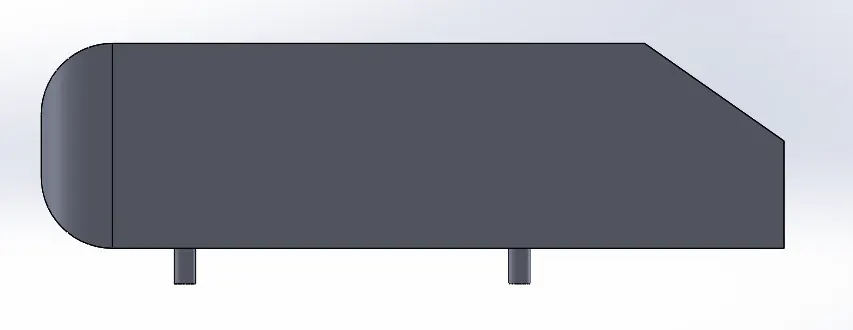
"The Ahmed reference model was originally developed for a time-averaged vehicle wake investigation (Ahmed et al. 1984). It is a car-like bluff body with a curved forebody, straight center section, and an angled rear end, representing a highly simplified ¼ scale lower medium-size hatchback vehicle. The specific angle of the back end can be altered between 0°and 40°. The model's major dimensions are 1044mm x 389mm x 288mm."
The Experimental Case Study can be found here Experiments by H. Lienhart, S. Becker, C. Stoots.
Y plus Contours
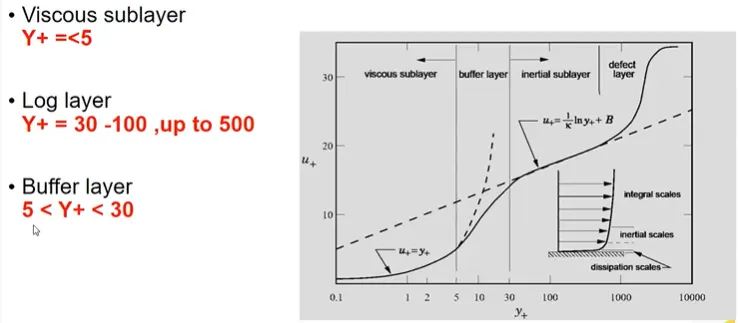
Turbulence is the state of chaotic and unstable fluid flow, just opposite of Laminar flow. Y plus(Y+) is the non-dimensional distance of the first cell from the wall.
Let's takes an example of a flat plate under zero pressure gradient and front left side the uniform velocity is coming to the plate. Firstly, it will be laminar flow, then after some disturbance, the region will be called as Transition Region, when the disturbance is growing too much the flow will change in Turbulent Flow. The boundary layer in the turbulent region will be called a turbulent boundary layer whereas in laminar it will be called the laminar boundary layer.
Reynold's Number `Re` is the ratio of Inertial force to the Viscous Force.
Viscous Sub Layer: Viscous stress term dominates
Buffer Layer: Transitional region
Log law Region: Reynolds shear stress term dominates
Reynolds Number `"Re"=(rhoVL)/mu`
For this Simulation `V=25m/s` and the fluid flow is air with a density of 1.225 kg/m^3
Therefore `"Re"=(1.225" X "25" X " 1.044)/(1.7894X10^-4)`
`Re=1786772.1`
Coefficient of Friction
`Cf=0.576/(Re)^(1/5)=0.003236`
`tau_w=Cf*rho*v^2/2`
`tau_w=0.003236*1.225*25^2/2`
`tau_w=1.23878 N/m^2`
`uf=sqrt(tau_w/rho`
Therefore `uf=sqrt(1.23878/1.225)=1.00561m/s`
Hence the First Layer Thickness is:
`y_1=(mu*y^+)/(rho*uf)`
`y_1=(1.7894X10^-5*80)/(1.225*1.00561)`
`y1=1.1621mm`
The front region is taken as 2 meters. The region just behind the Ahmed body was kept as 5*L, where L is the length of Ahmed's body I .e.1044mm.
The project mainly focuses on the following things:-
1. Geometry creation of an Ahmed body using Solidworks.
2. Importing Geometry to Space Claim, then setting up the Wind Tunnel with proper dimensions.
3. Setting Up Case Study using Ansys Fluent using proper solver & Boundary conditions.
4. Solving the Case Study Files using Turbulence Model
5. Post-Processing the result Using CFD post generating Velocity, Pressure, and y+ contours.
6. Generating the Velocity X for different Z locations and comparing the value with experimental data Using MS-Excel.
7. Generating the Normalized plot using excel.
------------------------------------------------------------------------------------------------------
1. Geometry creation of an Ahmed body using Solidworks.
The Ahmed Geometry was prepared using Solidworks. The exact dimensions were used in order to get a good result.
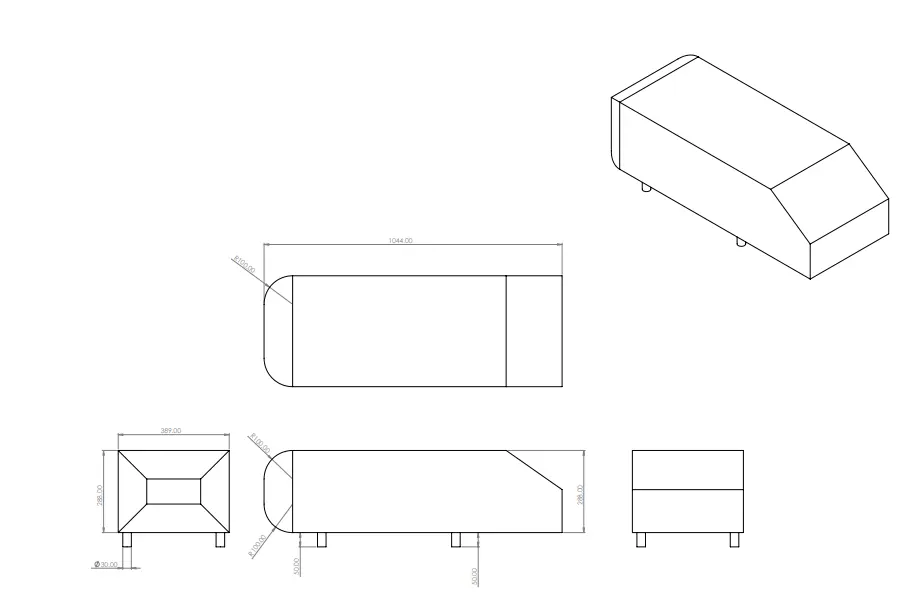
Ahmed Body can be downloaded from here: Geometry Ahmed Body(.stl)
Ahmed Body with Wing Tunnel can be downloaded from here: Ahmed Body With Wind Tunnel
Various Features were used to create the geometry like a sketch and extrude.
Isometric View
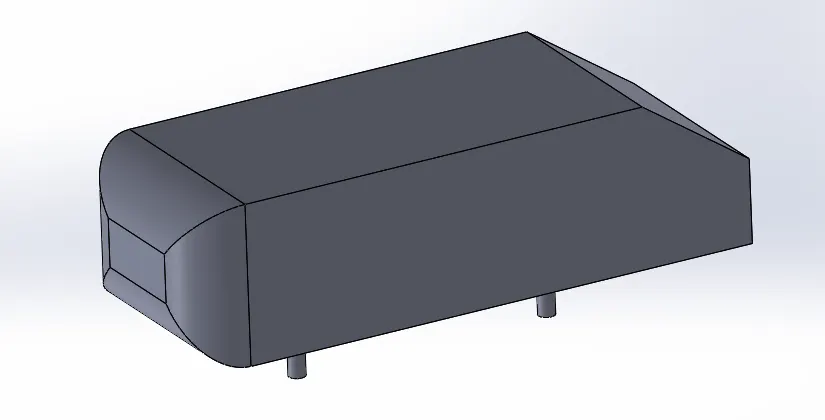
*The Slant angle was kept as `35^0` that is also called as Critical Angle
Front View and Side View
Case Study Set-Up
1.Geometry Creation
First of all, the Ahmed body geometry was imported using Space Claim. The geometry was separately prepared using different CAD package ie Solidworks, then the .stl file was imported to Space Claim to set up the case study. The exact dimensions were used to create the geometry. After importing Ahmed's body, a Virtual wind tunnel was setup using proper dimensions. After the same geometry was imported in Ansys workbench for generating the fluid flow domain volume to define the boundary conditions and further proceed with Pre Processing, and post-processing the results. The Geometry was split into half Using the Split option in order to create a fine mesh and get accurate results. A shared topology option was enabled to generate the local refinement zone.
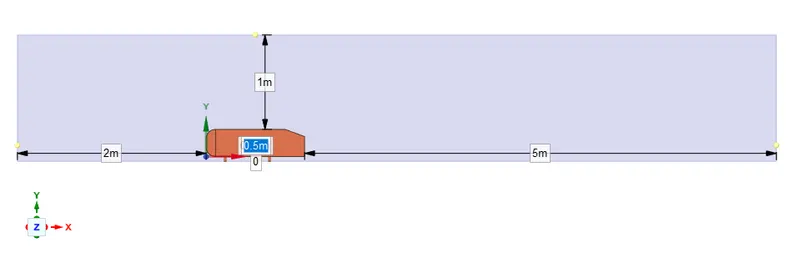
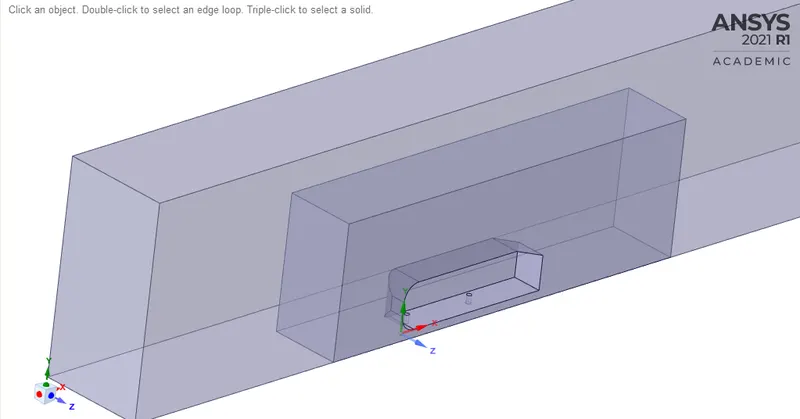
The Virtual Wind Tunnel Dimension is :
| Dx(m) | Dy(m) | Dz(m) |
| 8 | 1 | 1 |
The Slant angle was kept as `35^0` Which is also called a Critical Angle.
2. Boundary Creation and Meshing
After the control volumes are perfectly created the boundary tags were created in order to assign the different boundary conditions ie. velocity, temperature(if needed), or some other physics. For this geometry, 4 different boundary tags or names were created that were used earlier to assign the boundary condition. The four names are Inlet, Symmetry, Outlet, and Car Walls.
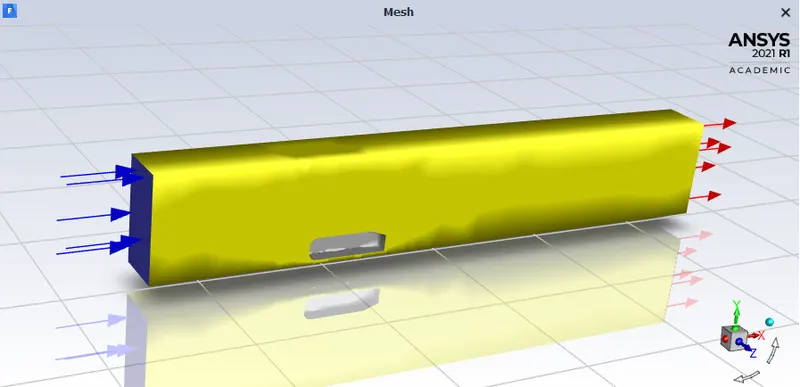
The Blue arrow represents the Inlet, Red color represents the Outlet where the Yellow walls represent the Symmetry wall Boundary tag.
Meshing
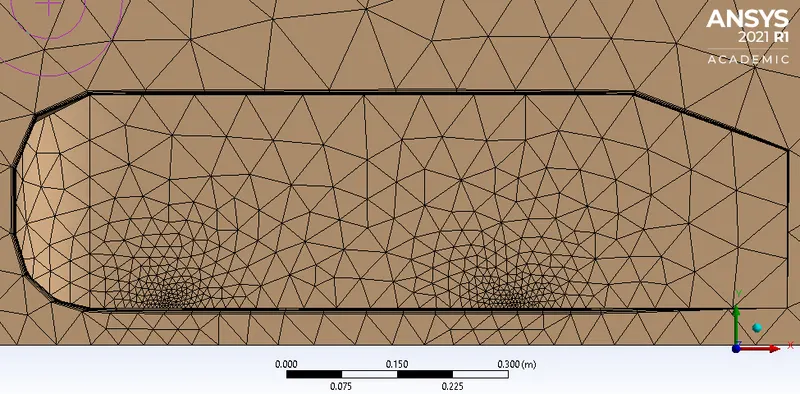
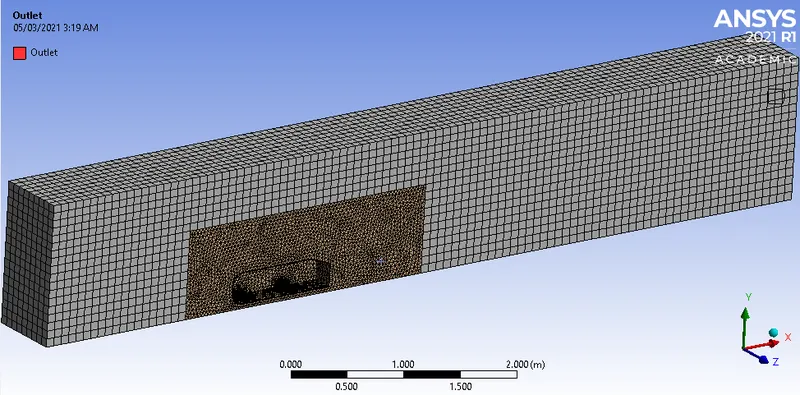
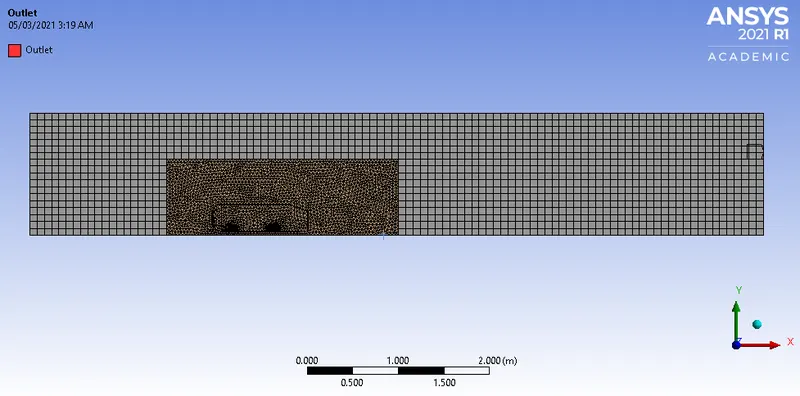
As in this Geometry, We were interested in External Aerodynamics So meshing plays a very important role in that application. The geometry was created in such a way that it has 3 regions essential for meshing.
1. Virtual Wind Tunnel
2. Local Refinement Zone
3. Surface of Ahmed Body
For the Virtual wind tunnel, the Tetrahedral was used because the flow was aligned while entering from the Inlet patch. Whereas, The Local Refinement zone had Trigonal Elements in order to capture the flow properly and get more accurate results. But The Ahmed Body Geometry had Inflation Layers and the first layer thickness was calculated with help of Y+.
- Main Enclosure-100mm-Multi-Zone (Hexa)
- Small Enclosure or Local Refinement Zone-50mm
- Face sizing of Ahmed body -25mm
- Face sizing on legs of Body-5mm
- Inflation Layer: Total Thickness:5 Layers -1.16mm, 20% Growth rate
Mesh Indepency Test
3 Different mesh Quality were used in order to find the accurate element count that gives the accurate results without compromising with the results.
| S.No. | Mesh Quality | Number of Elements | Coefficient of Lift | Coefficient of Drag |
| 1 | Coarse | 41611 | 0.2021 | 0.444 |
| 2 | Medium | 231470 | 0.20 | 0.29 |
| 3 | Fine | 463952 | 0.20 | 0.29 |
So, The Medium Quality mesh was chosen in order to save computational power.
3. Case Study Setup
For setting up the case study Ansys Fluent was used in order to simulate the case study.
The various parameter was considered while setup this case study. The case study setup dock was used to set up the problem which appears on the left-hand side of the converge studio
| S.No. | |||
| 1 | Models | Viscous Model-`K-epsilon -"Realizable"` | The turbulence model was used as we were interested in External Aerodynamics and the Reynolds number was in the turbulent category. |
| 2 | Material |
Air (N2:O2::23%:77%) |
Air was used as the fluid inside the Virtual Wind Tunnel |
| 3 | Cell Zone Condition | Control Volume Region was set to Air | The flow inside the Control volume wanted it to be only air. |
| 4 | Boundary Conditions | Inlet X is 24m/s | |
| The outlet was set to 0 Guage Pressure | |||
| Ahmed Body Walls No slip | |||
| Side, Top & Bottom wall Symmetry |
4. Solution
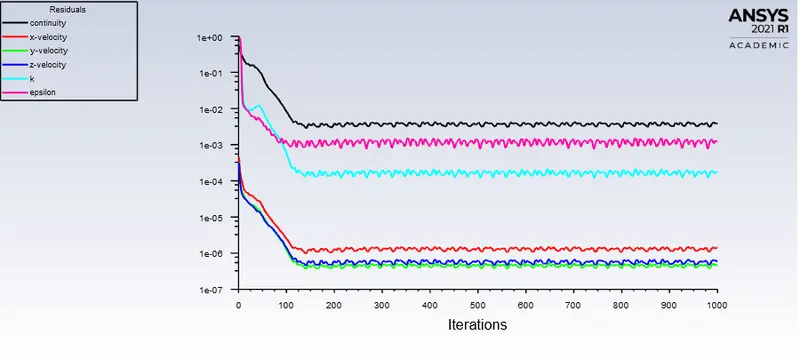
For the Solution Residuals Monitor, the Magnitude was changed to 1e-6 to get less error with more accuracy.
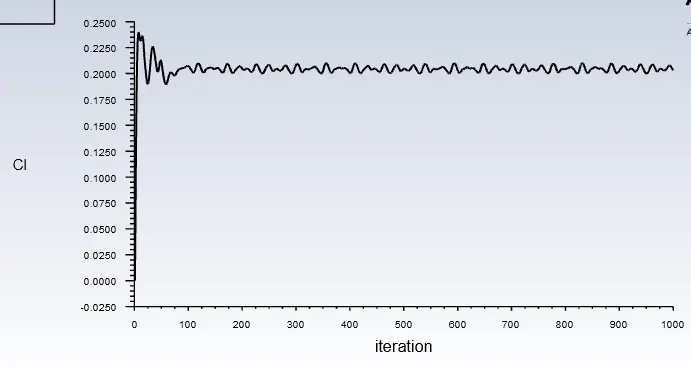
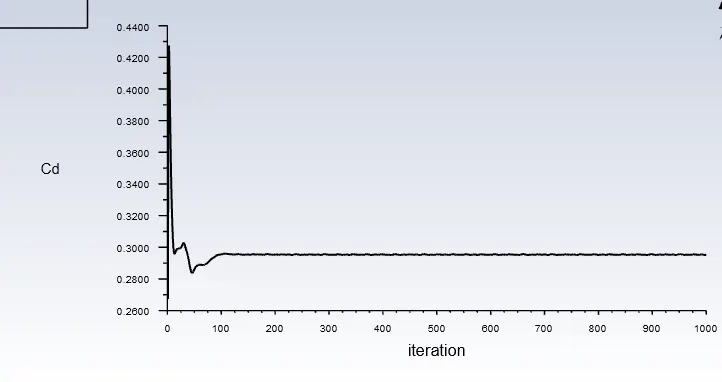
The Coefficient of Lift and Drag Report Data was Enabled.
Hybrid Intilizization was used in order to initialize this simulation.
As this was Steady-State Simulation so the Simulation was run for 1000 cycles and the results were generated easily.
Post Processing
Results
Residual Plots
Coefficient of Lift Plot
Coefficient of Drag Plot
Coefficient of lift
-------------------------------- -------------------
Ahmed_Body_wall 0.20299858
-------------------
Coefficient of Drag
-------------------------------- -------------------
Ahmed_Body_wall 0.29529265
Pressure Contour
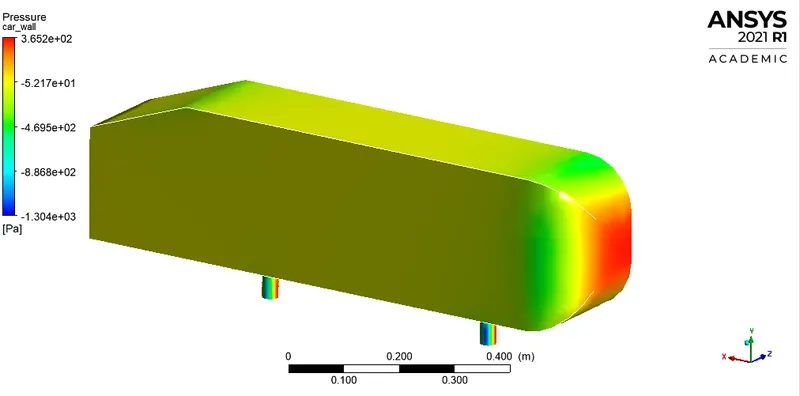
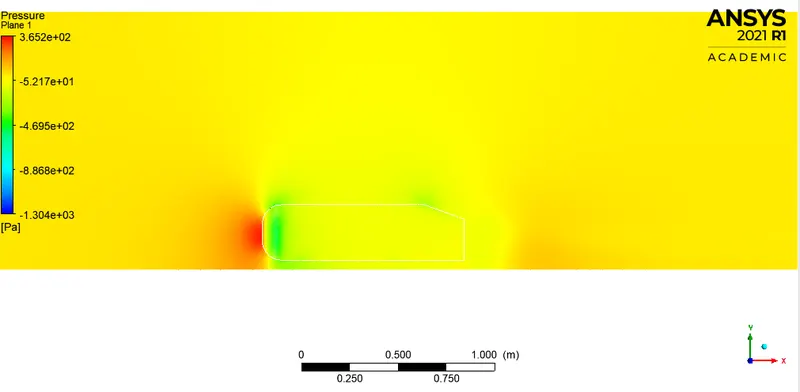
The flow is diverted to a greater extent by the front surface as it comes are rounded. The nature of flow in the lower side is due to wake formation, which is due to flow separation and recirculation.
Observation
The pressure is very high on the front face of Ahmed's body due to flatness its because the wing is hitting that surface and forming a high-pressure zone indicating the red zone.
The pressure becomes a bit lower on the top and sidewalls of Ahmed's body and has a little bit of high pressure as compared to the backend of Ahmed's body that has very low pressure because the wing losses its kinetic energy. As the airstrikes, the front surface the kinetic energy becomes low which results in loss of pressure as well as velocity. The pressure is known as stagnation pressure. the flow separation takes place at the sharp ends which is responsible for wakes formation and also responsible for pressure drop
Velocity Contour
Vector Plot
Observation
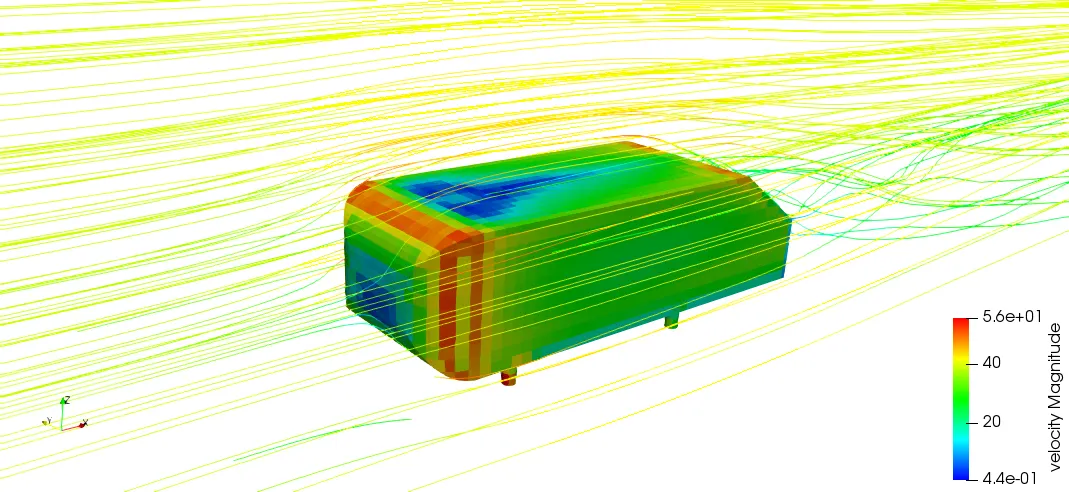
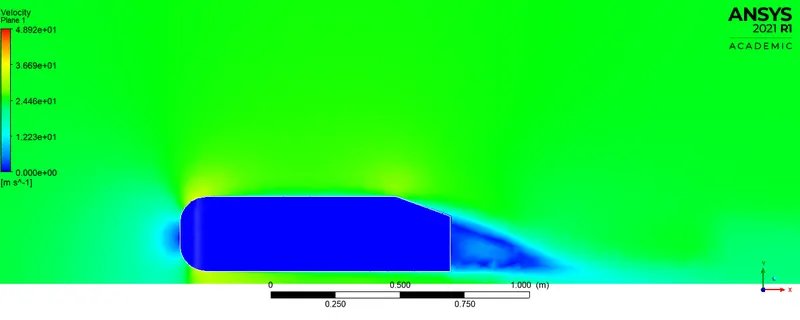
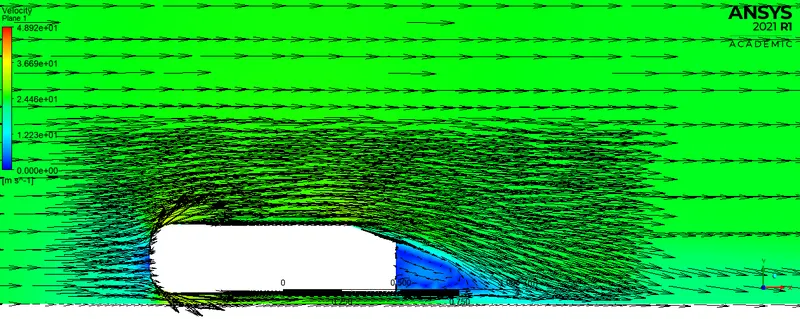
The velocity at the backside(indicated in blue color) is very low and there is a formation of the recirculation zone the top and side surface of Ahmed's body has a layer of very high velocity along with high pressure. then due to slant, the flow is getting separated along with the formation of recirculation.
The Velocity is very low on the windward side because the airstrikes the front area and losses its kinetic energy. The low-velocity region along the trailing edge is called the wake region, which is due to the slant angle of Ahmed's body i.e.35 deg. it is accorded to the geometry. this seems to move because the vortices formed in the region due to the recirculation of air. This contributes to the majority of the drag force on the body as it causes suction to take place in the location which ultimately adds up the drag on the body.
Stream Lines
Velocity Plots At different Data Points
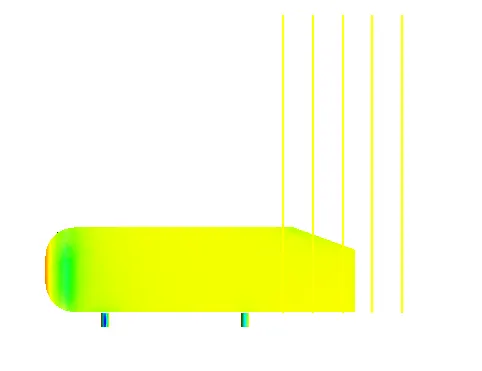
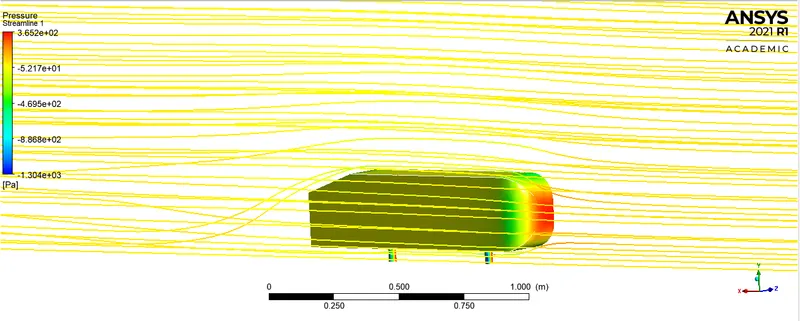
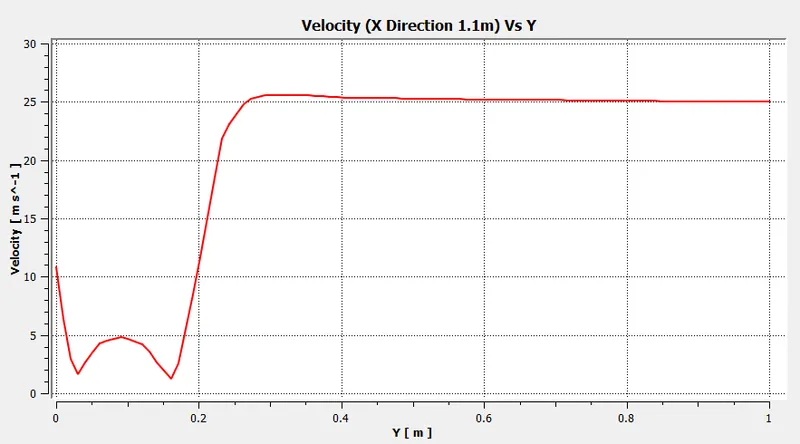
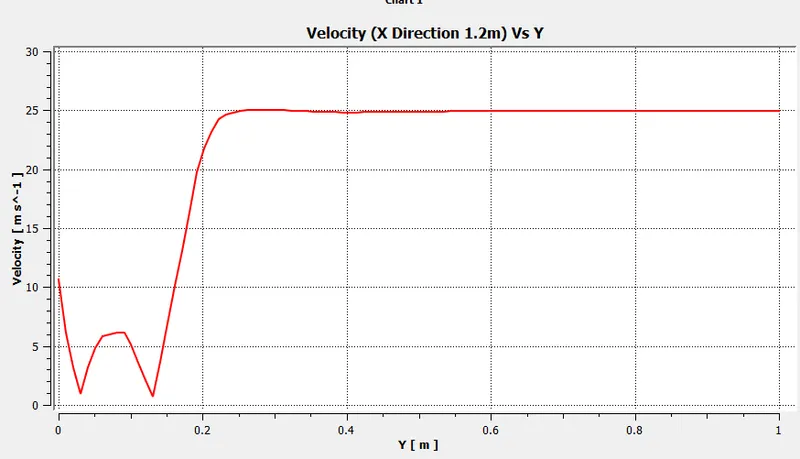
Generally, the Validation work can be found out using the line data to obtain the velocity plot for various lines. The above image was used to generate the velocity plot.
The lines were created at 0.8m, 0.9m, 1m, 1.1m, and 1.2m from the front face of Ahmed's body.
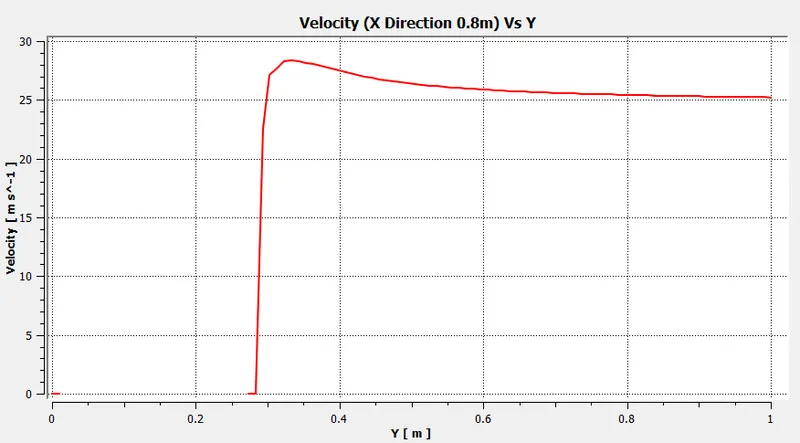
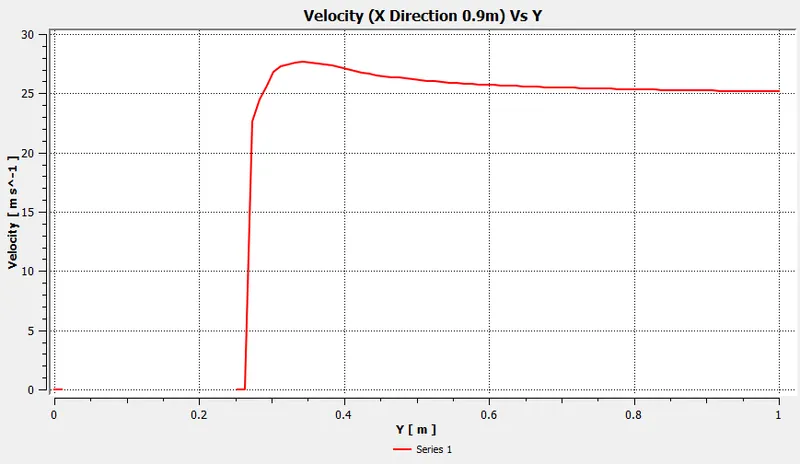
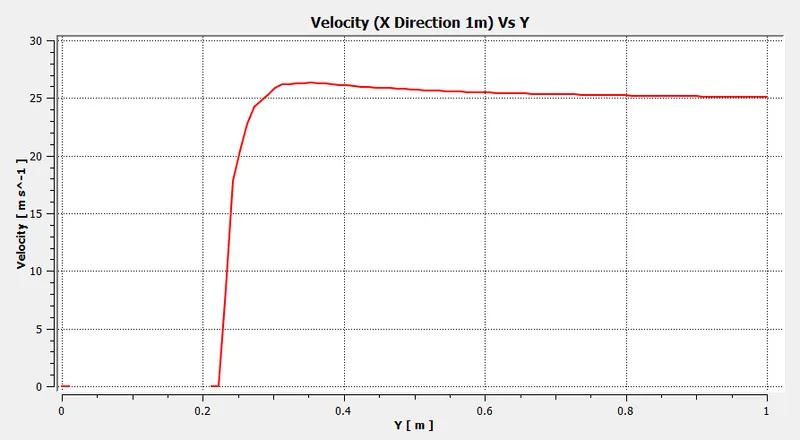
---------------------------------------------------------------------------------------------------------------------
These Results were generated when V=40m/s was used and the Validation was obtained.
Velocity in X-axis along with different Z location
The Values of experimental data was provided and we need to compare those result with the simulation data obtained.
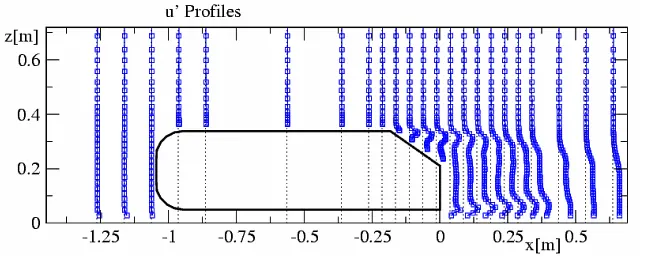
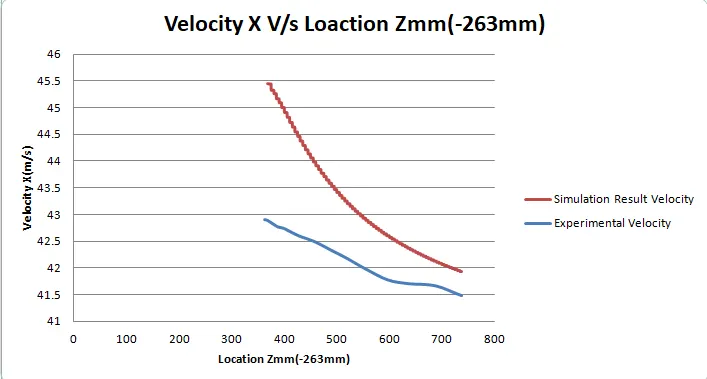
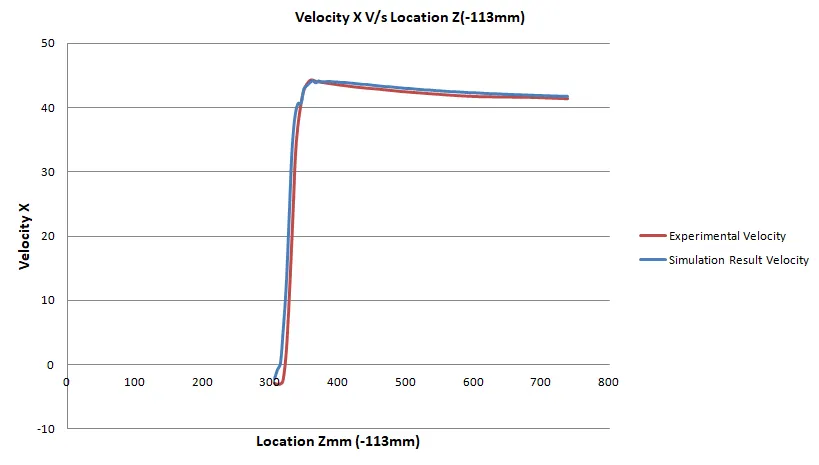
As the probe is near to Top surface of Ahmed Body the velocity is more but less than that of the front surface the kinetic energy of the wind is reduced. The high-pressure layer is formed on the top surface that has high velocity and it reduces means the air disturbance reduces as the probe point up along z-axis.
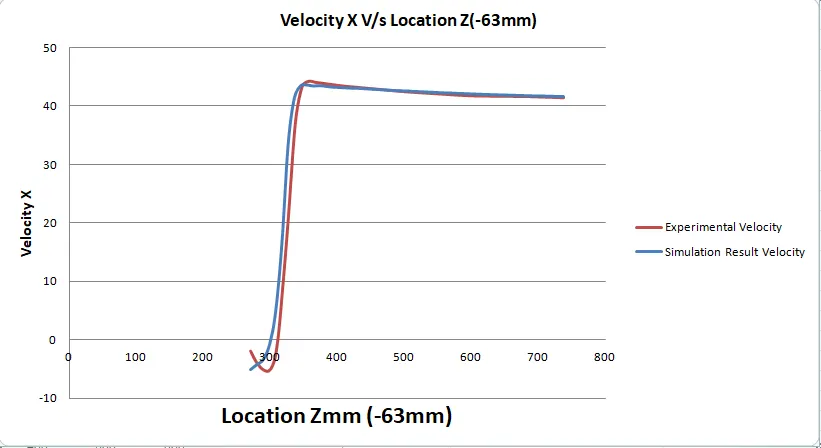
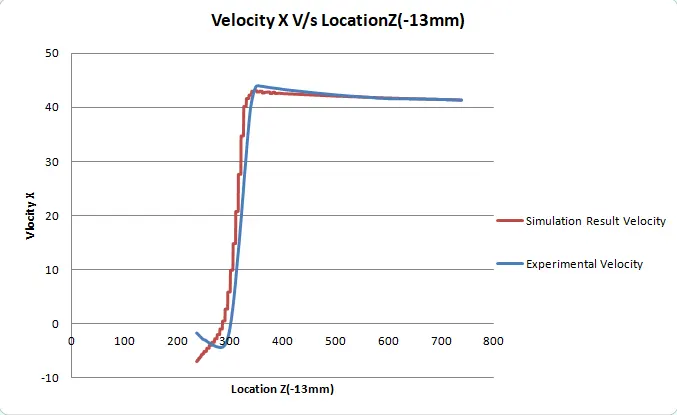
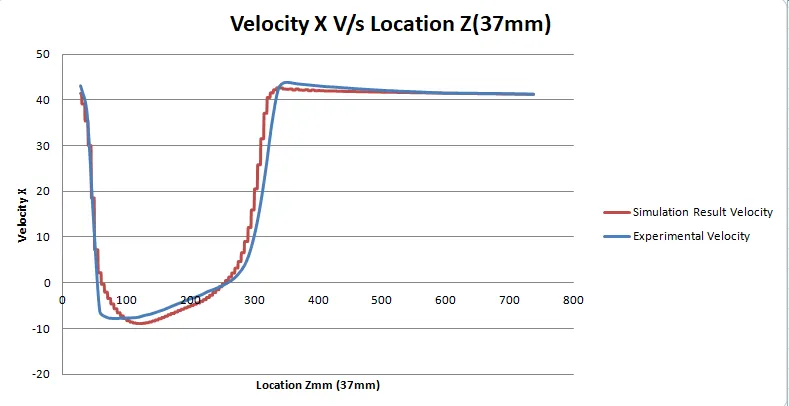
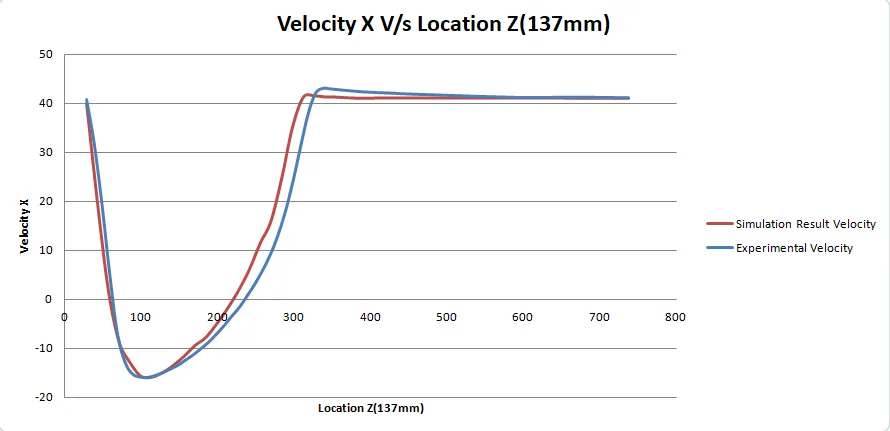
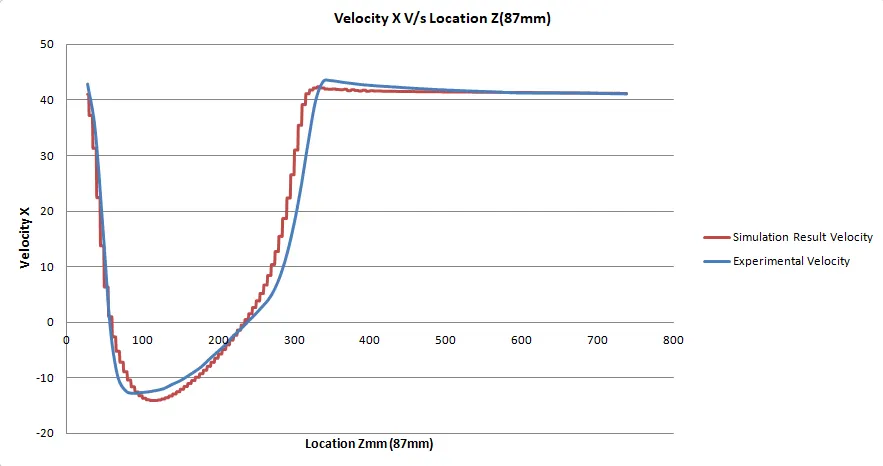
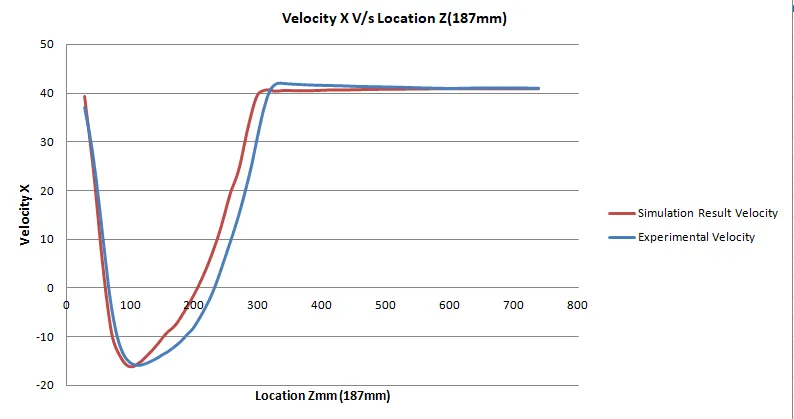
The last 4 Plots represent the region just behind the Ahmed body where there is the formation of the recirculation zone that has low pressure and low velocity. When the probe is just below the Ahmed body the velocity is high, then slowly it approaches the recirculation zone that has low pressure. suddenly after the wakes region finishes the velocity becomes normal.
The error in the plots is due to Coarse quality mesh because the system did not have enough computational resources.
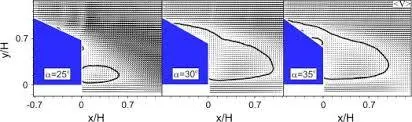
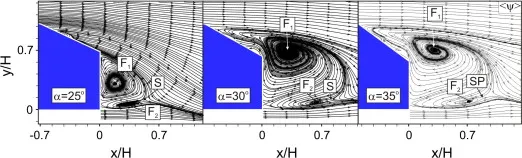
As the Slant angle increases the recirculation zone also broadens which is responsible for more wakes generation and drag force.
Normalized Plot
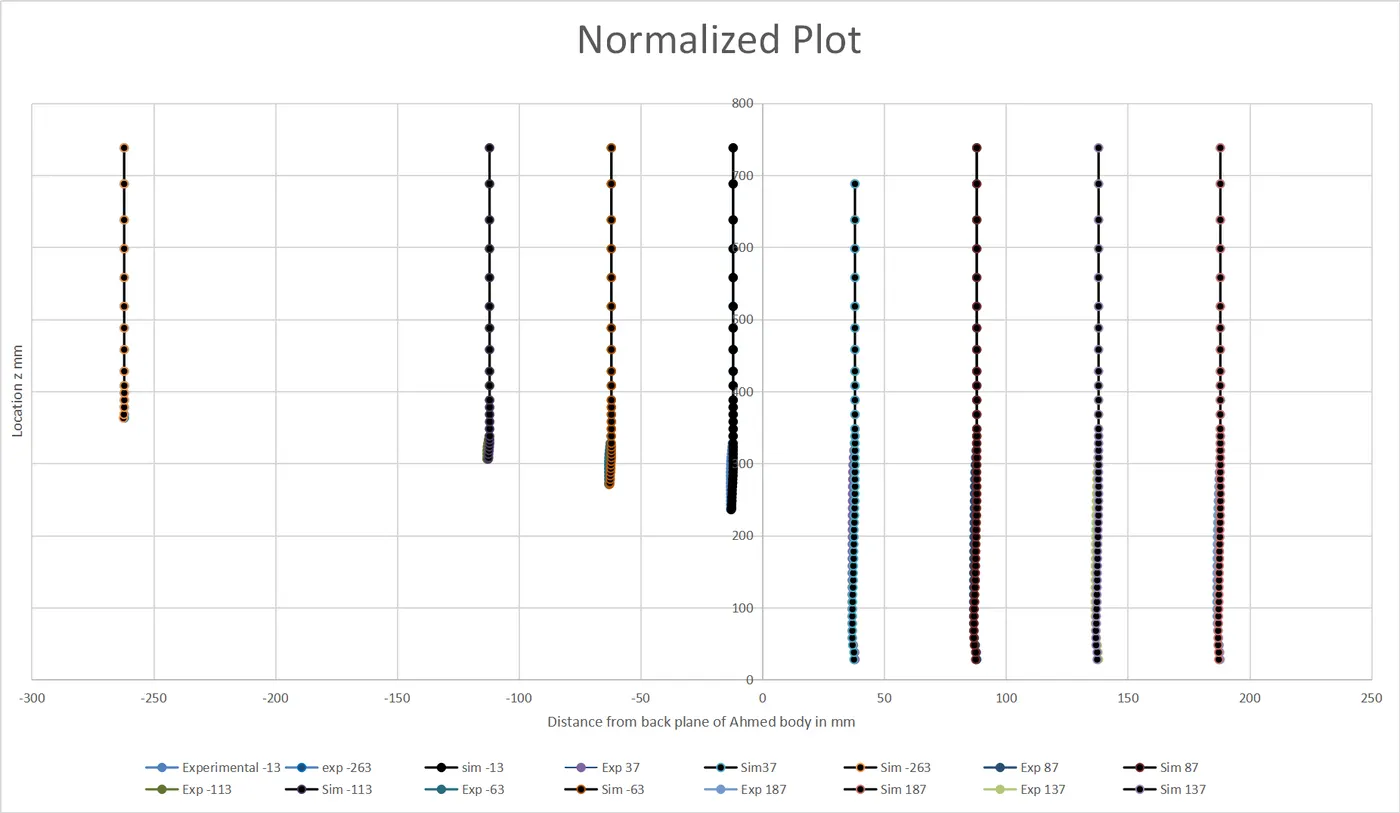
Datasheet can be downloaded from here: Data Sheet MS excel
Conclusion:
At last, it can be concluded that in order to get more accurate data the mesh should be finer but the computation time will increase because a lot of error can be seen in plots that were plotted for different z locations for different Velocity X. The normalized plot was created which was okay as the Experimental and simulation value were intersecting each other mostly.
The results were:
`"Coefficient of Lift" Cunderset{L}{}=0.2`
`"Coefficient of Drag" Cunderset{D}{}=0.29`
The surface below Ahmed's body was kept as the Noslip wall is because we wanted to capture the viscous region. In the Velocity plot, a recirculation plot can be found just behind the Ahmed body where velocity drops and pressure also drops(the region where the slant surface finishes). The Maximum Pressure is found on the front curve surface regions.