MATLAB program to simulate the forward kinematics of a 2R Robotic Arm.
Aim: To write a MATLAB program to simulate the forward kinematics of a 2R Robotic Arm.
Governing Equations:
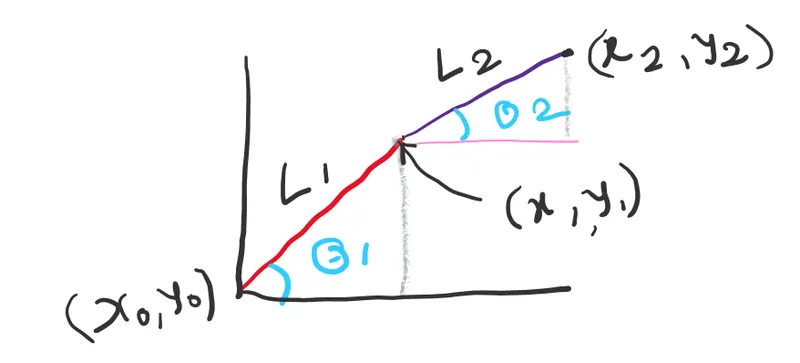
- 2R Robotic Arm has 2 links. One link is fixed at the base and other is attached to first and end effector is attached to it.
- I am assigning a variable for length of first link as L1 and for other as L2 in meters.
- For the angle of the first link with base variable assigned is theta1 and for the the angle made by second link with base theta2 variable is assigned in degree.
-
The coordinates of positions of the end points of the links are as below
x0 = 0
y0 = 0
This is the position of the link 1 at the base
-
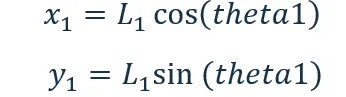
The position of the other end of the link can be found by trigonometry
-
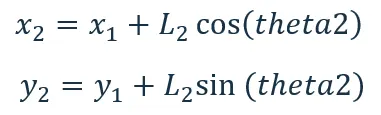
The position of the second link with respect to first (x2,y2) can be defined from the following relation
-
These are the governing equations required for the solving the given problem and can be used to plot the animation.
Objectives of The Project:
- To simulate the positions of the end effector of robot for various possible angles between 0 to 90 degrees.
- For these different values of (x1, y1) and (x2, y2) must be calculated and plotting of the same has to be done.
Body of the Content
Code used for the this is as below
%Matlab program for 2R Robotic Arm Challenge
clear all
close all
clc

%Inputs
L1 = 1;
L2 = 0.5;
theta1 = linspace(0,90,10);
theta2 = linspace(0,90,10);
ct = 1;
for i = 1:length(theta1)
    THETA1 = theta1(i);
    for j = 1:length(theta2)
        THETA2 = theta1(j);
         x0 = 0;
         y0 = 0;

         x1 = L1*cosd(THETA1);
         y1 = L1*sind(THETA1);


         x2 = x1 + L2*cosd(THETA2);
         y2 = y1 + L2*sind(THETA2);

    %plotting of the animation

        plot([x0 x1],[y0 y1],[x1 x2],[y1 y2],'linewidth',3)
        axis([-0.1 1.5 0 1.5])
        pause(0.03)
        M(ct)=getframe(gcf);
        ct=ct+1;

    end
 end
movie(M)
videofile = VideoWriter('fwdkin1.avi','Uncompressed AVI')
open(videofile)
writeVideo(videofile,M)
close(videofile)
For this MATLAB program initially length L1is taken assumed 1 meter and L2 as 0.5 meter with following command.
L1 = 1;
L2 = 0.5;
The angles theta1 and theta 2 are considered as array ranging from 0 to 90 with gap of 10 degrees.
theta1 = linspace(0,90,10);
theta2 = linspace(0,90,10)
Result of the values of theta1 and theta2 arrays will be as [0 10 20 30 40 50 60 70 80 90]
Now for the plotting the different positions two ‘for loops’ are used.
command length(theta1) will give output 10 so different values will range from 1 to 10 as follows
for i = 1:length(theta1)
This will result as value of i = [ 1 2 3 4 5 6 7 8 9 10 ]
In the next command THETA1 = theta1(i)
And this will result value of THETA1 = [0 10 20 30 40 50 60 70 80 90]
Same thing can be applied for getting values of THETA2 with following command.
for j = 1:length(theta2)
THETA2 = theta1(j)
So will have 10 values of THETA2 for one value of THETA1 i.e.
THETA1 = 0 then THETA2 = [0 10 20 30 40 50 60 70 80 90]
THETA1 = 1 then THETA2 = [0 10 20 30 40 50 60 70 80 90]
And so on up to Theta = 90
Then using above governing equations the values of the (x1, y1) and (x2, y2) can be calculated.
x0 = 0;
y0 = 0;
x1 = L1*cosd(THETA1);
y1 = L1*sind(THETA1);
With this we get 10 values of (x1,y1) and for each values of (x1,y1) we get the 10 values of (x2,y2) i.e. 100 values.
x2 = x1 + L2*cosd(THETA2);
y2 = y1 + L2*sind(THETA2);
Here sind and cosd is used because given angle THETA1 and THETA2 are in degree.
For plotting the animation
plot([x0 x1],[y0 y1],[x1 x2],[y1 y2],'linewidth',3)
This command is used for drawing the lines from points given.
axis([-0.1 1.5 0 1.5])
This command is for defining the origin and 100 frames will be created here.
M(ct)=getframe(gcf);
The command getframe(gcf); captures the entire interior of the current figure window i.e. get current figure and it will be assigned to an array M(ct).
Then movie(M) command will generate movie with all the frames.
videofile = Videowiter('fwdkin1.avi','Uncompressed AVI'); will create videofile
open(videofile) will open this video file then I use writeideo(videofile,M) command to write the video file and inside that write the frames which are captured in M. Lastly close the video file by close(videofile) command.
Thus the in the same folder fwdkin1.avi file is saved. the link of the same is given for the reference
Video file of the simulation is uploaded here
https://tinyurl.com/challegerobotics
While coding I faced some errors as listed below
- Instead of using command linspace I used linespace and later corrected.
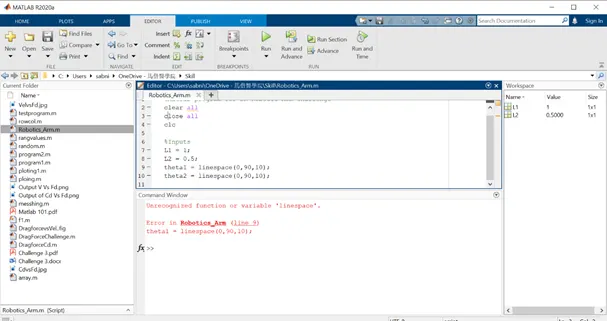
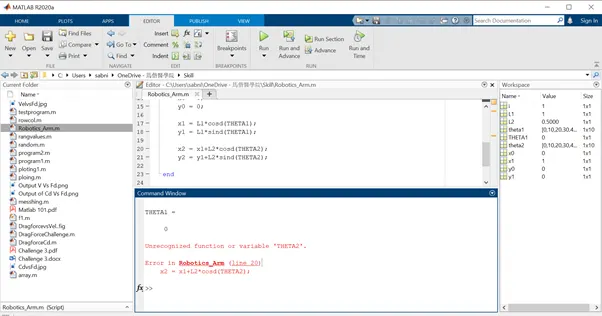
- I forget to define THETA2 variable.
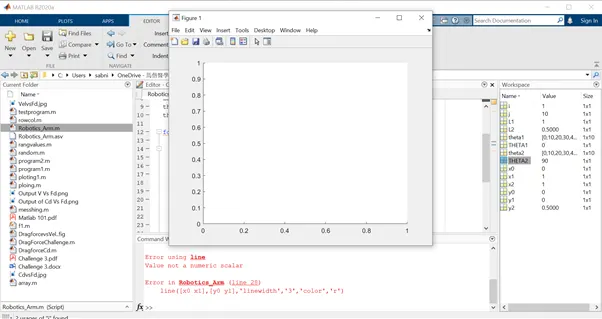
- I tried using line command, but I got error and I recognized that it was due to putting ‘’ to linewidth 3. It should not be under ‘’. i.e ‘3’ corrected to 3
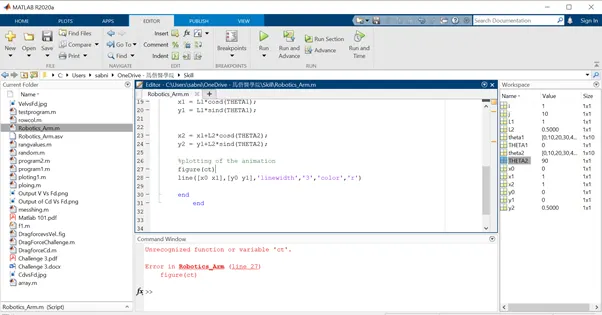
- Variable ct was not defined.
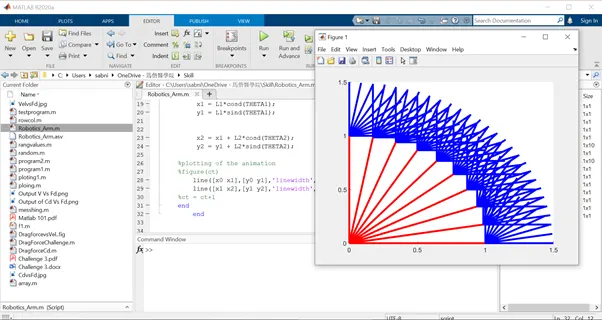
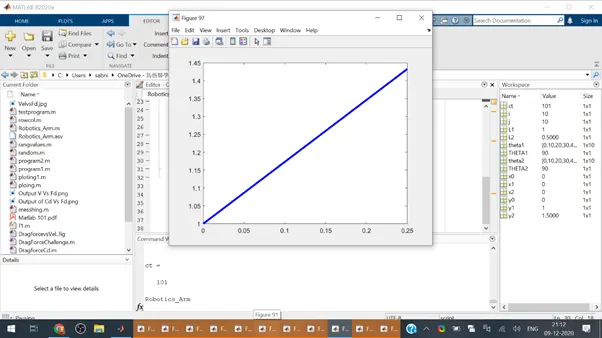
- While plotting individual figures I did not change the range of theta1 and theta 2 so I got 100 figures it crashed memory of the laptop
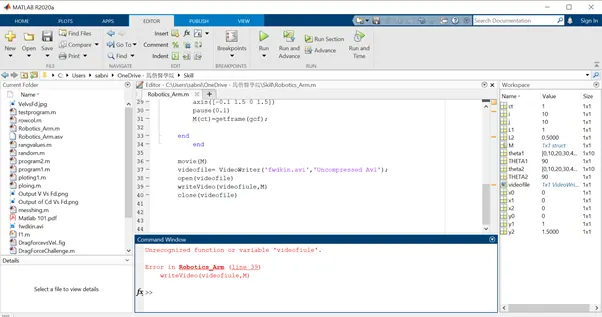
- Typo error in videofile name.
Conclusion
- With above code we can simulate the various positions of Robotics arm end effector and we can find the workspace of the robot for different lengths of link 1 and link 2.