Forward Kinematics of a 2R Robotic Arm using Python
OBJECTIVE:
1) To simlulate the forward kinematics of a 2R Robotic Arm using Python.
2) To capture the animation of it.
INTRODUCTION:
- KINEMATICS:It is a branch of mechanincs in which the motion of a body is considered without any forces that causes the motion.
- ROBOTIC ARM:A Robotic Arm is a mechanical type of an arm which is usually programmable and can perform similar functions such as an human arm. It consists of many links and has an end effector to which either a tool like drilling machine or welding machine is attached.
THEORY:
- FORWARD KINEMATICS:
Forward kinematics refers to the use of the kinematic equations of a robot to compute the position of the end-effector from specified values for the joint parameters.
- 2R ROBOTIC ARM:
It basically consists of 2 links and an end effector or manipulator. One of the links is attached to the base of the robot.
FORMULAE FOR 2R ROBOTIC ARM:
x1=x0+l1⋅cos(θ1)x1=x0+l1⋅cos(θ1)
y1=y0+l1⋅sin(θ1)y1=y0+l1⋅sin(θ1)
x2=x1+l2⋅cos(θ2)x2=x1+l2⋅cos(θ2)
y2=y1+l2⋅sin(θ2)y2=y1+l2⋅sin(θ2)
Here, l1l1= Length of the link 1 (in mtrs)
l2l2= Length of the link 2 (in mtrs)
θ1θ1= Angle of Link 1( in degrees) with respect to the base
θ2θ2= Angle of Link 1( in degrees) with respect to the base
x0,x1&x2x0,x1&x2= x axis coordinates of the link
y0,y1&y2y0,y1&y2= y axis coordinates of the link
Procedure:
Program:
# Forward Kinematics of 2R Robotic Arm

# Importing modules
import math
import matplotlib.pyplot as plt

# Defining the set of values for angles
n_theta=10
theta_start=0
theta_end=math.pi/2


# Initial conditions
x0=0
y0=0
l1=1
l2=0.5

# Empty arrays for angles
theta1=[]
theta2=[]

# Assigning Counter variable
ct=1

for i in range(0,n_theta):
	tmp=theta_start+i*(theta_end-theta_start)/(n_theta-1)
	theta1.append(tmp)
	theta2.append(tmp)

for t1 in theta1:
	for t2 in theta2:

		x1=l1*math.cos(t1)
		y1=l1*math.sin(t1)

		x2=x1+l2*math.cos(t2)
		y2=y1+l2*math.sin(t2)

		filename=str(ct)+'.png'
		ct=ct+1

		plt.figure()
		plt.title('Forward Kinematics of 2R Robotic Arm')
		plt.plot([x0,x1],[y0,y1])
		plt.plot([x1,x2],[y1,y2])
		plt.xlim([0,2])
		plt.ylim([0,2])
		plt.savefig(filename)
Stepwise Explanation:
1) First, we import the math library and plot library in order to perform mathematical calculations and finally plot the result.
2) We input the values of theta from start to end of the cycle and the values of x0, y0, l1 & l2.
3) Then we create empty arrays for theta 1 and theta 2 so a set of values can be taken for these.
4) We assign a counter variable ct for create an animation of the results formed.
5) We use the For loop and append commands to increment the values of the theta 1 and theta 2.
6) We again use For loop for calculating the values of x1, x2, y1 & y2 respectively for each increment of the theta values.
7) We then create a png file for so that all the images get saved into a single folder which could be further processed for animation.
8) We then, create plots and save them as image files.
9) We run the program by pressing Ctrl+B and the execution is free of any errors.
10) There are 100 plots created i.e. from theta1 and theta2 =0 till theta1 and theta2 =90.
11) We use command prompt to create animation using the image magick as shown in the image given below.
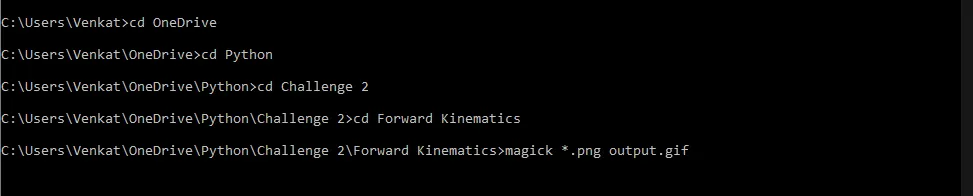
12) We then convert that gif file in the video file.
Results and Discussion:
1) We have written a program in python to simulate the forward kinematics of a 2R Robotic Arm.
2)Therefore the graph has been plotted and the animation was uploaded on youtube and the link is given below.