Forward Kinematics of 2R Robotic Arm
Aim:
The main aim is to simulate the forward kinematics of a 2R Robotic Arm and to create an animation file of the plot.
Theory:
Forward Kinematics:
Forward Kinematics refers to the use of the kinematic equations of a robot to compute the position of the end-effector from specified values for the joint parameters. The kinematics equations of the robot are used in robotics, computer games, and animation. The reverse process that computes the joint parameters that achieve a specified position of the end-effector is known as inverse kinematics.
A robotic arm (not robotic hand) is a type of mechanical arm, usually programmable, with similar functions to a human arm, the arm may be the sum total of the mechanism or may be part of a more complex robot. The links of such a manipulator are connected by joints allowing either rotational motion (such as in an articulated robot) or translational (linear) displacement. The links of the manipulator can be considered to form a kinematic chain. The terminus of the kinematic chain of the manipulator is called the end effector and it is analogous to the human hand.
Working Principle and Setup:
- The parts of the robotic arm are base, Link-1 & 2, Manipulator
- The base is fixed. One end of Link-1 is attached to the base and the other to the link-2 at an angle ‘’. Link-2 end is connected to the manipulator at an angle ‘’.
- The image is shown below.
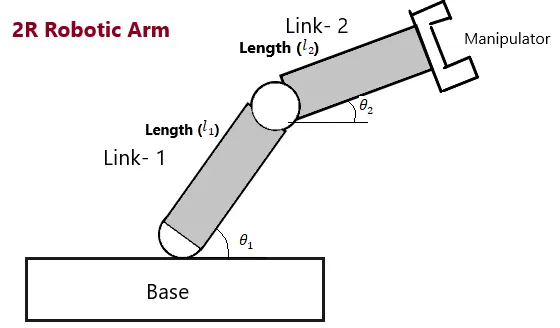
Procedure:
- The code initially takes prerequisites with the length of both the links, theta values.
%Inputs
l1=1;       % Link-1
l2=0.5;     % Link-2
ct=1;       % Count For the iteration
theta1=linspace(0,90,10);   % The angle for the link-1
theta2= linspace(0,90,10);  % The angle for the link-2
- Initially, the x and y values are set to ‘0’.
- The `x_1` and `y_1` value then changes with the angle ‘`theta_1`’
- The `x_2` and `y_2` values changes with the angle `theta_2` along with the `x_1` and `y_1`.
THETA2= theta2(j);
x0=0;
y0=0;

x1= l1*cosd(THETA1);
y1= l1*sind(THETA1);

x2 = x1+ l2*cosd(THETA2);
y2= y1 + l2*sind(THETA2)- The plotting of graphs is done and an axis is created and plots are saved.
%plotting
plot ([x0 x1], [y0 y1],[x1 x2], [y1 y2], 'linewidth', 3)
axis([-0.1 1.5 0 1.5])
pause(0.03)
M(ct) = getframe(gcf);
ct=ct+1;- The Movie is created by using the VideoWriter command and is as follows.
movie(M)
videofile = VideoWriter('forward_kinematics.avi','Uncompressed AVI');
open(videofile)
writeVideo(videofile,M)
close(videofile)
Code:
The Complete code is written below.
%Program to create a Forward Kinematics for a 2R Robotic Arm
clear
close
clc

%Inputs
l1=1;       % Link-1
l2=0.5;     % Link-2
ct=1;       % Count For the iteration
theta1=linspace(0,90,10);   % The angle for the link-1
theta2= linspace(0,90,10);  % The angle for the link-2

for i = 1:length(theta1)
    THETA1= theta1(i);
    for j = 1:length (theta2)
        THETA2= theta2(j);
        x0=0;
        y0=0;

        x1= l1*cosd(THETA1);
        y1= l1*sind(THETA1);

        x2 = x1+ l2*cosd(THETA2);
        y2= y1 + l2*sind(THETA2);


        %plotting
        plot ([x0 x1], [y0 y1],[x1 x2], [y1 y2], 'linewidth', 3)
        axis([-0.1 1.5 0 1.5])
        pause(0.03)
        savefig
        M(ct) = getframe(gcf);
        ct=ct+1;
    end
end

movie(M)
videofile = VideoWriter('forward_kinematics.avi','Uncompressed AVI');
open(videofile)
writeVideo(videofile,M)
close(videofile)
Result:
The animation is created for the 2R Robotic Arm and the video is placed below.
Link:
For Animation Youtube Link: https://youtu.be/95m5y8k2XHw