Finding the global maxima of a stalagmite function and optimizing it using MATLAB code
AIM: Finding the global maxima of a stalagmite function and optimizing it using MATLAB code.
OBJECTIVES:
- Write code in MATLAB to optimize the stalagmite function and find the global maxima of the function.
- Clearly explain the concept of genetic algorithm in your own words and also explain the syntax for ga in MATLAB in your report.
- Make sure that your code gives the same output, even if it is made to run several times.
THEORY:
Genetic Algorithm-
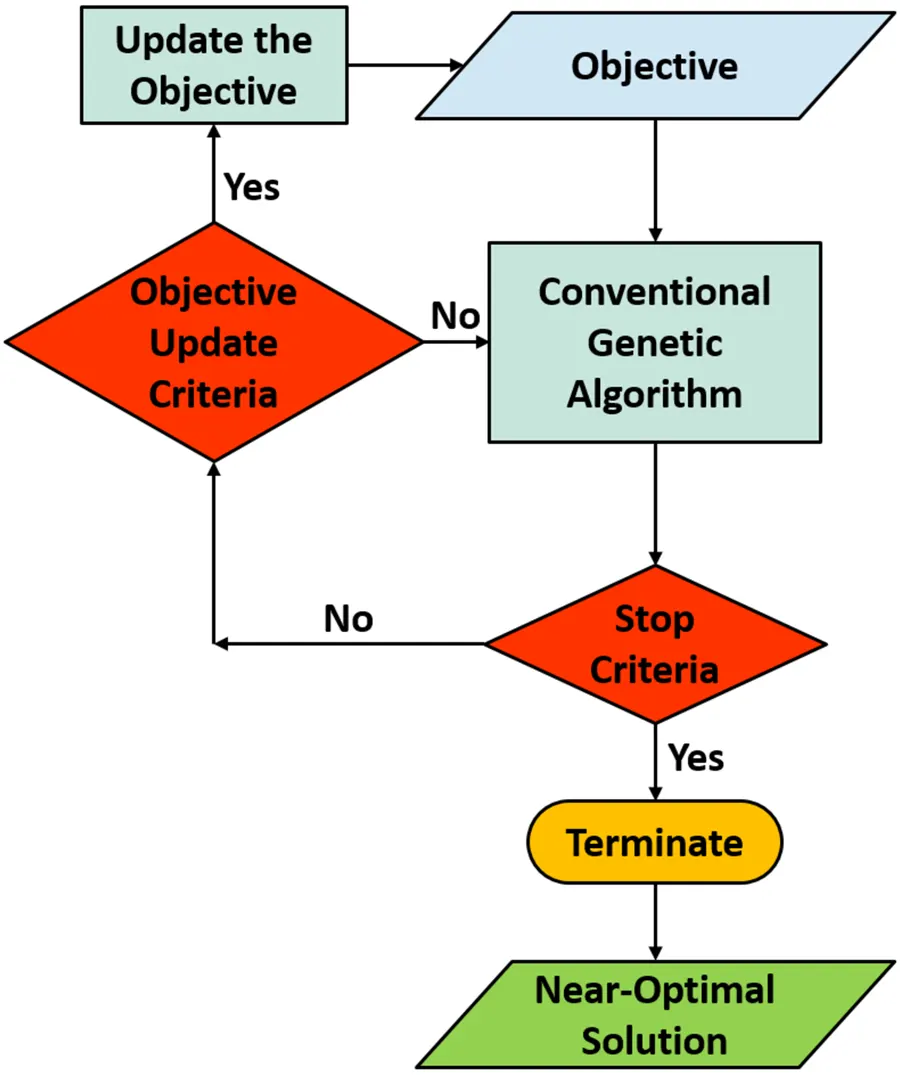
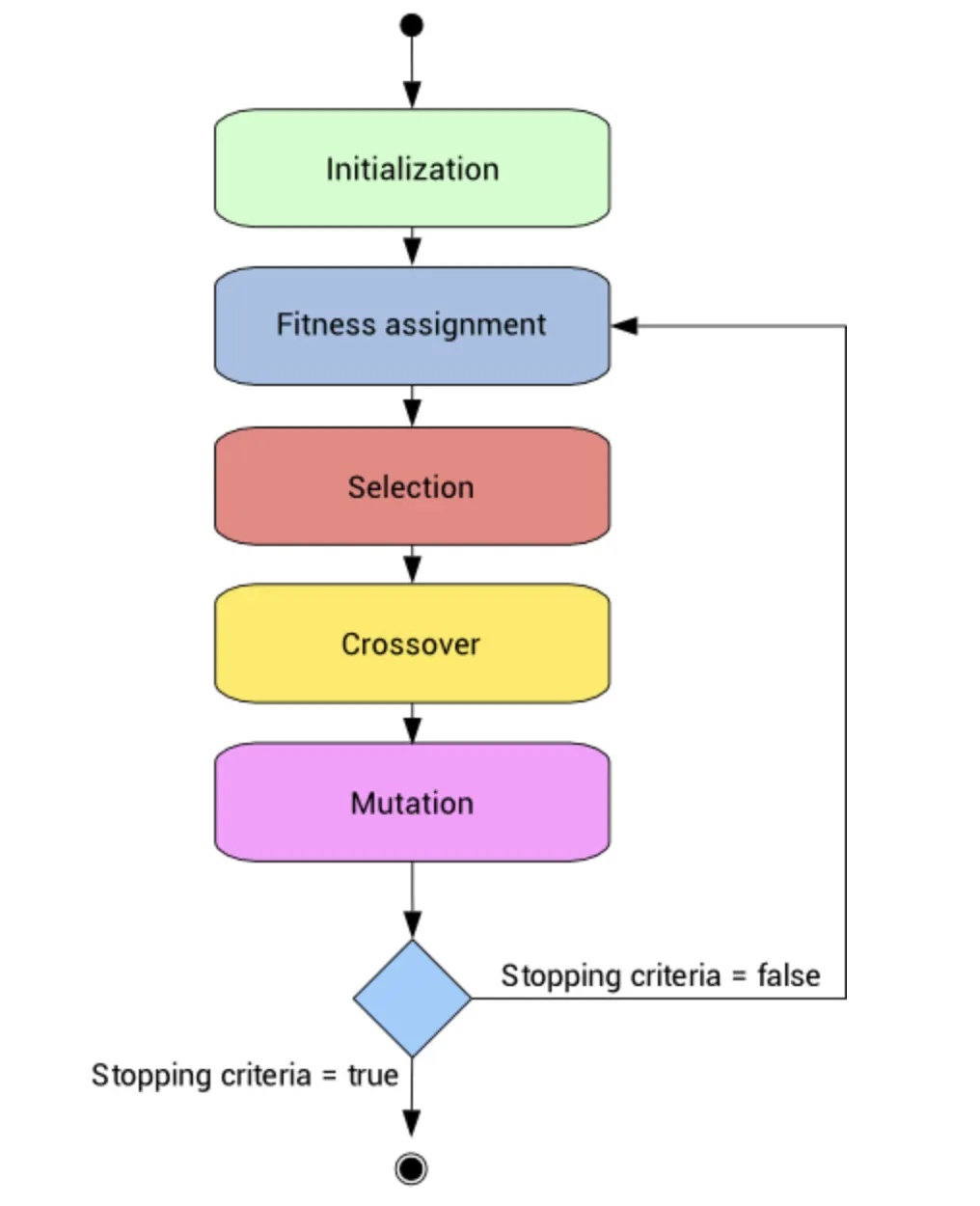
The genetic algorithm is an algorithm used for solving both constrained and unconstrained optimization problems. A genetic algorithm is a search heuristic that is inspired by Charles Darwin’s theory of natural evolution. It selects random inputs called population, check their fitness for selection, and pairing purposes (the pair is called as parents) to generate new data (called as new/next generation). This next-generation data is mutated from data acquired from parents which is essential for computing optimized output.
The genetic algorithm uses three main types of rules at each step to create the next generation from the current population:
- Selection rules select the individuals, called parents, that contribute to the population at the next generation.
- Crossover rules combine two parents to form children for the next generation.
- Mutation rules apply random changes to individual parents to form children.
Syntax of ga-
x=ga(fn,ηvars,A,b,Aeq,beq,lb,Ub)
GOVERNING EQUATION:
F(x,y)=f1x,f1y,f2x,f2y
f1x=[sin(5.1πx+0.5)]6
f1y=[sin(5.1πy+0.5)]6
f2x=exp[−4ln(2)0.64(x−0.0667)2]
f2y=exp[−4ln(2)0.64(y−0.0667)2]
CODE:
Main code:
clear all
close all
clc

% Defining the workspace
x=linspace(0,0.6,150);   %range of X
y=linspace(0,0.6,150);   %range of Y


%Number of iterations = 50
n=50;

% starting the loop
for i=1: length(x)
      for j=1 : length(y)
            coor(1)=x(i);
            coor(2)=y(j);
            f(i,j)=func1(coor);
     end
end

%study 1
tic
for i=1:n
      [coor,fmax(i)]=ga(@func1,2);
      xopt(i)=coor(1);
      yopt(i)=coor(2);
end
time1 = toc;

% plotting unbound iteration case
figure(1)
subplot(2,1,1)
surfc(x,y,-f)
shading interp  %makes the surface look more smoother
hold on
plot3(xopt,yopt,-fmax,'marker','o','markerfacecolor','r','markersize',2)
title('Study1: unbound inputs values')
subplot(2,1,2)
plot(-fmax)
xlabel('Iteration')
ylabel('fmax')
colorbar()


%study 2
tic
for i=1:n
      [coor,fmax(i)]=ga(@func1,2,[],[],[],[],[0;0],[0.6;0.6]);
      xopt(i)=coor(1);
      yopt(i)=coor(2);
end
time2=toc;

% plotting bound iteration case
figure(2)
subplot(2,1,1)
surfc(x,y,-f)
shading interp   %makes the surface look more smoother
hold on
plot3(xopt,yopt,-fmax,'marker','o','markerfacecolor','r','markersize',2)
title('Study2: Bounded inputs values')
subplot(2,1,2)
plot(-fmax)
xlabel('Iteration')
ylabel('fmax')
colorbar()

%options
options = optimoptions('ga');
options = optimoptions('ga','Populationsize',250);

tic
for i=1:n
      [coor,fmax(i)] = ga(@func1,2,[],[],[],[],[0;0],[0.6;0.6],[],[],options);
      xopt(i)=coor(1);
      yopt(i)=coor(2);
end
time3=toc;

% plotting the population bound graph
figure(3)
subplot(2,1,1)
surfc(x,y,-f)
shading interp   %makes the surface look more smoother
hold on
plot3(xopt,yopt,-fmax,'marker','o','markerfacecolor','r','markersize',2)
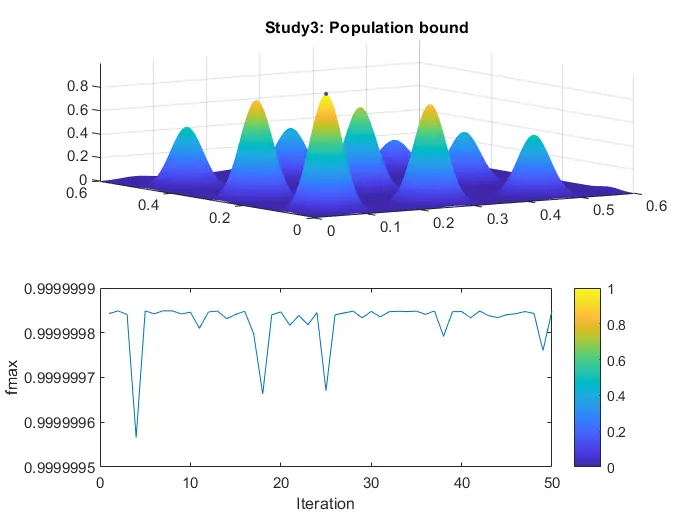
title('Study3: Population bound')
subplot(2,1,2)
plot(-fmax)
xlabel('Iteration')
ylabel('fmax')
colorbar()
Function code:
function[v]= stalagmite(input_vector)

    x=input_vector(1);
    y=input_vector(2);

   f1_x1=(sin((5.1*3.14*x)+.5))^6;
   f1_y1=(sin((5.1*3.14*y)+.5))^6;
   f2_x2=exp(-4*log(2)*(x-.0667)^2/0.64);
   f2_y2=exp(-4*log(2)*(y-.0667)^2/0.64);
   [v]=-(f1_x1*f1_y1*f2_x2*f2_y2);
end
STEP BY STEP EXPLANATION:
- First, we write a code to define the stalagmite function. Here we break down the formula into 4 terms for convenience.
- Then we write the main code where we define two inputs x and y both of which are one dimensional equally spaced array containing 100 elements. We utilize mesh grid command to create an array of x and y values.
- Now we use for loop to input values of the 2D array in stalagmite function. Here we encounter a problem i.e. every time the code is executed different values for stalagmite function are obtained. This is overcome by introducing another loop into the code. We then input these values into the genetic algorithm. For the genetic algorithm ‘ga’ function is used.
- To improve our Genetic Algorithm, we undertake three cases to optimize the function so that we can accurately find the global maxima of the function. We need to do this because the GA randomly takes values and global maxima can change according to that.
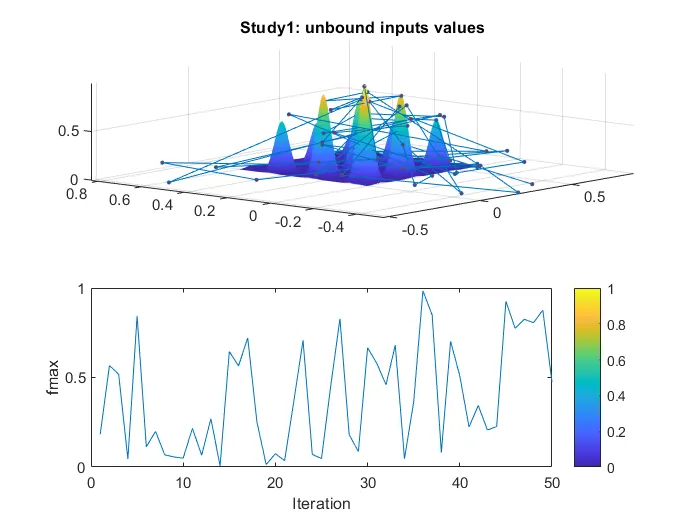
- In case 1 we evaluate all possible global maxima for all the iterations using a loop. We two plot in one figure using subplot command. ‘surfc’ command is used for x vs y graph and for function max vs iteration we use simple ‘plot’ command. The values in figure (1) are unbounded values.
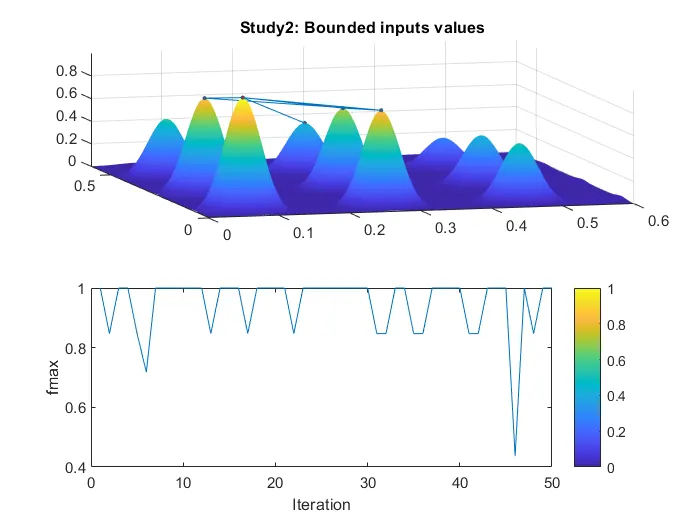
- In case 2 we put an upper bound and lower bound on ‘ga’ function and again plot two plots which we plot during case 1.
- In case 3 we increase GA iterations. We do this because in GA after successive iterations, the population "evolves" toward an optimal solution i.e more the number of iterations, more optimal the solution will be. Now we use the same commands to plot the graph and curve.
OUTPUT:
CASE-1:
CASE-2:
CASE-3:
REFERENCES:
https://in.mathworks.com/help/gads/what-is-the-genetic-algorithm.html