FINAL INDEPENDENT PROJECT
AUTOMATIC CERTIFICATE GENERATION USING MATLAB
AIM OF THE PROJECT- TO WRITE A CODE WHICH WILL MAKE GENERATE CERTIFICATES AUTOMATICALLY USING MATLAB
OBJECTIVES
1. TO CREATE CERTIFICATES EASILY AND WITH GREAT EASE
2. TO MAKE CERTIFICATES AVAILABLE TO ANYONE AT ANYTIME.
3. MAKE TRANSPARENCY AMONG STUDENTS.
PROJECT MOTIVATION
MATLAB is a versatile tool that can automate many tasks. Presented here is a MATLAB code to generate certificates for workshops, conferences, symposiums, etc. Conventionally, educational institutions and companies use specialised tools for report cards and certificates generation on a large scale. This MATLAB code can be extended to generate analysis reports for large data sets as well.
INTRODUCTION
Automatic certificate generation is one of the method through which certificates can be generated with great ease. Certificates are the part of the institutions which will be provided to the students as a part of their excellence in the curriculum or co-curriculum. Certificates can be considered as an encouragement given to the students to achieve more in their curriculum or co-curriculum. The automatic certificate generation using MATLAB will help the institutions to manage the work in a better way as possible. It will help in smooth functioning of the institutions. The institutions will be able to upload the certificates through this system and the students can access the certificates in an easy way. It will also help in transparency.
MAIN CONCEPT
Overview
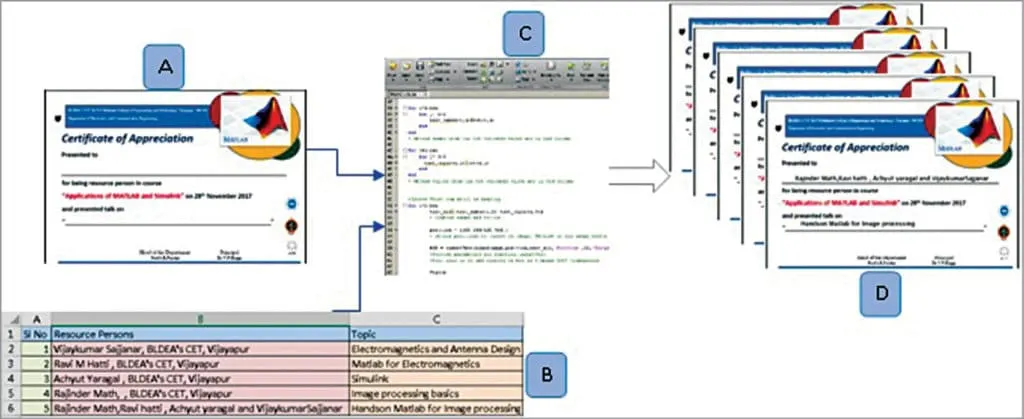
The Automatic Certificate Generation project overview is shown in Fig. 1. File name of the blank certificate (A) is used as input in the code. Details to be written on the certificate are obtained from an Excel sheet (B). The data is written over the blank certificate and many such certificates are generated by the MATLAB code (C). The certificates generated by the program can be saved in a folder with a unique file name (D).
Description
The three major steps involved in this project are shown in Fig. 2. Base image can be in any colour and should be in tif, jpg or png format. The image generated by the program retains properties of the base image. Source code given here only inserts text on the image. Data to be written can be in either .xls or .xlsx format. MS Excel is preferred as it’s a powerful mathematical and statistical tool. It allows data to be internally computed and analysed within the file.
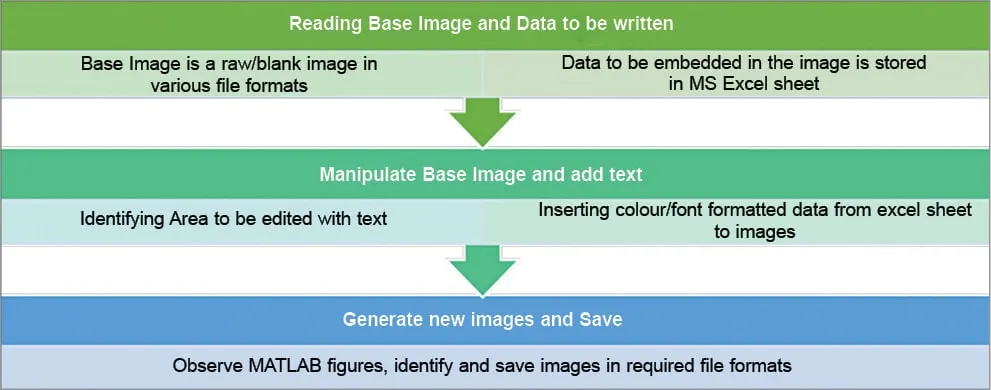
The position at which text is to be inserted can be identified using simple image editor tools such as MS Paint and Picture Manager. Pixels or picture elements are the most basic elements of an image. An image of 1024×768 resolution contains 786,432 pixels or nearly 0.79 megapixels. Pixel positions to be identified are as many as the number of texts and numbers to be inserted on the image. The project code can be very easily manipulated for similar image processing tasks.
The generated MATLAB figures or images can be saved into separate files or a single file as per requirement. By default, the code saves the generated image in .tif format with a unique name. With simple code modifications, images can also be ported to a PDF file.
Working environment
Fig. 3 shows folder contents of the MATLAB working directory. MainCode.m, Certificate_Blank.tif and Registration_Details.xls files should be saved in the same folder.
MainCode.m is the MATLAB M-file containing the main code, Certificate_Blank.tif is the base image, and Certificate_Topic from 1 through 6 are certificates generated from the data in Registration_Details.xls. While running M-file, MATLAB should be permitted to change directory to the location where the main folder is saved.
PROJECT CODE
% main code for Automatic certificate generation using MATLAB


clc % Clear command window.
clear all %Clear variables and functions from memory
close all % closes all the open figure windows
home % Send the cursor home

filename = 'Registration_Details.xls';
[num,txt] = xlsread(filename)
% Read Excel sheet containing details. Text is read from the file
% seperately from numbers


len=length(txt)
% obtain length of text in excel or number of certificates to be generated
% This code provides scalability

blankimage = imread('Certificate_Blank.tif');
% Read blank certificate image

for i=1:len
    for j= 2:2
        text_names(i,j)=txt(i,j)
    end
end
% Obtain names from the txt variable which are in 2nd column

for i=1:len
    for j= 3:3
      text_topic(i,j)=txt(i,j)
    end
end
% Obtain topics from the txt variable which are in 3rd column


%Ignore first row which is heading
for i=2:len
        text_all=[text_names(i,2) text_topic(i,3)]
        % combine names and topics

        position = [100 258;120 416];
        % obtain positions to insert on image, MSPaint or any image editor

        RGB = insertText(blankimage,position,text_all,'FontSize',22,'BoxOpacity',0);
        %Provide parameters for function insertText
        %Font size is 22 and opacity of box is 0 means 100% transparent

        figure
        imshow(RGB)
        %Obtain and display figure in color

        y=i-1
        filename=['Certificate_Topic_' num2str(y)]
        lastf=[filename '.tif']
        saveas(gcf,lastf)
        % generate and save files with .tif extension
end

% Code works for any length of data ROWWISE AND COLUMNWISE
% Last for loop with minor changes facilitate new project implemntations
EXECUTED RESULTS
THE CERTIFICATE_BLANK
CREATED CERTIFICATES
SCOPE OF THE PROJECT
Analysis and presentation of large data sets is a tedious task in applications such as Big Data, IoT and sensors-actuators modelling. The project presented here can be extended and customised for analysis and reports generation in these applications.
This system can help in automatically generating the certificates without any difficulty and with great ease. Sometimes the people will not be having the certificates that are required or they might have misplaced it. Through this system the people need not worry about the loss of the certificates. Since they will be able to access their certificates at anytime from anywhere in the world. It should also have a strong database system. The user interface must be simple and easy to understand by the common man. This system will allow the institutions to manage the certificates with great ease and grace. The features that can be included in the automatic certificate generation using MATLAB are as follows:
- Students database management: The database of the students present in the institution must be maintained in a well organized way. It is required to send the certificates to the particular students of the organization.
- Certificate access: The students will be able to access the certificate online through the use of this system.
- Login id: There will be separate login id that will provide to the people of the institutions as well as the students to upload and access the certificates respectively.
CONCLUSION
HENCE THIS PROGRAM SUCCESSFULLY CREATES CERTIFICATES BY TYAKING INPUTS FROM THE EXCEL SHEET AND USING THEM IN THE CERTIFICATE BLANK.
ALL THE CODE FILES AND EXCEL SHEET WITH ALL THE CREATED CERTIFICATES ARE ATTACHED FOR VERIFICATION.