English Dictionary App & Library Book Management System using PYTHON
# 1A: English Dictionary App
This project uses the skills learned from week 1 to week 6.
The aim of this project is to create an English Dictionary app that returns definitions of English words.
When the application is started, it displays a menu as follows:
Main Menu
Add a new word
Find the meaning
Update a word
Exit
Enter Choice:
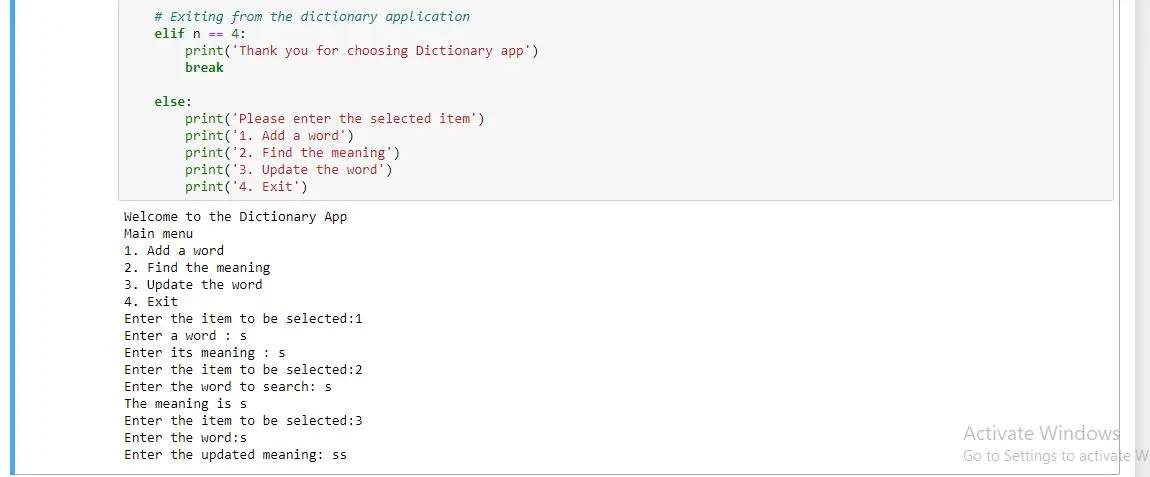
If item 1 is selected, it should prompt for a word and then accept its meaning. This pair of word and its meaning should be stored in a file called ‘words.txt’. When item 2 is selected, it should prompt for a word, search that word in the file ‘words.txt’ and return the meaning if it is found. If the meaning is not found, it should display an appropriate message. Similarly, when choice 3 is entered, it should accept a word and update its meaning. In all the above three cases, the prompt should return to the main menu. The words and their meanings should be stored as a dictionary in words.txt, using the concept of serialization. If choice 4 is selected, a graceful exit should be performed.
CODE:
import json #import json module
print('Welcome to the Dictionary App')
print('Main menu')
print('1. Add a word')
print('2. Find the meaning')
print('3. Update the word')
print('4. Exit')
#Concept of Serialistaion
f = open('words.txt','w')
dictionary = {}
json.dump(dictionary,f)
f.close()
while True:
n = int(input('Enter the item to be selected:'))
# Adding new word and its meaning
if n == 1:
f = open('words.txt','w')
word = input('Enter a word : ')
meaning = input('Enter its meaning : ')
dictionary[word] = meaning
json.dump(dictionary,f)
f.close()
# Searching the meaning of the word to be found
elif n == 2:
f = open('words.txt','r+')
dictionary = json.load(f)
search = input('Enter the word to search: ')
if search in dictionary:
print('The meaning is',dictionary.get(search))
else:
print('Word not found')
json.dump(dictionary,f)
f.close()
# Updating the meaning of the word
elif n == 3:
f = open('words.txt','w')
word = input('Enter the word:')
update_meaning = input('Enter the updated meaning: ')
dictionary[word] = update_meaning
json.dump(dictionary,f)
f.close()
# Exiting from the dictionary application
elif n == 4:
print('Thank you for choosing Dictionary app')
break
else:
print('Please enter the selected item')
print('1. Add a word')
print('2. Find the meaning')
print('3. Update the word')
print('4. Exit')
Output:
1B: Library Book Management System
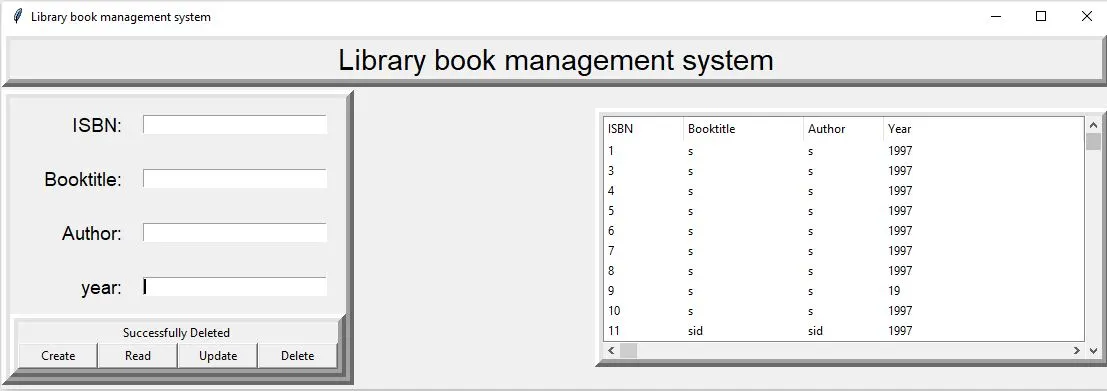
In this project, a Library Book Management System will be implemented with the front end GUI developed using Tkinter and the backend database implemented in SQLite. It is a single window tkinter GUI application which will implement CRUD( create, read, update, delete) operations on a ‘books’ database, in SQLite. The window will contain text widgets to accept / display book title, author, year of publication, ISBN (optional) and a large text area/ list box to display the records which match the search criteria.
#Libraries
# Importing all the required libraries
from tkinter import*
import sqlite3
import tkinter.ttk as ttk
import tkinter.messagebox as tkMessageBox
root =Tk()
root.title("Library book management system")
#Creating Methods for CRUD application
def Database():
global conn, cursor
conn = sqlite3.connect('system.db')
cursor = conn.cursor()
cursor.execute("CREATE TABLE IF NOT EXISTS book (isbn INTEGER PRIMARY KEY AUTOINCREMENT NOT NULL, bookname TEXT, author TEXT, year TEXT)")
def create():
if Booktitle.get() == "" or Author.get() == "" or Year.get() == "":
txt_result.config(text = "Please enter all the fields", fg = "red")
else:
Database()
cursor.execute("INSERT INTO book (bookname, author, year) VALUES (?,?,?)",(str(Booktitle.get()),str(Author.get()),int(Year.get())))
conn.commit()
Booktitle.set("")
Author.set("")
Year.set("")
ISBN.set("")
cursor.close()
conn.close()
txt_result.config(text="Data inserted", fg ="green")
def read():
tree.delete(*tree.get_children())
Database()
cursor.execute("SELECT* FROM Book ORDER BY bookname")
fetch = cursor.fetchall()
for data in fetch:
tree.insert('','end', values = (data[0],data[1],data[2],data[3]))
cursor.close()
txt_result.config(text = "Successfully fetched data", fg= "black")
def update():
Database()
if Booktitle.get() != "":
cursor.execute("UPDATE Book SET bookname = ? WHERE ISBN = ?",(Booktitle.get(),ISBN.get(),))
if Author.get() != "":
cursor.execute("UPDATE Book SET author = ? WHERE ISBN = ?",(Author.get(),ISBN.get(),))
if Year.get() != "":
cursor.execute("UPDATE Book SET year = ? WHERE ISBN = ?",(Year.get(),ISBN.get(),))
conn.commit()
Booktitle.set("")
Author.set("")
Year.set("")
ISBN.set("")
cursor.close()
conn.close()
txt_result.config(text="Successfully Updated ", fg = "black")
def delete():
Database()
cursor.execute("DELETE FROM Book where bookname = ? or ISBN = ? ",(Booktitle.get(),ISBN.get(),))
conn.commit()
Booktitle.set("")
Author.set("")
Year.set("")
ISBN.set("")
cursor.close()
conn.close()
txt_result.config(text="Successfully Deleted ", fg="black")
def exit():
result = tkMessageBox.askquestion('Do you want to exit? (y/n)', icon ='warning')
if result == 'yes':
root.destroy()
exit()
#Variable declaration
# declaring the variables associated with the methods
Booktitle = StringVar()
Author = StringVar()
Year = StringVar()
ISBN = IntVar()
#Frames
#creating frames for displaying output
Top = Frame(root, width =900, height =50, bd =8, relief = 'raise')
Top.pack(side = TOP)
Left =Frame(root, width =300, height= 500, bd =8 , relief ='raise')
Left.pack(side = LEFT)
Right =Frame(root, width =600, height= 500, bd =8 , relief ='raise')
Right.pack(side = RIGHT)
Forms =Frame(Left, width = 300, height = 450)
Forms.pack(side = TOP)
Buttons=Frame(Left, width = 300, height = 100, bd =8, relief ='raise')
Buttons.pack(side = BOTTOM)
#LABELS
#creating labels
txt_title = Label(Top, width = 800, font=('arial',22), text = "Library book management system")
txt_title.pack()
txt_isbn = Label(Forms, text = "ISBN: ", font = ('arial',14), bd=15)
txt_isbn.grid(row=0,stick="e")
txt_bt = Label(Forms, text = "Booktitle: ", font = ('arial',14), bd=15)
txt_bt.grid(row=1,stick="e")
txt_ar = Label(Forms, text = "Author: ", font = ('arial',14), bd=15)
txt_ar.grid(row=2,stick="e")
txt_yr = Label(Forms, text = "year: ", font = ('arial',14), bd=15)
txt_yr.grid(row=3,stick="e")
txt_result = Label(Buttons)
txt_result.pack(side = TOP)
#Entry widget
#Widget for GUI application
isbn = Entry(Forms, textvariable=ISBN,width=30)
isbn.grid(row=0,column=1)
bbt = Entry(Forms, textvariable=Booktitle,width=30)
bbt.grid(row=1,column=1)
ar= Entry(Forms, textvariable=Author,width=30)
ar.grid(row=2,column=1)
yr= Entry(Forms, textvariable=Year,width=30)
yr.grid(row=3,column=1)
#Buttons
#Buttons for GUI application
btn_create = Button(Buttons, width=10, text="Create", command = create)
btn_create.pack(side=LEFT)
btn_read = Button(Buttons, width=10, text="Read", command = read)
btn_read.pack(side=LEFT)
btn_update = Button(Buttons, width=10, text="Update", command = update)
btn_update.pack(side=LEFT)
btn_delete = Button(Buttons, width=10, text="Delete", command = delete)
btn_delete.pack(side=LEFT)
#List
#Creating a tree to display list of data stored in table
scrollbary = Scrollbar(Right, orient=VERTICAL)
scrollbarx = Scrollbar(Right, orient=HORIZONTAL)
tree = ttk.Treeview(Right, columns=("ISBN","Booktitle","Author","Year"))
scrollbary.config(command=tree.yview)
scrollbary.pack(side=RIGHT, fill=Y)
scrollbarx.config(command=tree.xview)
scrollbarx.pack(side=BOTTOM,fill=X)
tree.heading('ISBN', text = 'ISBN', anchor =W)
tree.heading('Booktitle', text = 'Booktitle', anchor =W)
tree.heading('Author', text = 'Author', anchor =W)
tree.heading('Year', text = 'Year', anchor =W)
tree.column('#0', stretch=NO, minwidth=0, width=0)
tree.column('#1', stretch=NO, minwidth=0, width=80)
tree.column('#2', stretch=NO, minwidth=0, width=120)
tree.column('#3', stretch=NO, minwidth=0, width=80)
tree.pack()
#Initialisation
root.mainloop()
Output:
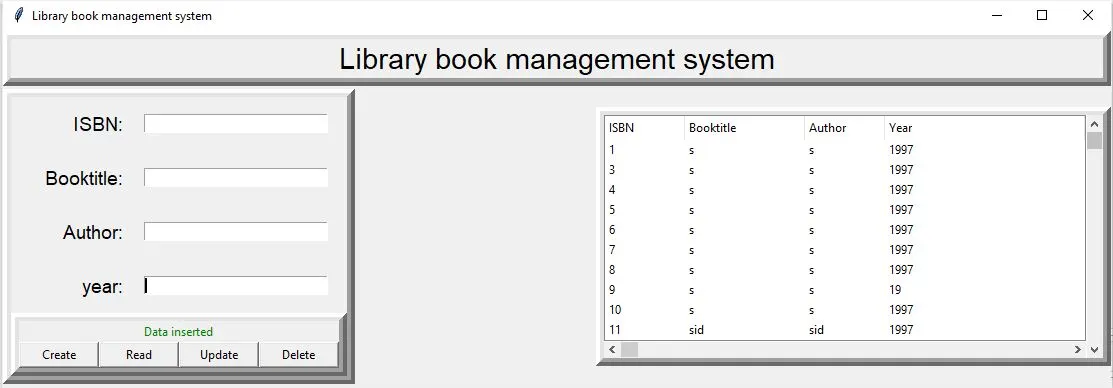
1. Data insertion
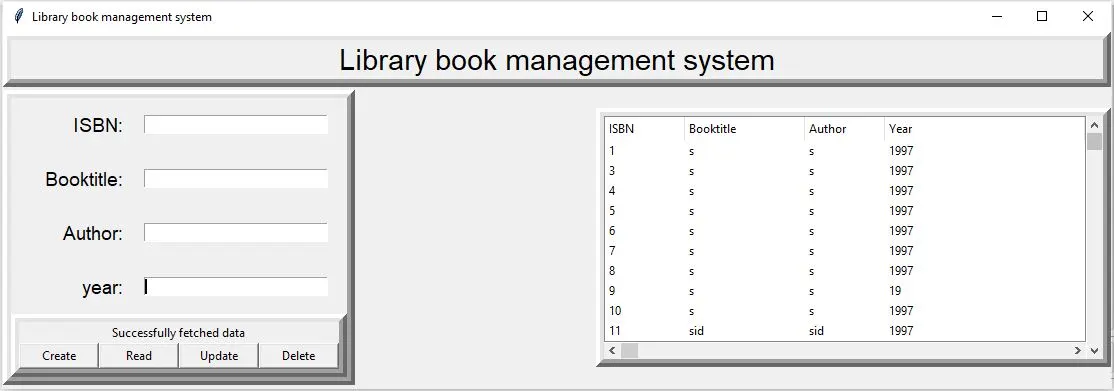
2. Data reading
3. Data deletion