Creation of geometries by Coordinate system methods using AutoCad
Create the geometries from P1 to P2 using all the coordinates system methods. You need to use the Line tool to create the geometries. Where required you need to use the circle tool.
Please read the drawings and find out the missing dimensions before working on the sketches.
Note: Use the Imperial Template and the Decimal Units to draft the features. Dimensions are there for references.
Civil Related Problems: Draw the profile and the trusses using any coordinate system methods. The dimensions are there for references.
Answer:
AIM:
- To create the geometries from P1 to P2 using all the coordinates system methods, to use the Line tool and circle to create the geometries.
-
Geometries P-1 and P-2 drawn using all coordinate systems, and each of the remaining geometries are drawn using any one of the coordinate systems or the direct distance entry method.
INTRODUCTION:
Coordinate Systems:
Coordinate system is a system where numbers are used to determine the unique position of points and/or other geometric elements.
The various coordinate systems are:
- Absolute Coordinate System: Absolute coordinates are based on the UCS origin (0,0), which is the intersection of the X and Y axes. Use absolute coordinates when you know the precise X and Y values of the point.
- Relative Coordinate System: The location of a Relative coordinate is defined by its distance from a reference point. In AutoCAD, when using this system the first point of the drawing/geometry is always absolute, i.e. it is established with respect to origin (0,0) and then all the successive positions are established with respect to their preceding point. This system is further classified as-
- Relative rectangular coordinates:
Relative coordinates are based on the last point entered. Use relative coordinates when you know the location of a point in relation to the previous point.
To specify relative coordinates, precede the coordinate values with an @ sign. For example, entering @3, 4 specifies a point 3 units along the X axis and 4 units along the Y axis from the last point specified.
- Relative polar coordinates:
Relative coordinates are also based on the last point entered. Use relative coordinates when you know the location of a point in relation to the previous point.
To specify relative coordinates, precede the coordinate values with an @ sign. For example, entering @1<45 specifies a point at a distance of 1 unit from the last point specified at an angle of 45 degrees from the X axis.
Direct distance entry method:
Locates the next point at a specified distance in the direction of your cursor
At a prompt to locate a point, enter a numeric value
With direct distance entry, you can quickly specify a point relative to the last point you entered. At any prompt for a point location, you move the cursor first to specify the direction, and then enter a numeric distance.
PROCEDURE:
Line
To Draw Line simple lines or series of lines segments .access to command line by one way of the following:
- Command Line: Line or L
- Menu Bar: Draw- Line
- Draw Bar
- Tool palettes: Draw- Line
- Ribbon: Home- Draw panel -Line
When execute command line the program requires specify first point, display in command line:
Specify first Point:
Specify next point or [Undo]:
Specify next point or [Close/Undo]:
Drafting the geometry given in P1
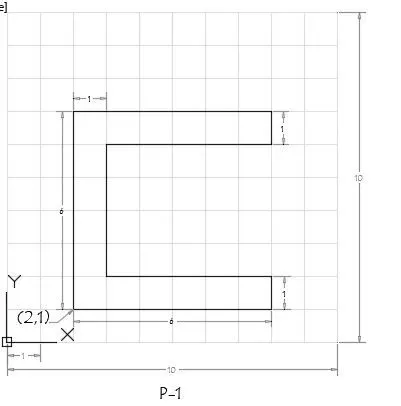
1.Using absolute coordinate system
- Command: _line
Specify first point: 2,1
Specify next point as : 8,1
Specify next point as : 8,2
Specify next point as : 3,8
Specify next point as : U
Specify next point as : 3,2
Specify next point as : 3,6
Specify next point as : 8,6
Specify next point as : 8,7
Specify next point as : 2,7
Specify next point as : C
Command: *Cancel*
RESULT:
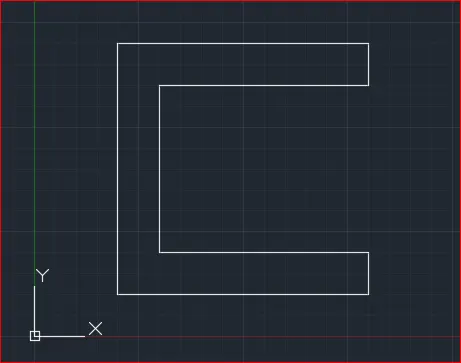
2. Using Relative Rectangular coordinate system
-
Command: _line
Specify first point: 2,1
Specify next point as : @6,0
Specify next point as : @0,1
Specify next point as : @-5,0
Specify next point as : @0,4
Specify next point as : @5,0
Specify next point as : @0,1
Specify next point as : @-6,0
Specify next point as : C
RESULT:
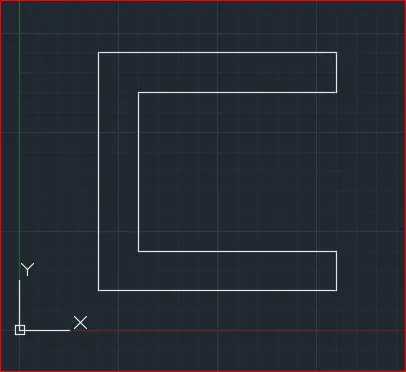
3. Using Relative Polar coordinate system
-
Command: _line
Specify first point: 2,1
Specify next point as : @6<0
Specify next point as : @1<90
Specify next point as : @5<180
Specify next point as : @4<90
Specify next point as : @5<0
Specify next point as : @1<90
Specify next point as : @6<180
Specify next point as : C
RESULT:
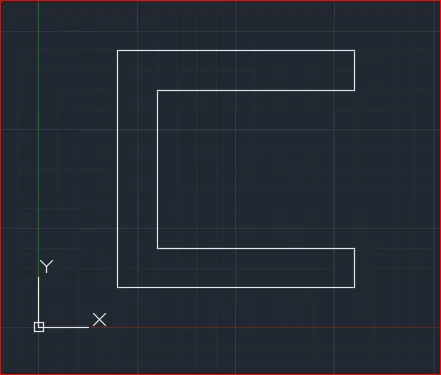
4. Using Direct Distance Entry method
-
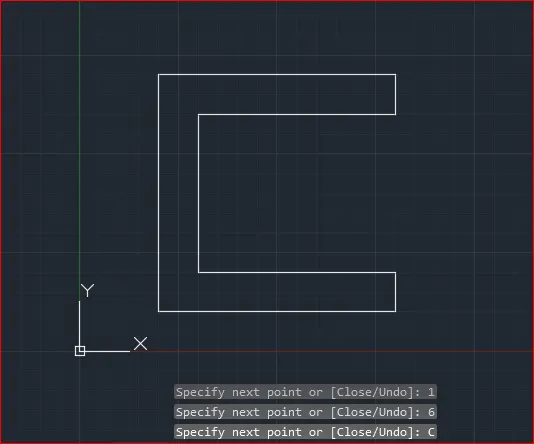
Command: _line
Specify first point: 2,1
Specify next point as : 6
Specify next point as : 1
Specify next point as : 5
Specify next point as : 4
Specify next point as : 5
Specify next point as : 1
Specify next point as : 6
Specify next point as : C
RESULT
------------------------------------------------------------------------------------
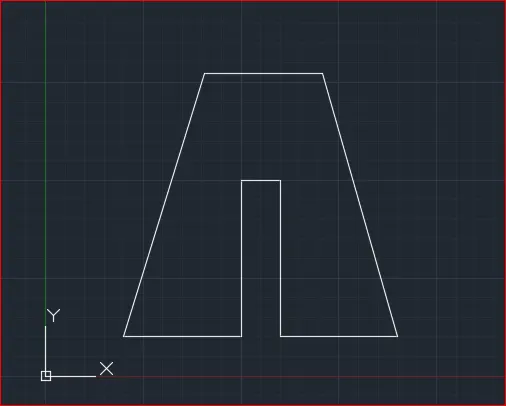
Drafting the geometry given in P2
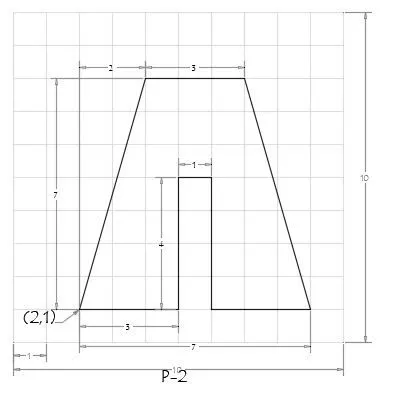
1. Using Absolute coordinate system
-
Command: _line
Specify next point as : 5,1
Specify next point as : 5,5
Specify next point as : 6,5
Specify next point as : 6,1
Specify next point as : 9,1
Specify next point as : 7,8
Specify next point as : 4,8
Specify next point as : C
RESULT:
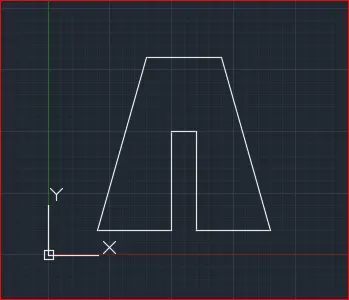
2. Using Relative Rectangular coordinate system
-
Command: _line
Specify first point: 2,1
Specify next point as : @3,0
Specify next point as : @0,4
Specify next point as : @1,0
Specify next point as : @0,-4
Specify next point as : @3,0
Specify next point as : @-2,7
Specify next point as : @-3,0
Specify next point as : C
RESULT:
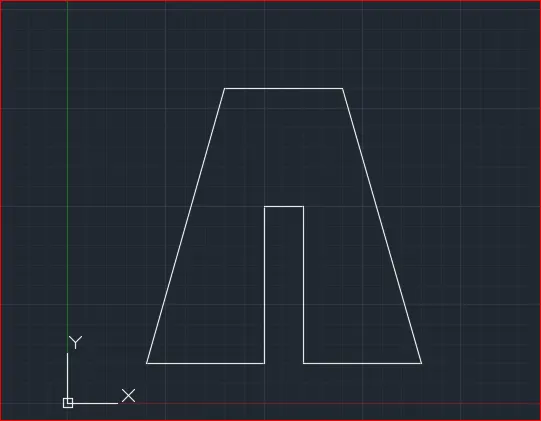
3. Using Relative Polar coordinate system
-
Command: _line
Specify first point: 2.1,2
Specify next point as : @3<0
Specify next point as : @4<90
Specify next point as : @1<0
Specify next point as : @4<270
Specify next point as : @3<0
Specify next point as : @7<106
Specify next point as : @3<180
Specify next point as : C
RESULT:
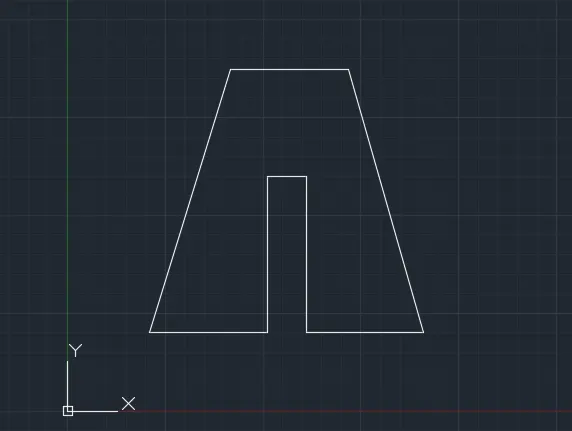
4. Using Direct Distance Entry method
-
Command: _line
Specify next point as : 3
Specify next point as : 4
Specify next point as : 1
Specify next point as : 4
Specify next point as : 3
Specify next point as : 7 in 106 degree
Specify next point as : 3
Specify next point as : C
RESULT:
-----------------------------------------------------------------------------
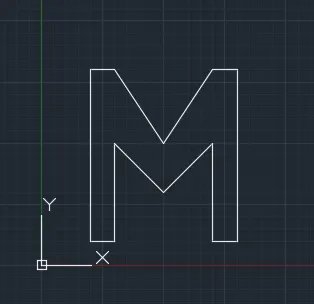
♦ Drafting the geometry given in P4
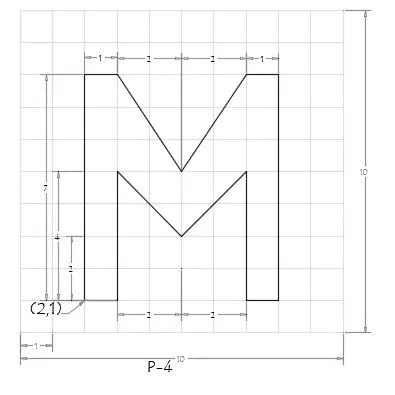
Relative rectangular coordinate system
- Command: _line
Specify first point: 2,1
Specify next point or [Undo]: @1,0
Specify next point or [Undo]: @4,0
Specify next point or [Close/Undo]: U
Specify next point or [Undo]: @0,4
Specify next point or [Close/Undo]: @2,-2
Specify next point or [Close/Undo]: @2,2
Specify next point or [Close/Undo]: @0,-4
Specify next point or [Close/Undo]: @1,0
Specify next point or [Close/Undo]: @0,7
Specify next point or [Close/Undo]: @-1,0
Specify next point or [Close/Undo]: @-2,-3
Specify next point or [Close/Undo]: @-2,3
Specify next point or [Close/Undo]: @-1,0
Specify next point or [Close/Undo]: C
RESULT:
-------------------------------------------------------
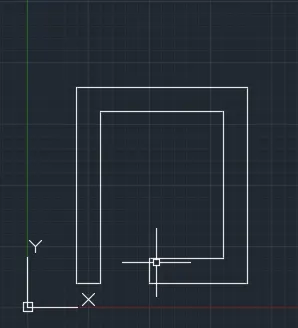
Drafting the geometry given in P-5
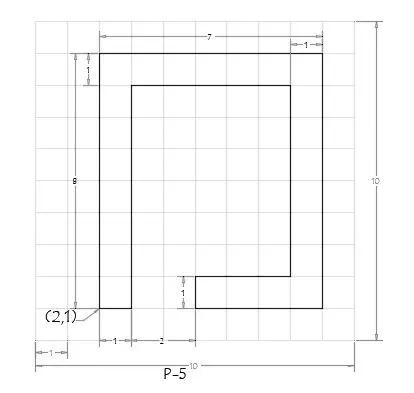
Using Relative Polar coordinate system
- ommand: _line
Specify first point: 2,1
Specify next point or [Undo]: @1<0
Specify next point or [Undo]: @7<90
Specify next point or [Close/Undo]: @5<0
Specify next point or [Close/Undo]: @6<270
Specify next point or [Close/Undo]: @3<180
Specify next point or [Close/Undo]: @1<270
Specify next point or [Close/Undo]: @4<0
Specify next point or [Close/Undo]: @8<90
Specify next point or [Close/Undo]: @7<180
Specify next point or [Close/Undo]: C
RESULT:
--------------------------------------------------
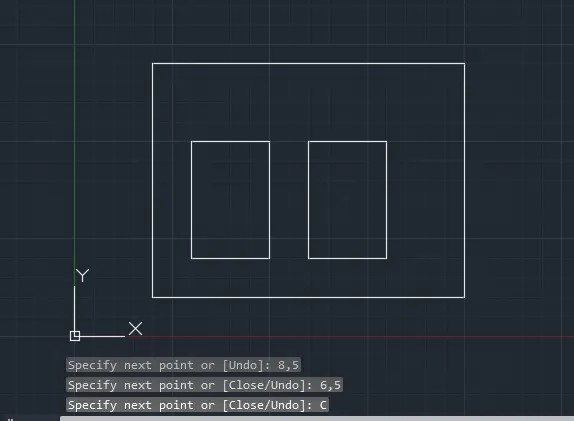
♦ Drafting the geometry given in P7
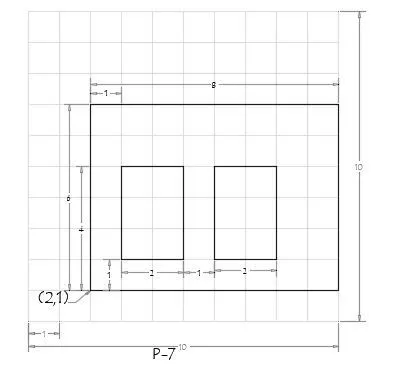
Absolute coordinate system
- Command: _line
Specify first point: 2,1
Specify next point or [Undo]: 10,1
Specify next point or [Undo]: 10,7
Specify next point or [Close/Undo]: 2,7
Specify next point or [Close/Undo]: C - Command: _line
Specify first point: 3,2
Specify next point or [Undo]: 5,2
Specify next point or [Undo]: 5,5
Specify next point or [Close/Undo]: 3,5
Specify next point or [Close/Undo]: C - Command: _line
Specify first point: 6,2
Specify next point or [Undo]: 8,2
Specify next point or [Undo]: 8,5
Specify next point or [Close/Undo]: 6,5
Specify next point or [Close/Undo]: C
RESULT:
----------------------------------------------------------------------------------------------
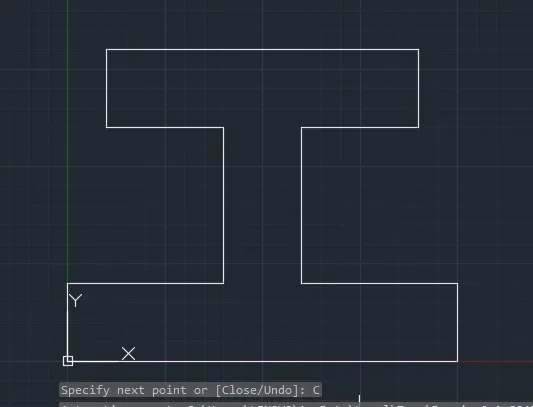
Drafting the geometry given in P-8
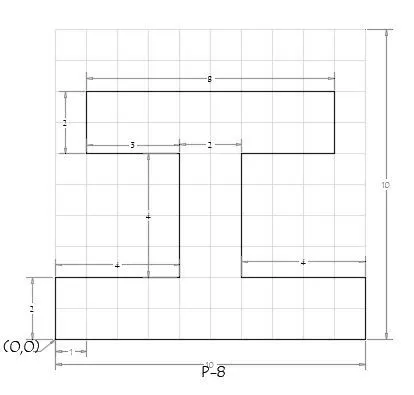
Relative Rectangular coordinate system
- Command: _line
Specify first point: 0,0
Specify next point or [Undo]: @10,0
Specify next point or [Undo]: @0,2
Specify next point or [Close/Undo]: @-4,0
Specify next point or [Close/Undo]: @0,4
Specify next point or [Close/Undo]: @3,0
Specify next point or [Close/Undo]: @0,2
Specify next point or [Close/Undo]: @-8,0
Specify next point or [Close/Undo]: @0,-2
Specify next point or [Close/Undo]: @3,0
Specify next point or [Close/Undo]: @0,-4
Specify next point or [Close/Undo]: @-4,0
Specify next point or [Close/Undo]: C
RESULT:
-------------------------------------------------------------------------------------
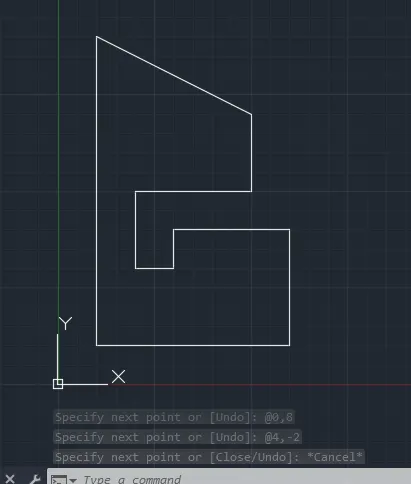
♦ Drafting the geometry given in P-9
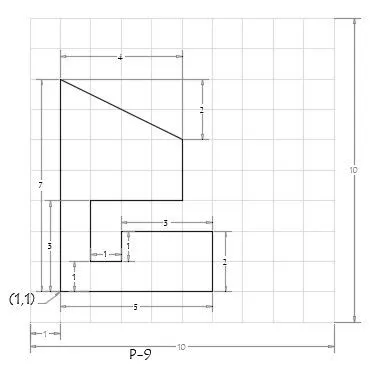
Relative Rectangular coordinate system
- Command: _line
Specify first point: 1,1
Specify next point or [Undo]: @0,7
Specify next point or [Undo]: @5,6
Specify next point or [Close/Undo]: _u
Specify next point or [Undo]: @4,-2
Specify next point or [Close/Undo]: *Cancel*
Command: _line
Specify first point: 1,1
Specify next point or [Undo]: @0,8
Specify next point or [Undo]: @4,-2
Specify next point or [Close/Undo]: *Cancel*
RESULT:
--------------------------------------------------------------------
Drafting the geometry given in P-10
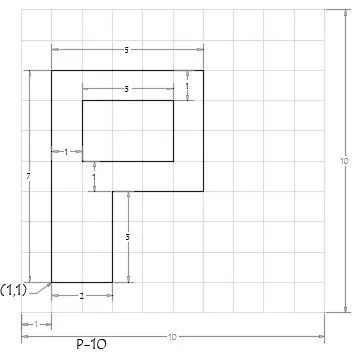
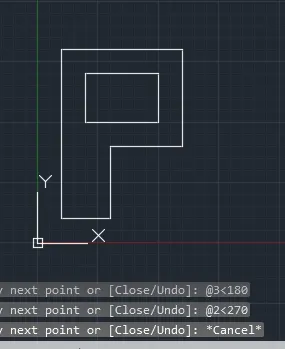
Relative Polar coordinate system
- Command: _line
Specify first point: 1,1
Specify next point or [Undo]: @2<0
Specify next point or [Undo]: @3<90
Specify next point or [Close/Undo]: @3<0
Specify next point or [Close/Undo]: @4<90
Specify next point or [Close/Undo]: @5<180
Specify next point or [Close/Undo]: @7<270
Specify next point or [Close/Undo]: *Cancel*
Command:
Command: _line
Specify first point: 2,5
Specify next point or [Undo]: @3<0
Specify next point or [Undo]: @2<90
Specify next point or [Close/Undo]: @3<180
Specify next point or [Close/Undo]: @2<270
Specify next point or [Close/Undo]: *Cancel*
RESULT:
---------------------------------------------------
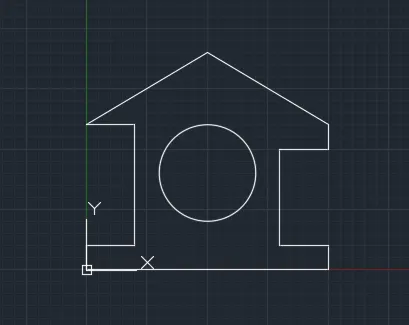
♦ Drafting the Wood profile as shown in the given image
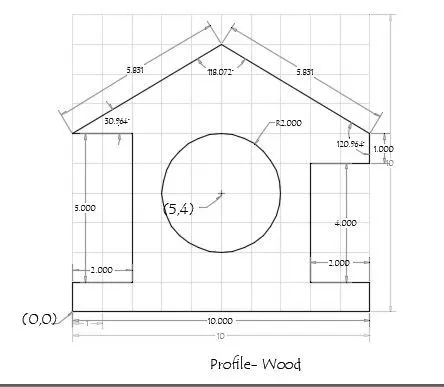
Absolute coordinate system :
- Command: _line
Specify first point: 0,00
Specify next point or [Undo]: 10,0
Specify next point or [Undo]: 10,1
Specify next point or [Close/Undo]: 8,1
Specify next point or [Close/Undo]: 8,5
Specify next point or [Close/Undo]: 10,5
Specify next point or [Close/Undo]: 10,6
Specify next point or [Close/Undo]: 5,9
Specify next point or [Close/Undo]: 0,6
Specify next point or [Close/Undo]: 2,6
Specify next point or [Close/Undo]: 2,1
Specify next point or [Close/Undo]: 0,1
Specify next point or [Close/Undo]: C - Command: _circle
Specify center point for circle or [3P/2P/Ttr (tan tan radius)]: 5,4
Specify radius of circle : 2
RESULT:
--------------------------------------------------------------------
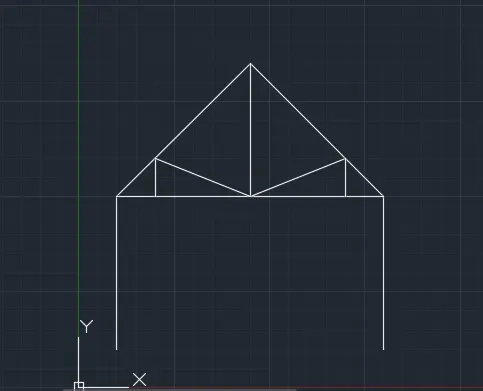
Drafting the Queen Post Truss as shown in the given image
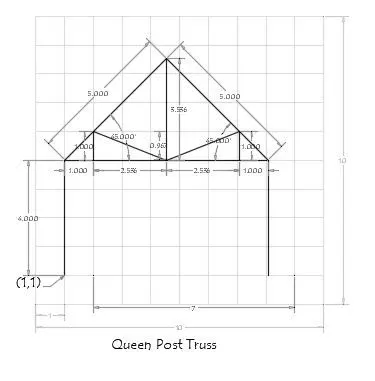
Absolute coordinate system :
- Command: _line
Specify first point: 1,1
Specify next point or [Undo]: 1,5
Specify next point or [Undo]: 4.5,8.5
Specify next point or [Close/Undo]: 8,5
Specify next point or [Close/Undo]: 8,1
Specify next point or [Close/Undo]: *Cancel* - Command: _line
Specify first point: 1,5
Specify next point or [Undo]: 8,5
Specify next point or [Undo]: *Cancel* - Command: _line
Specify first point: 2,5
Specify next point or [Undo]: 2,6 - Specify next point or [Undo]: 4.5,5
Specify next point or [Undo]: *Cancel* - Command: _line
Specify first point: 4.5,5
Specify next point or [Undo]: 7,6
Specify next point or [Undo]: 7,5
Specify next point or [Close/Undo]: *Cancel* - Command: _line
Specify first point: 4.5,5
Specify next point or [Undo]: 4.5,8.5
Specify next point or [Undo]: *Cancel*
Command:
RESULT:
------------------------------------------------------------------------------
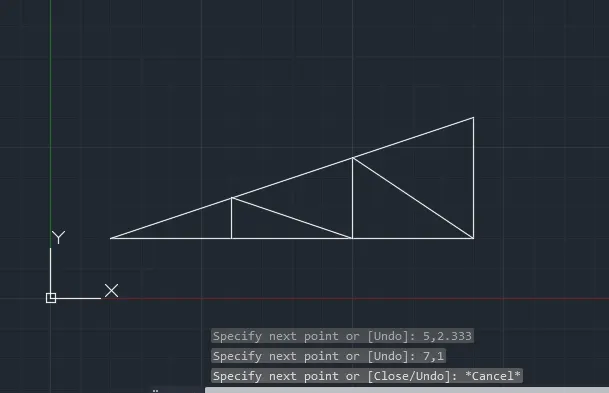
Drafting the Queen Mono Pitch as shown in the given image
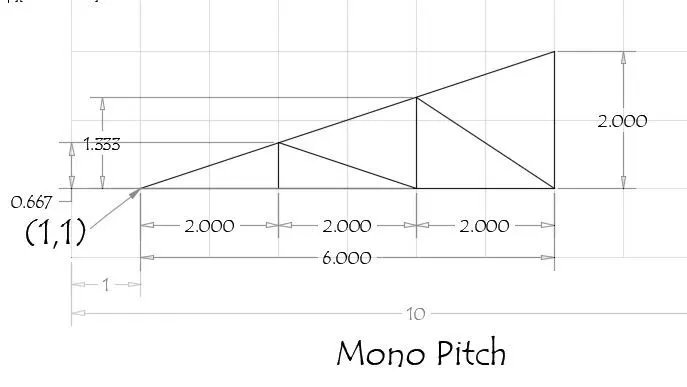
Absolute coordinate system :
- Command: _line
Specify first point: 1,1
Specify next point or [Undo]: 7,1
Specify next point or [Undo]: 7,3
Specify next point or [Close/Undo]: C - Command: _line
Specify first point: 3,1
Specify next point or [Undo]: 3,1.667
Specify next point or [Undo]: 5,1
Specify next point or [Close/Undo]: 2.333
Specify next point or [Undo]: 7,1
Specify next point or [Close/Undo]: *Cancel*
RESULT: