Creation of geometries by Coordinate system methods using AutoCad
- To Create the geometries from P1 to P2 using all the coordinates system methods.
- Absolute coordinate system
- Relative coordinate system
- Polar coordinate system
Click on AutoCad on the desktop and open it
Click on new
Set the units and limits
Use line command to start with the drawing
Using absolute coordinate systems:
Enter the line command,
- Specify the first point type 2,1in command prompt and press enter (starting point)
- Specify the next point at 8,1 and press enter
- Specify the next point at 8,2 and press enter
- Specify the next point at 3,2 and press enter
- Specify the next point at 3,6 and press enter
- Specify the next point at 8,6 and press enter
- Specify the next point at 8,7 and press enter
- Specify the next point at 8,2 and press enter
- Specify the next point or close, select the close option from the command bar press enter

Relative coordinate method:
- Enter the line command
- Specify the 1st point: type 2,1 in the command bar and press enter (starting point)
- Specify the next point as @8,0 and press enter
- Specify the next point as @0,2 and press enter
- Specify the next point as @-5,0 and press enter
- Specify the next point as @0,6and press enter
- Specify the next point as @8,0 and press enter
- Specify the next point as @0,7 and press enter
- Specify the next point as @0, -2 and press enter
- Specify the next point or close, select close option from the command bar and press enter
Polar coordinates method:
- Specify 1st point:2,1
- Specify next point as @6<0
- Specify next point as @1<90
- Specify next point as @5<180
- Specify next point as @5<90
- Specify next point as @5<0
- Specify next point as @1<90
- Specify next point as @6<180
- Specify the next point or close, select close option from the command bar and press enter
- Using absolute coordinate system:
- Enter the line command
- Specify the 1st point: type 2,1 in the command bar and press enter (starting point)
- Specify the next point at 5,1 and press enter
- Specify the next point at 5,5 and press enter
- Specify the next point at 6,5 and press enter
- Specify the next point at 6, -5 and press enter
- Specify the next point at 6,9 and press enter
- Specify the next point at 9,7 and press enter
- Specify the next point at 7, -4 and press enter
- Specify the next point or close, select close option from the command bar and press enter

Using relative coordinate system:
- Specify the 1st point: type 2,1 in the command bar and press enter (starting point)
- Specify the next point at @3,0 and press enter
- Specify the next point at @0,4 and press enter
- Specify the next point at @1,0and press enter
- Specify the next point at @0,-4 and press enter
- Specify the next point at @3,0 and press enter
- Specify the next point at @-2,7 and press enter
- Specify the next point at @-3,0 and press enter
- Specify the next point or close, select close option from the command bar and press enter
Using polar coordinate system
- Enter the line command
- Specify the 1st point: type 2,1 in the command bar and press enter (starting point)
- Specify next point as @7<45, press enter
- Specify next point as @3<0, press enter
- Specify next point as @7<225, press enter
- Specify next point as @3<180, press enter
- Specify next point as @4<90, press enter
- Specify next point as @1<180, press enter
- Specify next point as @4<270, press enter
- Specify the next point or close, select close option from the command bar and press enter
- Using absolute coordinate system:
- Enter the line command
- Specify the 1st point: type 2,1 in the command bar and press enter (starting point)
- Specify the next point at 3,1 and press enter
- Specify the next point at 3,4 and press enter
- Specify the next point at 5,2 and press enter
- Specify the next point at 7,4 and press enter
- Specify the next point at 7,1 and press enter
- Specify the next point at 8,1 and press enter
- Specify the next point at 8,7 and press enter
- Specify the next point at 7,7 and press enter
- Specify the next point at 5,4 and press enter
- Specify the next point at 3,7 and press enter
- Specify the next point at 2,7 and press enter
- Specify the next point or close, select close option from the command bar and press enter

Using relative coordinate system
- Specify the 1st point: type 2,1 in the command bar and press enter (starting point)
- Specify the next point at @3,0 and press enter
- Specify the next point at @0,4 and press enter
- Specify the next point at @1,0and press enter
- Specify the next point at @0,-4 and press enter
- Specify the next point at @3,0 and press enter
- Specify the next point at @-2,7 and press enter
- Specify the next point at @-3,0 and press enter
- Specify the next point or close, select close option from the command bar and press enter
Using polar coordinate system
- Enter the line command
- Specify the 1st point: type 2,1 in the command bar and press enter (starting point)
- Specify next point as @7<90, press enter
- Specify next point as @1<0, press enter
- Specify next point as @-3<135, press enter
- Specify next point as @3<45, press enter
- Specify next point as @1<0, press enter
- Specify next point as @7<270, press enter
- Specify next point as @1<180, press enter
- Specify next point as @4<90, press enter
- Specify next point as @3<225, press enter
- Specify next point as @3<135, press enter
- Specify next point as @4<270, press enter
- Specify the next point or close, select close option from the command bar and press enter
- Using absolute coordinate system:
- Enter the line command
- Specify the 1st point: type 2,1 in the command bar and press enter (starting point)
- Specify the next point at 3,1 and press enter
- Specify the next point at 3,8 and press enter
- Specify the next point at 8,8 and press enter
- Specify the next point at 8,2 and press enter
- Specify the next point at 5,2 and press enter
- Specify the next point at 9,1 and press enter
- Specify the next point at 9,9 and press enter
- Specify the next point at 2,9 and press enter
- Specify the next point or close, select close option from the command bar and press enter

Using relative coordinate system
- Specify the 1st point: type 2,1 in the command bar and press enter (starting point)
- Specify the next point at @1,0 and press enter
- Specify the next point at @0,7 and press enter
- Specify the next point at @5,0and press enter
- Specify the next point at @0,-6 and press enter
- Specify the next point at @-3,0 and press enter
- Specify the next point at @0,-1 and press enter
- Specify the next point at @4,0 and press enter
- Specify the next point at @0,8 and press enter
- Specify the next point at @-7,0 and press enter
- Specify the next point or close, select close option from the command bar and press enter
Using polar coordinate system
- Enter the line command
- Specify the 1st point: type 2,1 in the command bar and press enter (starting point)
- Specify next point as @1<0, press enter
- Specify next point as @7<90, press enter
- Specify next point as @5<0, press enter
- Specify next point as @-6<90, press enter
- Specify next point as @-3<0, press enter
- Specify next point as @-1<90, press enter
- Specify next point as @4<0, press enter
- Specify next point as @8<90, press enter
- Specify next point as @-7<0, press enter
- Specify the next point or close, select close option from the command bar and press enter
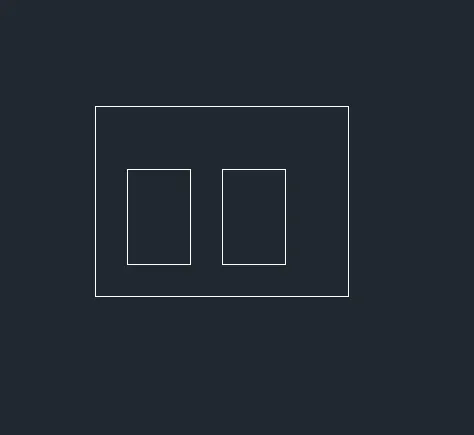
- Using absolute coordinate system:
- Enter the line command
- Specify the 1st point: type 2,1 in the command bar and press enter (starting point)
- Specify the next point at 2,6 and press enter
- Specify the next point at 2,10 and press enter
- Specify the next point at 10,10 and press enter
- Specify the next point at 10,2 and press enter
- Again, enter line specify 1st point as 3,2 and press enter
- Specify the next point at 3,3 and press enter
- Specify the next point at 3,5 and press enter
- Specify the next point at 5,5 and press enter
- Specify the next point or close
- Again, enter line command specify 1st point as 6,2
- Specify the next point at 6,3 and press enter
- Specify the next point at 6,8 and press enter
- Specify the next point at 8,1 and press enter
- Specify the next point or close, select close option from the command bar and press enter
Using relative coordinate system
- Specify the 1st point: type 2,1 in the command bar and press enter (starting point)
- Specify the next point at @1,0 and press enter
- Specify the next point at @0,4 and press enter
- Specify the next point at @8,0and press enter
- Specify the next point at @0,10 and press enter
- Specify the next point at @-8,0 and press enter
- Again, enter line specify 1st point as 3,2 and press enter
- Specify the next point at @0,3 and press enter
- Specify the next point at @2,0 and press enter
- Specify the next point at @0,2 and press enter
- Specify the next point at @6,1 and press enter
- Again, enter line command specify 1st point as 6,2
- Specify the next point at @0,3 and press enter
- Specify the next point at @2,0 and press enter
- Specify the next point at @0,2 and press enter
- Specify the next point or close, select close option from the command bar and press enter
Using polar coordinate system
- Enter the line command
- Specify the 1st point: type 2,1 in the command bar and press enter (starting point)
- Specify next point as @6<90, press enter
- Specify next point as @8<0, press enter
- Specify next point as @6<270, press enter
- Specify the next point or close, select close option from the command bar and press enter
- Again, enter line specify 1st point as 3,2 and press enter
- Specify next point as @3<90, press enter
- Specify next point as @2<0, press enter
- Specify next point as @3<270, press enter
- Specify the next point or close, select close option from the command bar and press enter
- Again, enter line command specify 1st point as 6,2
- Specify next point as @3<90, press enter
- Specify next point as @2<0, press enter
- Specify next point as @3<270, press enter
- Specify the next point or close, select close option from the command bar and press enter
- Using absolute coordinate system:
- Enter the line command
- Specify the 1st point: type 0,0 in the command bar and press enter (starting point)
- Specify the next point at 10,0 and press enter
- Specify the next point at 10,2 and press enter
- Specify the next point at 2,6and press enter
- Specify the next point at 6,6 and press enter
- Specify the next point at 6,10 and press enter
- Specify the next point at 10,8 and press enter
- Specify the next point at 8,1 and press enter
- Specify the next point at 4,4 and press enter
- Specify the next point at 4,1 and press enter
- Specify the next point or close, select close option from the command bar and press enter

Using relative coordinate system
- Specify the 1st point: type 0,0 in the command bar and press enter (starting point)
- Specify the next point at @10,0 and press enter
- Specify the next point at @0,2 and press enter
- Specify the next point at @-4,0and press enter
- Specify the next point at @0,4 and press enter
- Specify the next point at @3,0 and press enter
- Specify the next point at @0,2and press enter
- Specify the next point at @-8,0 and press enter
- Specify the next point at @0,-2 and press enter
- Specify the next point at @3,0 and press enter
- Specify the next point at @0,-4and press enter
- Specify the next point at @4,0 and press enter
- Specify the next point or close, select close option from the command bar and press enter
Using polar coordinate system
- Enter the line command
- Specify the 1st point: type 0,0 in the command bar and press enter (starting point)
- Specify next point as @4<90, press enter
- Specify next point as @3<180, press enter
- Specify next point as @2<90, press enter
- Specify next point as @8<0, press enter
- Specify next point as @2<270, press enter
- Specify next point as @3<180, press enter
- Specify next point as @4<270, press enter
- Specify next point as @4<0, press enter
- Specify next point as @2<270, press enter
- Specify the next point or close, select close option from the command bar and press enter
- Using absolute coordinate system:
- Enter the line command
- Specify the 1st point: type 1,1 in the command bar and press enter (starting point)
- Specify the next point at 6,1 and press enter
- Specify the next point at 3,6 and press enter
- Specify the next point at 3,2and press enter
- Specify the next point at 2,4 and press enter
- Specify the next point at 5,4 and press enter
- Specify the next point at 5,6 and press enter
- Specify the next point at 6,8 and press enter
- Specify the next point at 8,1 and press enter
- Specify the next point or close, select close option from the command bar and press enter

Using relative coordinate system
- Specify the 1st point: type 1,1 in the command bar and press enter (starting point)
- Specify the next point at @6,0 and press enter
- Specify the next point at @0,2 and press enter
- Specify the next point at @-3,0and press enter
- Specify the next point at @0,1 and press enter
- Specify the next point at @-1,0 and press enter
- Specify the next point at @0,2and press enter
- Specify the next point at @3,0 and press enter
- Specify the next point at @0,2 and press enter
- Specify the next point at @3,0 and press enter
- Specify the next point at @0,2and press enter
- Specify the next point at @4,0 and press enter
- Specify the next point or close, select close option from the command bar and press enter
Using polar coordinate system
- Enter the line command
- Specify the 1st point: type 1,1 in the command bar and press enter (starting point)
- Specify next point as @5<0, press enter
- Specify next point as @2<90, press enter
- Specify next point as @3<180, press enter
- Specify next point as @1<270, press enter
- Specify next point as @1<180, press enter
- Specify next point as @2<90, press enter
- Specify next point as @4<165, press enter
- Specify the next point or close, select close option from the command bar and press enter
- Using absolute coordinate system:
- Enter the line command
- Specify the 1st point: type 1,1 in the command bar and press enter (starting point)
- Specify the next point at 1,8 and press enter
- Specify the next point at 6,8 and press enter
- Specify the next point at 6,4and press enter
- Specify the next point at 3,4 and press enter
- Specify the next point at 1,4 and press enter
- Specify the next point or close, select close option from the command bar and press enter
- Again, enter line specify 1st point as 2,5 and press enter
- Specify the next point at 2,7 and press enter
- Specify the next point at 5,7 and press enter
- Specify the next point at 5,5 and press enter
- Specify the next point or close, select close option from the command bar and press enter

Using relative coordinate system
- Specify the 1st point: type 1,1 in the command bar and press enter (starting point)
- Specify the next point at @2,0 and press enter
- Specify the next point at @0,3 and press enter
- Specify the next point at @3,0 and press enter
- Specify the next point at @0,4 and press enter
- Specify the next point at @-5,0 and press enter
- Specify the next point or close, select close option from the command bar and press enter
- Again, enter line specify 1st point as 2,5 and press enter
- Specify the next point at @0,2and press enter
- Specify the next point at @3,0 and press enter
- Specify the next point at @0,-2 and press enter
- Specify the next point or close, select close option from the command bar and press enter
Using polar coordinate system
- Enter the line command
- Specify the 1st point: type 1,1 in the command bar and press enter (starting point)
- Specify next point as @2<0, press enter
- Specify next point as @3<90, press enter
- Specify next point as @3<0, press enter
- Specify next point as @4<90, press enter
- Specify next point as @5<180, press enter
- Specify the next point or close, select close option from the command bar and press enter
- Again, enter line specify 1st point as 2,5 and press enter
- Specify next point as @2<90, press enter
- Specify next point as @3<0, press enter
- Specify next point as @2<270, press enter
- Specify the next point or close, select close option from the command bar and press enter
- Truss using polar coordinate
- Enter the line command
- Specify the 1st point: type 0,0 in the command bar and press enter (starting point)
- Specify next point as @1<90, press enter
- Specify next point as @2<0, press enter
- Specify next point as @5<90, press enter
- Specify next point as @2<180, press enter
- Specify next point as @5.291<30.545, press enter
- Specify next point as @5.291<335.535, press enter
- Specify next point as @1<270, press enter
- Specify next point as @2<180, press enter
- Specify next point as @4<270, press enter
- Specify next point as @0.498<270, press enter
- Specify next point as @2<0, press enter
- Specify the next point or close, select close option from the command bar and press enter

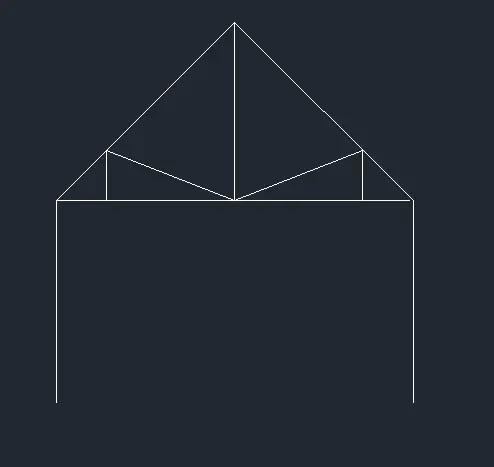
- Queen post truss using polar coordinate
- Enter the line command
- Specify the 1st point: type 1,1 in the command bar and press enter (starting point)
- Specify next point as @4<90, press enter
- Specify next point as @1<0, press enter
- Specify next point as @2.566<0, press enter
- Specify next point as @2.566<0, press enter
- Specify next point as @1<0, press enter
- Specify next point as @4<270, press enter
- Specify the next point or close, select close option from the command bar and press enter
- Again, enter line specify 1st point as 4.5,5 and press enter
- Specify next point as @3.556<90, press enter
- Specify next point as @5<225, press enter
- Specify the next point or close, select close option from the command bar and press enter
- Again, enter line specify 1st point as 2,5 and press enter
- Specify next point as @1<90, press enter
- Specify next point as @2.566<338, press enter
- Specify the next point or close, select close option from the command bar and press enter
- Again, enter line specify 1st point as 4.5,8.5 and press enter
- Specify next point as @5<316, press enter
- Again, enter line specify 1st point as 7,5 and press enter
- Specify next point as @1<90, press enter
- Specify next point as @2.566<200, press enter
- Specify the next point or close, select close option from the command bar and press enter
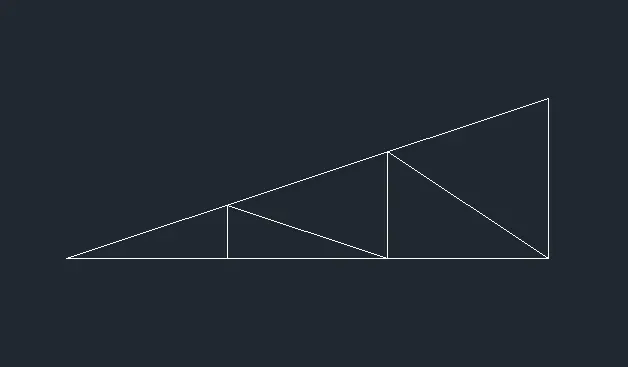
- Mono pitch using polar coordinate
- Enter the line command
- Specify the 1st point: type 7,2 in the command bar and press enter (starting point)
- Specify next point as @2.1083<203, press enter
- Specify next point as @1.33<270, press enter
- Specify next point as @2<0, press enter
- Specify next point as @2.4<146, press enter
- Specify next point as @2.093<203, press enter
- Specify next point as @0.667<270, press enter
- Specify next point as @2<0, press enter
- Specify next point as @2.108<161, press enter
- Specify next point as @2.123<161, press enter
- Specify next point as @2<0, press enter
- Specify the next point or close, select close option from the command bar and press enter
All coordinate systems are used to sketch, all above drawings,
the coordinate systems are easy to use and understand the drawings.