Creation of geometries by Coordinate system methods using AutoCad
AIM:
- My aim is to create the geometries from P1 to P2 using all the co-ordinates system methods.
INTRODUCTION:
- Autocad was derived from a program that began in 1977 and then released in 1979 called Interact CAD, also referred to in early Autodesk documents as MicroCAD, which was written prior to Autodesk's (then Marinchip Software Partners) formation by Autodesk co-founder Michael Riddle.
- The first version by Autodesk was demostrated at the 1982 comdex and released that December. AutoCAD supported CP/M-80 computers. As Autodesk's flagship product, by March 1986 AutoCAD had become the most ubiquitous CAD program worldwide.
PROCEDURE:
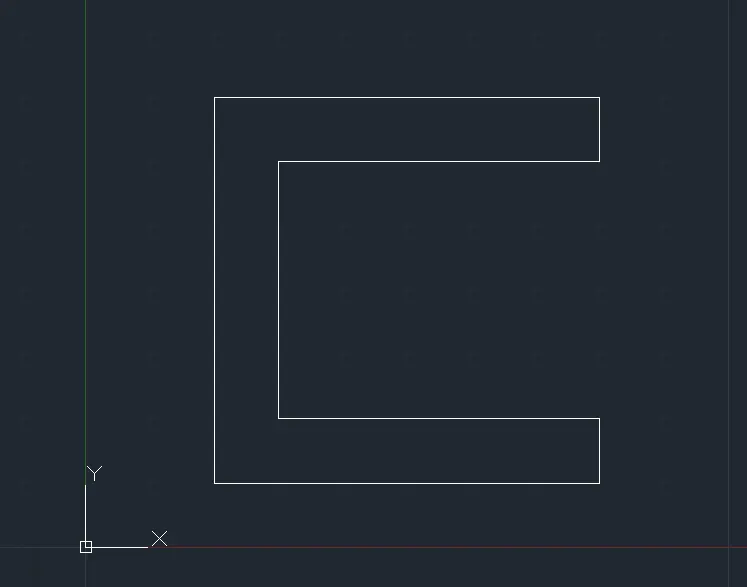
(1) Co-ordinate method:
Step-1: Choose the line tool.
Step-2: Line specify first point: 1,1 (Start point).
Step-3: Line specify next point or [Undo]: 2,7 (Second point).
Step-4: Line specify next point or [Undo]: 8,7 (Third point).
Step-5: Line specify next point or [Undo]: 8,6 (Fourth point).
Step-6: Line specify next point or [Undo]: 3,6.
Step-7: Line specify next point or [Undo]: 3,2.
Step-8: Line specify next point or [Undo]: 8,2.
Step-9: Line specify next point or [Close/Undo]: 8,1.
Step-10: Line specify next point or [Close/Undo]: Close.
Relative co-ordinate method:
Step-1: Choose the line tool.
Step-2: Line specify first point: 2,1 (starting point)
Step-3: Line specify next point or [Undo]: @0,6.
Step-4: Line specify next point or [Undo]: @6,0.
Step-5: Line specify next point or [Undo]: @0,-1.
Step-6: Line specify next point or [Undo]: @-5,0.
Step-7: Line specify next point or [Undo]: @0,-4.
Step-8: Line specify next point or [Undo]: @5,0.
Step-9: Line specify next point or [Close/Undo]: @0,-1.
Step-10: Line specify next point or [Close/Undo]: Close.
Polar co-ordinate method:
Step-1: Choose the line tool.
Step-2: Line specify first point: 2,1 (starting point)
Step-3: Line specify next point or [Undo]: @6<90.
Step-4: Line specify next point or [Undo]: @6<0.
Step-5: Line specify next point or [Undo]: @1<270.
Step-6: Line specify next point or [Undo]: @5<180.
Step-7: Line specify next point or [Undo]: @4<270.
Step-8: Line specify next point or [Undo]: @5<0.
Step-9: Line specify next point or [Close/Undo]: @1<270.
Step-10: Line specify next point or [Close/Undo]: Close.
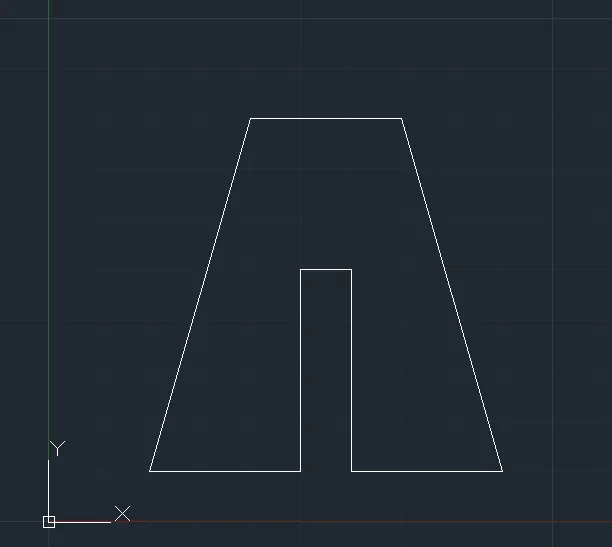
(2) Co-ordinate method:
Step-1: Choose the line tool.
Step-2: Line specify first point: 2,1 (start point).
Step-3: Line specify next point or [Undo]: 4,8.
Step-4: Line specify next point or [Undo]: 7,8.
Step-5: Line specify next point or [Undo]: 9,1.
Step-6: Line specify next point or [Undo]: 6,1.
Step-7: Line specify next point or [Undo]: 6,5.
Step-8: Line specify next point or [Undo]: 5,5.
Step-9: Line specify next point or [Close/Undo]: 5,1.
Step-10: Line specify next point or [Close/Undo]: Close.
Relative co-ordinate method:
Step-1: Choose the line tool.
Step-2: Line specify first point: 2,1 (start point).
Step-3: Line specify next point or [Undo]: @2,7.
Step-4: Line specify next point or [Undo]: @3,0.
Step-5: Line specify next point or [Undo]: @2,-7.
Step-6: Line specify next point or [Undo]: @-3,0.
Step-7: Line specify next point or [Undo]: @0,4.
Step-8: Line specify next point or [Undo]: @-1,0.
Step-9: Line specify next point or [Close/Undo]: @0,-4.
Step-10: Line specify next point or [Close/Undo]: Close.
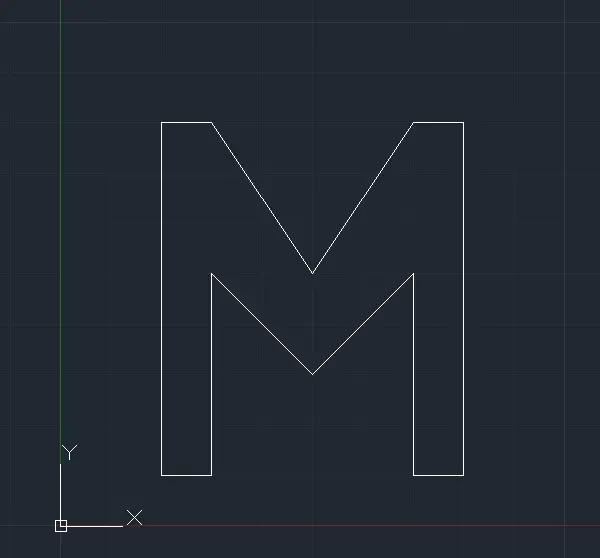
(3) Co-ordinate system:
Step-1: Choose the line tool.
Step-2: Line specify first point: 2,1 (start point).
Step-3: Line specify next point or [Undo]: 2,8.
Step-4: Line specify next point or [Undo]: 3,8.
Step-5: Line specify next point or [Undo]: 5,5.
Step-6: Line specify next point or [Undo]: 7,8.
Step-7: Line specify next point or [Undo]: 8,8.
Step-8: Line specify next point or [Undo]: 8,1.
Step-9: Line specify next point or [Undo]: 7,1.
Step-10: Line specify next point or [Undo]: 7,5.
Step-11: Line specify next point or [Undo]: 5,3.
Step-12: Line specify next point or [Undo]: 3,5.
Step-13: Line specify next point or [Close/Undo]: 3,1.
Step-14: Line specify next point or [Close/Undo]: Close.
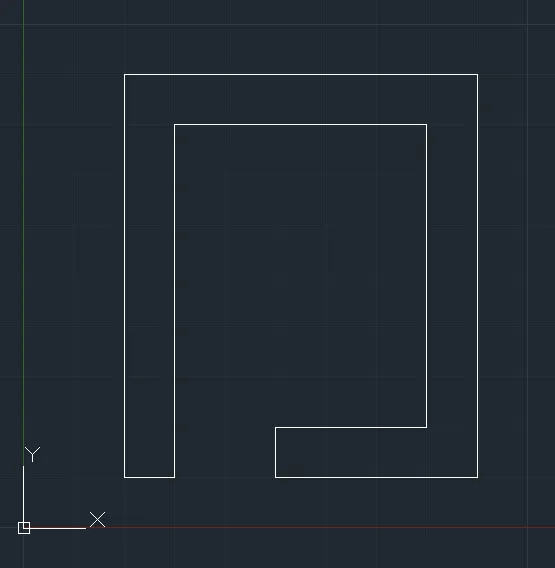
(4) Co-ordinate method:
Step-1: Choose the line tool.
Step-2: Line specify first point: 2,1 (start point).
Step-3: Line specify next point or [Undo]: 2,9.
Step-4: Line specify next point or [Undo]: 9,9.
Step-5: Line specify next point or [Undo]: 9,1.
Step-6: Line specify next point or [Undo]: 5,1.
Step-7: Line specify next point or [Undo]: 5,2.
Step-8: Line specify next point or [Undo]: 8,2.
Step-9: Line specify next point or [Undo]: 8,8.
Step-10: Line specify next point or [Undo]: 3,8.
Step-11: Line specify next point or [Close/Undo]: 3,1.
Step-12: Line specify next point or [Close/Undo]: Close.
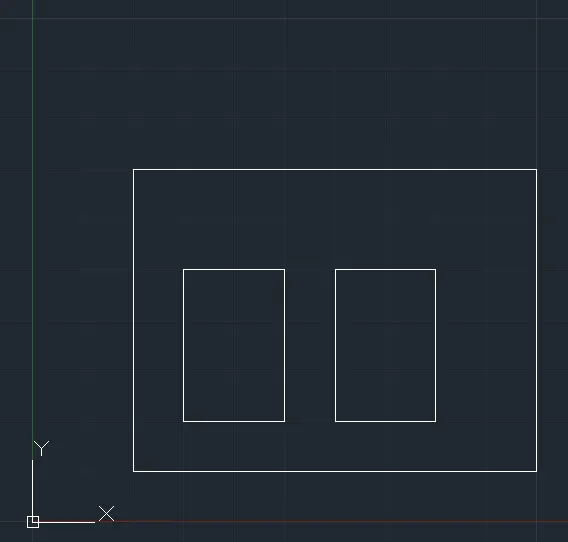
(5) Co-ordinate method:
Step-1: Choose the line tool.
Step-2: Line specify first point: 2,1 (start point).
Step-3: Line specify next point or [Undo]: 2,7.
Step-4: Line specify next point or [Undo]: 10,7.
Step-5: Line specify next point or [Close/Undo]: 10,1.
Step-6: Line specify next point or [Close/Undo]: Close.
Step-7: Choose the line tool.
Step-8: Line specify First point or [Undo]: 3,2.
Step-9: Line specify next point or [Undo]: 3,5.
Step-10: Line specify next point or [Undo]: 5,5.
Step-11: Line specify next point or [Close/Undo]: 5,2.
Step-12: Line specify next point or [Close/Undo]: Close.
Step-13: Choose the line tool.
Step-14: Line specify first point: 6,2.
Step-15: Line specify next point or [Undo]: 6,5.
Step-16: Line specify next point or [Undo]: 8,5.
Step-17: Line specify next point or [Close/Undo]: 8,2.
Step-18: Line specify next point or [Close/Undo]: Close.
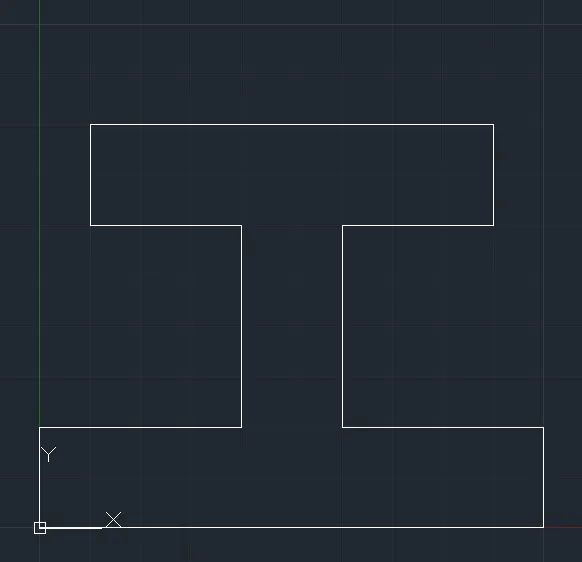
(6) Co-ordinate system:
Step-1: Choose the line tool.
Step-2: Line specify first point: 0,0 (start point).
Step-3: Line specify next point or [Undo]: 0,2.
Step-4: Line specify next point or [Undo]: 4,2.
Step-5: Line specify next point or [Undo]: 4,6.
Step-6: Line specify next point or [Undo]: 1,6.
Step-7: Line specify next point or [Undo]: 1,8.
Step-8: Line specify next point or [Undo]: 9,8.
Step-9: Line specify next point or [Undo]: 9,6.
Step-10: Line specify next point or [Undo]: 6,6.
Step-11: Line specify next point or [Undo]: 6,2.
Step-12: Line specify next point or [Undo]: 10,2.
Step-13: Line specify next point or [Close/Undo]: 10,0.
Step-14: Line specify next point or [Close/Undo]: Close.
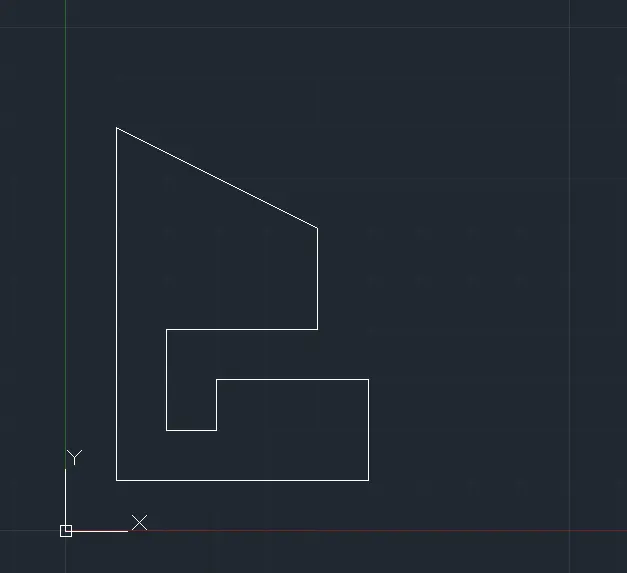
(7) Relative polar co-ordinate:
Step-1: Choose the line tool.
Step-2: Line specify first point: 1,1 (start point).
Step-3: Line specify next point or [Undo]: @0,7.
Step-4: Line specify next point or [Undo]: @4,-2.
Step-5: Line specify next point or [Undo]: @0,-2.
Step-6: Line specify next point or [Undo]: @-3,0.
Step-7: Line specify next point or [Undo]: @0,-2.
Step-8: Line specify next point or [Undo]: @1,0.
Step-9: Line specify next point or [Undo]: @0,1.
Step-10: Line specify next point or [Undo]: @3,0.
Step-11: Line specify next point or [Close/Undo]: @0,-2.
Step-12: Line specify next point or [Close/Undo]: Close.
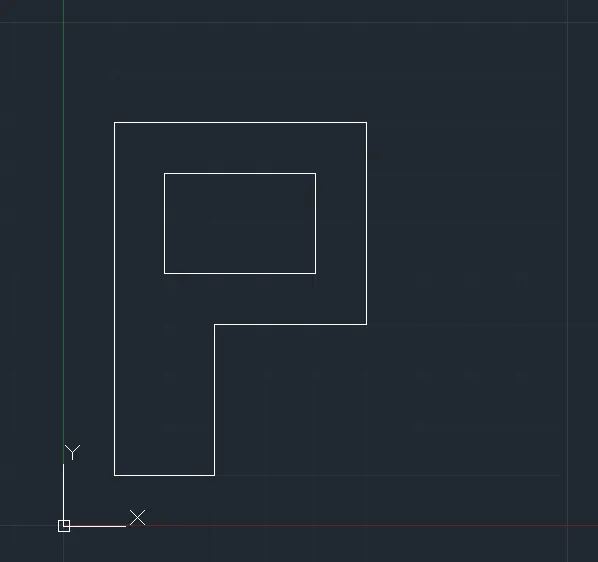
(8)
Step-1: Choose the line tool.
Step-2: Line specify first point: 1,1 (start point).
Step-3: Line specify next point or [Undo]: @0,7.
Step-4: Line specify next point or [Undo]: @5,0.
Step-5: Line specify next point or [Undo]: @0,-4.
Step-6: Line specify next point or [Undo]: @-3,0.
Step-7: Line specify next point or [Close/Undo]: @0,-3.
Step-8: Line specify next point or [Close/Undo]: Close.
Step-9: Line specify first point: 2,5.
Step-10: Line specify next point or [Undo]: @0,2
Step-11: Line specify next point or [Undo]: @3,0
Step-12: Line specify next point or [Close/Undo]: 0,-2.
Step-13: Line specify next point or [Close/Undo]: Close.
(9) Relative co-ordinate method:
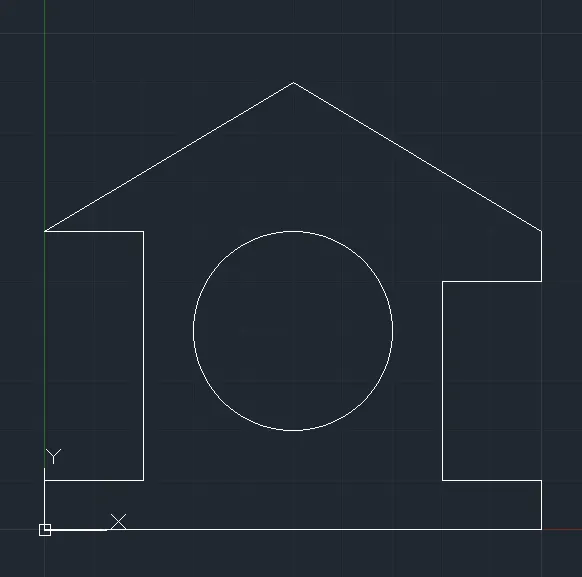
Step-1: Choose the line tool.
Step-2: Line specify first point: 0,0 (start point).
Step-3: Line specify next point or [Undo]: @0,1.
Step-4: Line specify next point or [Undo]: @2,0.
Step-5: Line specify next point or [Undo]: @0,5.
Step-6: Line specify next point or [Undo]: @-2,0.
Step-7: Line specify next point or [Undo]: @5,3.
Step-8: Line specify next point or [Undo]: @5,-3.
Step-9: Line specify next point or [Undo]: @0,-1.
Step-10: Line specify next point or [Undo]: @-2,0.
Step-11: Line specify next point or [Undo]: @0,-4.
Step-12: Line specify next point or [Undo]: @2,0.
Step-13: Line specify next point or [Close/Undo]: @0,-1.
Step-14: Line specify next point or [Close/Undo]: Close.
Step-15: Choose the circle tool.
Step-16: Circle specify the centre point: 5,4.
Step-17: Specify the radius or diameter of the circle: 2.
(10) Procedure:
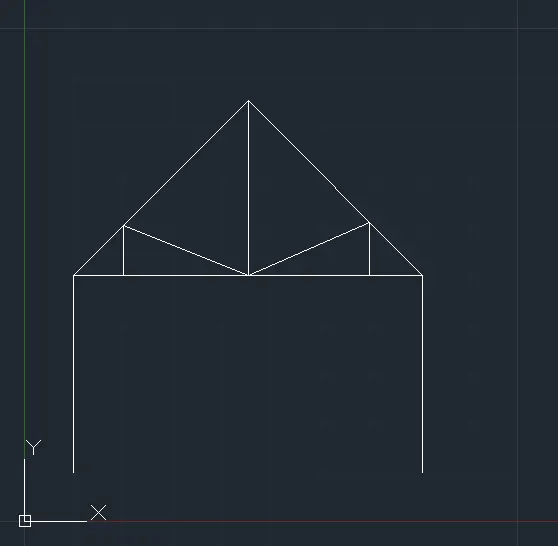
- Line
- @4<90
- @7<0
- @4<270
- Enter
- Line
- 1,5
- @5<45
- Enter
- Line
- 8,5
- Extend that line to make a triangle
- @3.5<270
- Enter
- Line
- 2,5.
- @1<90
- Extend that line to join the mid point of right angle triangle
- Enter
- Line
- 7,5
- @1<90
- Extend that line to join the mid point of right angle triangle
- Enter.
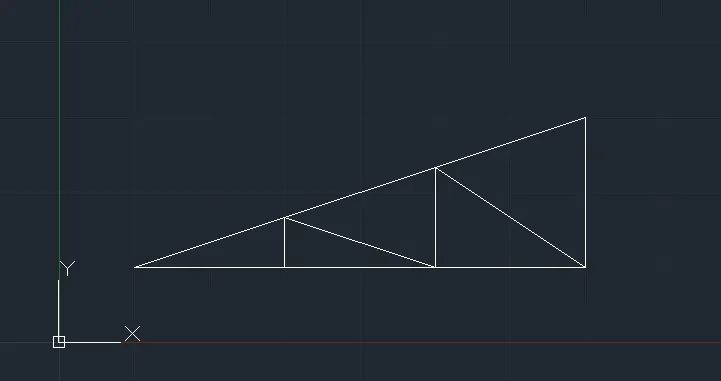
(11) Procedure:
- Line
- 1,1
- 3,1
- 5,1
- 7,1
- 7,3
- Close
- Line
- 3,1
- 3,1.667
- 5,1
- 5,2.333
- 7,1
- Enter.