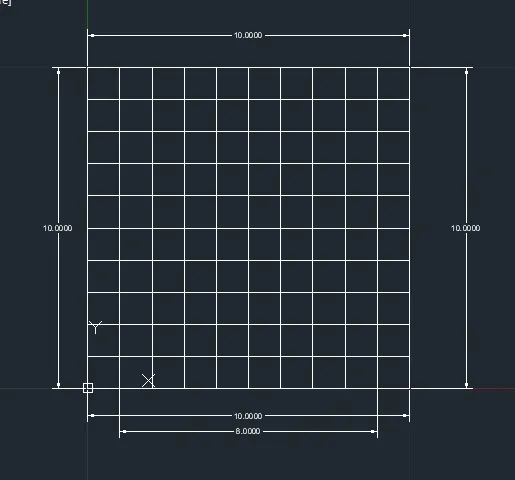
Creation of geometries by Coordinate system methods using AutoCad
Create the geometries from P1 to P2 using all the coordinates system methods. You need to use the Line tool to create the geometries. Where required you need to use the circle tool.
Please read the drawings and find out the missing dimensions before working on the sketches.
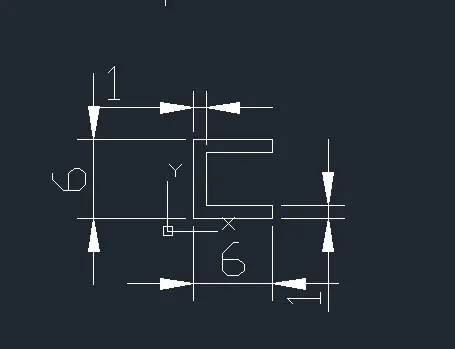
P1
- select line tool and specify the first coordinate point 2,1 and click enter.
- we can use absolute coordinate system relative rectangular coordinate system and relative polar coordinate system.
- for the next point first we use absolute coordinate system.
- second point is 2,7 and next points will be as follows.
- (8,7),(8,6),(3,6),(3,2),(8,2),(8,1) and last enter c for close.
- For the relative rectangular coordinate system.
- First point will be 2,1 and the next points are as follows.
- Second point (@6,0),(@0,1),(@-5,0),(@0,4),(@5,0),(@0,1),(@-6,0).
- and at last enter c for close.
- For the relative polar coordinate system.
- First point will be 2,1 and next points are as follows.
- From second point (@6<0Degree),(@1<90D),(@5<180D),(@4<90D),(@5<0D),(@1<90D),(@6<180D).
- at last enter c for close.
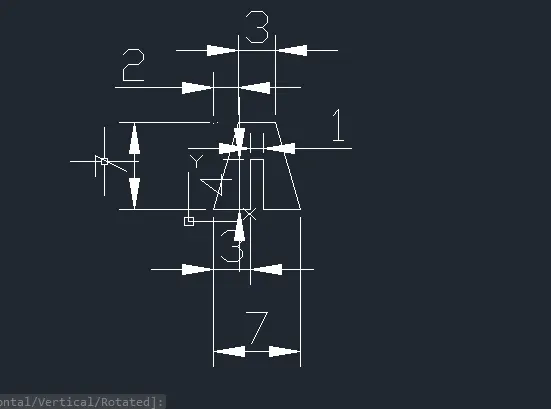
P2
- select line tool and specify the first coordinate point 2,1 and click enter.
- we can use absolute coordinate system relative rectangular coordinate system and relative polar coordinate system.
- for the next point first we use absolute coordinate system.
- second point is 4,8 and next points will be as follows.
- (7,8),(9,1),(6,1),(6,5),(5,5),(5,1) and last enter c for close.
- For the relative rectangular coordinate system.
- First point will be 2,1 and the next points are as follows.
- Second point taken as (@0,7), (@2,0) and locate the secont point then from there (@3,0) for fourth point we repeated the process as (@2,0),(@0,-7) and located then from there (@-3,0),(@0,4),(@-1,0),(@0,-4).
- and at last enter c for close.
- For the relative polar coordinate system.
- First point will be 2,1 and next points are as follows.
- From second point (@7<74.055D),(@3<0D),(@7<105.945D),(@3<180D),(@4<90D),(@1<180D),(@4<270D).
- at last enter c for close.
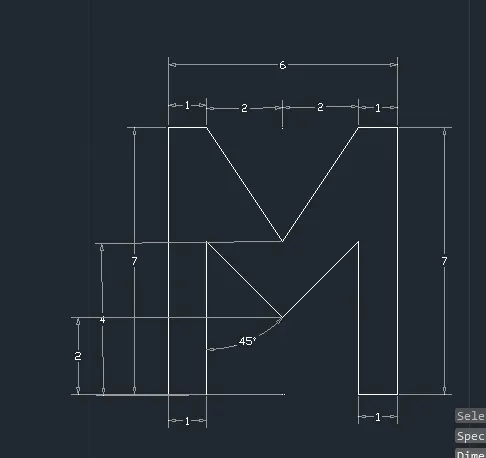
- For the Absolute coordinate system.
- First point will be 2,1 and next points are as follows.
- From second point (2,8),(3,8),(5,5),(7,8),(8,8),(8,1),(7,1),(7,5),(5,3),(3,5),(3,1).
- at last enter c for close.
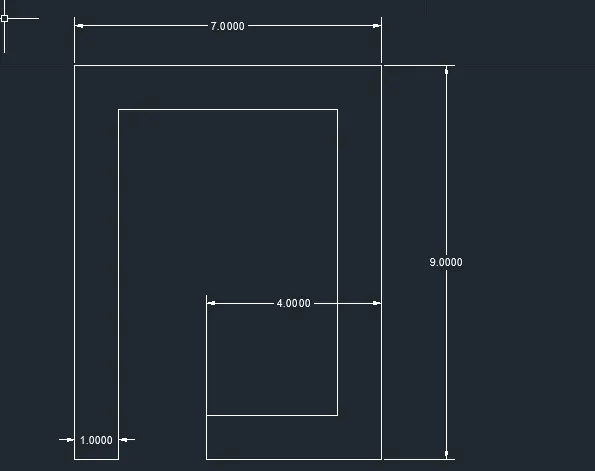
- For the Absolute coordinate system.
- First point will be 2,1 and next points are as follows.
- From second point (2,9),(9,9),(9,1),(5,1),(5,2),(8,2),(8,8),(3,8),(3,1).
- at last enter c for close.
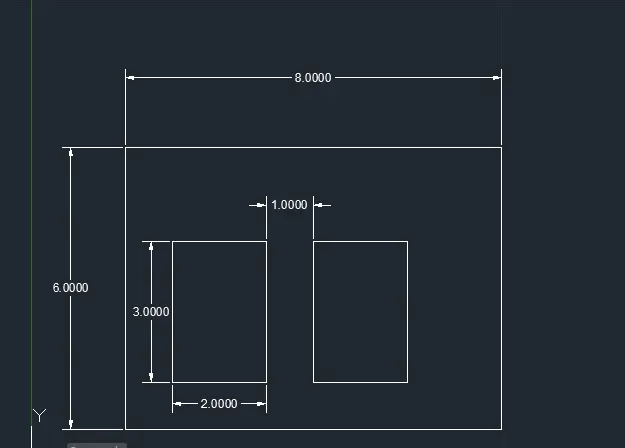
- For the Absolute coordinate system.
- First point will be 2,1 and next points are as follows.
- From second point (2,7),(10,7),(10,1) enter c for close the outer section box.\
- For inside first box enter (3,2),(3,5),(5,5),(5,2) enter c for close.
- For next box (6,2),(6,5),(8,5),(8,2).
- at last enter c for close.
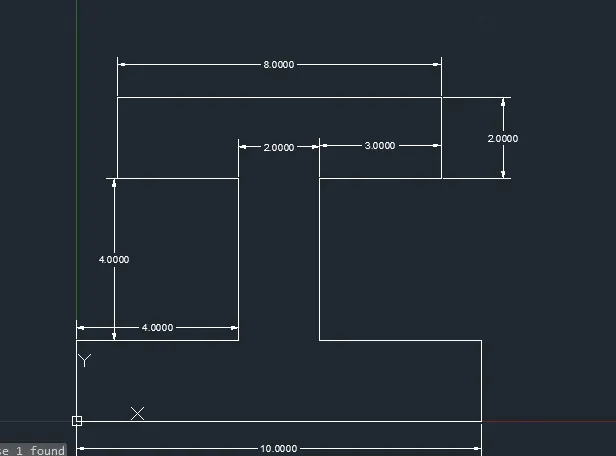
- For the Absolute coordinate system.
- First point will be 0,0 and next points are as follows.
- From second point (0,2),(4,2),(4,6),(1,6),(1,8),(9,8),(9,6),(6,6),(6,2),(10,2),(10,0).
- at last enter c for close.
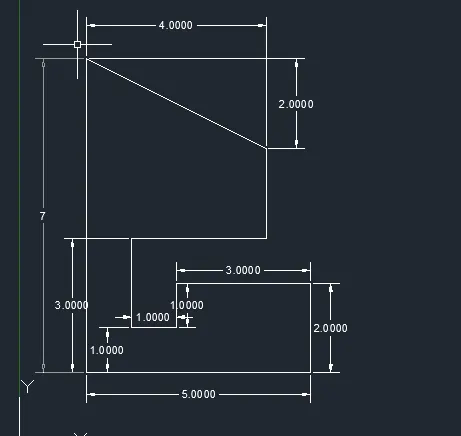
- For the Absolute coordinate system.
- First point will be 1,1 and next points are as follows.
- From second point (1,8),(5,6),(5,4),(2,4),(2,2),(3,2),(3,3),(6,3),(6,1).
- at last enter c for close.
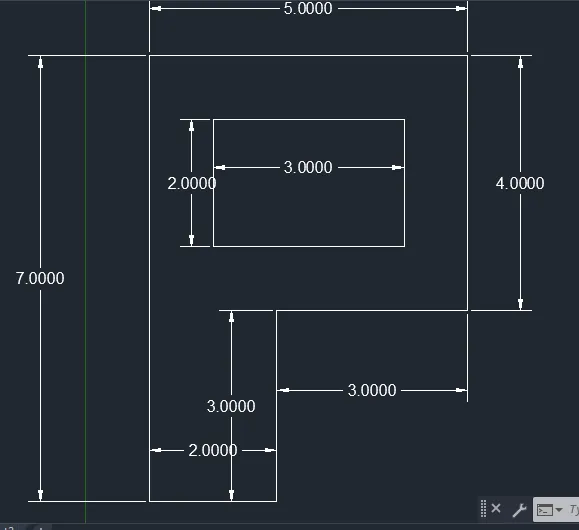
- For the Absolute coordinate system.
- First point will be 1,1 and next points are as follows.
- From second point (1,8),(6,8),(6,4),(3,4),(3,1) enter c for close.
- For inside box (2,5),(2,7),(5,7),(5,5).
- at last enter c for close.
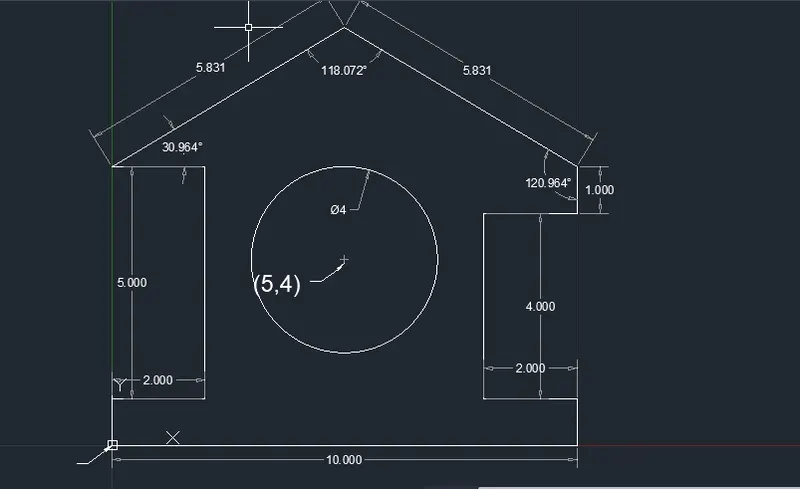
- For the Absolute coordinate system.
- First point will be 0,0 and next points are as follows.
- From second point (0,1),(2,1),(2,6),(0,6),(5,9),(10,6),(10,5),(8,5),(8,1),(10,1),(10,0).
- at last enter c for close.
- The enter circle radius comand and specify center of the circle as 5,4 and enter radius as 2.00 then enter.
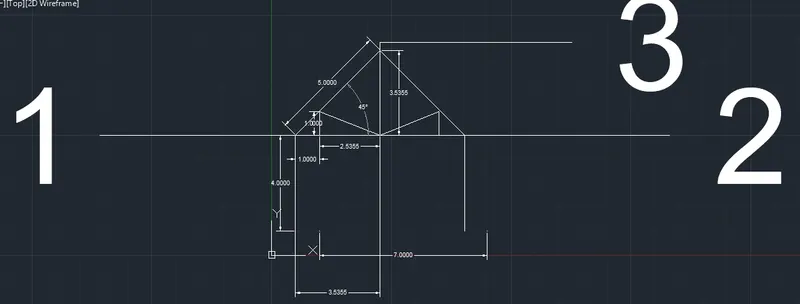
- For the relative polar coordinate system.
- First point will be 1,1 and next points are as follows.
- From second point (@4<90Degree),(@5<45D),(@5<315D),(@4<270D).
- enter line command and join 2 points from 1 and 2 points. and from the center 3.536 join to point 3 using line command.
- from point 1 locate point with lenth 1 unit and using line command draw line of 1 unit (@1<90D) and join line to center line.
- from the point 2 locate the point (7,5) and draw line of 1 unit (@1<90D) join line to center line.
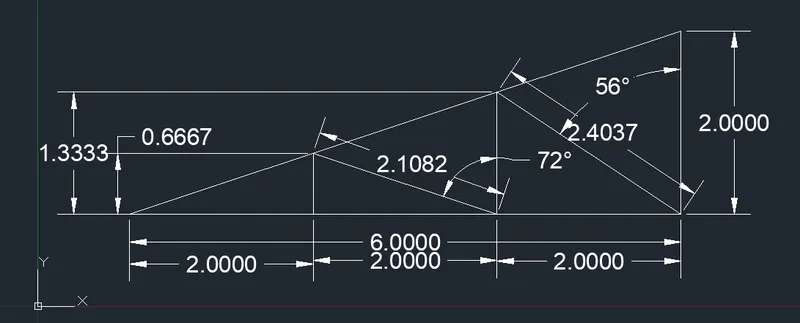
- For the relative polar coordinate system.
- First point will be 1,1 and next points are as follows.
- From second point (@6<0Degree),(@2<90D) and enter c for close.
- enter line command locate (3,1) draw line of (@0.667<90D) and locate (5,1) draw line of (@1.333<90D).
- and using line command join cross lines as shown in figure with accurate measurment.