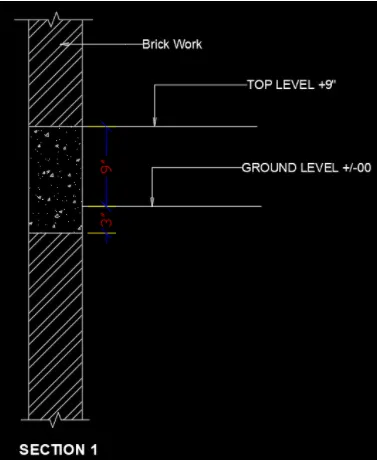
Creation of Column Schedule and Drawing Template using AutoCad
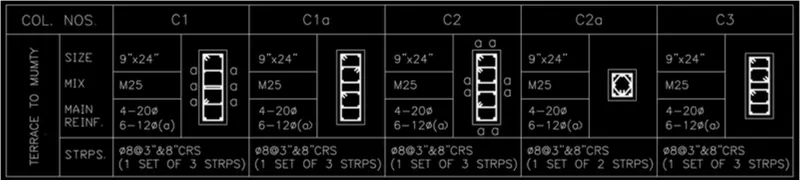
Aim : To create a column schedule as given
Procedure:
1. draw the outline of the schedule using polyline
2. create the column c1, c1a, c2, c2a, c3, outside the column using polylines by giving the correct dimensions of the columns respectively .
3. move the drawn column into the schedule out line
4. using multiline text , give details about each column
Result: the column schedule is:
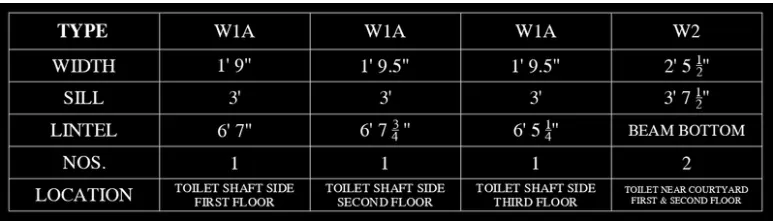
Aim :To create a window scehdule as shown
Procedure :
1.Using polyline make the rows and column neceesary
2.Using multiline text input all the details in the rows and columns
Result : The window schedule is:
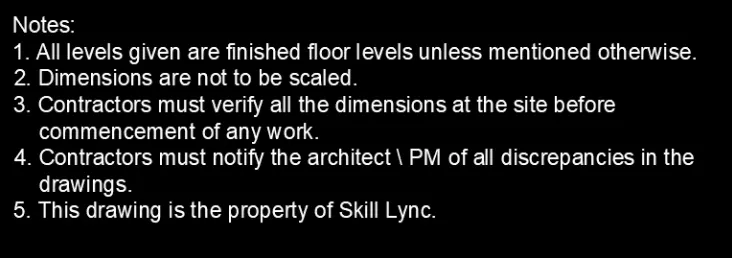
Aim : To create drawing template as shown
Procedure :
1. using multiline text , make the notes that is given,
2. using polyline make the outline of the grid box
3. use multiline text to give the deatils in the grid box
Result :

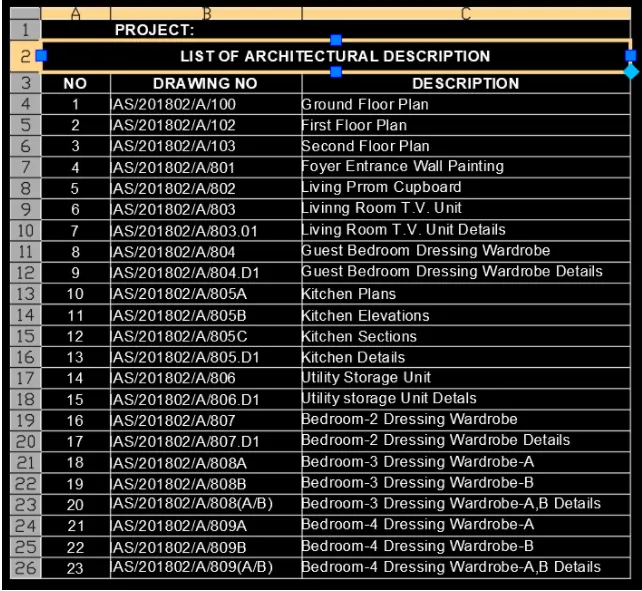
Aim : To create a list of drawing schedule
Procedure :
1.open table command .
2.modify the table according to the given table, first two rows cell type : title
3.adjust the size of the rows and column
4.enter data in the table using multiline text
Result : the list is shown below
Aim : To create beam detailing
Procedure :
1. using polyline draw the beam as shown in the question
2. using hatch , hatch the part wherever necessary
3. using multiline text give details and use arrow marks
Result :