Creating various 3D Models like Furniture, Footing, Girder, Column drop with panel and Gable Wall in AutoCad
1
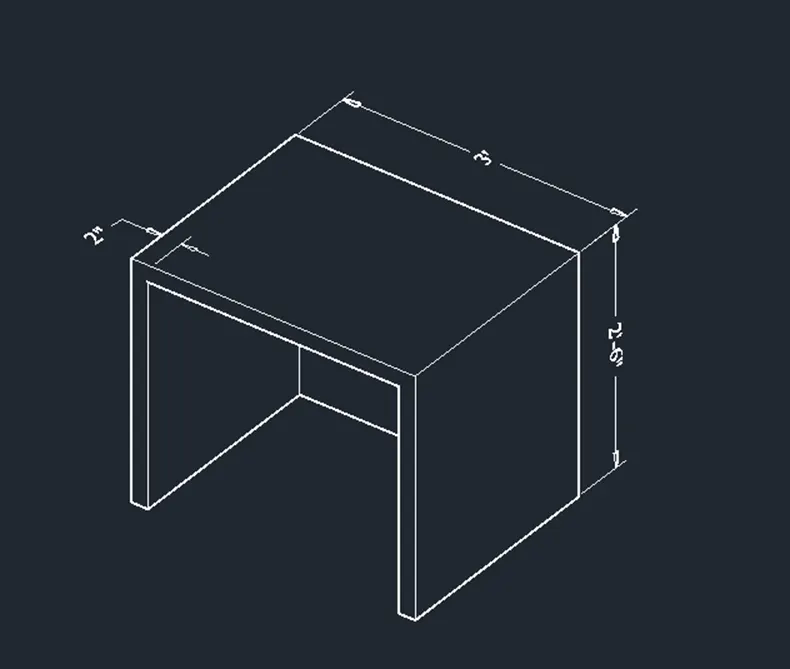
Aim: To create a 3D Furniture element using AutoCAD software.
Introduction:
Various commands used:
- QNEW command
- UN command
- Box command
- Rectangle command
- Extrude command
- SUBTRCT command
- DIMLIN command
- 3DO command
- UCS command
Procedure:
- Type QNEW in command box, press enter, select the imperial as default setting and select ok.
- Type UN in command box, press enter, select the measuring unit engineering with the precision 0’-0”.
- From setting of status bar change setting from drafting and annotation to the 3D modelling.
- Type LIMAX in command box, press enter, specify max limit as 20’,20’ and press enter.
- Type Z in command box, press enter, type A in command box and press enter.
- From view tab keep on the view cube icon from the ribbon.
- Select home icon of view cube to set the default position of UCS icon.
- Type BOX in command box, press enter.
- Specify first corner point, select the length option from command box, press enter, specify length as 3’ and press enter.
- Specify width as 2’4”, press enter and specify height as 2’6” and press enter.
- Type UCS in command box, press enter, select the face option from command box, and select the face on which we want the UCS icon such that XY plane lie on that face.
- Type REC in command box, press enter, specify first corner point as right bottom corner of rectangle, select the dimension option from command box, specify length as 2’8”, width as 2’4”, press enter and draw the rectangle.
- Type MOVE in command box, press enter, select the base point as corner point of rectangle and specify second point as @2”<180 and press enter.
- Type EXTRUDE in command box, press enter, select the just drawn rectangle and specify extrude height as @0,0,-2’2” and press enter.
- Type SUB in command box, press enter, select the external box, press enter, select internal extruded rectangle and press enter.
- Type UCS in command box, press enter.
- Select the face option from command box, and select the top face such that XY plane lie on the top face of the box.
- Type DIMLIN in command box, press enter and give the dimensions.
- From the viewport control change the custom visual style from 2D wireframe to HIDDEN to get the desired view.
- Type 3DO in command box, press enter and adjust the view as per requirement.
Result:
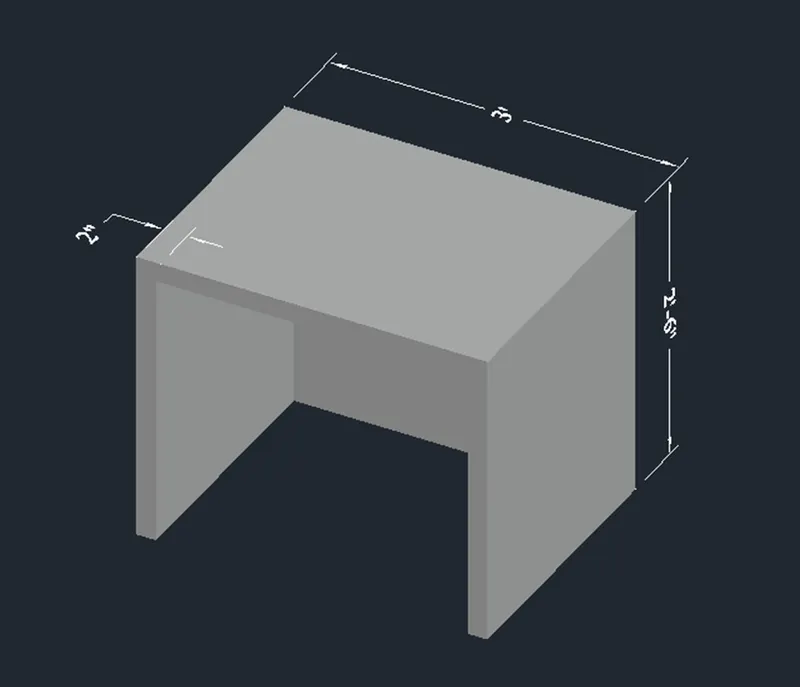
The 3D furniture element is created in AutoCAD software by using above mentioned procedure as shown below.
Shade view
2
Aim: To create the 3D model of an isolated footing using AutoCAD software.
Introduction:
Various commands used
- QNEW command
- UN command
- BOX command
- Pyramid command
- DIMLIN command
- UCS command
- 3DO command
Procedure:
- Type QNEW in command box, press enter, select the imperial as default setting and select ok.
- Type UN in command box, press enter, select the measuring unit engineering with the precision 0’-0”.
- Type LIMAX in command box, press enter, specify max limit as 20’,20’ and press enter.
- Type Z in command box, press enter, type A in command box and press enter.
- From view tab keep on the view cube icon from the ribbon.
- Select home icon of view cube to set the default position of UCS icon.
- Type BOX in command box, press enter.
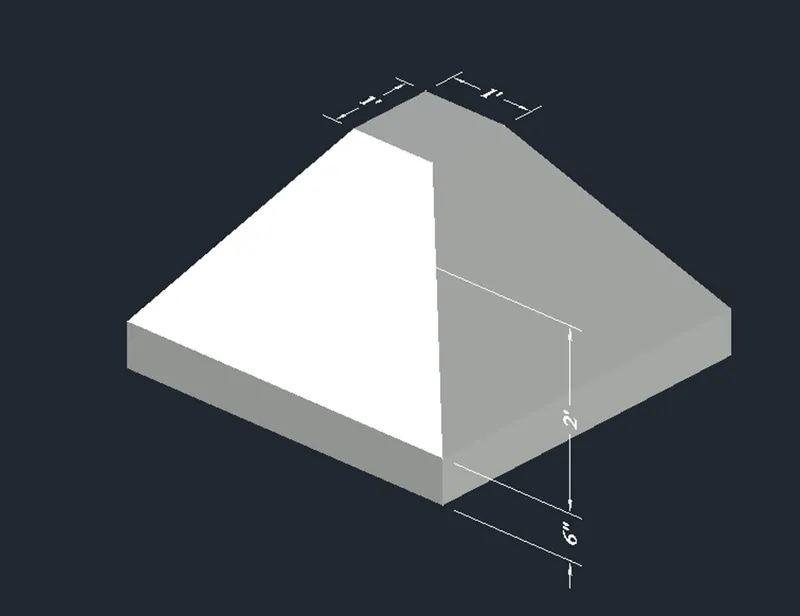
- Specify first corner point, select the length option from command box, press enter, specify length as 4’ and press enter.
- Specify width as 4’, press enter and specify height as 6” and press enter.
- Type pyramid in command box, press enter, select the edge option from command box, select the first endpoint of edge as corner of top of box, and second endpoint of edge as adjacent corner point.
- Select the top radius option from command box, specify top radius as 6”, press enter, specify height as 2’ and press enter.
- Type UCS in command box, press enter.
- Select the face option from command box, and select the top face such that XY plane lie on the top face of the box.
- Type DIMLIN in command box, press enter and give the dimensions.
- From the viewport control change the custom visual style from 2D wireframe to HIDDEN to get the desired view.
- Type 3DO in command box, press enter and adjust the view as per requirement.
Result:
3D modal of isolated footing is created in AutoCAD software by following the above mentioned command as shown below.
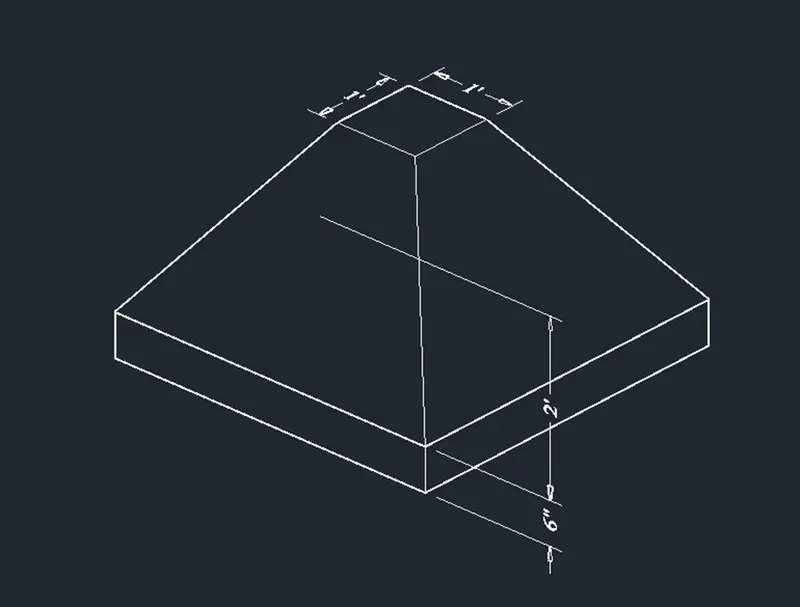
Shaded view
3
Aim: To create the 3D view of the AASTHO Type Girder using AutoCAD software.
Introduction:
Various commands used
- QNEW command
- UN command
- 3P command
- MIR command
- Join command
- Line command
- SWEEP command
- UCS command
- DIMLIN command
- DIMCON command
Procedure:
- Type QNEW in command box, press enter, select the imperial as default setting and select ok.
- Type UN in command box, press enter, select the measuring unit engineering with the precision 0’-0”.
- From setting of status bar change setting from drafting and annotation to the 3D modelling.
- Type LIMAX in command box, press enter, specify max limit as 20’,20’ and press enter.
- Type Z in command box, press enter, type A in command box and press enter.
- Select the top view from viewport control.
- Type 3P in command box, press enter and specify first point on the screen.
- Specify next point as @9”,0 and press enter.
- Specify next point as @0,6” and press enter.
- Specify next point as @-6”,6” and press enter.
- Specify next point as @0,1’-6” and press enter.
- Specify next point as @3”,3” and press enter.
- Specify next point as @0,6” and press enter.
- And, specify next point as @-6”,0 and press enter.
- Type MIR in command box, select the entire lines, specify first point on mirror line as first endpoint and second point on mirror line as second endpoint on the polyline and mirror it.
- Type JOIN in command box, press enter and select the entire geometry to create it as single object.
- Change the view to custom view from view box.
- Type L in command box, press enter.
- Select the first point and specify next point as @0,-10’, press enter and press escape.
- Type Sweep in command box, press enter, select the drawn object, press enter, select the path to sweep as drawn line of 10’ length.
- Type UCS in command box, press enter.
- Select the face option from command box, select the face on which dimensions are required and press enter.
- Type DIMLIN in command box, press enter and give the dimensions.
- From the viewport control change the custom visual style from 2D wireframe to HIDDEN to get the desired view.
Result:
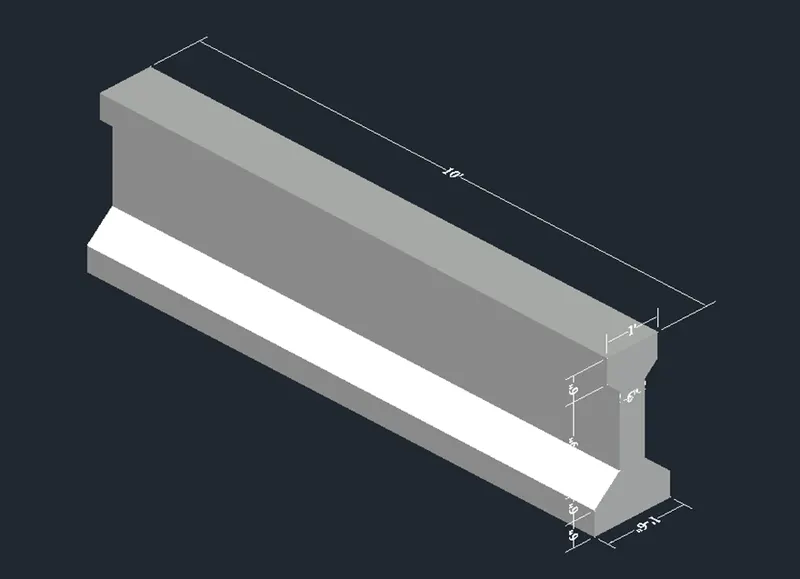
3D view of the AASTHO Type Girder is created in AutoCAD software using above mentioned procedure as shown below.
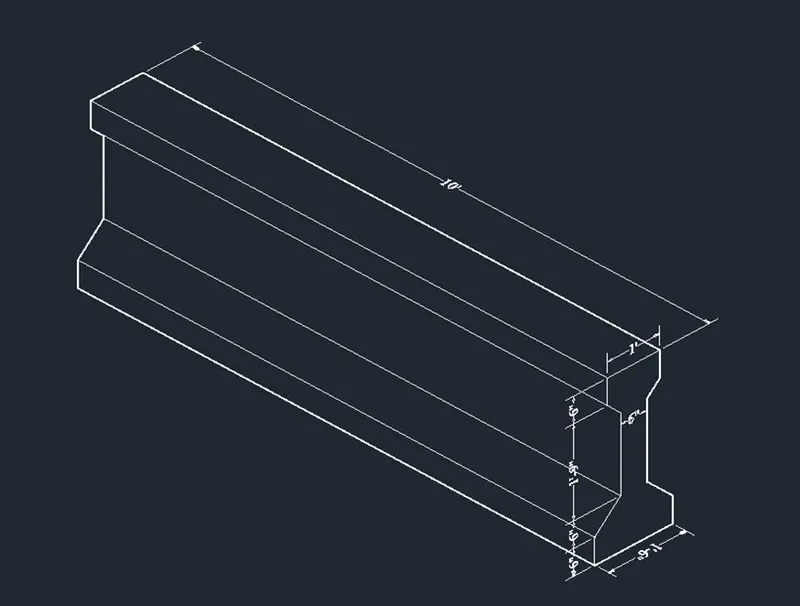
Shaded View
4
Aim: To create a 3d Model of a drop column with panel using AutoCAD software.
Introduction:
Various commands used
- QNEW command
- UN command
- Box command
- Pyramid command
- Cylinder command
- Hide command
- FACETRES command
- REG command
- RO command
- MOVE command
- DIMLIN command
Procedure:
- Type QNEW in command box, press enter, select the imperial as default setting and select ok.
- Type UN in command box, press enter, select the measuring unit engineering with the precision 0’-0”.
- From setting of status bar change setting from drafting and annotation to the 3D modelling.
- Type LIMAX in command box, press enter, specify max limit as 20’,20’ and press enter.
- Type Z in command box, press enter, type A in command box and press enter.
- From view tab keep on the view cube icon from the ribbon.
- Select home icon of view cube to set the default position of UCS icon.
- Type BOX in command box, press enter,
- Specify the first corner point, select the length option from the command box, specify length as 4’6, press enter, specify width as 4’6, press enter, specify height as 6” and press enter.
- Type REC in command box, press enter, select the dimension option from command box, specify length as 3’6”, width as 3’6” and press enter.
- Type MOVE in command box, press enter, select the base point as corner of rectangle, specify next point as @6”,6” and press enter.
- Type PYRAMID in command box, press enter, select the Edge option from command box, select first endpoint of edge as corner of rectangle, second endpoint of edge as adjacent corner of rectangle, select the TOP radius option from command box, specify top radius as 1’6”, press enter, specify height as 1’ and press enter.
- Type CYLINDER in command box, press enter, select the 3P option from command box, select the first, second and third point as midpoints of top of pyramid, specify height as 10’ and press enter.
- Type HIDE in command box, press enter.
- Type FACETRES in command box, press enter, specify new value as 10 and press enter.
- Type REG in command box, press enter, select the object and press enter.
- Change the view to front from viewport control.
- Type RO in command box, press enter, select the base point as right midpoint of box, specify rotation angle as 90 and press enter.
- From viewport control change the custom view to hidden to get the elevation.
- Type DIMLIN in command box, press enter and give the dimensions.
- From the viewport control change the custom visual style from 2D wireframe to HIDDEN to get the desired view.
Result:
3D Model of a drop column with panel is created in AutoCAD software using above mentioned procedure as shown below.
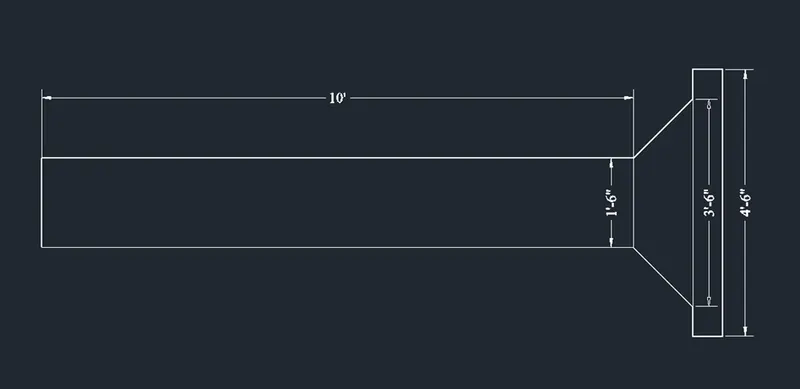
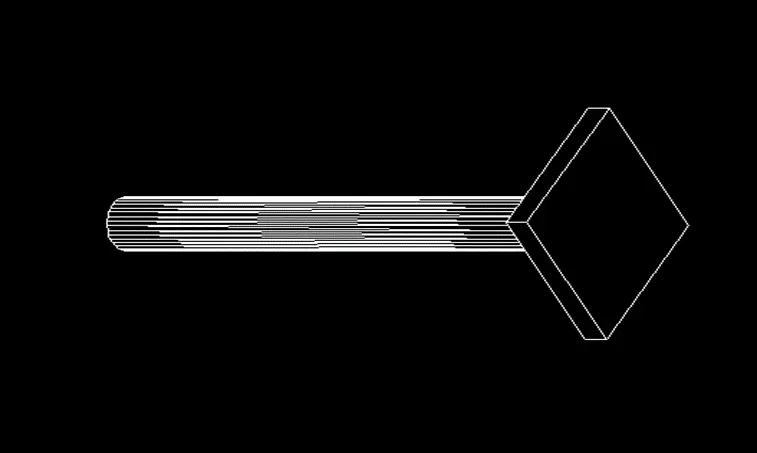
shaded view
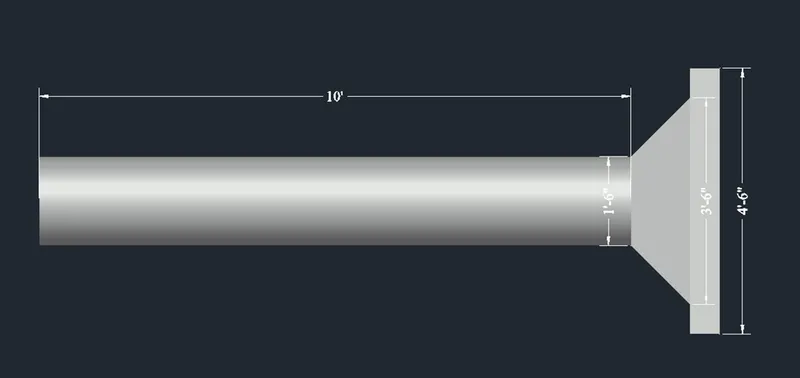
5
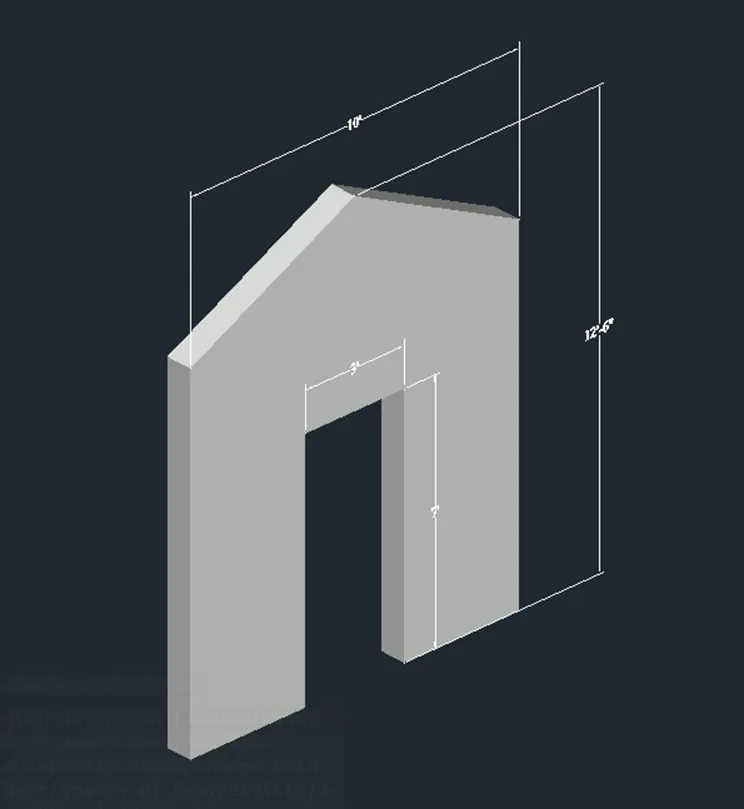
Aim: To create the 3d model of a wall using AutoCAD software.
Introduction:
Various commands used
- QNEW command
- UN command
- LIMAX command
- Zoom command
- 3P command
- MIR command
- Region command
- Extrude command
- DIMLIN command
Procedure:
- Type QNEW in command box, press enter, select the imperial as default setting and select ok.
- Type UN in command box, press enter, select the measuring unit engineering with the precision 0’-0”.
- From setting of status bar change setting from drafting and annotation to the 3D modelling.
- Type LIMAX in command box, press enter, specify max limit as 20’,20’ and press enter.
- Type Z in command box, press enter, type A in command box and press enter.
- From view tab keep on the view cube icon from the ribbon.
- Select home icon of view cube to set the default position of UCS icon.
- Type UCS in command box, press enter, select the X option from command box, specify rotation angle as 90 and press enter.
- Type 3P in command box, press enter, specify first point on the screen.
- Specify next point as @-5’,-2’6”’ and press enter.
- Specify next point as @42”,0 and press enter.
- Specify next point as @0,7’ and press enter.
- Specify next point as @0,18” and press enter.
- Type MIR in command box, press enter, select the entire drawing, select the first point on mirror line as start point of polyline and specify second point on mirror line as other endpoint of polyline and mirror the polyline.
- Type REGION in command box, press enter, select the entire object by using the crossing window.
- Type EXTRUDE in command box, press enter, select the object and specify height as @0,0,-9” and press enter.
- Type DIMLIN in command box, press enter and give the dimensions.
- From the viewport control change the custom visual style from 2D wireframe to HIDDEN to get the desired view
Result:
3D model of a wall is created in AutoCAD software by following the above mentioned procedure as shown below.
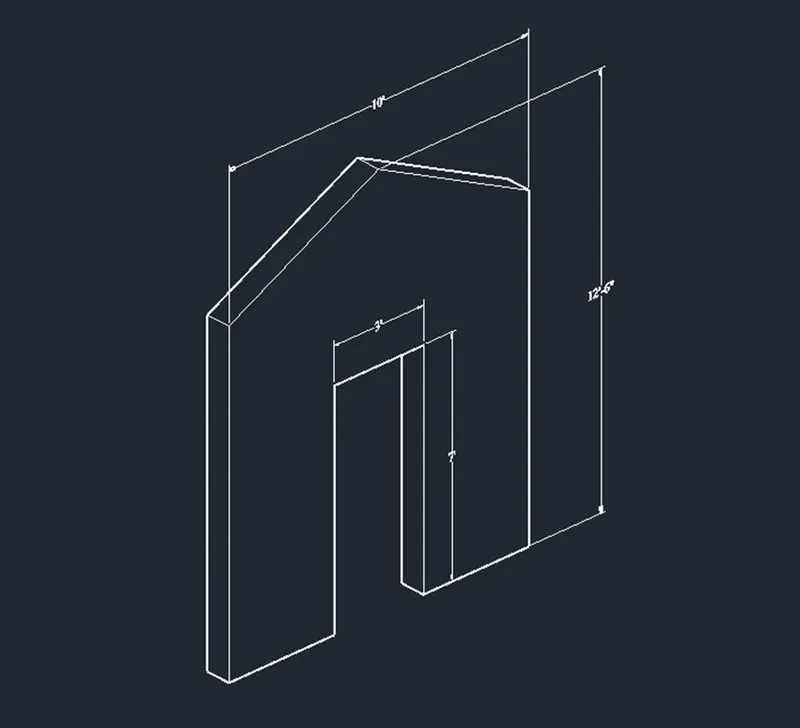
shaded view