Side Crash/Pole Impact Analysis of Dodge Neon
DODGE NEON SIDE CRASH ANALYSIS (POLE IMPACT)
Objective:
- In this project, the side portion of the Dodge Neon car was crash tested to analyze the deformation and various types of forces produced during a side crash scenario on a rigid pole with a speed of 35mph in 'HYPERMESH'. Along with this, the following outputs had to be requested in the analysis in 'RADIOSS'.
- Sectional force in the cross-member.
- Intrusions at B-pillar, hinge pillar, and fuel tank region.
- Peak velocity of the inner node of the door.
Introduction:
- A crash test is usually done to analyze the vehicle beforehand and make some changes in the body, structure, or material of the BIW if required. Different types of crash tests are performed on a vehicle like a frontal crash, side crash, roof crush, pedestrian impact, etc. to ensure the safety of the passengers as well as the pedestrian.
- The 'FEA' data obtained from the crash testing is usually in terms of forces, stresses, displacements, curves, etc. which can be analyzed and the safety of the occupants can be predicted. The simulations done in the software are very much closer to the actual crashing scenario of a vehicle.
- In this project, the side crash test was done on a BIW of the Dodge Neon model. The velocity of the car was set as 35mph which is one of the standard car speeds for the side crash according to the FMVSS norms.
- This project was done in HyperMesh and HyperCrash for case setup and simulation, and the post-processing, HyperView and HyperGraph 2D was used. Different types of energies, Von-Misses stresses, plastic strains, displacements, and force graphs were computed.
- The vehicle has been set to crash on a rigid wall of cylinder type (pole). Rigid walls, as the name says, are non-deformable, and fixed. Different sections were created on the parts of the vehicle body to analyze the forces. Along with this, intrusions have been created at the bottom of the B-pillar on the rocker, hinge pillar, and fuel tank area. Mass Balancing has also been done on the body to get the CoG (center of gravity) just at the bottom of the driver seat or on the rail.
Procedure:
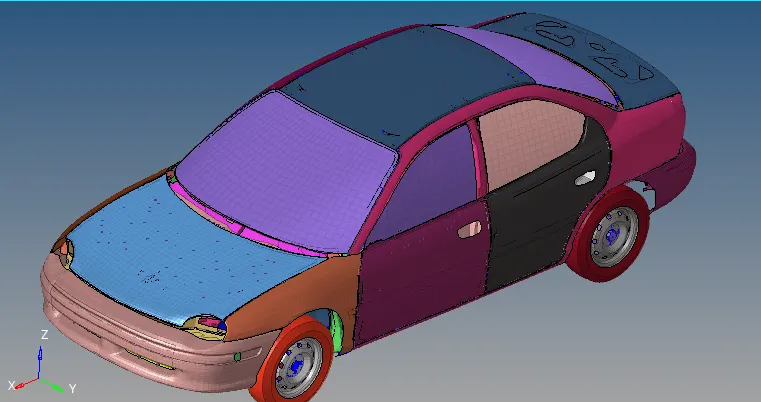
- The model was provided in .rad format. But since the node limit in the HyperMesh Student Edition is of 100k nodes, only the partial model was analyzed. The image below shows the full model.
- The partial model, consisted of only the essential parts, and doors and its other components of the driver side, and was imported in the HyperCrash by using the ‘import solver deck’ option, and was observed.
- All the Type7 interface cards (/INTER/TYPE7) which were present in the model were deleted and one single Type7 card was created for all the components. The properties of the card were set according to the recommended properties and in the slave nodes and master segments option, all the nodes of the model were selected. The image shows the Type 7 card along with its properties. This process can also be done in HyperMesh.
Penetration Check:
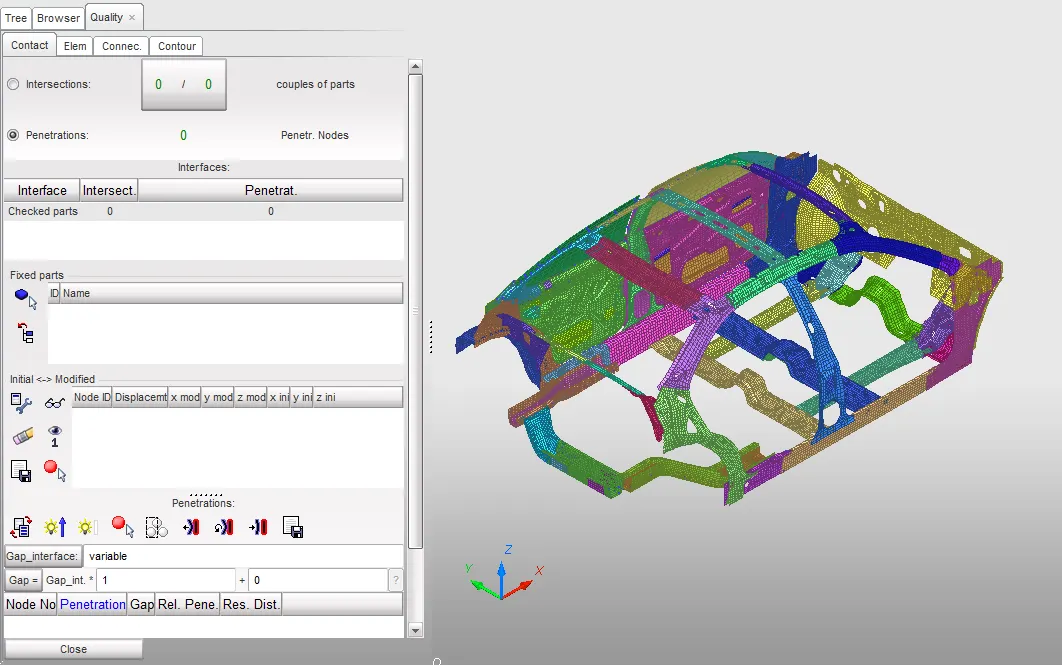
- The model was checked for any penetrations. If there are any penetrations in the model, the analysis will be affected. Therefore it is necessary to remove the initial penetrations or set the properties according to it.
- Penetration check was done in ‘HYPERCRASH’ from ‘quality>check tree selection>penetration’ option, and there was 0 penetration in the model as seen below.
Rigid Wall creation:
- After the penetration check, a rigid wall was created on the driver's side of the vehicle body. The rigid wall is basically a non-yielding retaining wall which is defined by the user master node and a group of slave nodes.
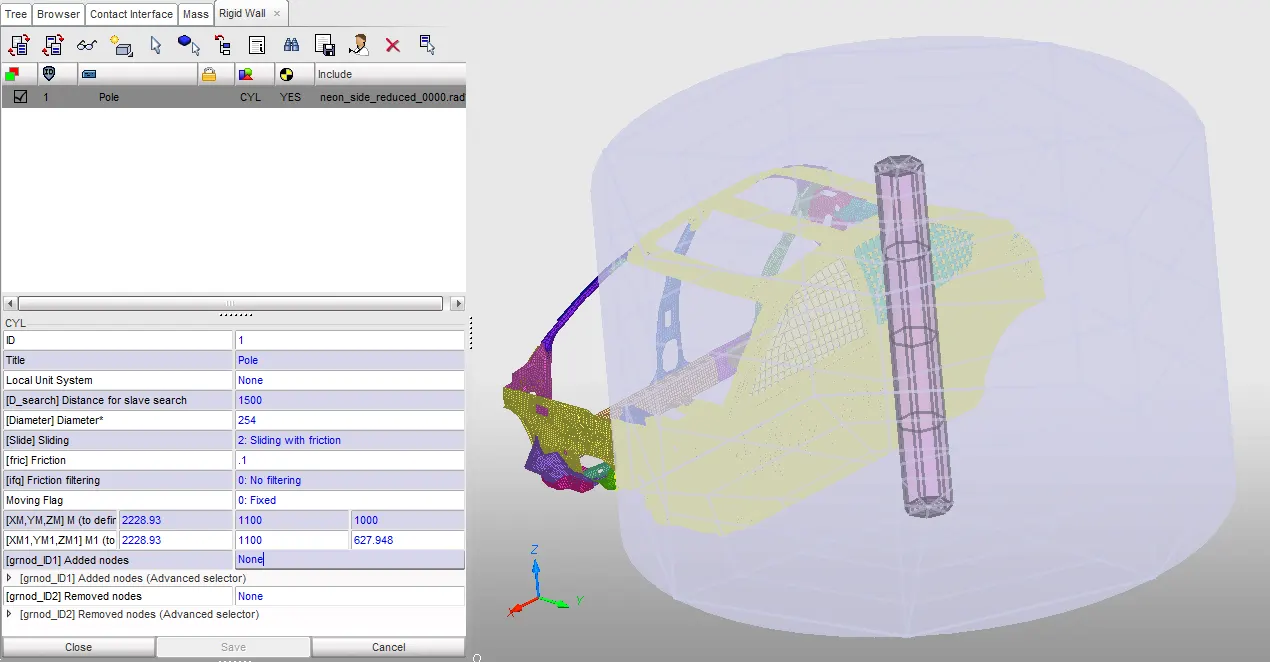
- There are 4 types of rigid-wall: Infinite plane, Infinite cylinder of diameter, Sphere, and Parallelogram. Out of these, the cylindrical rigid wall was created from ‘loadcase>rigidwall>cylinder’ from HyperCrash, as seen below. The ‘D_search’ i.e. the search distance for the slave nodes was kept as 1500mm, while the diameter of the cylinder was kept as 254mm. This is a standard value of the pole for the side crash/pole impact analysis according to FMVSS standards.
- The type of the rigid wall was set on Type2: Sliding with friction with a friction value of 0.1. A small gap was kept in between the rigid wall and the doors for illustration purposes. The image below shows the rigid pole created.
Mass Balancing:
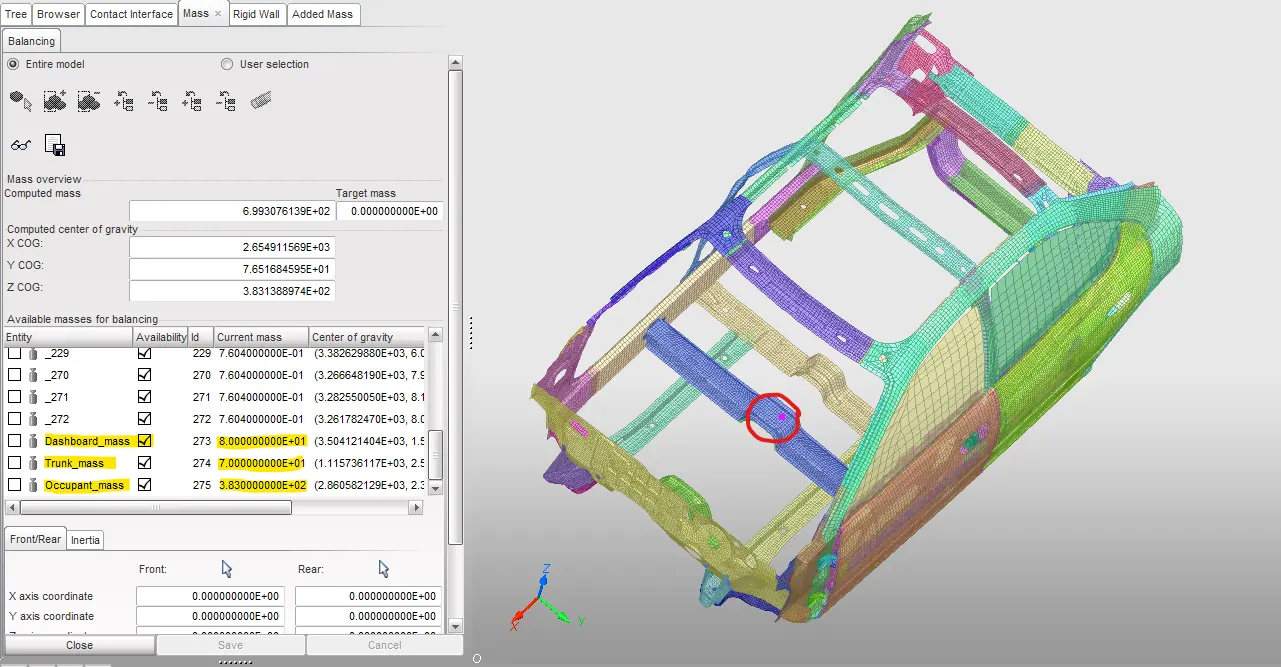
- The initial mass of the partial model provided was approximately 166kg, while the target mass was around 700kg. The remaining mass was added manually on the body from the ‘Mass>balancing’ option in HyperCrash.
- Out of the remaining 534kg, 383kg was added as the mass for occupant and their seat. While, 70kg was added in the rear portion as the trunk mass, and 80kg was added as the dashboard mass.
- Thus the CoG (circled portion) came exactly on the rail under the driver’s seat where it was supposed to come in this case, as shown below. The new mass after the addition became 699.3kg.
Initial Velocity (/INIVEL/TRA):
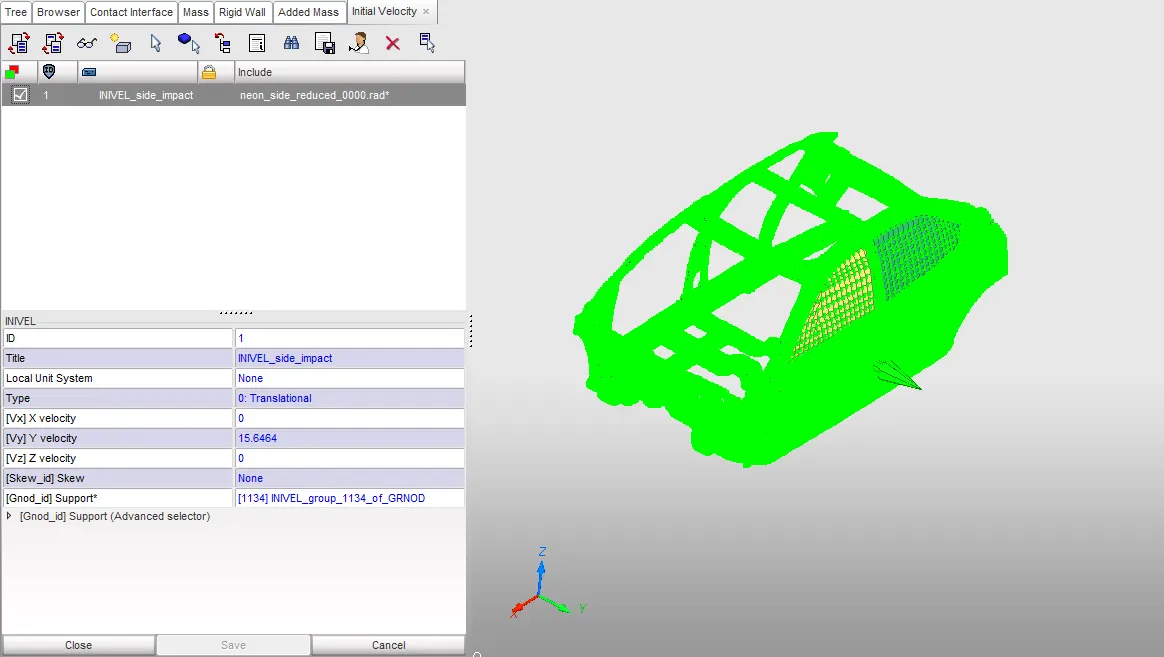
- Now, some initial velocity was required to be applied to the model. This initial velocity or INIVEL was applied from the ‘loadcase>initial velocity’ option. It can also be set by right-clicking in the collector browser.
- The velocity which was supposed to be applied was 35mph according to the set standards of FMVSS. But since the unit system in the HyperCrash is kg, mm, ms, the initial velocity conversion for 35mph came out to be 15.6464 mm/ms.
- This velocity was applied along the y-axis in translational manner. Generally, the INIVEL is applied using the global coordinate system. For node group or the ‘support’ nodes, all the nodes in the model were selected which meant that the velocity is applied to all the nodes.
Output Requests:
Cross-sections:
- Sections are used to identify the value of the forces passing through that portion of the component. By the use of the sections, the distribution of forces and stresses can be determined in a specific component.
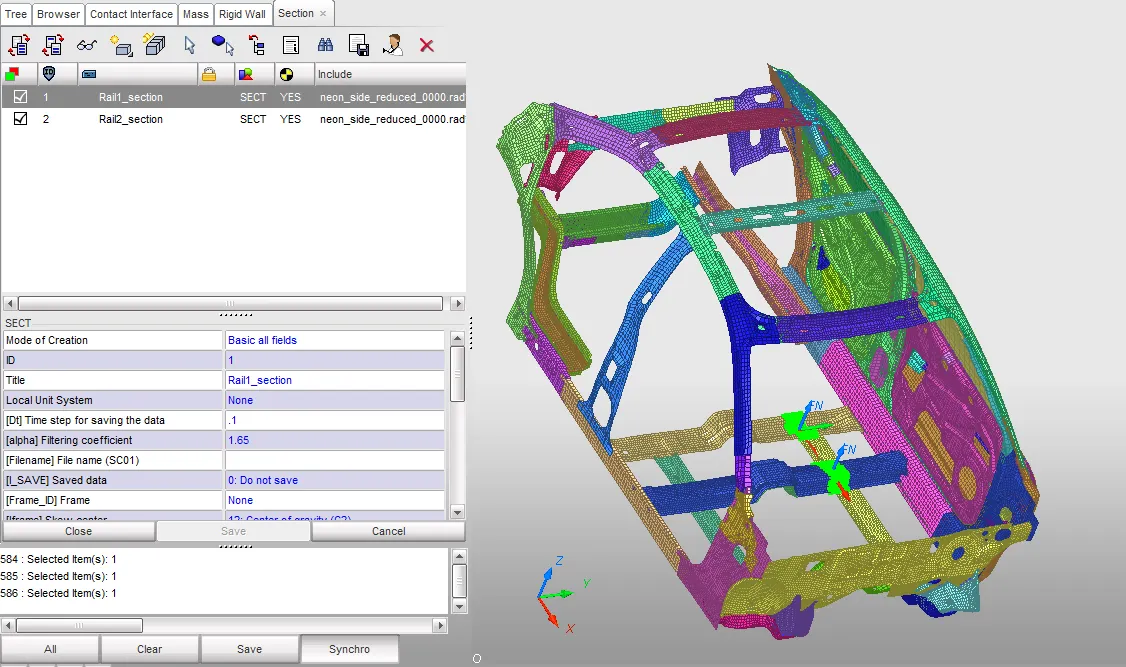
- Sections had to be created in different areas of different components of the model. According to the output requests, the sections had to be made in both the cross-rails under the driver seat which would give an idea of the force passing through which in-turn will tell the severity of the impact to the driver.
- These sections were created in HyperCrash from ‘data history>sections>default’ using the 3 nodes option.
Intrusions:
- Displacement of a specific node can be identified by opting for the intrusions parameter. In this, a node for which the displacement has to be calculated is specified. Along with it, a local skew also needs to be created in the direction opposite to it (Z-direction opposite to the node). Thus the variation of the distance between the node and the origin of the local coordinate system can be computed.
- In this case, the displacements of following nodes had to be computed.
- B-pillar
- Hinge-pillar
- Fuel tank region
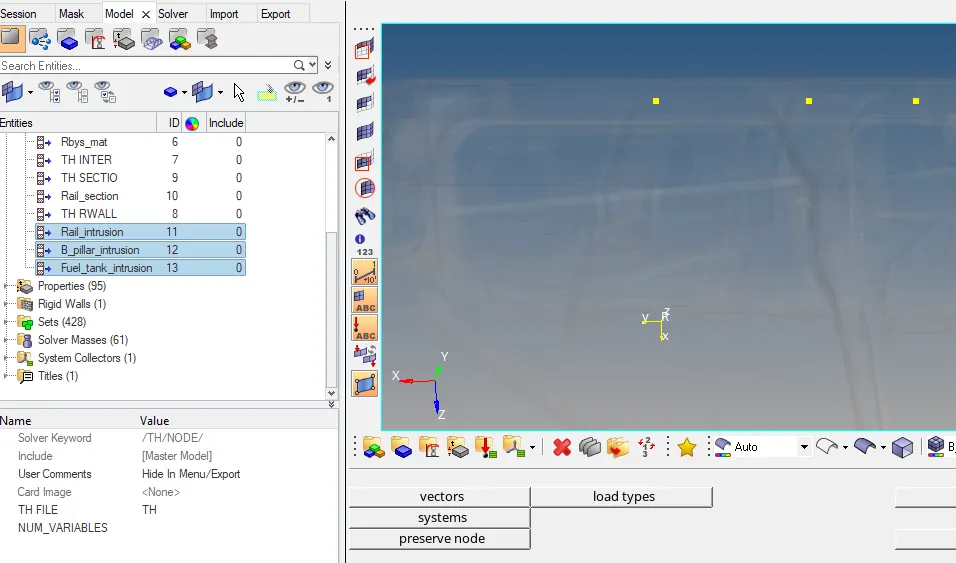
- This operation was done in HyperMesh under the ‘output block’ collector. A new output block was created and the nodes were specified by right clicking on the grnode>entity id, and the entire three node id were specified.
Peak Velocity:
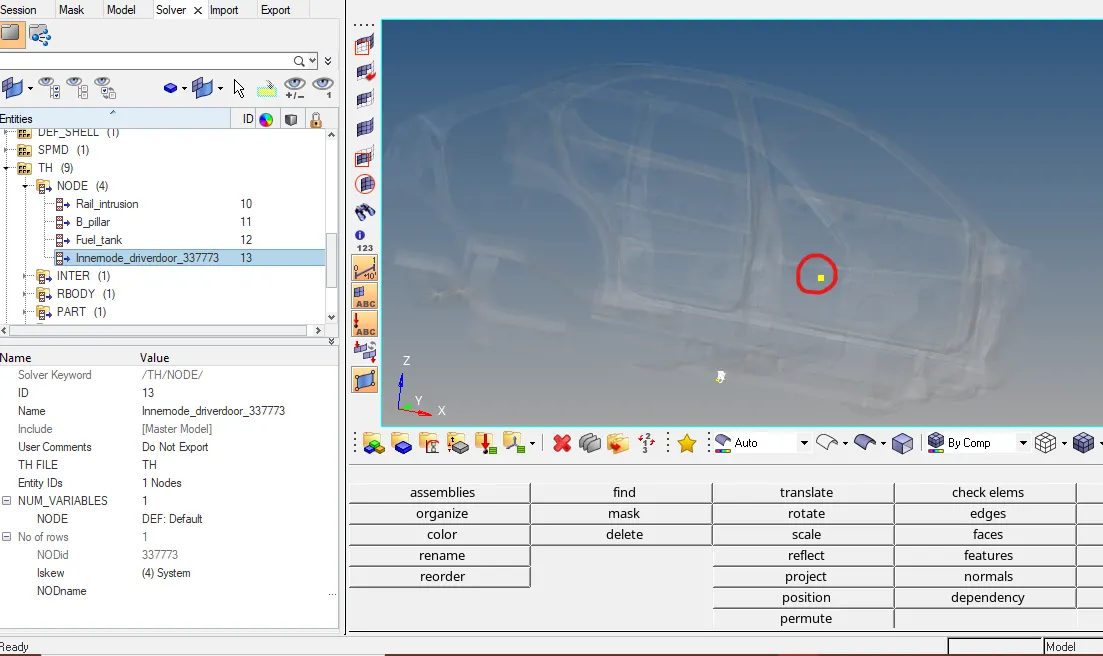
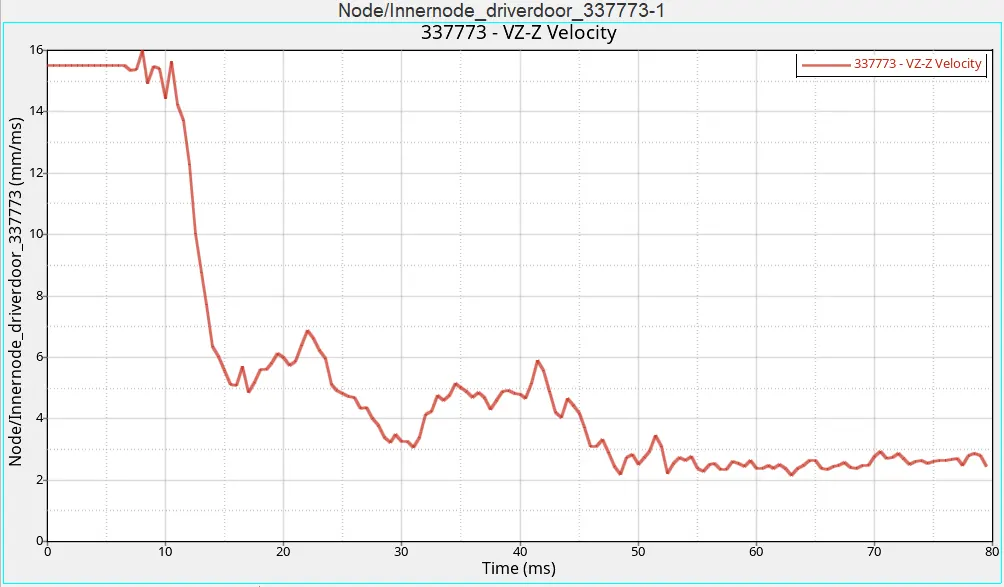
- The inner node of the driver side’s door had to be analyzed for peak velocity. This would indicate the speed at which the node would move in case of the pole impact. The node id for which the peak velocity was specified was 337773.
- For this, the node had to be included in the time history of the model. This was done in the Hypermesh output block. A new output block was created and the node id was specified in the TH of node, and a skew was defined for it.
- After specifying all the parameters, the model was checked for any errors. This was done in HyperCrash, under the ‘model>quality check’. Thus after clearing all the errors and making sure all the parameters were set properly, the ‘radioss’ operation was performed in the HyperMesh from the ‘analysis’ tab. The ‘options’ menu was set as ‘-nt 4’ also called ‘multi-threading’, where 4 is the number of threads for efficiency. This number of threads must be equal to the core of the CPU, and increases by the power of 2. The radioss operation took almost 1 to 1.5 hours of time, after which all the animation files, output files, and template files were generated at the destination specified.
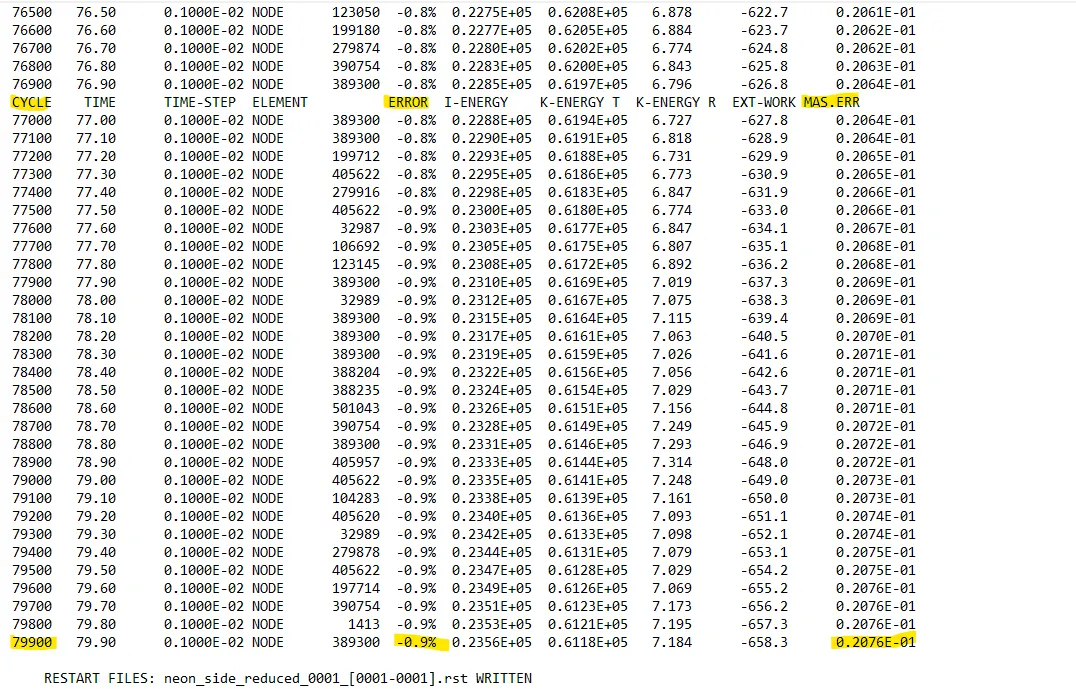
- After this, the engine output file was opened with the help of Notepad and the values of cycles, energy error, and mass error were observed. The observations were as follows:
Cycles: 79900
Energy error: -0.9%
Mass error: 0.02076
The negative value of the energy error indicates that there is an energy dissipation that happened during the simulation. Also since the value is well within the limit of 15%, it is acceptable.
- On the other hand, the mass error says that some negligible quantity of mass of around ??grams was added during the simulation for the time step control or stabilization purposes. Since this value is much lower than the 2% limit, it can be accepted. Since both the energy and mass errors are acceptable, further analysis and plotting are feasible. The image below shows the energy and mass error at the end of the simulation.
- Later for viewing the animations, HyperView was opened and the deformation, stress, and strain generation were in the following manner.
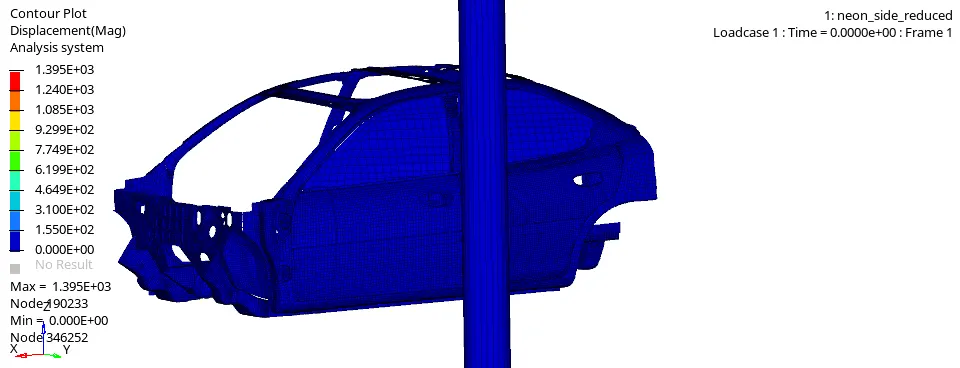
- Displacement: The maximum amount of displacement in the model was 1395 mm at the 190233rd The following animation file shows the displacement of the model.
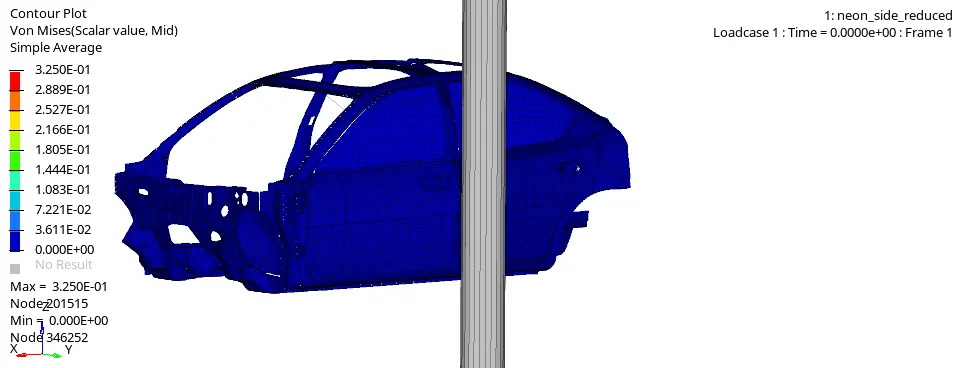
- Von-Misses Stress: The maximum amount of Von-Misses stress generated in the model was 0.3250 KN/mm2 at 201515th
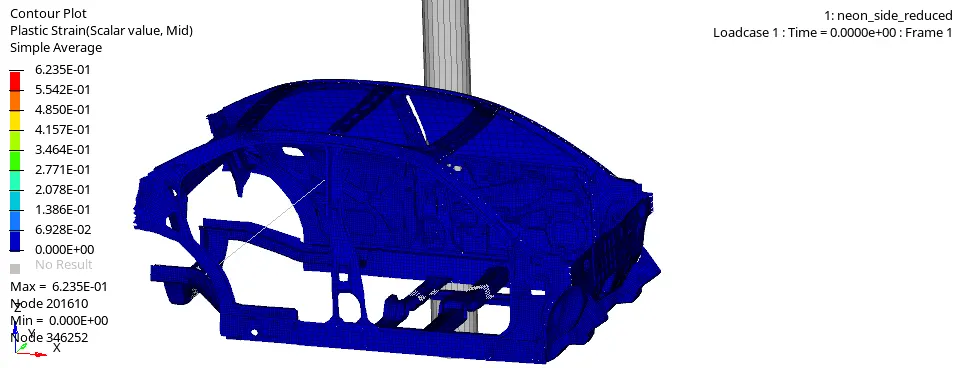
- Plastic Strain: The maximum amount of Plastic Strain generated in the model was 0.6235 as seen below.
- Later in the HyperGraph 2D, various plots of energies, forces, etc. were analyzed. Firstly, the Rigid Wall forces experienced by the rigid wall were plotted. The screen was split into two parts and the Normal Resultant force and Tangential Resultant force were plotted on them.
Rigid Wall NF and TF graphs:
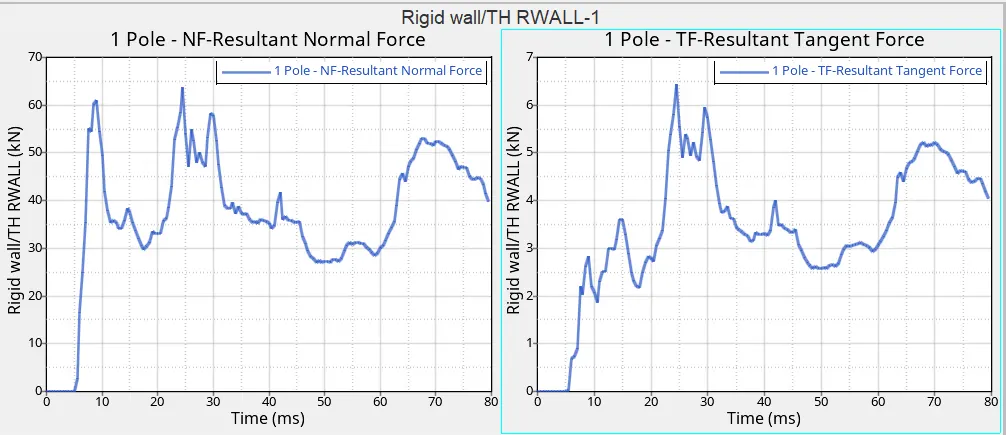
- As seen, the maximum normal forces reached up to 65KN, while the maximum tangential forces had a value of 6.5KN. Later the different types of energies like Internal Energy, Kinetic Energy, Contact Energy, and Total Energy graphs were plotted as seen below.
Internal Energy, Kinetic Energy, Contact Energy, and Total Energy:
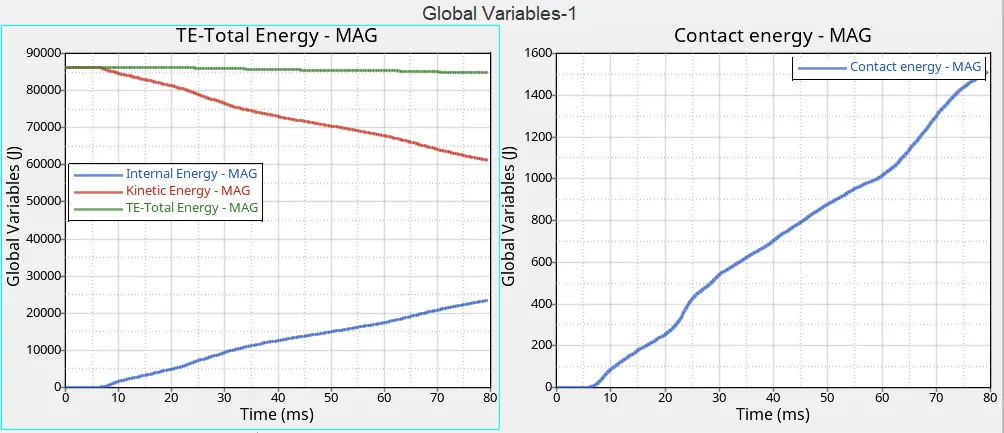
- Due to the large mass of the model, 700kg and the velocity of 15.6464 mm/ms, the kinetic energy in the model was very high. The initial value of the kinetic energy was around 85000J, which came down to around 60000J till the end of the simulation. On the other hand, due to the large deformation of the model, the internal energy rose up to 24000J. The sum of the internal energy, kinetic energy, and contact energy equals the Total Energy value of around 85000J from the graph.
60000+24000+1500=85500J (approx.).
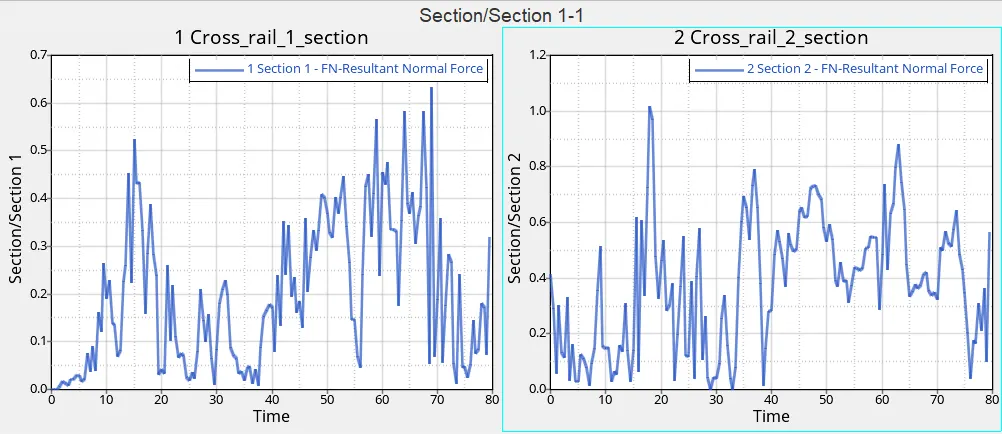
- Similarly, the section forces were plotted for the two rails under the driver seat.
Section forces:
- The image below shows the graph of the cross-section created at the cross-rails under the driver’s seat. The variation of the forces can be seen passing through the rail as the body gets impacted on the rigid pole.
- The maximum amount of the resultant normal force passing through the rail is around 0.65KN and 1KN.
Intrusion/Displacement of nodes:
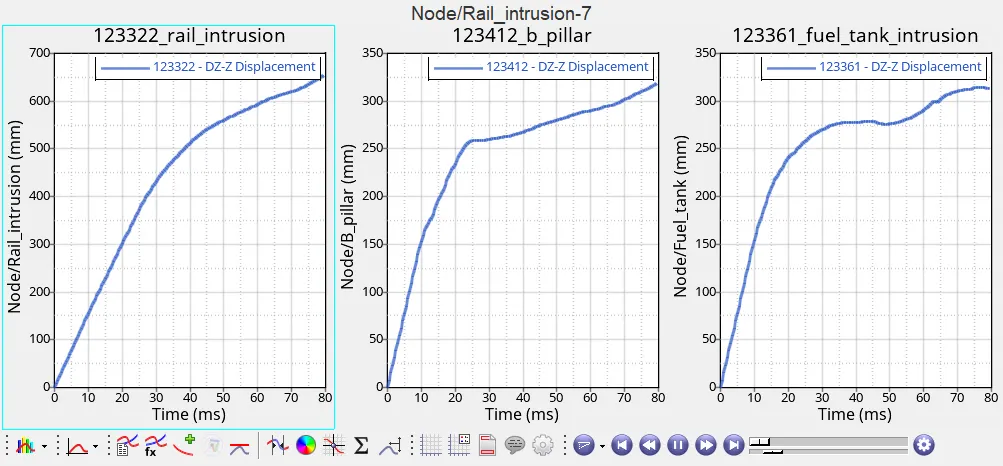
- The graphs below show the intrusions at the rail intrusion, b-pillar, and fuel tank area. All these intrusions are along the Z-axis; since the local frame of reference was created in such a way that Z-axis was opposite to the nodes.
- Thus the displacements at all the respective areas would be as follows:
(Initial distance between skew and node)-(distance at the end of simulation)= displacement
Rail intrusion: 1311.045-650=661.045mm
B-pillar intrusion: 1317.519-340=977.519mm
Fuel tank intrusion: 1319.743-340=979.743mm
Peak velocity:
- The peak velocity which was plotted at the inner node at the driver side's door had a maximum value of 16mm/ms which indicates the speed at which the 337773rd node would travel due to deformation during the impact.
Results and Conclusion:
- The side crash analysis or pole impact test is one of the important types of crash tests performed while analyzing the safety of the vehicle and its occupants. In this project, the partial model of Dodge Neon was analyzed for side-impact on a rigid pole. There were many different parameters specified in the case setup.
- This pole impact resembles the case when a vehicle is hit on the driver’s side by some another vehicle in a crash scenario. Since there is no crumple zone or other components between the pole and the driver, most of the forces are transmitted to the driver and the rear occupant. Therefore it becomes very essential to test the vehicle for the side impact.
- The Federal Motor Vehicle Safety Standards (FMVSS) has defined the parameters for the side impact like velocity, the diameter of the pole, etc. and this simulation was performed according to these set standards.
- The sectional forces were plotted for cross-rails along with the intrusions, and other forces. Thus it is very clear from this simulation that the body of the vehicle should be designed such that it will absorb all these huge amounts of forces.
- The side doors, cross-rails, roof rails, etc. play a major role in absorbing the forces. The more they absorb the forces, the higher is the safety of the occupants.