Side Impact test of Dodge Neon with a pole using HyperMesh, Radioss
AIM : To run the provided Dodge Neon car FE model for side crash analysis using Altair Radioss and analyse the results based on the objectives listed down below.
OBJECTIVES :
- To check unit system and either follow [Mg mm s] or [Kg mm ms].
- To create appropriate interface, with friction 0.2 and recommended parameters.
- To make sure of no penetration and intersections.
- To create rigid wall with friction 0.1 as per referance model.
- To compare the model weight with the referance model and use added masses to reach target weight 700kg while getting CG about the required range.
- To set the initial velocity as shown in picture.
- To use model checker to ensure good quality.
- To Timestep between 0.5 to 0.1 microseconds.
- To run the model for 80ms.
The output results should be based upon the following requests -
- Sectional force in the cross member.
- Intrusion at B pillar, Driver compartment and fuel tank region. Provide recommendation on what can help to reduce Fuel tank intrusion.
- Peak velocity of inner node of the door.
THEORY :
A Crash Test is a form of destructive testing usually performed in order to ensure safe design standards in crashworthiness and crash compatibility for various modes of transportation or related systems and components.
Side-impact tests :
A side impact car accident occurs when a vehicle hits a barrier on its side. This type of collision can occur head-on or at an angle. Due to the devastating vehicle damage that side impact collisions can cause, many of these accidents result in severe injury or even death.
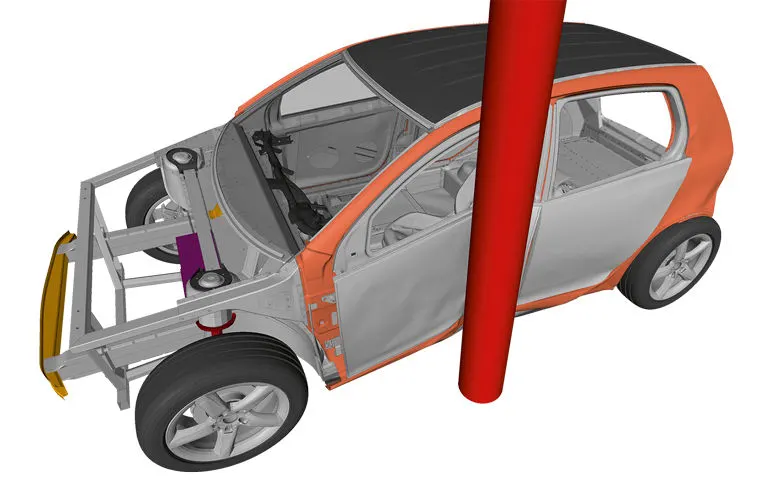
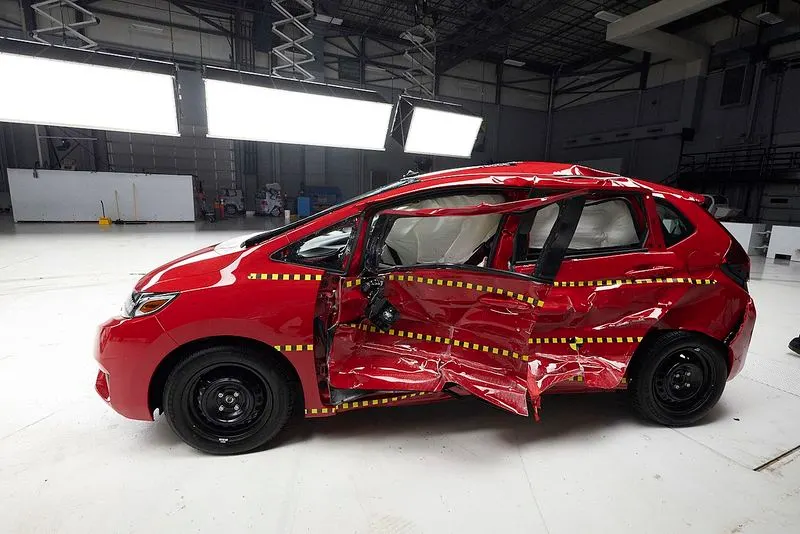
These forms of accidents have a very significant likelihood of fatality, as cars do not have a significant crumple zone to absorb the impact forces before an occupant is injured.
PROCEDURE :
- The full FE model (NEON_OP3D00) of Dodge Neon available with us is shown below.
The Shaded Elements and Mesh Lines option is enabled to visualize the model properly.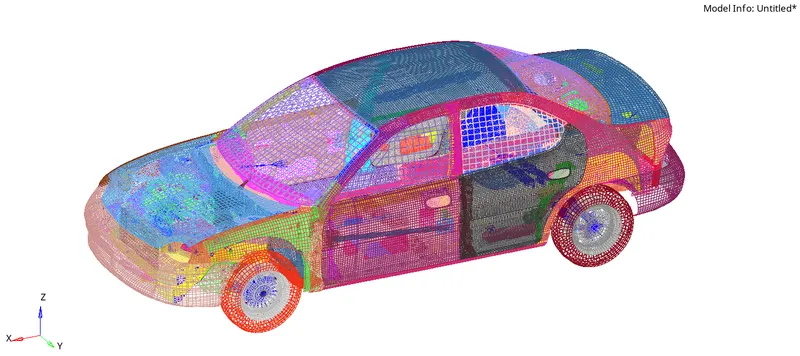
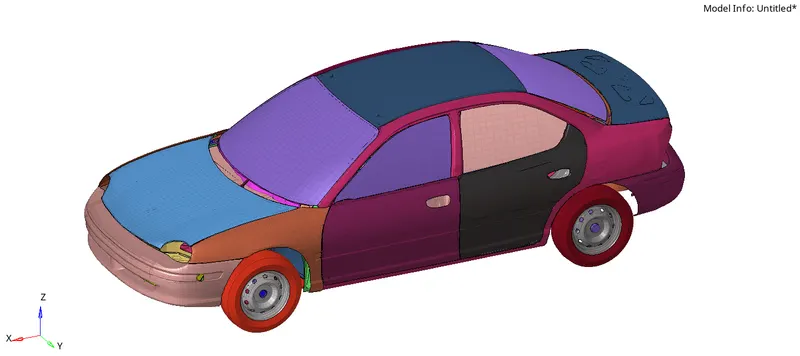
- Due to the limitation of HyperMesh & Radioss, no FE model with more than 100000 nodes can be imported in it.
This is why the model is divided into parts for the analysis. - The provided neon_sde_reduced starter file is imported in HyperMesh. The Radioss user profile is chosen.
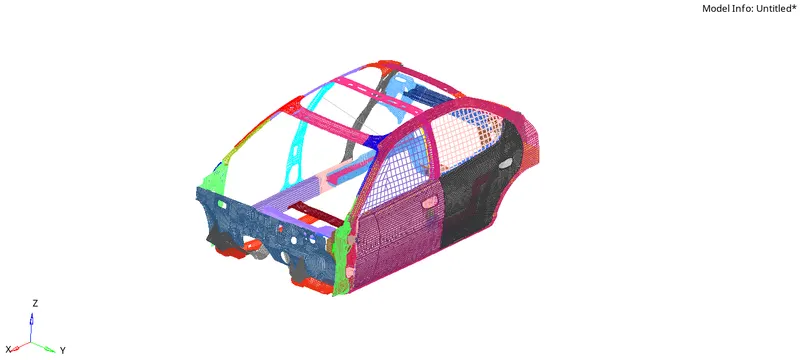
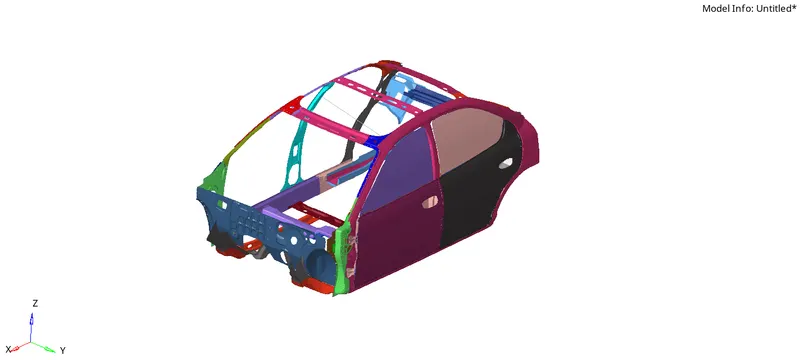
- Shown below is the property card assigned for the shell elements of the model -
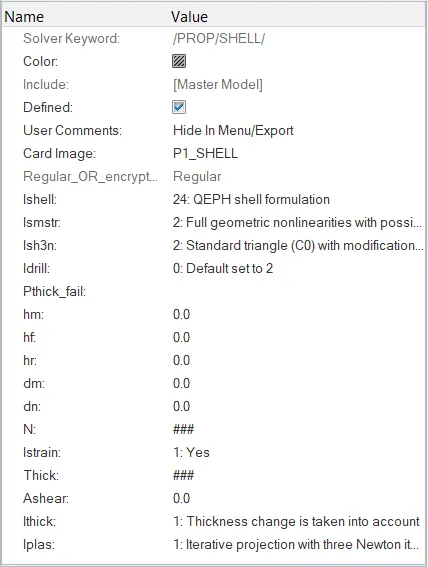
The property flags are given values according to the recommended Shell Formulation parameters, such as,
(1) Ishell=24 so that the QEPH method (reduced method with added stiffness) of integration is used. This type of integration method results in higher accuracy than the Q4 (under-integrated) method and lesser cost than the QBAT (full-integrated) method. Since, this method is a reduced integration type, there's only 1 integration point on the shell, which results in shorter computational time. Also, there is no hourglass energy involved in this case.
(2) Ismstr=2 for large strain formulation method where the strain values are based upon instantaneous calculations.
(3) Ish3n=2 corresponds to the tria shell element formulation with modification for large rotations.
(4) Ithick=1 leads to solver accounting for the shell thickness variation over the element. If it is set to 0, solver ignores the shell thickness variation.
(5) Iplas=1 is given so that the solver takes into account the stiffness variation along the thickness due to the plastic deformation involved during the impact. - There are two material cards available in the model - M1_ELAST and M2_PLAS_JOHNS_ZERIL.
(1) M1 Elastic material :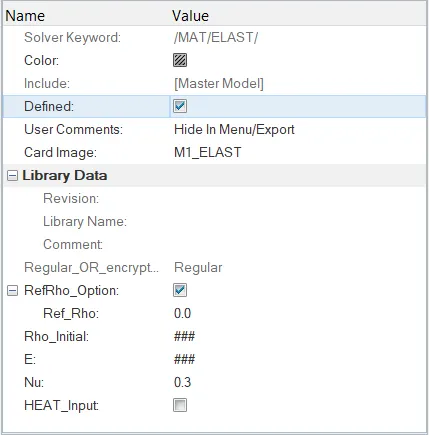
This card corresponds to a purely elastic material. There is no permanent deformation involved here and as soon as the load is removed, the material regains it's original shape.
The elastic behaviour of the material is characterized by three parameters - Density (rho), Young's modulus (E), and Poisson's ratio (nu).
This card is assigned to only - the Side door lock and the rails around the back door lock.
(2) M2 Johnson-Cook material :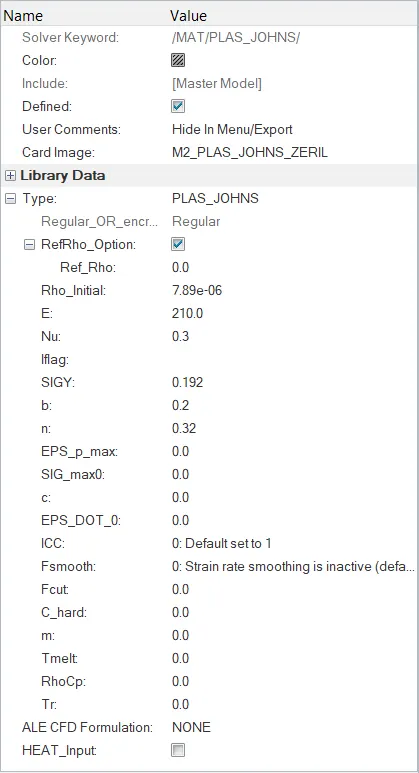
This material card corresponds to the Elasto-Plastic material behaviour, wherein the elastic zone is characterized by the values of Density (rho), Young's modulus (E), and Poisson's ratio (nu). While, the failure of the material occuring in the plastic region depends upon the values of Plastic Hardening parameter (b) and Plastic Hardening exponent (n).
The values provided are -
Density (Rho_initial) = 7.89e-06 kg/mm^3
Young's modulus (E) = 210 GPa
Poisson's ratio (Nu) = 0.3
Yield stress (SIGY) = 0.192 GPa
Plastic Hardening parameter (b) = 0.2
Plastic Hardening exponent (n) = 0.32
(I) Checking the Unit System :
- To check on which unit system the provided model is based upon, the BEGIN_CARD is used.
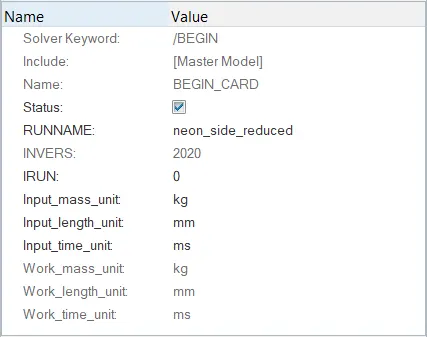
As we can see, the kg-mm-ms system is used here which corresponds to kilogram-milimeter-milisecond.
This system is kept as it is for this analysis. However, it can be changed very easily using this begin card.
(II) Creating appropriate interfaces with friction 0.2 and recommended parameters :
- Before creating the interface for our simulation, the model already contains 7 interface cards which are unncessary and should be deleted.
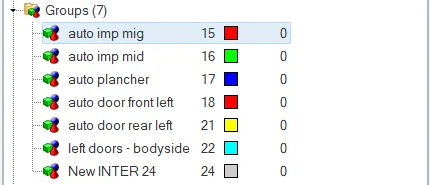
- Now, a new contact interface card is created.
TYPE7 card image is chosen which corresponds to the node-to-surface interactions.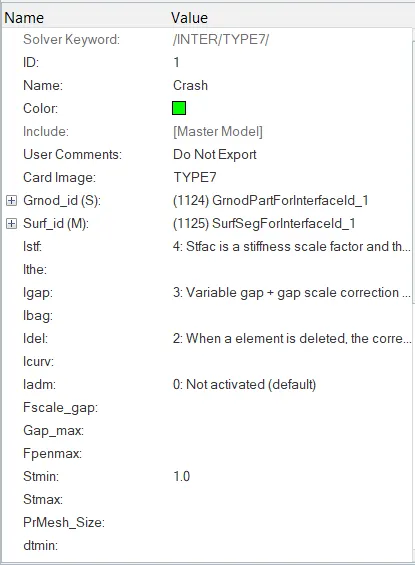
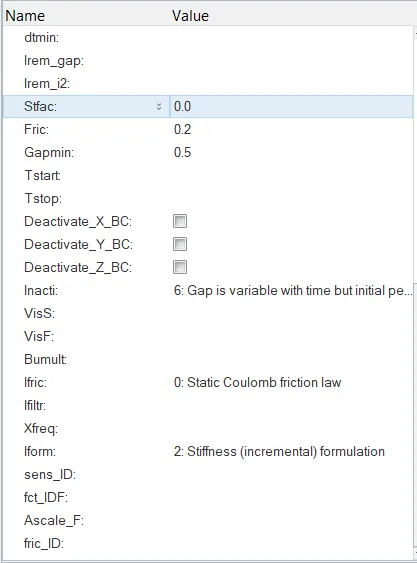
This card not only considers the penetrations/intersections of slave nodes with the master segments, but also takes into account the auto (self) contacts.
Also, the stiffness variation in this card is non-linear which helps to sfficiently curb node-surface penetration during the simulation.
The Slave side nodes and the Master side elements are chosen by selecting the entire model so as to ensure proper self-contact analysis.
Istf = 4 corresponds to the stiffness being chosen as the minimum of the slave and master side stiffnesses.
The minimum stiffness Istf is kept at 1 kN/mm which keeps a check on the stiffness value due to the non-linear behaviour of the imaginary spring element.
Igap = 3 results in variable gap computation during the simulation.
Idel = 2 is given so that when an element is deleted, the corresponding master side segment is removed from the master side of the interface.
Stmin = 1 kN/mm so that the stiffness does not fall below this limiting value during the impact which would result in huge time step.
Friction coefficient is given as 0.2 as required.
Gapmin specified here is 0.5 mm.
Iform = 2 corresponds to the stiffness based friction formulation.
Inacti = 6 is where the solver takes initiative to deal with the initially-penetrated nodes. The Inacti=6 flag removes the initial penetration, by reducing and scaling of the gap. This is very important, otherwise it might result in abnormal penetrations and intersections and the contact forces in the outputs will, in turn, show unrealistic nature.
Static Coulumb friction is chosen here with stiffness based friction formulation.
Rest all the parameters are left with their default values.
(III) Making sure there are no Initial Penetrations and Intersections :
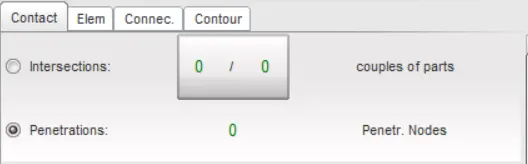
- To check for initial penetrations and intersections in the model, the HyperCrash window provides a direct option.
This can be done by using the Check penetrations for selected objects button.
This can also be done in HyperMesh using the option Penetration check inside the Tools menu. - No initial penetrations and intersections were found in the model, which is a good sign.
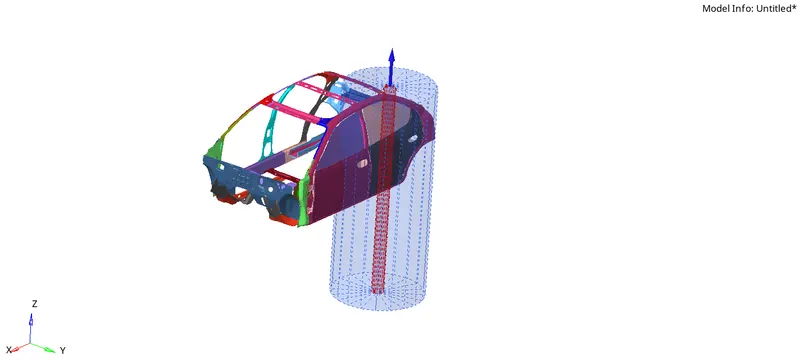
(IV) Creating the Rigid Wall (Pole) with friction 0.1 :
- Since, there is no rigid wall available for the frontal crash simulation, a wall is created similar to that available in the full model.
- Here,
Cylinder option is chosen as the Geometry type since the required wall is a Pole in nature with no bounds.
By providing the base node location by selecting the foremost node in the model, in terms of XM, YM and ZM, the y-coordinate is slightly varied in order to get the pole a bit farther from the model. Proper normal direction is specified.
Sliding with friction option is chosen and the friction coeff value is given as 0.1 as required.
The slave nodes for this wall are specified by providing the Search Distance DSearch = 1000 (similar to that in the full model).
The Diameter of the pole is specified as 254 mm.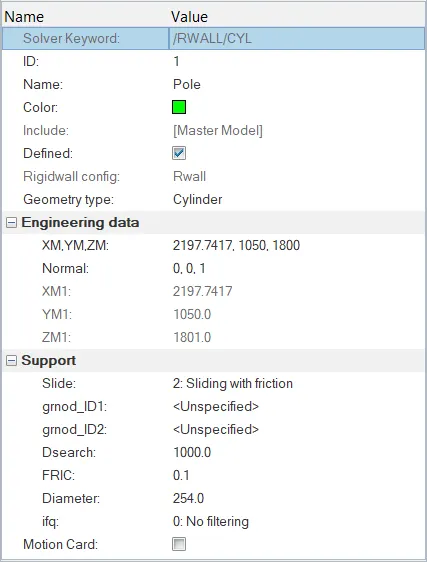
(VI) Comparing the model weight with the full scale 300k nodes model and Using added masses to reach target weight 700kg while getting CG about the required range :
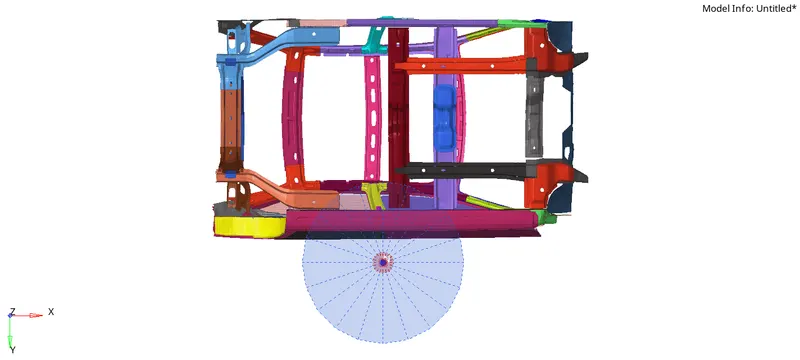
- Let us first check the total mass of the model before doing anything. For this, the Mass - Balancing option in HyperCrash is used. Same can be done using Tools - Mass details option in HyperMesh window.
The total mass is around 166 kg.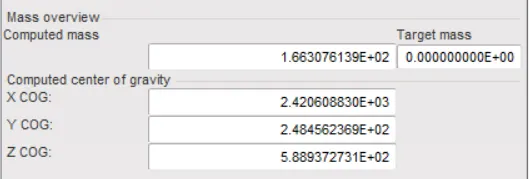
The pink dot in the middle represents the current CG of the model.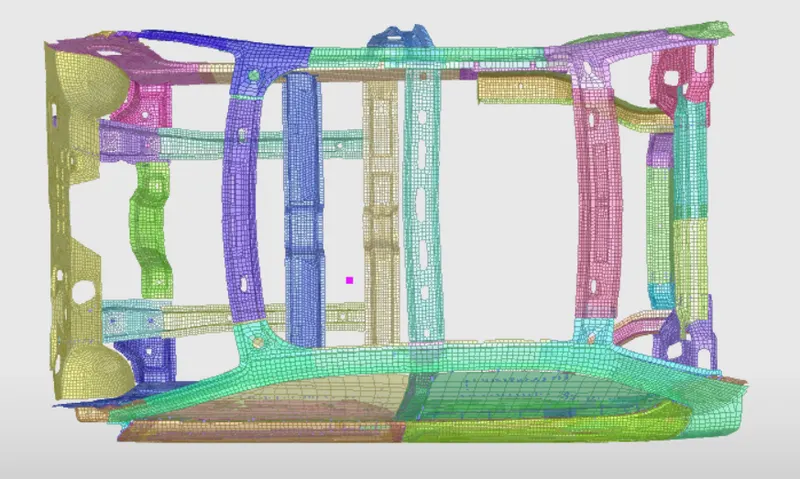
However, as we know, the ideal position of Center of Gravity lies somewhere around the rails below the two frontal seats and along the longitudinal midline, we need to add masses in such a way that the total mass of the model becomes 700 kg and the CG reaches at the desired location.
Thus an additional mass of around 534 kg needs to be added.
Firstly, the initially present small small masses are removed off.
If we conisder -
the weights of the two doors along with their plastic trim components, on the opposite side to be aournd 50 kg,
the weight of the Hood to be around 30 kg,
the Dashboard weight along with all the accessories to be about 90 kg, and
the total weight of all the seats to be about 360 kg
The total mass adds up to be : 166 + 50 + 30 + 90 + 360 = 696 kg.
Thus we have justified the additional masses for different components available in the car, which eventually leads to a total mass of about 696 kg of the model.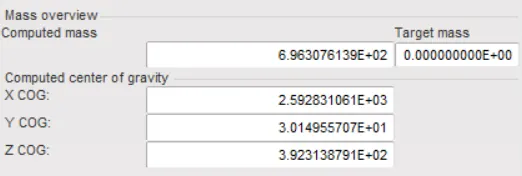
These additional masses are created using the ADMAS card in HyperMesh. The Mass type flag is chosen as 1 which distributes the load among all the chosen nodes.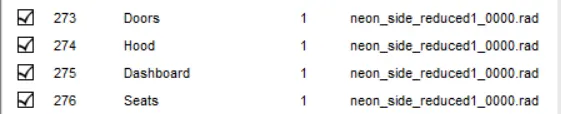
Shown below are the images of the nodes which are associated with the above mentioned masses -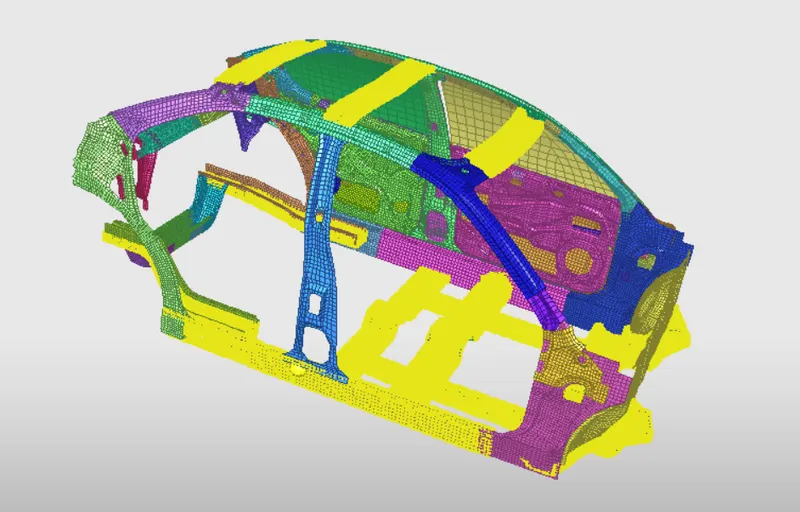
Accordingly, the CG comes out to be around the desired position -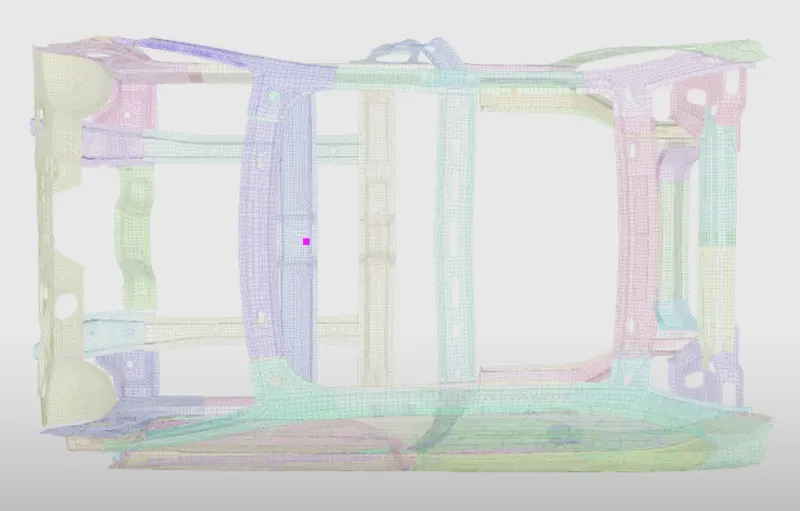
(VI) Changing the initial velocity to 35 :
- The initial velocity is a boundary condition for the simulation. Accrodingly, to assign this value to the model, Create - Boundary Conditions - INIVEL option in HyperMesh or Load Case - Initial Velocity option in HyperCrash is used.
- The value should be assigned as per the model unit system.
∴ 35 mph = `(35*1.6*10^6)/(60*60*10^3)` mm/ms
= 15.55 m/s
This velocity is in the global Y-direction, so for simplicity, local skew is not created here.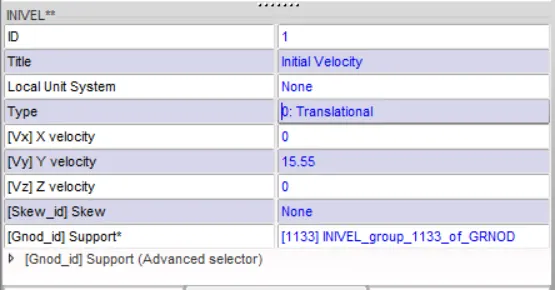
(VII) Using the model checker to ensure good quality :
- Tools - Model Checker - RadiossBlock option is used to check for the errors in the model.
Apart from few warnings, no errors were found.
These warnings can simply be ignored or we can run an automatic check over these.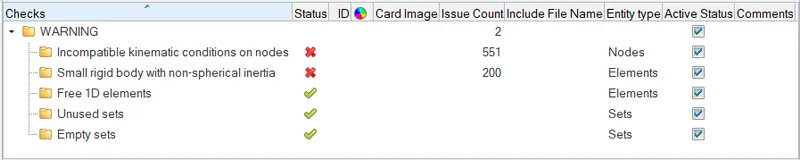
(VIII) Time step control :
- The situations are to be dealt with when the 'current time step' of the simulation falls below the 'minimum time step'.
As we can see, there are already 3 cards present in the model for time step control.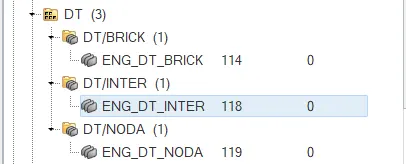
The Tmin values in each of these cards is changed to 0.5 `mu`s with some recommended values of scaling factors. - The ENG_DT_INTER card is given the DEL flag according to which, if the time step falls below the minimum value due to an element, that element is simply deleted out of the simulation.
- According to the CST flag, the element, which is causing the time step issue, is switched to small strain formulation. This will, however, lead to decrease in accuracy.
- The NODA CST card leads to a small addition of mass, which thereby increases the nodal density, which in turn results in a higher time step. This method, however, leads to mass error during the simulation.
(IX) Changing the animation step time and simulation run time :
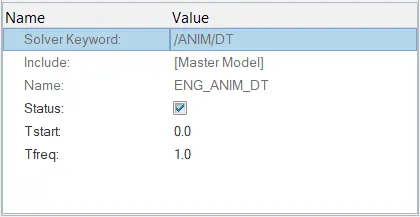
- This is done by accessing the ENG_ANIM_DT card and ENG_RUN card respectively.
The Tstop is guven as 80 ms and Tfreq is given as 1 ms which would result in a total of 81 animation steps.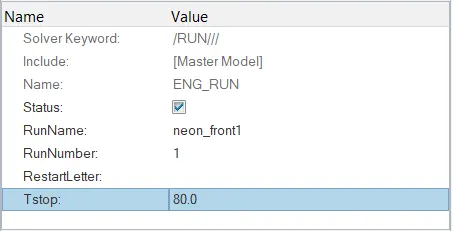
OUTPUT REQUESTS :
(I) Sectional forces :
- A section is created using the path Data History - Section in HyperCrash.
If the section is not proper after selecting the 3 nodes N1, N2 and N3, we can even manually change the nodes and elements to include in it.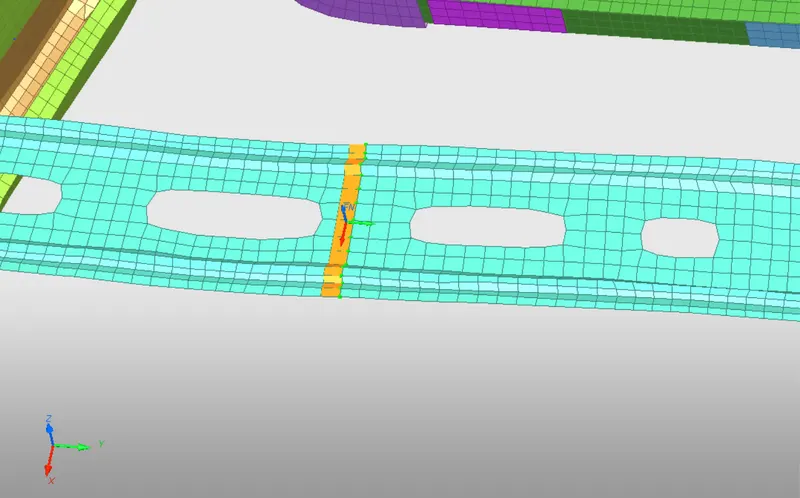
- Now, a movable frame is created around the place using the path Create - Frame - MOV. For this, one node at local origin, one along the local Z-axis and the last defining the YZ plane, need to be specified properly.
This frame ID is then specified in the Frame_ID option of the section created earlier.
Rest all the parameters are left with their default values.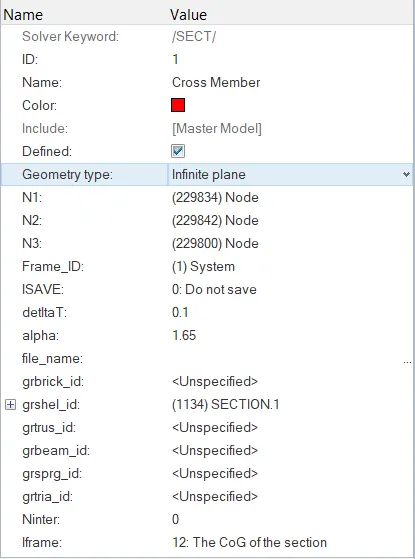
This frame ID is assigned to the section created above.
(II) Intrusion at B pillar, Driver compartment and fuel tank region :
- The intrusions will be checked w.r.t. a localised co-ordinate system. Accordingly Skews are created using the option Create - SKEW - MOV, on the opposite side of the nodes where the intrusions are to be checked.
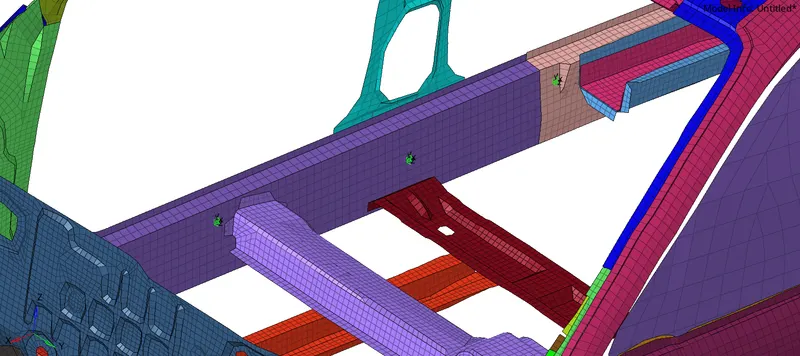
- Now, to create the TH data of the intrusions, Create - TH - Node option is used in the solver browser.
The required node IDs are specified along with the earlier created SKEW ID.
(III) Peak velocity of inner node of the door :
- To check the peak velocity of a node on the inner side of the door, a similar /TH/NODE card is created.
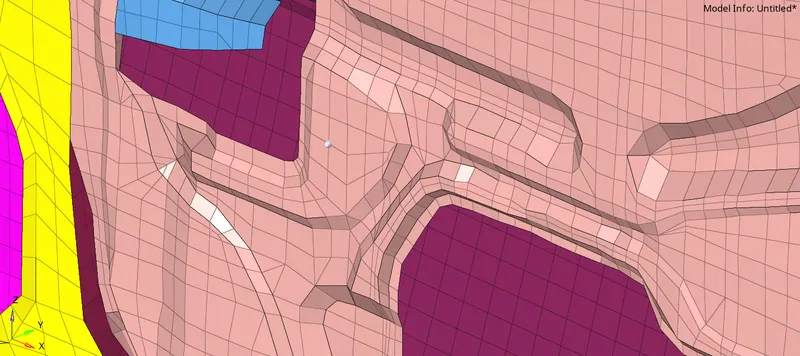
A similar localised skew is needed in order to analyse the behaviour of the node during the impact. - Now, all these outputs are requested in the Output Blocks card inside the Model browser.
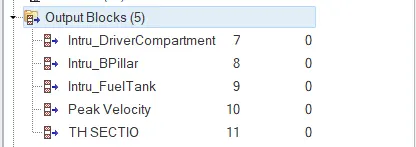
- A final model check-up is done to remove any error, if present, in the model.
The model is now ready to run for simulation.
RESULTS :
- The total elapsed time of simulation came out to be 5043.69 s (about 1 hour and 24 mins)
The simulation ran for a total of 160001 cycles. - The energy error lies well within the acceptable limits during the whole simulation. At the end, the ERR value comes out to be -2.2%, which is a good sign, as we know the energy error should lie below 15%.
Also, the error value is negative in nature, which means that there has been a dissipation of 2.2% of total energy during the simulation.
And even, the mass error at the end turns out to be 0.004% (well below the acceptable value of 1%). This mass error typically arises due to the Time-step control parameters provided by us.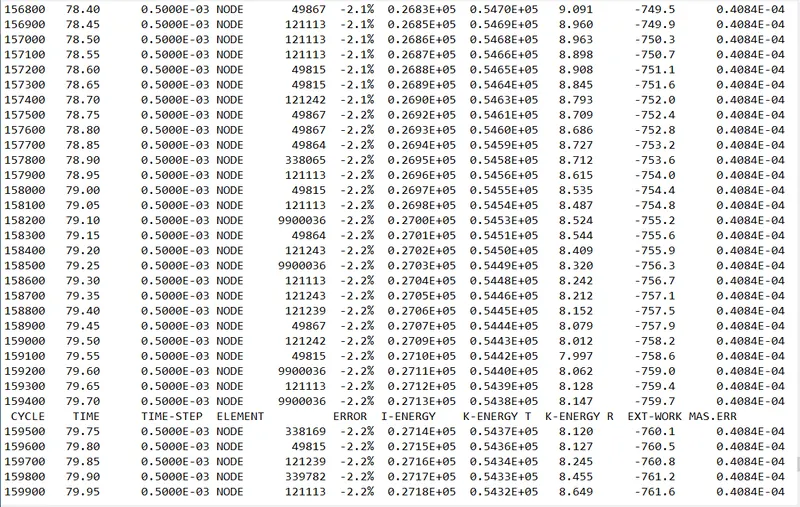
Also, there is no sharp spike in these two values (energy error and mass error) throughout the simulation run, which means that the simulation went pretty well and there is no critical part to look for. - The H3D file is imported in HyperView to visualize the animation.
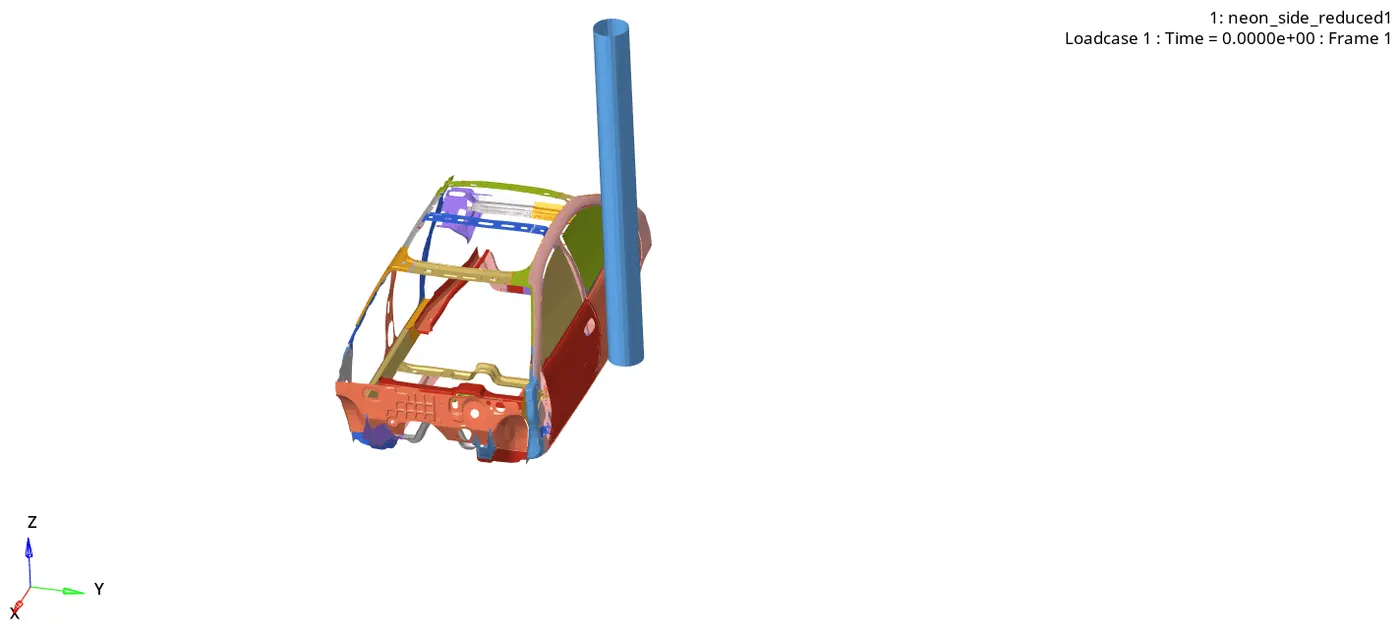
- The Von-Mises stress variation contour for the simulation is shown below -
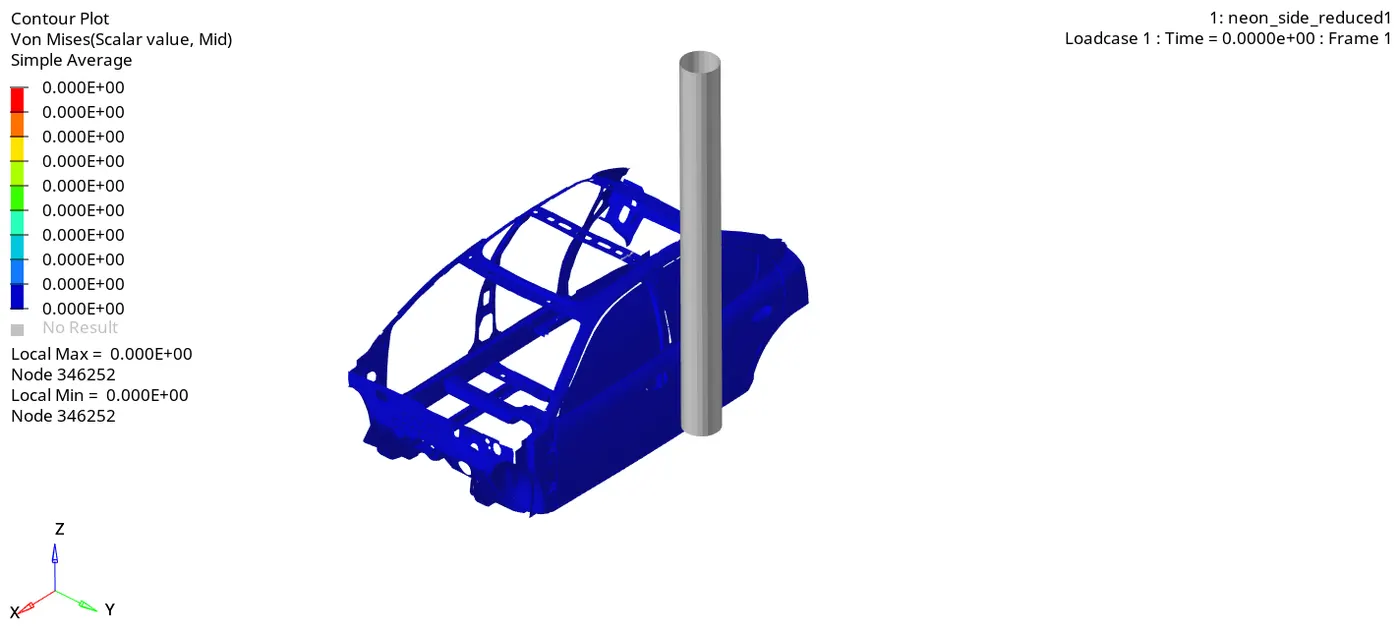
The maximum Stress developed in the model is 3.454e-01 kN/mm^2 i.e. 0.345 GPa. - The T01 file is imported in HyperGraph window, where all the rewuired Time-History plots are plotted.
(1) Energy (J) -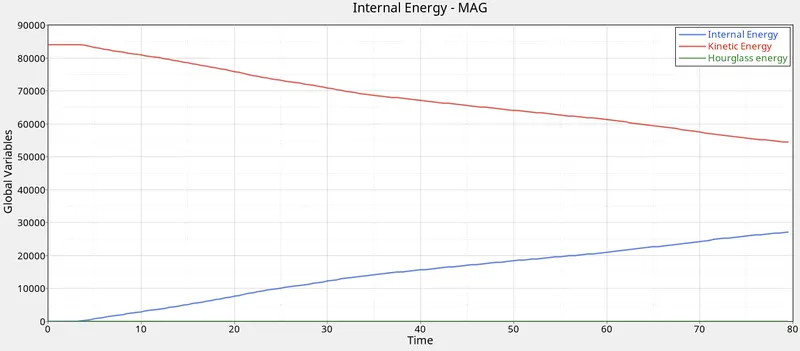
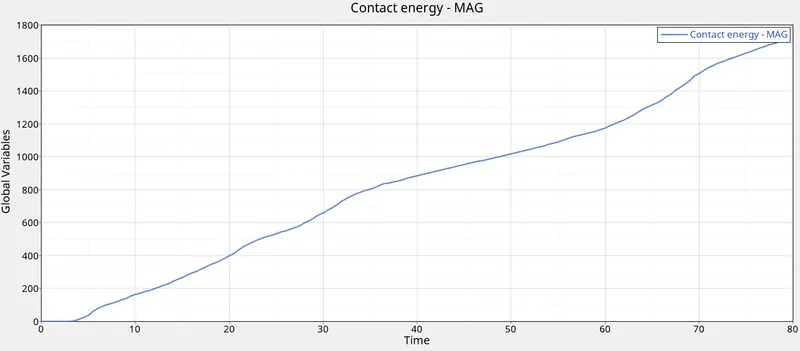
As we can see, there is no sudden spike in the Internal Energy as well as the Contact Energy (global variables) throughout the simulation, which implies the simulation ran well.
The maximum contact energy at the end of simulation is about 1710.7 J
Also, the Hourglass energy is almost zero throughout, which is why there is no abnormal deformation encountered in the animation.
(2) Sectional Force in the cross member (kN) -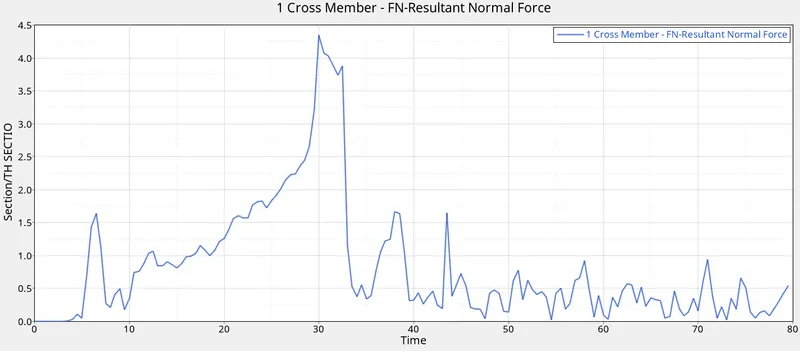
As we can see, the section force spikes up to a maximum value of 4.34 kN around t = 30 ms. This must be the time around which the pole impact reaches the location of oour section.
(3) Intrusions :
Intrusions are very important and should be necessarily analysed at key locations, as these directly related to the extent of damage and injuries of the onboard passengers.
Driver Compartment intrusions B-Pillar intrusions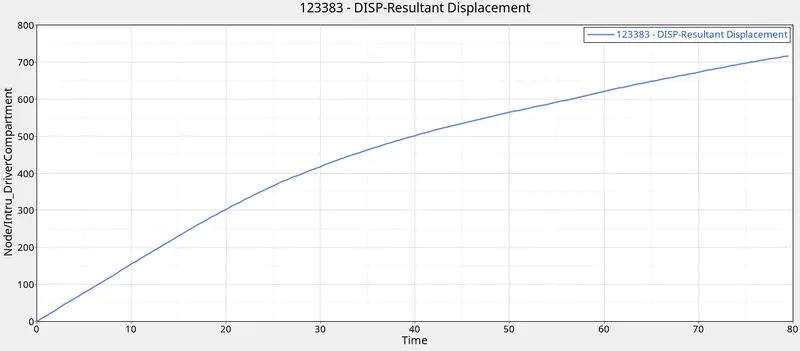
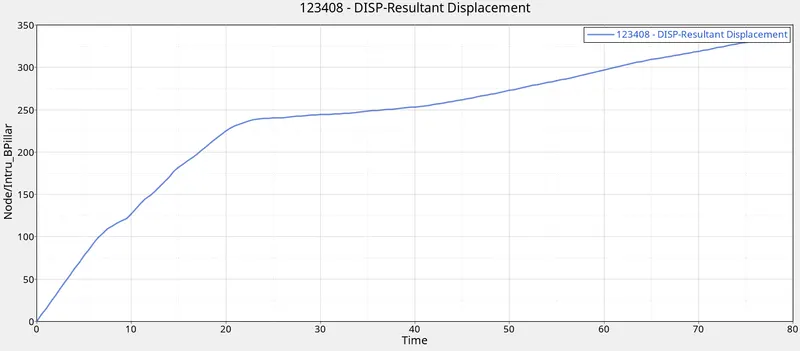
As we can see in the above images, the intrusions gradually go on increasing over the simulation run.
The maximum driver compartment intrusion is about 717 mm. This shows the severity of the impact.
The B-pillar intrusion reaches to a maximum value of about 337.64 mm.
Fuel Tank intrusions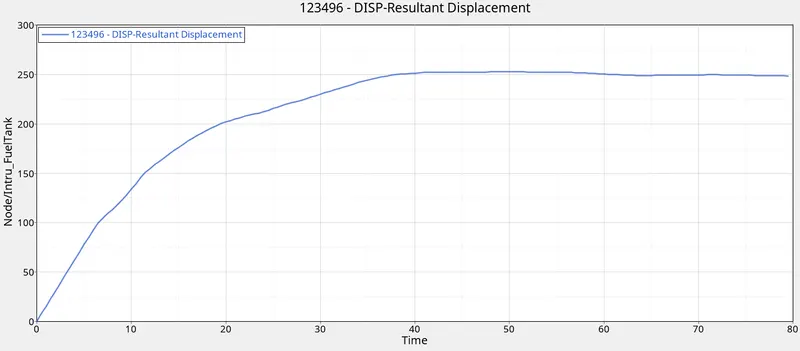
The fuel tank suffers an intrusion/ deformation of about 250 mm.
Fuel Tank intrusions are very dangerous and may result in bursting of the tank causing severe damages.
To reduce this damage, following steps can be taken -
1) Providing a protection frame around the tank which can help retain the shape of the tank and the peak stress can be effectively decreased.
2) Providing a cross-member which can help in reducing the tank deformations by stiffening the assembly.
Though, both of the above mentioned solutions result in an increased mass of the vehicle, these can be very effective while speaking in terms of crashworthiness of the vehicle.
(IV) Peak Velocity of inner node of the door :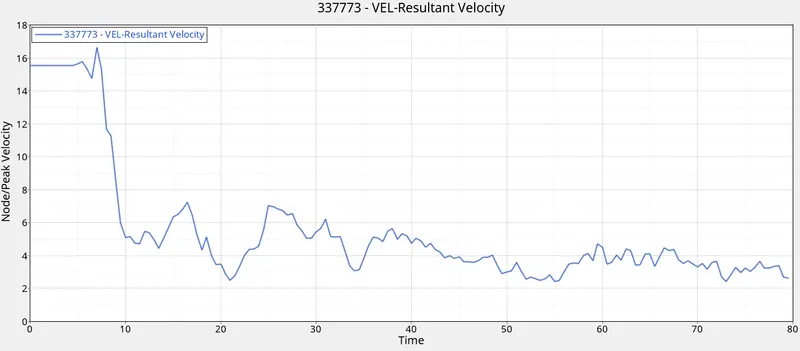
At the beginning of the impact, the door experiences high velocity (jerk).
The maximum value of the velocity is about 16.62 m/s.
CONCLUSIONS :
Succesfully ran the simulation for the Side Crash of Dodge Neon model with a pole.
The following things are concluded from the simulations and study done above -
- Energy error in the end of the simulation is well within the acceptable limits.
This means that the results are very much stable. - The mass error arising during the simulation is due to the Time-step control parameters provided by us.
- Position of CG of the model plays a vital role during the impact.
- Car Crash involves heavy contact forces. This brings us to a conclusion that the BIW should be such that it can dissipate as much energy as possible, in terms of plastic deformations. Failing so, the passengers can suffer damages on a large extent.
- Special arrangements should be done to reduce the fuel tank damages, failing so, it can lead to catastrophic damages.