Week 8 - Simulation of a backward facing step in OpenFOAM
Simulation start procedure after opening openfoam terminal
>>cd tut>>Is>>cd incompressible>>Is >>cd ico Foam
>>Is>>cp-r cavity/$FOAM_RUN/channel_test>>cd$FOAM_RUN
>>cd chaneel_test>>cd system>>getit blockMesh
blockMeshdict - This dict contains information about vertices , blocks and boundaries. Vertices are udes to create points which are further joined to create geomtery, so edit vertices entries to create requiredg geometry and then edit block entries to create faces. Run blockMesh command after this and then paraFoam command to check formation of geomtery in paraview. Edit boundary entries, define or give name to each faces
/*--------------------------------*- C++ -*----------------------------------*\
========= |
\\ / F ield | OpenFOAM: The Open Source CFD Toolbox
\\ / O peration | Website: https://openfoam.org
\\ / A nd | Version: 9
\\ / M anipulation |
\*---------------------------------------------------------------------------*/
FoamFile
{
format ascii;
class dictionary;
object blockMeshDict;
}
// * * * * * * * * * * * * * * * * * * * * * * * * * * * * * * * * * * //
convertToMeters 1;
vertices
(
//vertices from points 0 to 10
(0 0 0)
(0.08 0 0)
(0.08 0.005 0)
(0 0.005 0)
(0.08 0.01 0)
(0 0.01 0)
(0.2 0.01 0)
(0.2 0.005 0)
(0.2 0 0)
(0.2 -0.01 0)
(0.08 -0.01 0)
//vertices from points 11 to 21
(0 0 0.1)
(0.08 0 0.1)
(0.08 0.005 0.1)
(0 0.005 0.1)
(0.08 0.01 0.1)
(0 0.01 0.1)
(0.2 0.01 0.1)
(0.2 0.005 0.1)
(0.2 0 0.1)
(0.2 -0.01 0.1)
(0.08 -0.01 0.1)
);
blocks
(
//block 1
hex (0 1 2 3 11 12 13 14) (80 5 1) simpleGrading (1 1 1)
//block 2
hex ( 3 2 4 5 14 13 15 16) (80 5 1) simpleGrading (1 1 1)
//block 3
hex (2 7 6 4 13 18 17 15) (120 5 1) simpleGrading (1 1 1)
//block 4
hex (1 8 7 2 12 19 18 13) (120 5 1) simpleGrading (1 1 1)
//block 5
hex ( 10 9 8 1 21 20 19 12) (120 10 1) simpleGrading (1 1 1)
);
edges
(
);
boundary
(
outlet
{
type patch;
faces
(
(6 17 18 7)
(8 7 18 19)
(9 8 19 20)
);
}
inlet
{
type patch;
faces
(
(11 14 3 0)
(14 16 5 3)
);
}
top
{
type wall;
faces
(
(15 4 5 16)
(15 17 6 4)
);
}
bottom
{
type wall;
faces
(
(11 0 1 12)
(21 10 9 20)
);
}
sidestep
{
type wall;
faces
(
(21 12 1 10)
);
}
frontface
{
type empty;
faces
(
(13 15 16 14)
(12 13 14 11)
(20 19 12 21)
(19 18 13 12)
(18 17 15 13)
);
}
backface
{
type empty;
faces
(
(0 3 2 1)
(3 5 4 2)
(2 4 6 7)
(1 2 7 8)
(10 1 8 9)
);
}
);
mergePatchPairs
(
);
// *************************************************** //
controldict- This dict contains information about time, like start and end time and time step. edit all those values as per your choice. here start time is 0 and end time is 5s with time step dt of 0.001
/*--------------------------------*- C++ -*----------------------------------*\
========= |
\\ / F ield | OpenFOAM: The Open Source CFD Toolbox
\\ / O peration | Website: https://openfoam.org
\\ / A nd | Version: 9
\\ / M anipulation |
\*---------------------------------------------------------------------------*/
FoamFile
{
format ascii;
class disctionary;
location "system";
object controlDict;
}
// * * * * * * * * * * * * * * * * * * * * * * * * * * * * * * * * * * //
application icoFoam;
startFrom startTime;
startTime 0;
stopAt endTime;
endTime 5;
deltaT 0.001;
writeControl timeStep;
writeInterval 20;
purgeWrite 0;
writeFormat ascii;
writePrecision 6;
writeCompression off;
timeFormat general;
timePrecision 6;
runTimeModifiable true;
// * * * * * * * * * * * * * * * * * * * * * * * * * * * * * * * * * * //
Transport properties - change value of viscosity to 0.0001, so that we get reynolds number for laminar flow. Re = (density.u.viscosity)/ L
/*--------------------------------*- C++ -*----------------------------------*\
========= |
\\ / F ield | OpenFOAM: The Open Source CFD Toolbox
\\ / O peration | Website: https://openfoam.org
\\ / A nd | Version: 9
\\ / M anipulation |
\*---------------------------------------------------------------------------*/
FoamFile
{
format ascii;
class dictionary;
location "constant";
object transportProperties;
}
// * * * * * * * * * * * * * * * * * * * * * * * * * * * * * * * * * * * * * //
nu [0 2 -1 0 0 0 0] 1e-5;
// ****************************************************** //
Pressure - This dict is found inside 0 folder, define pressure conditions at all boundaries, for inlet and outlet we are using neumann boundary condition. In neumann boundary condition either velocity or pressure is defined for inlet or outlet.
/*--------------------------------*- C++ -*----------------------------------*\
========= |
\\ / F ield | OpenFOAM: The Open Source CFD Toolbox
\\ / O peration | Website: https://openfoam.org
\\ / A nd | Version: 9
\\ / M anipulation |
\*---------------------------------------------------------------------------*/
FoamFile
{
format ascii;
class volScalarField;
object p;
}
// * * * * * * * * * * * * * * * * * * * * * * * * * * * * * * * * * * * * * //
dimensions [0 2 -2 0 0 0 0];
internalField uniform 0;
boundaryField
{
inlet
{
type zeroGradient;
}
top
{
type zeroGradient;
}
bottom
{
type zeroGradient;
}
sidestep
{
type zeroGradient;
}
frontface
{
type empty;
}
backface
{
type empty;
}
outlet
{
type fixedValue;
value uniform 0;
}
}
Velocity - Define velocity parameters for all boundaries. top and bottom are no slip, inlet and outlet are neumann boundary condition and front and back faces are empty. Empty condition means they dont capture velocity and pressure changes this is is used when we want 2D simulation on 3dD geometry.
/*--------------------------------*- C++ -*----------------------------------*\
========= |
\\ / F ield | OpenFOAM: The Open Source CFD Toolbox
\\ / O peration | Website: https://openfoam.org
\\ / A nd | Version: 9
\\ / M anipulation |
\*---------------------------------------------------------------------------*/
FoamFile
{
format ascii;
class volVectorField;
object U;
}
// * * * * * * * * * * * * * * * * * * * * * * * * * * * * * * * * * * * * * //
dimensions [0 1 -1 0 0 0 0];
internalField uniform (0.1 0 0);
boundaryField
{
inlet
{
type fixedValue;
value uniform (0.2 0 0);
}
top
{
type noSlip;
}
bottom
{
type noSlip;
}
sidestep
{
type noSlip;
}
frontface
{
type empty;
}
backface
{
type empty;
}
outlet
{
type zeroGradient;
}
}
// **************************************************************** //
MESH without grading-
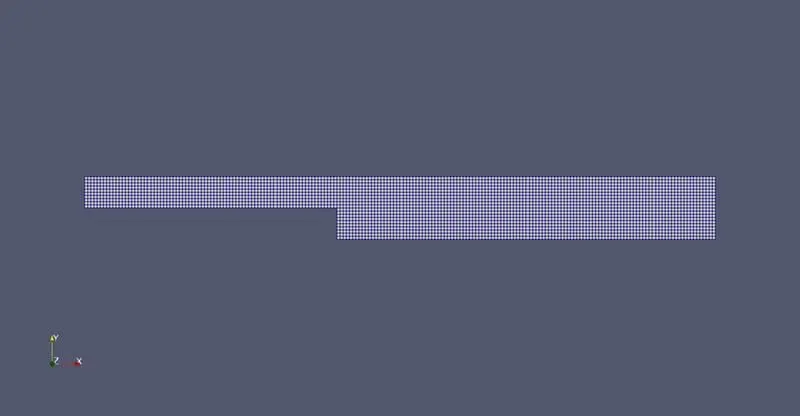
Velocity contour link
https://drive.google.com/file/d/1u9TPit2tOdWfxTFL5uTNH-Q-OAHfmKQa/view?usp=sharing
pressure contour link
https://drive.google.com/file/d/1u9TPit2tOdWfxTFL5uTNH-Q-OAHfmKQa/view?usp=sharing
Simulation with grading 0.2
In this simulation only grading values in block entries of blockMeshdict needs to be changed acording to grading on faces we want. In this case we want denser mesh at side step.
/*--------------------------------*- C++ -*----------------------------------*\
========= |
\\ / F ield | OpenFOAM: The Open Source CFD Toolbox
\\ / O peration | Website: https://openfoam.org
\\ / A nd | Version: 9
\\ / M anipulation |
\*---------------------------------------------------------------------------*/
FoamFile
{
format ascii;
class dictionary;
object blockMeshDict;
}
// * * * * * * * * * * * * * * * * * * * * * * * * * * * * * * * * * * * * * //
convertToMeters 1;
vertices
(
//vertices from points 0 to 10
(0 0 0)
(0.08 0 0)
(0.08 0.005 0)
(0 0.005 0)
(0.08 0.01 0)
(0 0.01 0)
(0.2 0.01 0)
(0.2 0.005 0)
(0.2 0 0)
(0.2 -0.01 0)
(0.08 -0.01 0)
//vertices from points 11 to 21
(0 0 0.1)
(0.08 0 0.1)
(0.08 0.005 0.1)
(0 0.005 0.1)
(0.08 0.01 0.1)
(0 0.01 0.1)
(0.2 0.01 0.1)
(0.2 0.005 0.1)
(0.2 0 0.1)
(0.2 -0.01 0.1)
(0.08 -0.01 0.1)
);
blocks
(
//block 1
hex (0 1 2 3 11 12 13 14) (80 5 1) simpleGrading (0.2 3 1)
//block 2
hex ( 3 2 4 5 14 13 15 16) (80 5 1) simpleGrading (0.2 0.2 1)
//block 3
hex (2 7 6 4 13 18 17 15) (120 5 1) simpleGrading (3 0.2 1)
//block 4
hex (1 8 7 2 12 19 18 13) (120 5 1) simpleGrading (3 3 1)
//block 5
hex ( 10 9 8 1 21 20 19 12) (120 10 1) simpleGrading (3 1 1)
);
edges
(
);
boundary
(
outlet
{
type patch;
faces
(
(6 17 18 7)
(8 7 18 19)
(9 8 19 20)
);
}
inlet
{
type patch;
faces
(
(11 14 3 0)
(14 16 5 3)
);
}
top
{
type wall;
faces
(
(15 4 5 16)
(15 17 6 4)
);
}
bottom
{
type wall;
faces
(
(11 0 1 12)
(21 10 9 20)
);
}
sidestep
{
type wall;
faces
(
(21 12 1 10)
);
}
frontface
{
type empty;
faces
(
(13 15 16 14)
(12 13 14 11)
(20 19 12 21)
(19 18 13 12)
(18 17 15 13)
);
}
backface
{
type empty;
faces
(
(0 3 2 1)
(3 5 4 2)
(2 4 6 7)
(1 2 7 8)
(10 1 8 9)
);
}
);
mergePatchPairs
(
);
MESH with grading
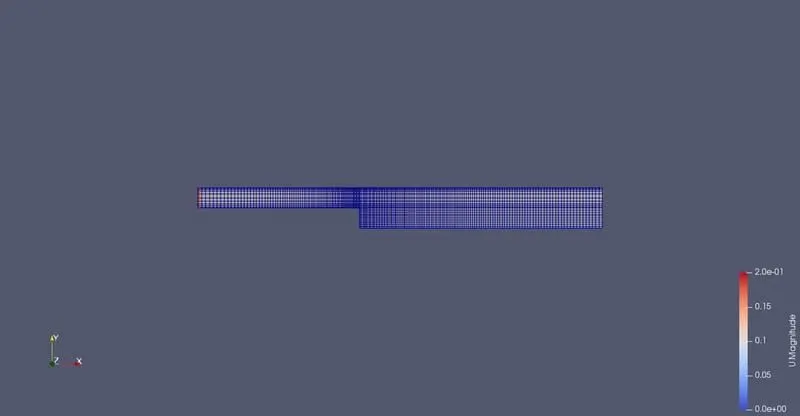
Velocity contour link
https://drive.google.com/file/d/1t0nGiXACLS691EJdfmqhU8zpQJL5byh-/view?usp=sharing
pressure contour link
https://drive.google.com/file/d/1Keh89gOdTMJW-_zf2D6tYOA5WhG3gpaK/view?usp=sharing
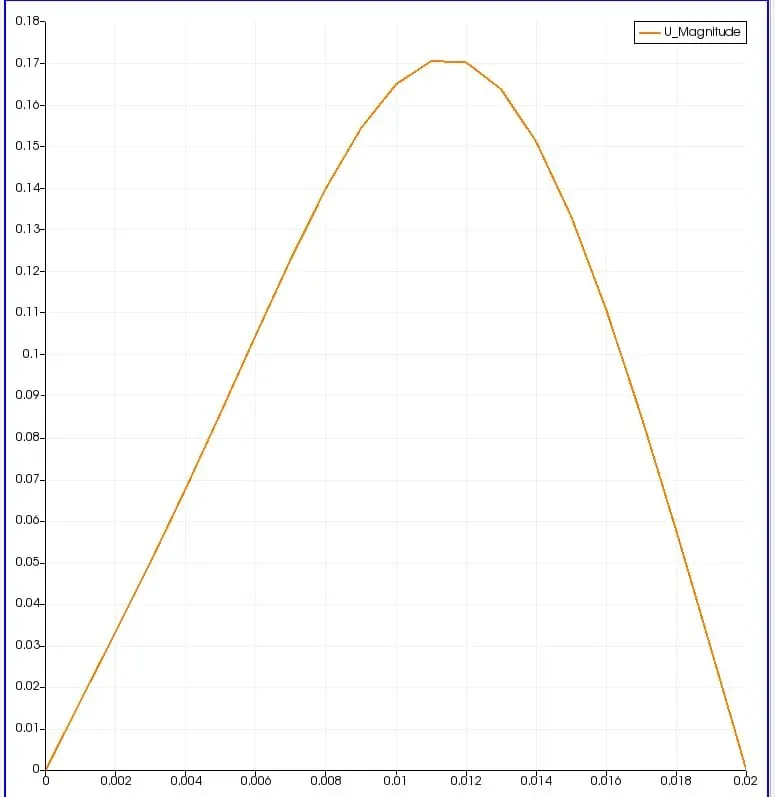
Velocity plot for case 1 (no grading)
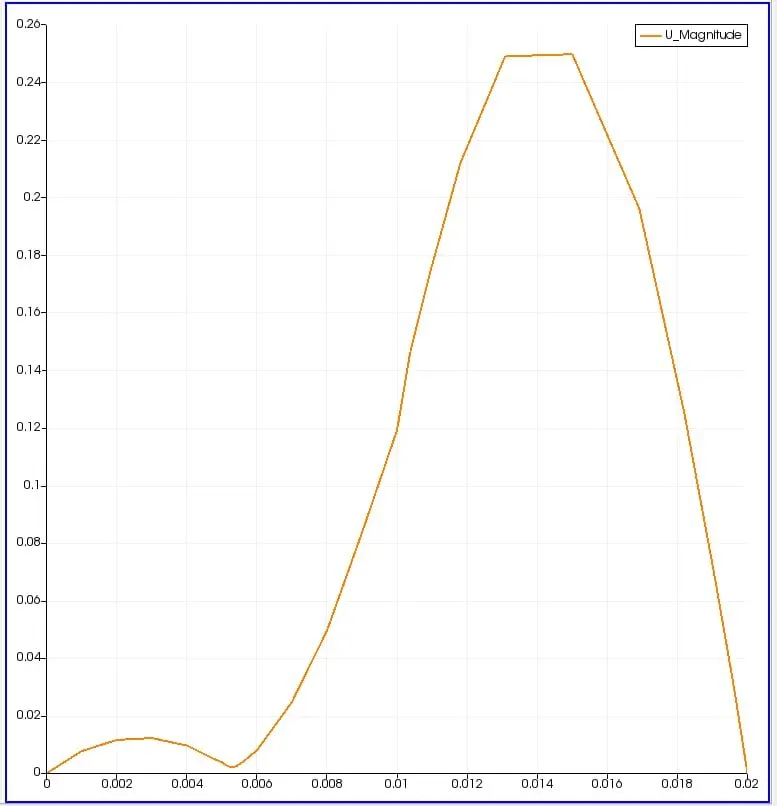
Velocity plot for case 2 (grading 0.2)
CONCLUSION-
- learnt about simple command used in ubuntu
- learnt about commnads and features of openFoam
- how to choose solver for particular problem
- how to run simulation in openFoam terminal, editing of blockMeshdict and controldict.
- defining boundary conditions and how to use paraview.