Simulation of a backward facing step in OpenFOAM
Objective:
In this challenge, you are going to simulate an incompressible-laminar-viscous flow through the backward-facing step geometry. You should perform a transient simulation. The solver can be chosen based on the described physics of the flow. You need to explain the entire simulation procedure (how you set up the case). You should also provide explanations for every change you make inside the reference case files obtained from OpenFOAM tutorials.
After that, you will perform 2 case studies as described below and compare the results.
Case 1 - Simulate the flow without using any grading factor (i.e., GF = 1)
Case 2 - Simulate the flow with a grading factor of 0.2. The cells should be finer near the walls (including the step wall).
You can use the following mesh parameters but you can feel free to modify these values.
Mesh specification
- Number of cells along the x-direction (longer dimension) = 200
- Number of cells along the longer y-direction = 20;
Boundary condition specification
The domain specifications are provided in the following figure.
Desired output
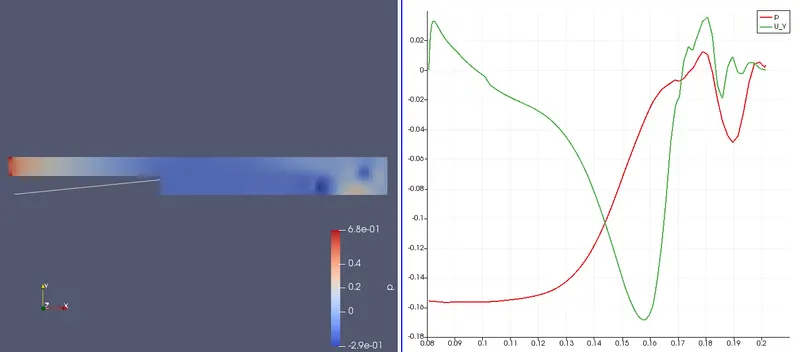
- Measure the velocity profile at 0.085 m from the inlet of the geometry for both case studies and compare. You can use the plot over line tool for this.
- Explain why the Grading/Growth factor is essential for meshing.
Solution:
Here we are going to simulate an incompressible laminar and viscous flow over a channel using the backward-facing step. And we are going to perform this simulation in OpenFOAM. And yes we are going to have to run some basic commands to run the simulation in order to understand flow properties then later we are going to post-process this in paraview to see how the temperature and pressure change with different time steps.
Now we get started we open the terminal command window in ubuntu, this is just like our command prompt from windows OS, and here we are going to go to the directory where the OpenFOAM is installed.
NOTE: that for every problem we have different solvers so here for Incompressible flow we have the ICOFOAM solver.
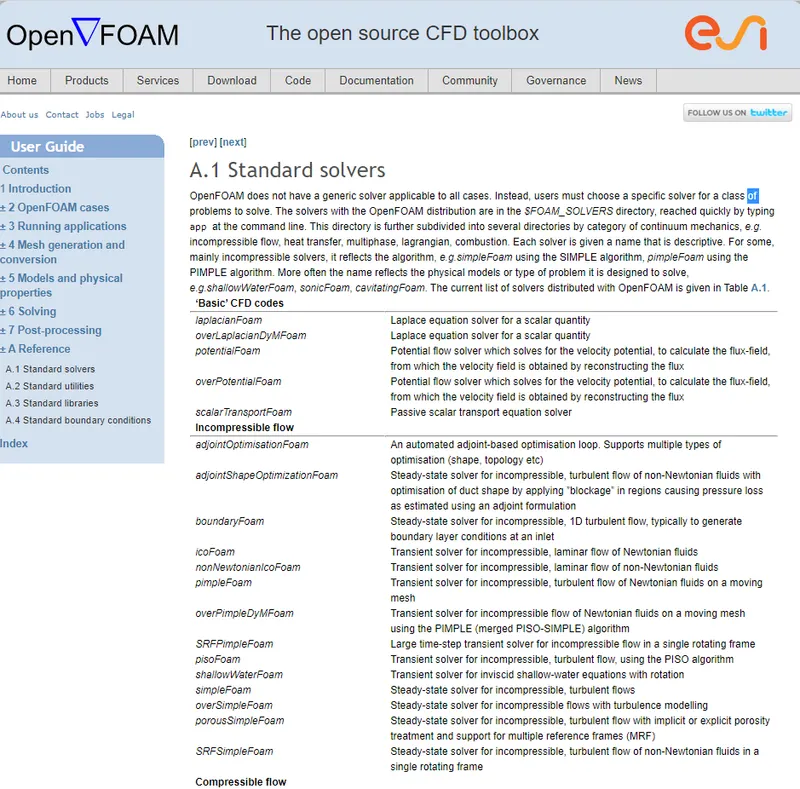
NOTE: The solvers can be copied from the TUTORIALS folder RUN folder only then you are able o run the command or it won't run if one tries to do it in TUTORIAL itself. Below are examples of how you should proceed with the commands
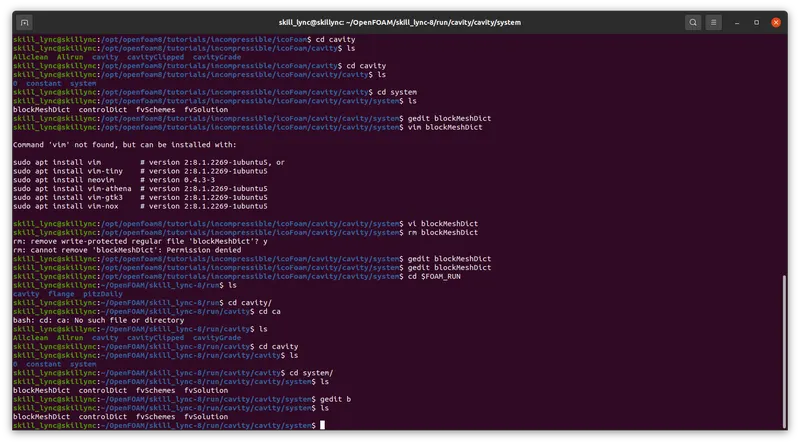
The commands go like this.
skill_lync@skillync:~$ pwd
/home/skill_lync
skill_lync@skillync:~$ ls
Desktop  Documents  Downloads  Music  OpenFOAM  Pictures  Public  snap  Templates  Videos
skill_lync@skillync:~$ cd $ FOAM_TUTORIALS
bash: cd: too many arguments
skill_lync@skillync:~$ cd $FOAM_TUTORIALS
skill_lync@skillync:/opt/openfoam8/tutorials$ ls
Allclean  Alltest  combustion    discreteMethods  electromagnetics  heatTransfer    IO          mesh        resources
Allrun    basic    compressible  DNS              financial         incompressible  lagrangian  multiphase  stressAnalysis
skill_lync@skillync:/opt/openfoam8/tutorials$ ll
total 84
drwxr-xr-x 17 root root 4096 Mar  8 18:19 ./
drwxr-xr-x 11 root root 4096 Mar  8 18:19 ../
-rwxr-xr-x  1 root root  504 Nov 14 18:07 Allclean*
-rwxr-xr-x  1 root root 3217 Nov 14 18:07 Allrun*
-rwxr-xr-x  1 root root 6048 Nov 14 18:07 Alltest*
drwxr-xr-x  5 root root 4096 Mar  8 18:19 basic/
drwxr-xr-x  9 root root 4096 Mar  8 18:19 combustion/
drwxr-xr-x  6 root root 4096 Mar  8 18:19 compressible/
drwxr-xr-x  4 root root 4096 Mar  8 18:19 discreteMethods/
drwxr-xr-x  3 root root 4096 Mar  8 18:19 DNS/
drwxr-xr-x  4 root root 4096 Mar  8 18:19 electromagnetics/
drwxr-xr-x  3 root root 4096 Mar  8 18:19 financial/
drwxr-xr-x  5 root root 4096 Mar  8 18:19 heatTransfer/
drwxr-xr-x 13 root root 4096 Mar  8 18:19 incompressible/
drwxr-xr-x  3 root root 4096 Mar  8 18:19 IO/
drwxr-xr-x  9 root root 4096 Mar  8 18:19 lagrangian/
drwxr-xr-x  8 root root 4096 Mar  8 18:19 mesh/
drwxr-xr-x 13 root root 4096 Mar  8 18:19 multiphase/
drwxr-xr-x  4 root root 4096 Mar  8 18:19 resources/
drwxr-xr-x  4 root root 4096 Mar  8 18:19 stressAnalysis/
skill_lync@skillync:/opt/openfoam8/tutorials$ cd basic/
skill_lync@skillync:/opt/openfoam8/tutorials/basic$ ls
laplacianFoam  potentialFoam  scalarTransportFoam
skill_lync@skillync:/opt/openfoam8/tutorials/basic$ cd ../
skill_lync@skillync:/opt/openfoam8/tutorials$ cd incompressible/
skill_lync@skillync:/opt/openfoam8/tutorials/incompressible$ ls
adjointShapeOptimizationFoam  icoFoam              pimpleFoam  porousSimpleFoam  simpleFoam     SRFSimpleFoam
boundaryFoam                  nonNewtonianIcoFoam  pisoFoam    shallowWaterFoam  SRFPimpleFoam
skill_lync@skillync:/opt/openfoam8/tutorials/incompressible$ cd icoFoam/
skill_lync@skillync:/opt/openfoam8/tutorials/incompressible/icoFoam$ ls
cavity  elbow
skill_lync@skillync:/opt/openfoam8/tutorials/incompressible/icoFoam$ cp -r cavity/ FOAM_RUN
cp: cannot create directory 'FOAM_RUN': Permission denied
skill_lync@skillync:/opt/openfoam8/tutorials/incompressible/icoFoam$ cp -r cavity/ $FOAM_RUN
skill_lync@skillync:/opt/openfoam8/tutorials/incompressible/icoFoam$ $FOAM_RUN
bash: /home/skill_lync/OpenFOAM/skill_lync-8/run: Is a directory
skill_lync@skillync:/opt/openfoam8/tutorials/incompressible/icoFoam$ ls
cavity  elbow
skill_lync@skillync:/opt/openfoam8/tutorials/incompressible/icoFoam$ cd $FOAM_RUN
skill_lync@skillync:~/OpenFOAM/skill_lync-8/run$ ls
cavity  flange  pitzDaily
skill_lync@skillync:~/OpenFOAM/skill_lync-8/run$ cd cavity
skill_lync@skillync:~/OpenFOAM/skill_lync-8/run/cavity$ ls
Allclean  Allrun  cavity  cavityClipped  cavityGrade
skill_lync@skillync:~/OpenFOAM/skill_lync-8/run/cavity$
as You can see here that you have copied the Cavity folder from icoFoam solver to the RUN folder, where we are going to run it. Now once we are here we need to edit the basic txt files to be able to read and for the simulation to run smoothly. STeps involved to run and edit the files. These ar the files that we need to edit before we for running simulations:
1. BLockMeshDict
2. controlDict
3. Fvscehmes
4. fvsolution
these files can be found under the cavity/cavity/system directory. that how we edit the following text files according to the objectives grid points
BlockmeshDict:
/*--------------------------------*- C++ -*----------------------------------*
  =========                 |
  \      /  F ield         | OpenFOAM: The Open Source CFD Toolbox
   \    /   O peration     | Website:  https://openfoam.org
    \  /    A nd           | Version:  8
     \/     M anipulation  |
*---------------------------------------------------------------------------*/
FoamFile
{
    version     2.0;
    format      ascii;
    class       dictionary;
    object      blockMeshDict;
}
// * * * * * * * * * * * * * * * * * * * * * * * * * * * * * * * * * * * * * //

convertToMeters 1;

vertices
(
    (0  0  0)
    (0.08  0  0)
    (0.08  0.005  0)
    (0  0.005  0)
    (0.08  0.01  0)
    (0  0.01  0)
    (0.2  0.01  0)
    (0.2  0.005  0)
    (0.2  0  0)
    (0.2  -0.01  0)
    (0.08  -0.01  0)
    (0  0  0.01)
    (0.08  0  0.01)
    (0.08  0.005  0.01)
    (0  0.005  0.01)
    (0.08  0.01  0.01)
    (0  0.01  0.01)
    (0.2  0.01  0.01)
    (0.2  0.005  0.01)
    (0.2  0  0.01)
    (0.2  -0.01  0.01)
    (0.08  -0.01  0.01)
);

blocks
(
    hex (0 1 2 3 11 12 13 14) (80 10 1) simpleGrading (1 1 1)
    hex (3 2 4 5 14 13 15 16) (80 10 1) simpleGrading (1 1 1)
    hex (2 7 6 4 13 18 17 15) (120 10 1) simpleGrading (1 1 1)
    hex (1 8 7 2 12 19 18 13) (120 10 1) simpleGrading (1 1 1)
    hex (10 9 8 1 21 20 19 12) (120 20 1) simpleGrading (1 1 1)
);

edges
(
);

boundary
(
    inlet
    {
        type patch;
        faces
        (
            (11 14 3 0)
            (14 16 5 3)
        );
    }

    outlet
    {
        type patch;
        faces
        (
            (19 20 9 8)
            (18 19 8 7)
            (17 18 7 6)
        );
    }

    frontAndBack
    {
        type empty;
        faces
        (
            (16 14 13 15)
            (14 11 12 13)
            (15 13 18 17)
            (13 12 19 18)
            (12 21 20 19)
            (0 3 2 1)
            (3 5 4 2)
            (2 4 6 7)
            (1 2 7 8)
            (10 1 8 9)
        );
    }

    top_bottom_step
    {
        type wall;
        faces
        (
            (16 15 4 5)
            (15 17 6 4)
            (11 0 1 12)
            (21 10 9 20)
            (21 12 1 10)
        );
    }
);

mergePatchPairs
(
);

// ************************************************************************* //
ControlDict:
/*--------------------------------*- C++ -*----------------------------------*
  =========                 |
  \      /  F ield         | OpenFOAM: The Open Source CFD Toolbox
   \    /   O peration     | Website:  https://openfoam.org
    \  /    A nd           | Version:  8
     \/     M anipulation  |
*---------------------------------------------------------------------------*/
FoamFile
{
    version     2.0;
    format      ascii;
    class       dictionary;
    location    "system";
    object      controlDict;
}
// * * * * * * * * * * * * * * * * * * * * * * * * * * * * * * * * * * * * * //

application     icoFoam;

startFrom       startTime;

startTime       0;

stopAt          endTime;

endTime         1.2;

deltaT          0.00005;

writeControl    timeStep;

writeInterval   100;

purgeWrite      0;

writeFormat     ascii;

writePrecision  6;

writeCompression off;

timeFormat      general;

timePrecision   6;

runTimeModifiable true;


// ************************************************************************* //
Fvschemes:
//*--------------------------------*- C++ -*----------------------------------*
  =========                 |
  \      /  F ield         | OpenFOAM: The Open Source CFD Toolbox
   \    /   O peration     | Website:  https://openfoam.org
    \  /    A nd           | Version:  8
     \/     M anipulation  |
*---------------------------------------------------------------------------*/
FoamFile
{
    version     2.0;
    format      ascii;
    class       dictionary;
    location    "system";
    object      fvSchemes;
}
// * * * * * * * * * * * * * * * * * * * * * * * * * * * * * * * * * * * * * //

ddtSchemes
{
    default         Euler;
}

gradSchemes
{
    default         Gauss linear;
    grad(p)         Gauss linear;
}

divSchemes
{
    default         none;
    div(phi,U)      Gauss linear;
}

laplacianSchemes
{
    default         Gauss linear orthogonal;
}

interpolationSchemes
{
    default         linear;
}

snGradSchemes
{
    default         orthogonal;
}


// ************************************************************************* //
Fvsolutions:
/*--------------------------------*- C++ -*----------------------------------*
  =========                 |
  \      /  F ield         | OpenFOAM: The Open Source CFD Toolbox
   \    /   O peration     | Website:  https://openfoam.org
    \  /    A nd           | Version:  8
     \/     M anipulation  |
*---------------------------------------------------------------------------*/
FoamFile
{
    version     2.0;
    format      ascii;
    class       dictionary;
    location    "system";
    object      fvSolution;
}
// * * * * * * * * * * * * * * * * * * * * * * * * * * * * * * * * * * * * * //

solvers
{
    p
    {
        solver          PCG;
        preconditioner  DIC;
        tolerance       1e-06;
        relTol          0.05;
    }

    pFinal
    {
        $p;
        relTol          0;
    }

    U
    {
        solver          smoothSolver;
        smoother        symGaussSeidel;
        tolerance       1e-05;
        relTol          0;
    }
}

PISO
{
    nCorrectors     2;
    nNonOrthogonalCorrectors 0;
    pRefCell        0;
    pRefValue       0;
}


// ************************************************************************* //
NOTE: We are to be noted that to not change anything in fvschemes and fvsolutions as they are the finite method solver txt files. which is to be left as it is as it steps are required to solve the simulations.
we have other 3 text files. which is pressure, the velocity that can found in the 0 folders in the cavity/cavity category which is extremely important to edit few values for the fluid motion to pass in simulation with pressure and velocity. which is to be monitored. And the other txt file is transport properties which is to be found in a constant folder in cavity/cavity/constant
1. Pressure
/*--------------------------------*- C++ -*----------------------------------*
  =========                 |
  \      /  F ield         | OpenFOAM: The Open Source CFD Toolbox
   \    /   O peration     | Website:  https://openfoam.org
    \  /    A nd           | Version:  8
     \/     M anipulation  |
*---------------------------------------------------------------------------*/
FoamFile
{
    version     2.0;
    format      ascii;
    class       volScalarField;
    object      p;
}
// * * * * * * * * * * * * * * * * * * * * * * * * * * * * * * * * * * * * * //

dimensions      [0 2 -2 0 0 0 0];

internalField   uniform 0;

boundaryField
{
    inlet
    {
        type            zeroGradient;
    }

    outlet
    {
        type            fixedValue;
        value           uniform 0;
    }

    frontAndBack
    {
        type            empty;
    }

    top_bottom_step
    {
        type            zeroGradient;
    }
}

// ************************************************************************* //
2. velocity
/*--------------------------------*- C++ -*----------------------------------*
  =========                 |
  \      /  F ield         | OpenFOAM: The Open Source CFD Toolbox
   \    /   O peration     | Website:  https://openfoam.org
    \  /    A nd           | Version:  8
     \/     M anipulation  |
*---------------------------------------------------------------------------*/
FoamFile
{
    version     2.0;
    format      ascii;
    class       volVectorField;
    object      U;
}
// * * * * * * * * * * * * * * * * * * * * * * * * * * * * * * * * * * * * * //

dimensions      [0 1 -1 0 0 0 0];

internalField   uniform (0 0 0);

boundaryField
{
    inlet
    {
        type            fixedValue;
        value           uniform (1.5 0 0);
    }

    outlet
    {
        type            zeroGradient;
    }

    frontAndBack
    {
        type            empty;
    }

    top_bottom_step
    {
        type            noSlip;
    }
}

// ************************************************************************* //
3. transport properties:
/*--------------------------------*- C++ -*----------------------------------*
  =========                 |
  \      /  F ield         | OpenFOAM: The Open Source CFD Toolbox
   \    /   O peration     | Website:  https://openfoam.org
    \  /    A nd           | Version:  8
     \/     M anipulation  |
*---------------------------------------------------------------------------*/
FoamFile
{
    version     2.0;
    format      ascii;
    class       dictionary;
    location    "constant";
    object      transportProperties;
}
// * * * * * * * * * * * * * * * * * * * * * * * * * * * * * * * * * * * * * //

nu              [0 2 -1 0 0 0 0] 1.48e-5;


// ************************************************************************* //
Now When we are inside the CAVITY folder we are to run the command BLOCKMESH for it to check the success of the program to run through.
and this what it looks like the whole program successfully.
/*---------------------------------------------------------------------------*
  =========                 |
  \      /  F ield         | OpenFOAM: The Open Source CFD Toolbox
   \    /   O peration     | Website:  https://openfoam.org
    \  /    A nd           | Version:  8
     \/     M anipulation  |
*---------------------------------------------------------------------------*/
Build  : 8-1c9b5879390b
Exec   : blockMesh
Date   : Apr 20 2021
Time   : 17:19:33
Host   : "skillync"
PID    : 2255
I/O    : uncollated
Case   : /home/skill_lync/OpenFOAM/skill_lync-8/run/cavity/cavity
nProcs : 1
sigFpe : Enabling floating point exception trapping (FOAM_SIGFPE).
fileModificationChecking : Monitoring run-time modified files using timeStampMaster (fileModificationSkew 10)
allowSystemOperations : Allowing user-supplied system call operations

// * * * * * * * * * * * * * * * * * * * * * * * * * * * * * * * * * * * * * //
Create time

Creating block mesh from
    "system/blockMeshDict"
Creating block edges
No non-planar block faces defined
Creating topology blocks
Creating topology patches

Creating block mesh topology

Check topology

	Basic statistics
		Number of internal faces : 5
		Number of boundary faces : 20
		Number of defined boundary faces : 20
		Number of undefined boundary faces : 0
	Checking patch -> block consistency

Creating block offsets
Creating merge list .

Creating polyMesh from blockMesh
Creating patches
Creating cells
Creating points with scale 1
    Block 0 cell size :
        i : 0.001 .. 0.001
        j : 0.0005 .. 0.0005
        k : 0.01
    Block 1 cell size :
        i : 0.001 .. 0.001
        j : 0.0005 .. 0.0005
        k : 0.01
    Block 2 cell size :
        i : 0.001 .. 0.001
        j : 0.0005 .. 0.0005
        k : 0.01
    Block 3 cell size :
        i : 0.001 .. 0.001
        j : 0.0005 .. 0.0005
        k : 0.01
    Block 4 cell size :
        i : 0.001 .. 0.001
        j : 0.0005
        k : 0.01

Writing polyMesh
----------------
Mesh Information
----------------
  boundingBox: (0 -0.01 0) (0.2 0.01 0.01)
  nPoints: 13282
  nCells: 6400
  nFaces: 25840
  nInternalFaces: 12560
----------------
Patches
----------------
  patch 0 (start: 12560 size: 20) name: inlet
  patch 1 (start: 12580 size: 40) name: outlet
  patch 2 (start: 12620 size: 12800) name: frontAndBack
  patch 3 (start: 25420 size: 420) name: top_bottom_step

End
if it shows like this then your Blockmesh Command run smoothly which now is indicated that your simulation is correct and ready to run for postprocessing the results. After running the icoFoam command in the cavity folder we get to the next section of post-processing.
skill_lync@skillync:~/OpenFOAM/skill_lync-8/run/cavity/cavity$ cd ..
skill_lync@skillync:~/OpenFOAM/skill_lync-8/run/cavity$ ll
total 28
drwxr-xr-x   5 skill_lync skill_lync 4096 Apr 19 11:53 ./
drwxrwxr-x   5 skill_lync skill_lync 4096 Mar 22 16:59 ../
-rwxr-xr-x   1 skill_lync skill_lync  450 Mar 26 12:00 Allclean*
-rwxr-xr-x   1 skill_lync skill_lync 2346 Mar 26 12:00 Allrun*
drwxr-xr-x 245 skill_lync skill_lync 4096 Apr 20 17:58 cavity/
drwxr-xr-x   5 skill_lync skill_lync 4096 Apr 19 11:53 cavityClipped/
drwxr-xr-x   5 skill_lync skill_lync 4096 Apr 19 11:53 cavityGrade/
skill_lync@skillync:~/OpenFOAM/skill_lync-8/run/cavity$  Blockmesh
Blockmesh: command not found
skill_lync@skillync:~/OpenFOAM/skill_lync-8/run/cavity$ ls
Allclean  Allrun  cavity  cavityClipped  cavityGrade
skill_lync@skillync:~/OpenFOAM/skill_lync-8/run/cavity$ cd cavity
skill_lync@skillync:~/OpenFOAM/skill_lync-8/run/cavity/cavity$ ls
0      0.075  0.15   0.225  0.3    0.375  0.45   0.525  0.6    0.675  0.75   0.825  0.9    0.975  1.05   1.125  1.2
0.005  0.08   0.155  0.23   0.305  0.38   0.455  0.53   0.605  0.68   0.755  0.83   0.905  0.98   1.055  1.13   constant
0.01   0.085  0.16   0.235  0.31   0.385  0.46   0.535  0.61   0.685  0.76   0.835  0.91   0.985  1.06   1.135  system
0.015  0.09   0.165  0.24   0.315  0.39   0.465  0.54   0.615  0.69   0.765  0.84   0.915  0.99   1.065  1.14
0.02   0.095  0.17   0.245  0.32   0.395  0.47   0.545  0.62   0.695  0.77   0.845  0.92   0.995  1.07   1.145
0.025  0.1    0.175  0.25   0.325  0.4    0.475  0.55   0.625  0.7    0.775  0.85   0.925  1      1.075  1.15
0.03   0.105  0.18   0.255  0.33   0.405  0.48   0.555  0.63   0.705  0.78   0.855  0.93   1.005  1.08   1.155
0.035  0.11   0.185  0.26   0.335  0.41   0.485  0.56   0.635  0.71   0.785  0.86   0.935  1.01   1.085  1.16
0.04   0.115  0.19   0.265  0.34   0.415  0.49   0.565  0.64   0.715  0.79   0.865  0.94   1.015  1.09   1.165
0.045  0.12   0.195  0.27   0.345  0.42   0.495  0.57   0.645  0.72   0.795  0.87   0.945  1.02   1.095  1.17
0.05   0.125  0.2    0.275  0.35   0.425  0.5    0.575  0.65   0.725  0.8    0.875  0.95   1.025  1.1    1.175
0.055  0.13   0.205  0.28   0.355  0.43   0.505  0.58   0.655  0.73   0.805  0.88   0.955  1.03   1.105  1.18
0.06   0.135  0.21   0.285  0.36   0.435  0.51   0.585  0.66   0.735  0.81   0.885  0.96   1.035  1.11   1.185
0.065  0.14   0.215  0.29   0.365  0.44   0.515  0.59   0.665  0.74   0.815  0.89   0.965  1.04   1.115  1.19
0.07   0.145  0.22   0.295  0.37   0.445  0.52   0.595  0.67   0.745  0.82   0.895  0.97   1.045  1.12   1.195
skill_lync@skillync:~/OpenFOAM/skill_lync-8/run/cavity/cavity$ ^C
skill_lync@skillync:~/OpenFOAM/skill_lync-8/run/cavity/cavity$
This is how it looks like that the simulation ran through completely and correctly which shows the number of time steps it took and required to post-process with para form using paraview and display the results.
Output:
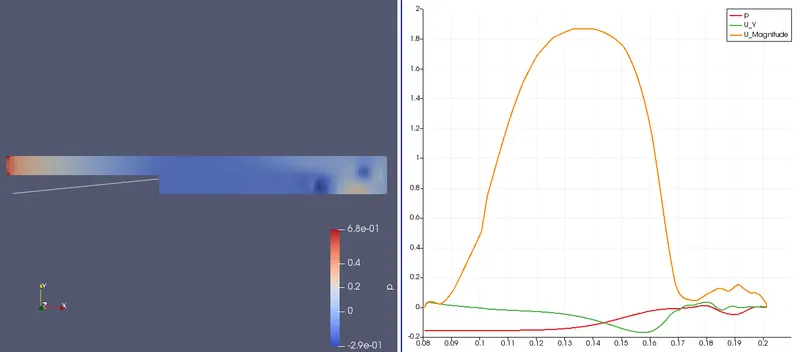
when the simple grading at 1.
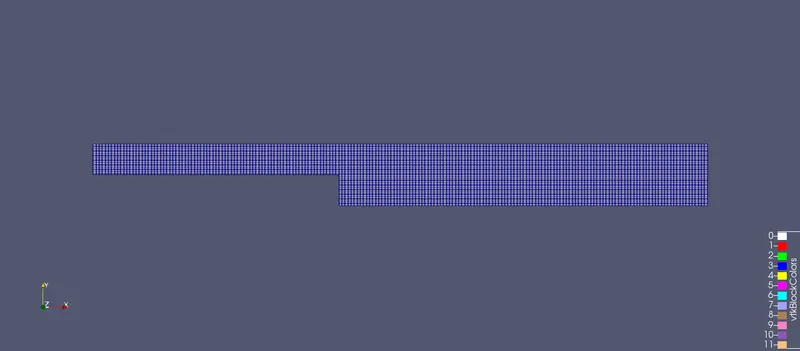
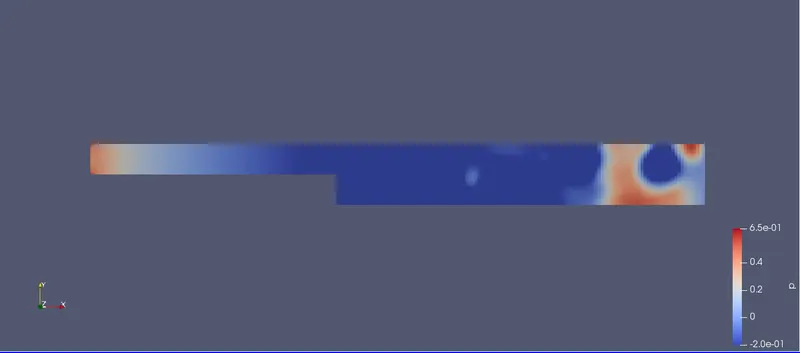
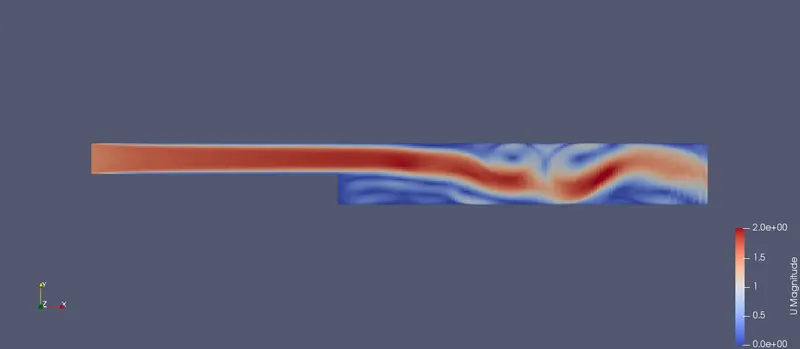
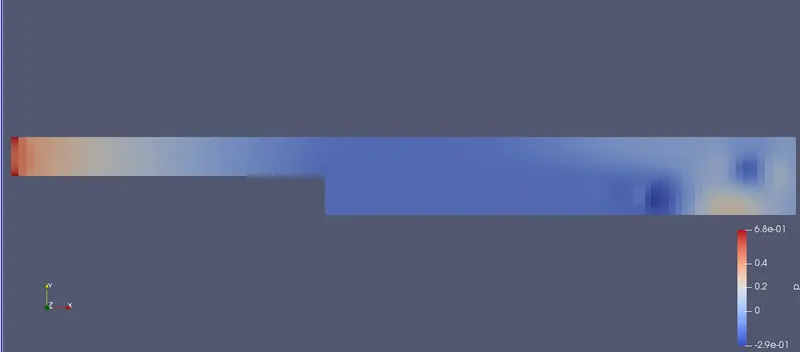
Graphs of velocity, pressure vs length of the domain at 0.85 secs
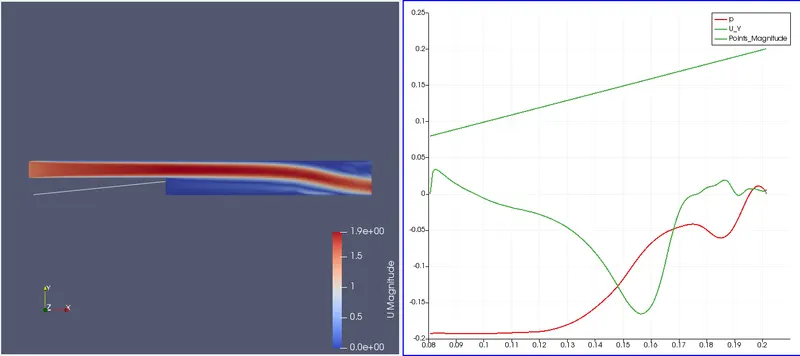
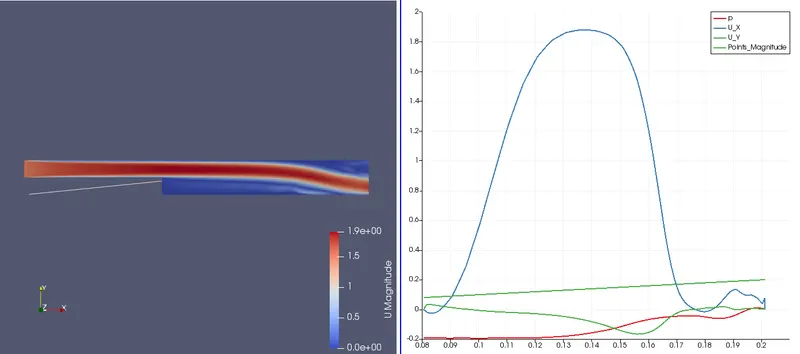
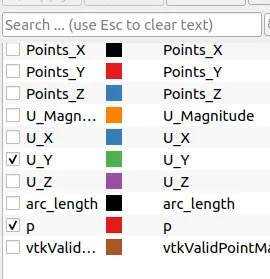
This is where we selected the type of plot vs time we need to show.
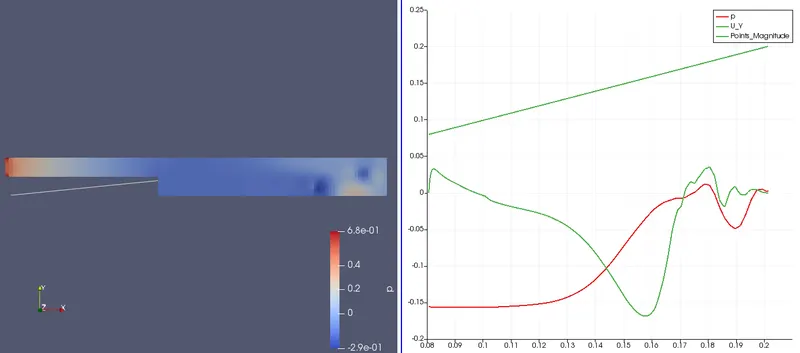
Grading Factor: 0.2

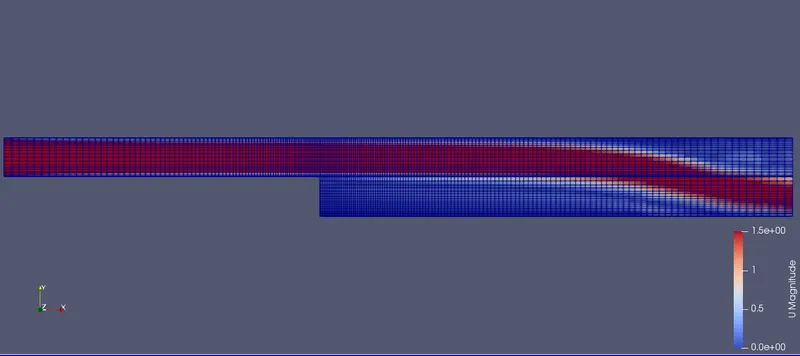
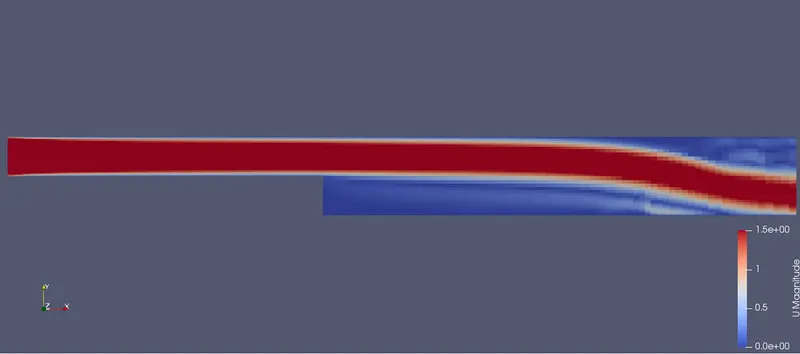
Graphs of velocity, pressure vs length of the domain at 0.85 secs
Why Grading/Growth factor is essential for meshing?
To sum up, the blockMeshDict dictionary generates a single block with:
• X/Y/Z dimensions: 1.0/1.0/1.0
• As the cell spacing in all directions is defined as 0.05, it will use the following number of cells in the X, Y, and Z directions: 20 x 20 x 20 cells.
• One single hex block with straight lines.
• Six patches of base type wall, namely, left, right, top, bottom, front, and back.
• The information regarding the patch base type and patch name is saved in the file boundary. Feel free to modify this file to fit your needs.
• Remember to use the utility check mesh to check the quality of the mesh and look for topological errors.
• Topological errors must be repaired.
conclusion: There is a slight difference between the meshes and the plot from the output. As we can see the slope is not different from one another.
References: