Week-7 Head Impact
Aim: simulate the given headforms aganist the rigid wall and meshed hood using LS-Dyna
step by step procedure of the 3 cases shown below.
Case-1: sample head model simulated aganist the rigid wall.
For the given model is contained after import shows only nodes and element and we have to add material,section,velocity,rigid wall,contact, and database to the headform to ready for the simulation.
i)open the LS-Prepost using file >open >keyword file(.k) and open.
ii)Define the section_shell in the card we have to use the ELFORM is 2 and section ID and add thickness to the shell since the thickness is not mentioned i have used the thickness is 2mm.
iii)And after that material needs to assign to the using MAT_024 piecewise linear plasticity material is used and the material properties as shown below.
Row=7.85E-9 g/mm3,E=0.21 g/mm ms2,Nu=0.3,SigY =2.5E-4 g/mm2. once it is done assign material and the section to the part.
iv)crete the rigid wall perpendicular to the rigid wall, using create entity >from the menu select the rigidwall,cre planar and select the node from the head and makesure the selected creates rigidwall normal to the axis,here i selected the node and normal to Y axis (NY) is selected and create .
v)we need to provide the contact as well for that contact _Automatic_ single_surface being used for this in the card we need to add type of slave type and slave set ,no need to define the master.once the head comes and hit the planar rigid wall it undergo deformation within the head.
vi)we need to provide the velocity to head and in challenge stated that lower velocity between 20 - 40, here i have used the 35kmph which is V=9.72 mm/ms.
vii)Control_Termination is used to specify the simulation end time which is 5ms i have considered.
viii)In the Database_binary_ D3plot and Dt is 0.1 is used. Database_Ascii,glstat,nodeout,swforce,Rwforce,Matsum and Dt =0.5 used .
ix) once everything is done we need to do the keyword check before save and Run the siulation,Application > model checking >general checking >key word check. And make sure there will not be any errors and warnings is no problem.
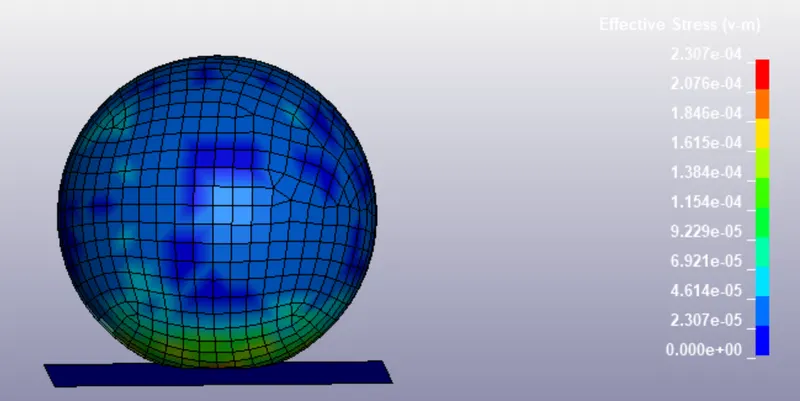
Fig:Vonmises contour
Here the max stress is the 2.37E-4 is getting at the velocity of 9.72mm/ms.As the velocity increase the stress experienced by the head also increase.
case-2:Pedestrain Head Impact aganist the rigid wall:
i) Here the Pedastrain head is consist of the different sub systems,and material card has assigned to that .we need to rotate the head at 45deg to replicate the realtime scenarion for that we need to include the include transformation and define the transformation cards.
ii) We need to open the pre-post using Define_Transformation ,select rotate A1=0,A2=1,A3=0 and the A4=0,A5=0,A6=0 and A7=45 and Transid=1 and accept and save. we just defined the tranformation and now we have to include the file that need to rotate 45 for that Include_Transform and select the transid and using Browse select the pedastrain head and insert and accept and done. file save as >save keyword as the and name it and save.
iii)open new pre-post file >open >keywordfile >select the file that rotated
iii)Now open new pre-post ,file >open >keywordfile ,select the that transformation is applied and open.
iv)we need to provide the velocity to head and in challenge stated that lower velocity between 20 - 40, here i have used the 35kmph which is V=9.72 mm/ms.
v) ontrol_Termination is used to specify the simulation end time which is 5ms i have considered.
vi)In the Database_binary_ D3plot and Dt is 0.1 is used. Database_Ascii,glstat,nodeout,swforce,Rwforce,Matsum and Dt =0.5 used .
vii) once everything is done we need to do the keyword check before save and Run the siulation,Application > model checking >general checking >key word check. And make sure there will not be any errors and warnings is no problem.
Case-3: Pedastrain head impacting the hood:
After the downloadded the files(hood.k and pedastrain head.k) need to keep both in the one separate folder.Here two models need to be in one .k file that is (main.k) to do that 1st open the Ls-prepost in that open keyword-manager ,all selct the define and Transformation and a1=0,a2=1,a3=0,a4=0,a5=0,a6=0,a7=45 and transid=1 accept and done.After we need to include >transform to the pedastrain head form so in the browser the select the pedastrain head.k file and apply the transid acccept and done .
*we need to save the this two files ias file >saveas ,save keyword and save as main.k and save. here we can do two feed the keywords in two ways either individual component like hood.k or rotated head.k in individual pre-post while saving always file >save as ,save keyword as and always none and select or mark main.k.
*whenever we use LS-Run always select the file is main.k and simulate.
*We need to apply the intial velocity to the rotated head always we need to check the subsystem before we accept the and done. Here we will create the Automatic _nodes_surface contact.
*Datebase_binary_D3plot and Dt =0.1 and Ascii option glstat,Matsum,Nodeout,Swforce,Rwforce and mention Dt=0.1. And Before we run the simulation and we need to check the model check and make error free.
Post-processing:
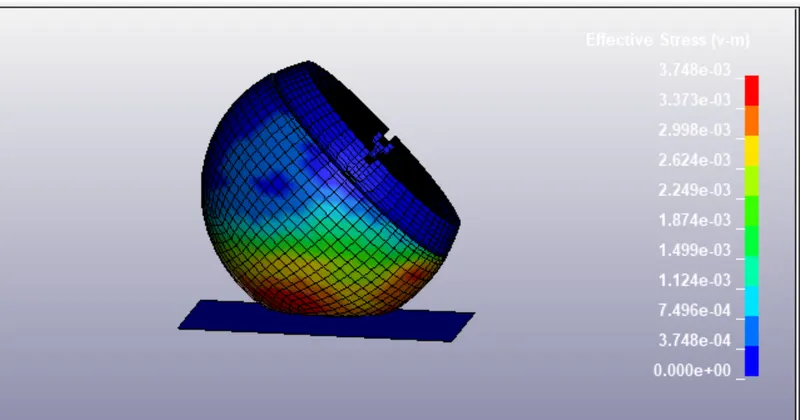
Fig: Vonmises plot for the angle 45deg head.
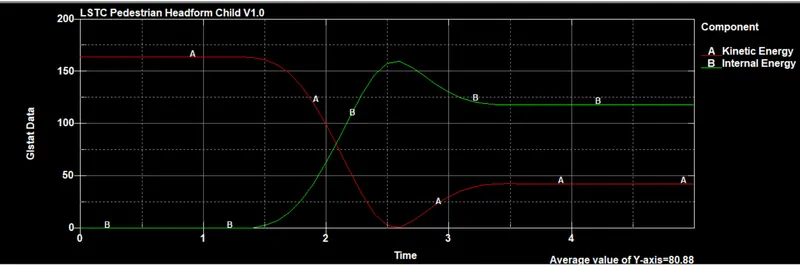
Fig:Internal&kinetic energy of rotated head hitting rigid wall
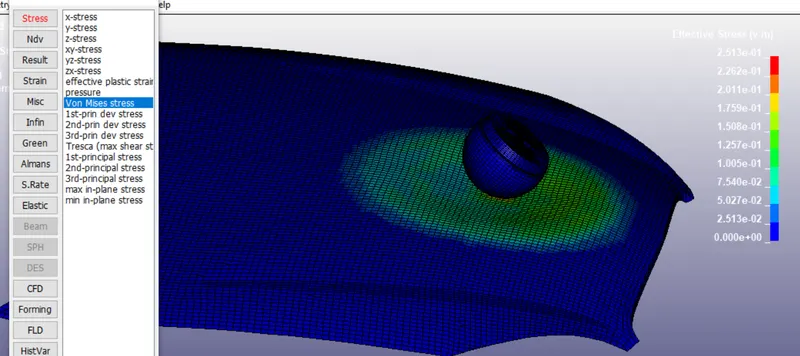
Fig:Rotated head hitting the hood
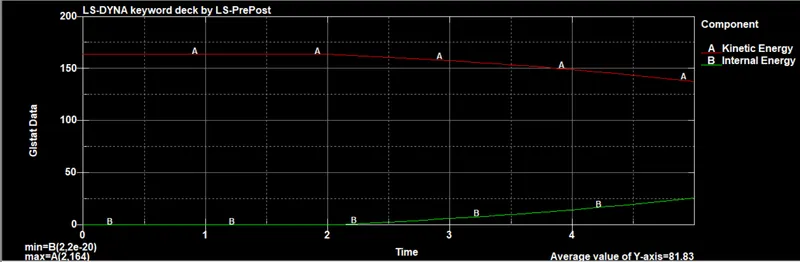
Fig:Inernal &K.E of hood &rotated head
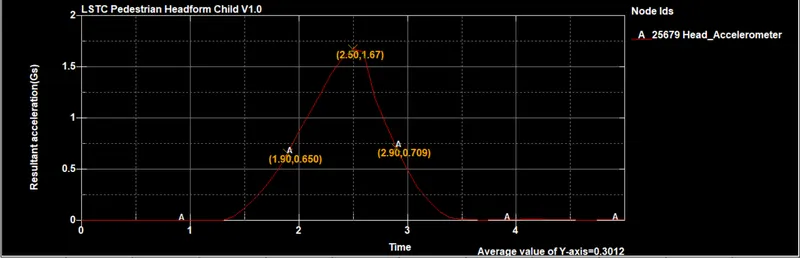
Fig:Acceleration plot of the rotated head and rigid wall
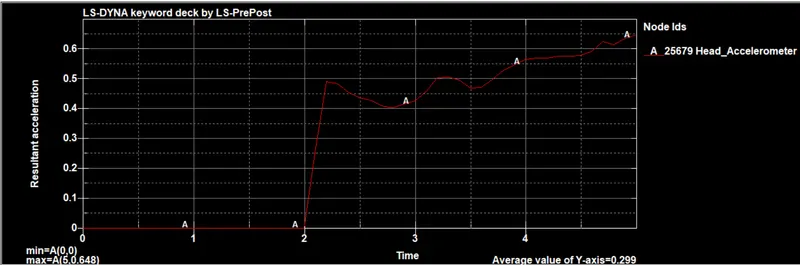
Fig:Acceleration plot of the rotated head and rigid wall
Hic value for the angled head hitting the rigid wall i have got the HIC value is HIC=15.7 mm2/ms^2 and the HIC value for the angled head hitiing the hood has the value of the HIC=8.499E-3. For the second curve angled head hitting the hood if we see the graph the maximum x,y coordinates are located on the curve denoted by the letter A the time value in the X-direction and average that values so i used the average time value.
Observation:
*In the case2 HIC values is high and where as the HIC for the third case is low as the theory says that as the low value of the HIC the probality of the survival is high . if the HIC value is high there is less possiability of the survival.
*Where as in the 3rd case the when the head comes and hit the hood considered as Alluminium it undergo some displacement and absorb the stress and less effect to the head .And in the rigidwall and rotated head there is no stress absorbed by the wall and more impact to the head.
*And realtime scenario the velocity rate can be high and angle of the head also changes . Here we tested with low velocity and particular angle which is 45 but realtime case the angle also changes.
*In the Hood and the rotated head simulation,graph between time and acceleration is till the 2ms the velocity is uniform and there is no change in the acceleration when the head hits the hood the the velocity changes then we can see the difference in the curve which means acceleration is changing.
Result:
Simulation has been done for the sample head aganist the rigid wall and pedastrain head aganist the rigid wall and pedastrain head aganist the hood.