Checking and correcting the edges in HyperMesh by using TCL/TK
ABSTRACT:
To create a code that displays free edges and T_edges for the displayed elements. Free edge color red and T edge cyan. Except for edges, all other components must be made transparent. Also, temp nodes must be automatically created for “free nodes” for a tolerance value of 0.01. Also, create a code to turn off free edge display and restore the window to the way it was.
PROGRAM:
*setdisplayattributes 4 1
set a {}
set b {}
proc Free_edges {} {
*createmark comps 1 "free_edges"
set a [hm_getmark components 1]
if {$a=={}} {
*createmark elements 1 "displayed"
*findedges1 elements 1 0 0 0 45
*setvalue comps name={^edges} name={free_edges}
*createmark elems 1 "displayed"
*equivalence elems 1 0.01 0 0 45
*equivalence elems 1 0.01 3 0 45
*createmark nodes 1 "retrieve"
*nodemarkaddtempmark 1
} else {
tk_messageBox -message  "free_edges exists" -icon info -type ok
}
}


proc T_edges {} {
*createmark comps 2 "T_edges"
set b [hm_getmark comps 2]
if {$b=={}} {
*createmark elements 1 "displayed"
*findedges1 elements 1 1 0 45
*setvalue comps name={^edges} name={T_edges}
*createmark components 1 "T_edges"
*createmark elems 1 "displayed"
*setvalue comps mark=1 color=#00FFFF
*equivalence elems 1 0.01 0 0 45
*equivalence elems 1 0.01 3 0 45
*createmark nodes 1 "retrieve"
*nodemarkaddtempmark 1
} else {
tk_messageBox -message  "T_edges exists" -icon info -type ok
}
}


proc hide {} {
*createmark components 1 "free_edges"
*hideentitybymark 1 1 1
*createmark components 2 "T_edges"
*hideentitybymark 2 1 1
*createstringarray 1 "elements_on" "geometry_on"
*setdisplayattributes 2 1
}
set a .equivalence
catch {destroy $a}
toplevel $a
wm geometry $a 300x300+50+50
wm resizable $a 0 0
wm deiconify $a
button $a.1 -text "Free_edges" -bg "#8B0000" -command Free_edges
place $a.1 -x 100 -y 50 -width 100 -height 50
button $a.2 -text "T_edges" -bg "#00FFFF" -command T_edges
place $a.2 -x 100 -y 100 -width 100 -height 50
button $a.3 -text "Hide"  -command hide
place $a.3 -x 100 -y 150 -width 100 -height 50
EXPLANATION:
Initially, the display is set to transparent mode using *setdisplayattributes command. Elements displayed were selected using the *createmark command. Then edges of the selected elements are shown using the *findedges1 command for Free edges and T Connected edge the edge_type values are 0 and 1. Then component with name ^edges is renamed with Free_Edges using *setvalue command, temp nodes are created by marking the node using *equivalence with tolerance of 0.01 and *nodemarkaddtempmark.
OUTPUT:
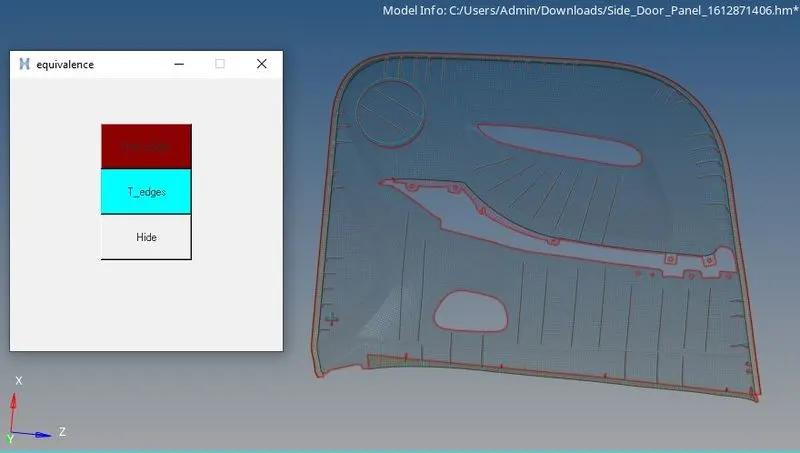
The free edges, T_Edges and hide button is created in the check box and then the component is setted to transperant view as shown in the figure.
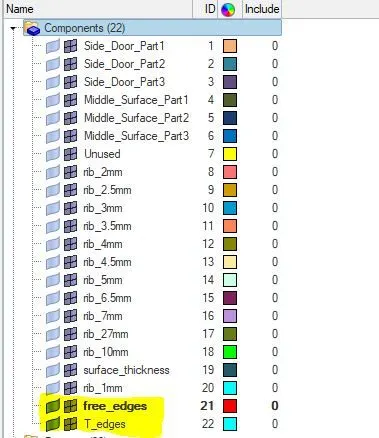
From the browser tree the components tab displays the free edges and the T_Edges in the component as we write a code according to it.
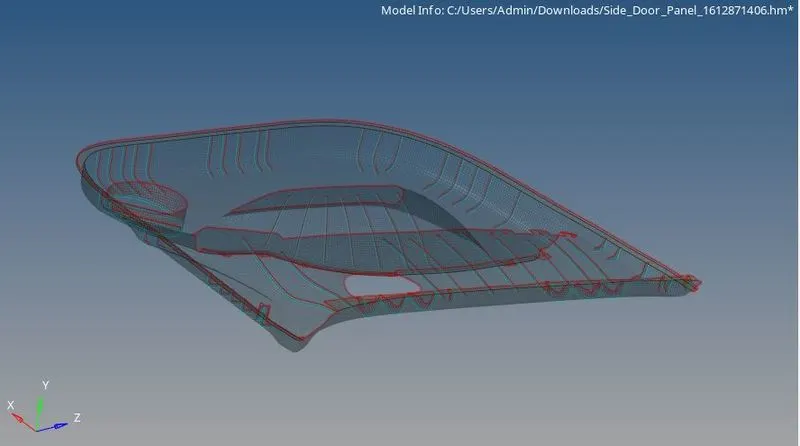
The free edges and the T edges in the component is diplayed using the code written using ther Notepad++ and then executed in HYpermesh. The errors in the model is rectified and then full code is executed successfully.