Week 6 - Data analysis
AIM: To perform data visualization, compatibility verification, and basic performance analysis using Python.
INTRODUCTION:
Data analysis involves examining, cleaning, transforming, and modeling data to uncover valuable insights, support decision-making, and draw meaningful conclusions. It encompasses various methods and techniques applied across multiple disciplines, including business, science, and social sciences. In the modern business environment, data analysis is pivotal in making informed decisions and improving operational efficiency.
The stages of the data analysis process include:
- Identifying Data Requirements
- Collecting Data
- Processing Data
- Cleaning Data
- Performing Exploratory Data Analysis (EDA)
- Building Models and Algorithms
- Developing Data Products
- Communicating Insights
OBJECTIVES:
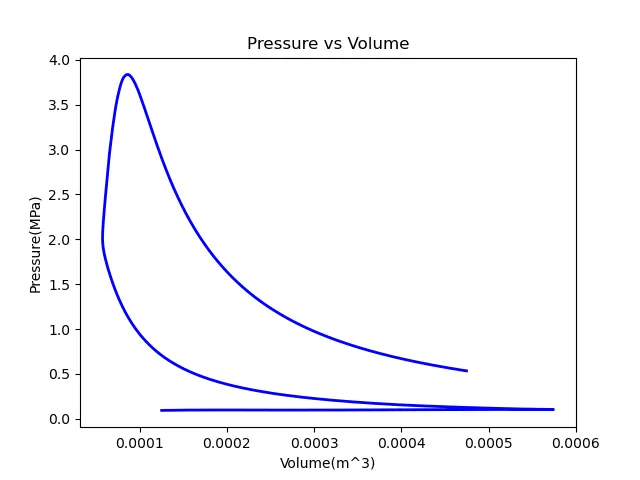
- Create a graph to visualize the relationship between two variables in the Converge output file.
- Validate the successful opening of the data file.
- Calculate the area under a Pressure-Volume (PV) diagram.
- Determine the power output of an engine operating at 1500 RPM.
- Compute the specific fuel consumption (SFC) when 20 mg of fuel is consumed per stroke cycle.
GOVERNING EQUATIONS:
Power:
Power=2π×T×RPM
Specific Fuel Consumption (SFC):
SFC=PowerFC
Where:
- T = Torque
- FC = Fuel Consumption
- SFC = Specific Fuel Consumption
Code Breakdown
1. Importing Required Libraries
numpy for numerical operations.matplotlib.pyplot for graph plotting.scipy.integrate.simps for numerical integration using the Simpson's rule (to calculate the area under a curve).engine_data.out). Here's a breakdown of the code:Purpose
- Analyze port fuel injection data.
- Extract specific columns from the file to plot graphs.
- Compute performance parameters such as the area under the Pressure-Volume (PV) diagram, power output, and specific fuel consumption (SFC).
Code Breakdown
1. Importing Required Libraries
numpyfor numerical operations.matplotlib.pyplotfor graph plotting.scipy.integrate.simpsfor numerical integration using the Simpson's rule (to calculate the area under a curve).
2. File Handling
try:
open('engine_data.out')
print('File opened successfully')
print('\n')
except:
print('File not recognized. Please provide a valid CONVERGE output file')
engine_data.out.- Prints a success message if the file opens correctly.
- If the file fails to open, it prints an error message and stops further execution.
3. Initializing Variables
line_count = 1
column_num = []
column_name = []
column_units = []
X = []
Y = []
x = 7  # Column number for X-axis
y = 1  # Column number for Y-axis
line_count: Tracks the line being processed.column_num,column_name,column_units: Store metadata about the file's columns (e.g., column index, names, and units).X,Y: Arrays to store data points for the graph's X and Y axes.xandy: Indices corresponding to specific columns in the file for graph plotting.
Reading the File Line by Line line ():
for line in open('engine_data.out'):
    for i in range(0,19):
        if i >= 2 and line_count == 2:
            column_num.append(int(line.split()[i]))

    for j in range(0,18):
        if j >= 1:
            if line_count == 3:
                column_name.append(line.split()[j])
            elif line_count == 4:
                column_units.append(line.split()[j])

    if '#' not in line and line_count >= 6:
        X.append(float(line.split()[x]))
        Y.append(float(line.split()[y]))

    line_count += 1
- Processes the file line by line.
- Lines 2-4: Extract column numbers, names, and units.
- After Line 6: Extracts data values from columns specified by
xandy(ignoring lines with#).
5. Plotting the Graph
plt.figure()
plt.plot(X, Y, linewidth=2, color='blue')
plt.title(str(column_name[y]) + ' vs ' + str(column_name[x]))
plt.xlabel(str(column_name[x]) + str(column_units[x]))
plt.ylabel(str(column_name[y]) + str(column_units[y]))
plt.savefig(str(column_name[y]) + ' vs ' + str(column_name[x]) + 'for Engine')
plt.show()
- Creates a plot of
YvsX. - Sets the title, x-label, and y-label using column names and units.
- Saves the graph as an image file.
6. Results Calculation
Area Under PV Diagram
area = simps(Y, X) * pow(10, 6)
print('Area under PV diagram (Joule) = ' + str(area) + ' J')
- Calculates the area under the curve (PV diagram) using Simpson's rule.
- Multiplies by 106 to adjust units.
Power Output
N = 1500  # Engine RPM
m = 20    # Fuel consumption per stroke cycle (mg)
s = 4     # Number of strokes
c = 1     # Number of cylinders
k = 2     # Power cycle per two revolutions

power = (c * area * N) / (60 * k * 1000)
print('Power output = ' + str(power) + ' kW')
- Power is calculated using the formula: Power=60⋅k⋅1000c⋅Area⋅N
- Assumes 1500 RPM, 4 strokes, and 1 cylinder.
Specific Fuel Consumption (SFC)
FC = N * 60 * m * pow(10, -9) / 2
SFC = FC / power
print('Specific Fuel Consumption = ' + str(SFC) + ' kg/hr/kW')
- Fuel consumption (FC) is calculated using the formula: FC=2N⋅60⋅m⋅10−9 Where N is the engine RPM, m is the fuel consumed per stroke, and 10−9 converts milligrams to kilograms.
- SFC is the ratio of fuel consumption to power output: SFC=PowerFC
Output
- Graph of
YvsXsaved as an image file. - Prints:
- Area under the PV diagram.
- Power output in kilowatts.
- Specific fuel consumption in kg/hr/kW.
CONCLUSION
Code was run successfully