Creating the GUI for final checks in HyperMesh by using TCL/TK
ABSTRACT:
To create a GUI for all the final checks for the component. It contains the operations like deleting empty components, re-order, re-number. An extra button is used to perform all the operations at a same time called as master button.
PROGRAM:
set a .window
catch {destroy $a}
toplevel $a
wm title $a "Checks Manager"
wm geometry $a 300x480+100+100
wm resizable $a 0 0
wm deiconify $a

proc Delete {} {
	*createmark surfaces 1 "displayed"
	if {[hm_marklength surfaces 1]!= 0} {*deletemark surfaces 1}
}
button $a.01 -text "Delete" -command Delete -font {times 15 bold} ;         place $a.01 -x 10 -y 10 -width 160 -height 60

proc Unused {} {
set b {material property}
foreach m $b {
*EntityPreviewUnused $m 2
if {[hm_marklength $m 2] !=0} {*deletemark $m 2
} else {tk_messageBox -message "No Unused $m " -icon info}
}
}
button $a.02 -text "Unused" -command Unused -font {times 15 bold} ;         place $a.02 -x 10 -y 80 -width 160 -height 60

proc Empty {} {
set c {assembly component}
foreach n $c {
*EntityPreviewEmpty $n 1
if {[hm_marklength $n 1] !=0} {*deletemark $n 1
} else {tk_messageBox -message "No Empty $n " -icon info}
}
}
button $a.03 -text "Empty" -command Empty -font {times 15 bold} ;                    place $a.03 -x 10 -y 160 -width 160 -height 60

proc Reorder {} {
set d {component assembly property material}
foreach z $d {
*createmark $z 1 "all"
if {[hm_marklength $z 1]!= 0} {*collectormarkmove $z 1 1 2}
}
}
button $a.04 -text "Reorder" -command Reorder -font {times 15 bold} ;                place $a.04 -x 10 -y 240 -width 160 -height 60

proc Renumber {} {
set e {components assembly property material}
foreach w $e {
*createmark $w 2 "all"
if {[hm_marklength $w 2]!= 0} {*renumbersolverid components 2 1 1 0 0 0 0 0}
}
}
button $a.05 -text "Renumber" -command Renumber -font {times 15 bold} ;              place $a.05 -x 10 -y 320 -width 160 -height 60

proc Master {} {
Delete
Unused
Empty
Reorder
Renumber
}
button $a.06 -text "Master" -command Master -bg #B30505  -font {times 15 bold } ;                  place $a.06 -x 10 -y 400 -width 160 -height 60
EXPLANATION:
First a window is created using achech box and button command with the dimensions of the box. Then the procedure for all the operations by using the if loop is written in the Notepad++. The important command is
*EntityPreviewUnused this command is used to mark the unused entities and store it in mark temporarily.
*EntityPreviewEmpty this command is used to mark the unused empty entities and store it in mark temporarily.
*collectormarkmove this command is used to reorder the entity by name, id.
*renumbersolverid this command is used to renumbers the solver IDs for entities with mark id.
OUTPUT:
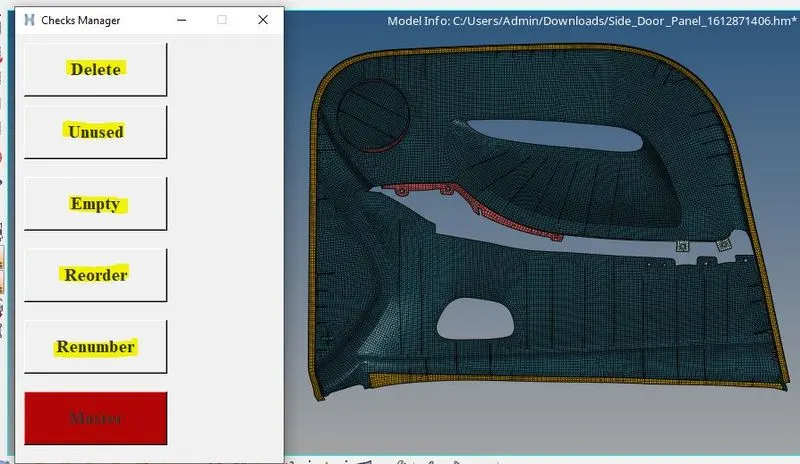
The master button is highlighted with the colour.
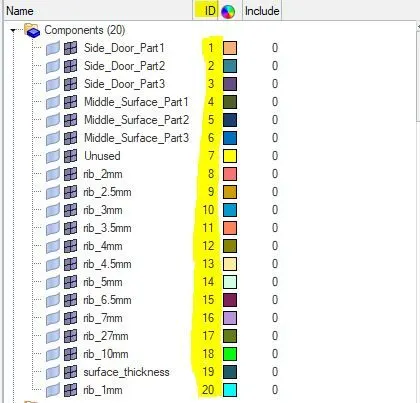
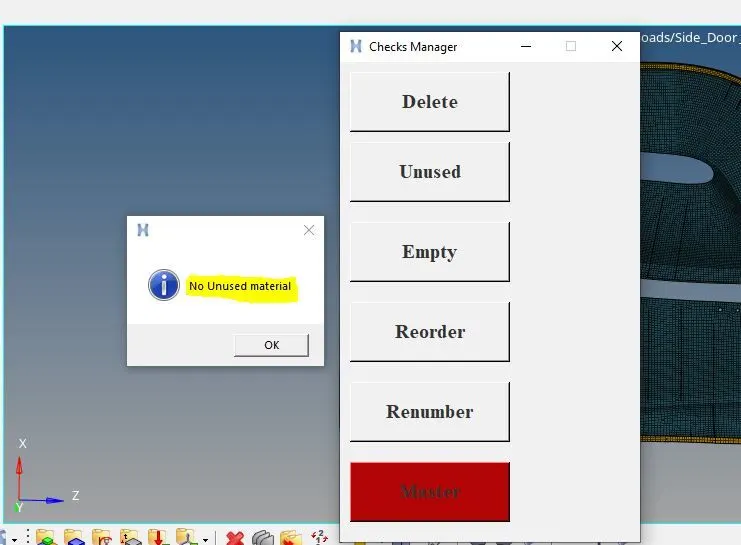
The highlighted numberss are the output of reorder button and the left side figure showing the info tab for no entities.
Thus the checks manager is created and executed in Hypermesh using the Notepad++ code and the final checks for the given component is achieved.