Week 6: Conjugate Heat Transfer Simulation
Aim
To perform a conjugate heat transfer analysis for a case of air flow inside a hollow cylinder
- Introduction
Conjugate Heat Transfer is the heat transfer occurring at the interface of solid and fluid medium. This heat transfer is a virtue of temperature difference and finds application in various automotive and aerospace parts such as car radiators, engine castings and propulsion systems. To simulate this heat transfer across the interacting solid and fluid bodies, the analysis used is term Conjugate Heat Transfer (CHT) Analysis.
In the given project, the air flow across a solid pipe of wall thickness is simulated. By considering the heat flux subjected into the system, we determine the temperature characteristics at outlet and interface walls.
- Objective
To create the geometry using converge CFD tool and perform CHT analysis to:
- Determine a grid independent solution for outlet temperature
- Study the effect of super-cycle stage interval
- Geometry and Boundary flagging
3.1 Geometry
The first step is to create the solid pipe of thickness= 5 mm. We start by creating a cylinder shape with R1=R2= 0.015 and z=0.2. This is superimposed with another cylinder with R1=R2= 0.02 and z=0.2
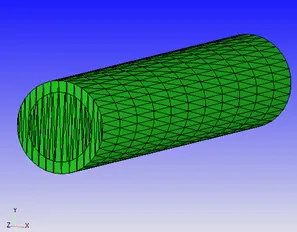
Upon running the diagnosis, we note intersections in the geometry. The next step is to repair the geometry and delete the interference region. This leads to creation of open edges at the inlet and outlet regions.
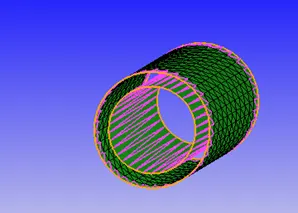
To resolve this, we use CreateàTriangleàLoft edgesàSelect the inner and outer open edges
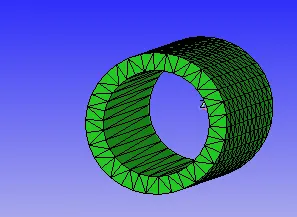
The inlet and outlet regions of the pipe are patched (RepairàPatchàList of edgesàEdge by angle) and the geometry is completed.
However, upon running the diagnosis tool, we see that the inlet and outlet surfaces are mapped with error- Nonmanifold problems, that is, one edges is shared by more than two triangles. This issue is resolved when the case is setup and the interface region are marked for CHT analysis
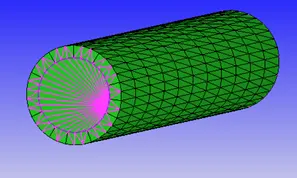
3.2 Boundary flag
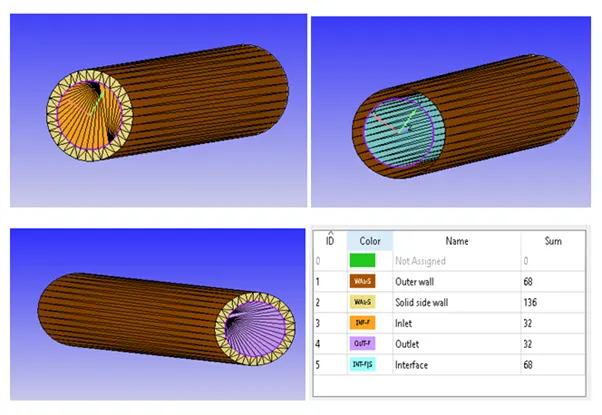
The inlet, outlet, outer solid wall, side solid wall and the interface region are flagged as shown in the figure.
4. Setup
The case is setup with the below parameters:
Application typeà Time-based
MaterialsàPre-defined mixture (air), Solid simulation, Gas simulation and Species (not in mech.dat)
Solid simulationàPredefined solidsàAluminum
Speciesà Gas (N2 and O2) and Solid (Query Available ListàAl)
Simulation Run Parametersà Transient, Compressible and Full hydrodynamic simulation
Simulation time parametersà Start time=0 sec, End time=0.5 sec, Time step= 1e-7 to 1 sec
Solver parametersà EquationsàPressureàMax iteration=500
4.1 Regions and initialization
Region 0- Fluid region
Stream ID= 0, Species= Air
Region 1: Solid region
Stream ID= 1 and Solid, Species= Al (Pull from boundary) with Mass fraction= 1.0
4.2 Boundary
Outer wall
Region- Solid, Boundary type- Wall
Wall type- Slip, Temperature BC- Heat flux = -10,000 W/m2
Solid Side wall
Region- Solid, Boundary type- Wall
Wall type- Slip, Temperature BC- Neumann (NE)
Inlet
Region- Fluid, Boundary type- Inflow
Pressure- NE, Velocity= 5m/s (along z-direction)
Species = Air
Outlet
Region- Fluid, Boundary type- Outflow
Pressure- 101325 Pa, Velocity= NE
Backflow species = Air
Interface
Boundary type= interface
Wall- Stationary
Forward side (normal direction): Region-Fluid, Wall treatment- Law of wall
Reverse side : Region- Solid, Wall treatment- Slip
4.3 Physical models
Physical models: Turbulence modeling and super-cycle modeling
Turbulence model: RNG K-Ɛ
Super-cycle model: start_time: 0.05, supercycle_stage_interval: 0.05 and Conduction CFL = 100
To determine the solid temperature, we define a point [0.001615, 0.017425, 0.18] in the solid boundary close to the outlet.
- Results and discussion
5.1 Grid independency test
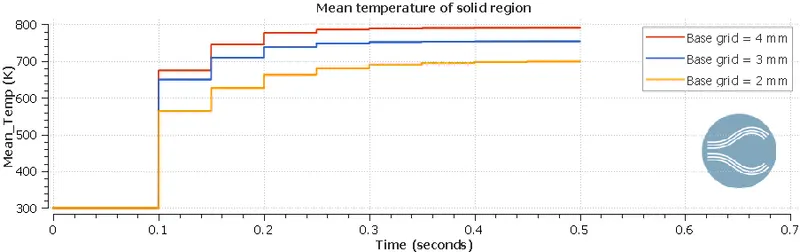
For performing the grid independency test, we run the simulation with base grid sizes of 2, 3 and 4 mm and plot the temperature for the cases.
Temperature plot for base grid size = 2, 3 and 4 mm
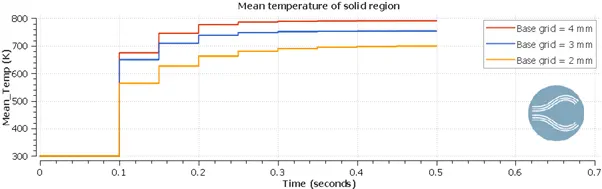
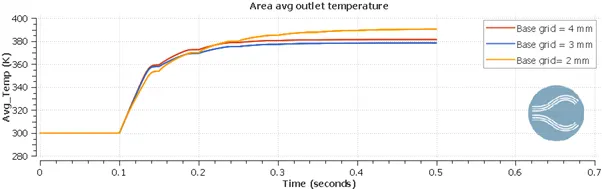
It can be seen from the temperature plots that the temperature characteristics change upon refinement of the mesh grid. However, any simulation is performed with a compromise between the simulation time/expenditure and result accuracy. Considering the limits of the simulation, the base gird size of 2 mm is considered satisfactory for the simulation.
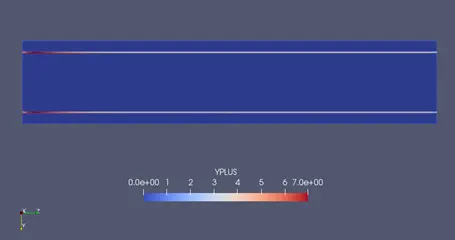
5.2 y+
Y+ is defined as the dimensionless wall distance for a boundary layer flow. It is calculated as follows:
Y+ = Distance from wall * frictional velocity/dynamic viscosity
To understand the significance of y+, it is important to understand the boundary layer phenomenon. For a turbulent flow, as we move along y-direction, the developed boundary layer consists of a laminar sub-region, transition region and turbulent region which get mixed with the mainstream flow.
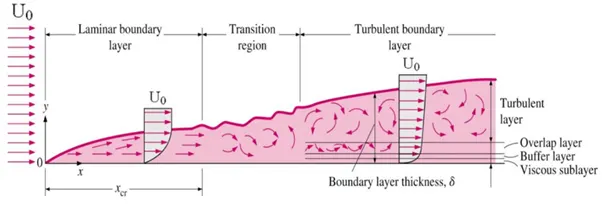
A value of y+ less than 10 indicates that the cell center of the base grid closest to the wall is in the laminar region whereas y+ more than 30 indicates that the cell center is in the turbulent region. A y+ value of 10-30 is not desirable as this indicates a transition flow in the boundary layer and cannot be accurately simulated.
For the given case, for the base grid size 2mm y+ = 7.0
5.2 Velocity calculation for Re=7000
For the given case, the Reynolds number of fluid flow is specified to be 7000.
Using the formula,
`R_e = (rho.v.D)/mu`
Therefore,
`v= (R_e.mu)/(rho.D)`
For air flow,
`rho`= 1.225 kg/m3, D = 30 mm and µ = 1.81 x 10⁻⁵ Pa-s
Inlet velocity, v= 3.447 m/s
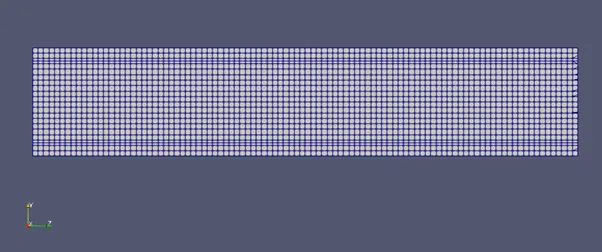
5.3 Mesh (Surface with edges)
5.4 Temperature contour
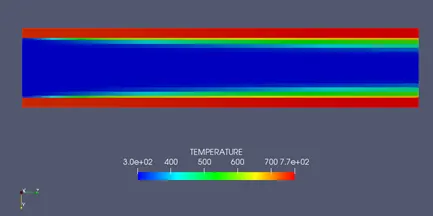
The above animation shows the temperature characteristic over time. It can be observed that the heat flux given into the system results in solid wall temperature increase. This temperature is transfer to the fluid (air) flowing inside the pipe. The fluid close to the wall is heated and there exists a temperature gradient along the y-direction in the fluid flow. This gradient stabilizes as we move towards the outlet of the pipe.
5.5 Velocity contour
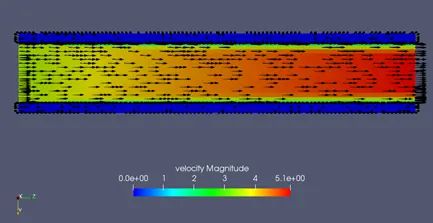
The above plot shows the fluid flow velocity characteristic at the end of the simulation at time =0.5 s. The vector plot shows the direction of flow from the inlet towards the outlet. As the fluid flows, the law of wall at the interface results in a boundary layer development.
5.6 Super-cycle
Super-cycling is a time control strategy used in applications involving conjugate heat transfer. It is a widely used in simulation of combustion processes. In a conjugate heat transfer analysis, it is to be noted that a transient analysis is performed on solid region and liquid region separately. That is the set of equations differ for the two mediums. Also, it is found that the convergence of solution for the fluid region takes place in a shorter amount of simulation time as compared to the solid boundary.
Thus, in order to reduce the simulation time, the cfd solver uses the below steps:
- Run transient analysis for the initial time period in which both solid and fluid regions are solved
- Freeze the fluid solver
- Run steady state (or transient state) solver for the solid region for the given time length
- Upon convergence, unfreeze the fluid solver and both regions are solved simultaneously
- This process is repeated till the end time step
Effect of super-cycle stage interval on simulation time
For demonstrating the effect of super-cycling on simulation time, we use the coarse grid of 4 mm and change the super-cycle stage interval from 0.01 to 0.05.
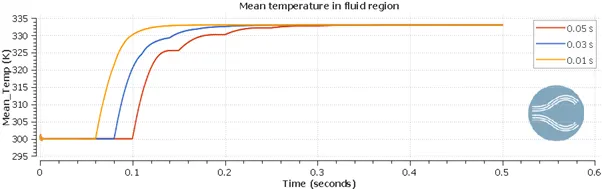
The simulation time recorded for the three cases are as follows:
|
Case |
Super-cycle stage interval (in sec) |
Simulation time (in sec) |
|
1 |
0.01 |
979 |
|
2 |
0.03 |
833 |
|
3 |
0.05 |
671 |
It can be noted that the simulation time decreases with an increase in the super-cycle stage interval.
- Conclusion
Thus, the conjugate heat transfer analysis is performed successfully for a case of air flow inside a solid pipe